Pixi.js: PIXI.Graphics.arc() 180 degrees edges not horizontally (or vertically) straight.
Expected Behavior
Arc edges are straight, aligned with the X axis:

The issue is that because of this, if you have 2 semi-circles and want to glue them together, you will have small gaps between them.
The canvas.arc works as expected: https://jsfiddle.net/vnaf2qgp/1/

Current Behavior
Possible Solution
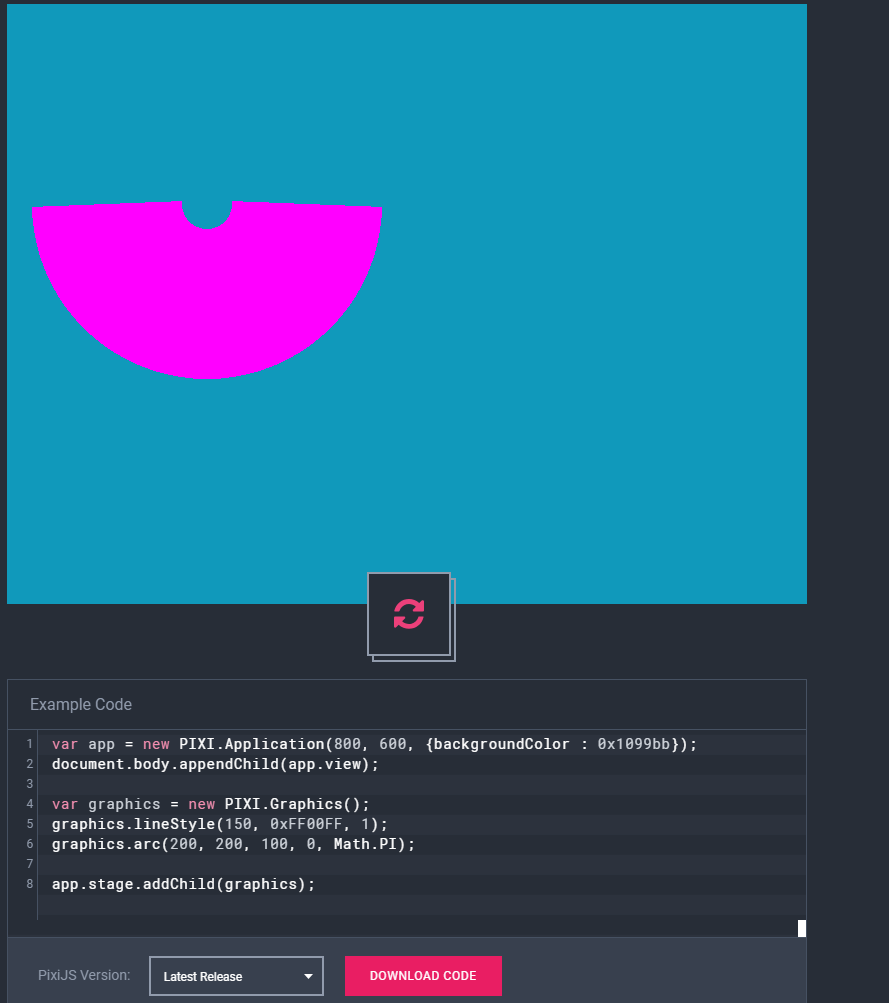
It looks like the center of the arc is aligned on the horizontal axis, but because of the increased thickness the outer and inner edges are not aligned.
Steps to Reproduce
var app = new PIXI.Application(800, 600, {backgroundColor : 0x1099bb});
document.body.appendChild(app.view);

var graphics = new PIXI.Graphics();
graphics.lineStyle(150, 0xFF00FF, 1);
graphics.arc(200, 200, 100, 0, Math.PI);

app.stage.addChild(graphics);
Environment
pixi.jsversion: . 4.8.6 (also reproductible in latest version)- Browser & Version: _Chrome 73
- OS & Version: Windows 10
 Cristy94
All 13 comments
Workaround is fills with "arc" or "quadraticCurveTo" instead of strokes. I do not recommend to make strokes that big, better do it with fills.
I know the math behind that bug and I dont know how to solve that properly. Its interesting that canvas2d solves it just fine, maybe I'll look in Google Skia sources.
 ivanpopelyshev
on 21 Mar 2019
ivanpopelyshev
on 21 Mar 2019
P.S. I see that you take your rest seriously, no commits in weekends ;)
ivanpopelyshev
on 21 Mar 2019
Workaround is fills with "arc" or "quadraticCurveTo" instead of strokes. I do not recommend to make strokes that big, better do it with fills.
Ok, so that means I still have to figure out the math for drawing a filled semi-circle using arc and lineTo, right? Or is there a simple way of drawing the shape above that I'm missing? :-?
Also, if you could link to the source code of the math to draw the arc, maybe I could have a look and help.
Cristy94
on 21 Mar 2019
Here's an example:
https://pixiplayground.com/#/edit/boNSR7Cww43E4YmUXa904
 bigtimebuddy
on 21 Mar 2019
bigtimebuddy
on 21 Mar 2019
Thanks, that's a good start, but I need it to be able to draw incomplete donuts (eg. have angle as a parameter, where angle can be between 0 and Math.PI, instead of the Math.PI that's hard coded atm), so you can have a quarter donut also).
NEVERMIND, I see I can just change Math.PI and it works, I thought I had to change other variables too.
PS: I searched on google for pixi playground to post an example, but had a hard time finding it (I searched for: pixi sandbox, pixi editor, pixi online editor, pixi examples).
Cristy94
on 21 Mar 2019
It might be nice for someone to make a generalized torus drawing function in Graphics. Could be very handy. Something a little more generalized than that example I created. That way you can specify a start/end angle, center, inner radius, outer radius, etc.
Sounds like your issue here is solved. Definitely use fills vs line strokes. Closing issue.
bigtimebuddy
on 21 Mar 2019
Here's another example that's a little bit easier to reuse:
https://pixiplayground.com/#/edit/OBQor67s0zJdfHKMc85f3

bigtimebuddy
on 22 Mar 2019
Thank you!If it works better than the strokeFill code, why not use this method to implement stroke for arcs? This way the same code can also be reused for arc fill and arc stroke
Cristy94
on 22 Mar 2019
The example doesn't seem to work in 4.8.6, nothing is shown. https://pixiplayground.com/#/edit/OBQor67s0zJdfHKMc85f3
Cristy94
on 22 Mar 2019
Yeah, that code is v5 only. Here's for v4:
https://pixiplayground.com/#/edit/vkoTHW4xwaVvq~7D9Yunh
The difference in v4 and v5 is that calling clear() removes fill and linestyles in v4.
bigtimebuddy
on 22 Mar 2019
arc() is still imprecise in the latest dev version:

Having this in a pixi canvas that scales with the browser using app.renderer.resize() and redrawing the lines makes the problem visible at some sizes (typical flickering, appearing/disappearing of those cracks).
All angles are multiples of 90 degree (Math.PI / 2)
 movAX13h
on 27 Mar 2019
movAX13h
on 27 Mar 2019
@movAX13h could you please create a new issue with a demo of that screenshot. Thanks.
bigtimebuddy
on 27 Mar 2019
This thread has been automatically locked since there has not been any recent activity after it was closed. Please open a new issue for related bugs.
![lock[bot] picture](https://avatars1.githubusercontent.com/in/6672?v=4&s=40) lock[bot]
on 27 Mar 2020
lock[bot]
on 27 Mar 2020
Related issues
 Makio64
·
3Comments
Makio64
·
3Comments
 lunabunn
·
3Comments
lunabunn
·
3Comments
 YuryKuvetski
·
3Comments
YuryKuvetski
·
3Comments
 finscn
·
3Comments
finscn
·
3Comments
 SebastienFPRousseau
·
3Comments
SebastienFPRousseau
·
3Comments