Pixi.js: External font not showing up on Firefox
Hello, in my application I need to use an external font. So I use css to import the font.
          @font-face {
            font-family: jaggersf;
            src: local("jaggersf"), url(jaggersf.ttf);
        }
I only use this font in PIXIJS (so not in DOM) therefore everytime I refresh the first text showed up in a different font (and the second text which come after the loading of the first is correct), but that's a normal behavior and I fixed this by forcing the loading with a
But on Firefox, the font will never show up. It will only show up if I refresh the page. That means it only show up when it's in the browser cache. (When I do a CTRL+F5 to clear cache it will not show up on Firefox).
Even if I load the font in the DOM it will not work. The font will work on the DOM but not showing up in the PIXIJS renderer scene before a refresh of the page.
This problems occurs in 4.8.6 and in 5.0.0rc2
Another interesting thing is that in 5.0.0rc2 the shadow seems clearer than in 4.8.6.
Here's some screenshot.
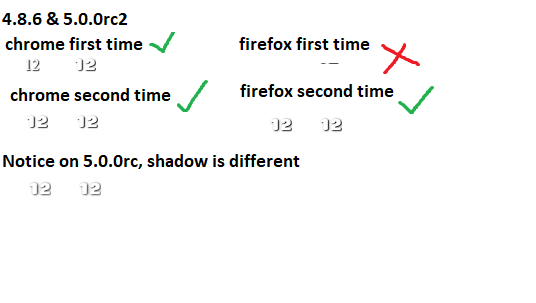
You can notice that on Firefox the first time, no font show up (even if I specify two font like ExternalFont and Arial) and it seems to have the external font but with y coordinate higher.
And you can notice how in 5.0.0rc it seems brigther.
here's the code for 4.8.6
<!DOCTYPE html>
<html>

<head>
    <meta http-equiv="content-type" content="text/html; charset=utf-8" />

    <script src="https://cdnjs.cloudflare.com/ajax/libs/pixi.js/4.8.6/pixi.min.js"></script>

    <style type="text/css">
          @font-face {
            font-family: jaggersf;
            src: local("jaggersf"), url(jaggersf.ttf);
        }
    </style>
</head>

<body>
    <div id="renderer1"></div>

    <script type="text/javascript">

    var renderer = new PIXI.autoDetectRenderer(160, 190,  { transparent: true, resolution: 1 });
    var text = new PIXI.Container();

    document.getElementById("renderer1").appendChild(renderer.view);


    // First text
    let tmpTexture = new PIXI.Text("12", { fontFamily: 'jaggersf', fontSize: '23pt', align: 'center', fill: '#ffffff', dropShadow: true, dropShadowColor: '#000000', dropShadowBlur: 4, dropShadowAngle: Math.PI / 6, dropShadowDistance: 2, });
    text.addChild(tmpTexture);


    // rendering
    var inn = setInterval(function (r) { renderer.render(text); }, 1000 / 24);

    // Second Text
    let tmpTexture2 = new PIXI.Text("12", { fontFamily: 'jaggersf', fontSize: '23pt', align: 'center', fill: '#ffffff', dropShadow: true, dropShadowColor: '#000000', dropShadowBlur: 4, dropShadowAngle: Math.PI / 6, dropShadowDistance: 2, });
    tmpTexture2.x += 100;
    setTimeout(function(){text.addChild(tmpTexture2)}, 1000);


    </script>


</body>

</html>
Here's the code for 5.0.0rc2
<!DOCTYPE html>
<html>

<head>
    <meta http-equiv="content-type" content="text/html; charset=utf-8" />

    <script src="https://cdnjs.cloudflare.com/ajax/libs/pixi.js/5.0.0-rc.2/pixi.min.js"></script>

    <style type="text/css">
          @font-face {
            font-family: jaggersf;
            src: local("jaggersf"), url(jaggersf.ttf);
        }
    </style>
</head>

<body>
    <div id="renderer1"></div>

    <script type="text/javascript">

    var renderer = new PIXI.Renderer(160, 190,  { transparent: true, resolution: 1 });
    var text = new PIXI.Container();

    document.getElementById("renderer1").appendChild(renderer.view);


    // First text
    let tmpTexture = new PIXI.Text("12", { fontFamily: 'jaggersf', fontSize: '23pt', align: 'center', fill: '#ffffff', dropShadow: true, dropShadowColor: '#000000', dropShadowBlur: 4, dropShadowAngle: Math.PI / 6, dropShadowDistance: 2, });
    text.addChild(tmpTexture);


    // rendering
    var inn = setInterval(function (r) { renderer.render(text); }, 1000 / 24);

    // Second Text
    let tmpTexture2 = new PIXI.Text("12", { fontFamily: 'jaggersf', fontSize: '23pt', align: 'center', fill: '#ffffff', dropShadow: true, dropShadowColor: '#000000', dropShadowBlur: 4, dropShadowAngle: Math.PI / 6, dropShadowDistance: 2, });
    tmpTexture2.x += 100;
    setTimeout(function(){text.addChild(tmpTexture2)}, 1000);


    </script>


</body>

</html>
You can test it here :
http://93.113.206.174/pixi_485.html
http://93.113.206.174/pixi_501.html
Thank you for the reading and the help.
 Dosseum
All 5 comments
I use https://github.com/bramstein/fontfaceobserver as part of the loading process, and don't create any text using a custom font until that process has completed. This solves any issues I had (some of which you describe here)
 themoonrat
on 24 Feb 2019
themoonrat
on 24 Feb 2019
I was just going to say the same thing but @themoonrat beat me too it. fontfaceobserver is awesome.
 bigtimebuddy
on 24 Feb 2019
bigtimebuddy
on 24 Feb 2019
Maybe someone could create a Loader middleware for loading fonts?
bigtimebuddy
on 24 Feb 2019
Perfect ! That works well with the fontfaceobserver ! (Except the shadow thing with 5.0.0rc2 but that's another thing)
Thank you for the reply and the solution
Dosseum
on 25 Feb 2019
This thread has been automatically locked since there has not been any recent activity after it was closed. Please open a new issue for related bugs.
![lock[bot] picture](https://avatars1.githubusercontent.com/in/6672?v=4&s=40) lock[bot]
on 28 Feb 2020
lock[bot]
on 28 Feb 2020
Related issues
 SebastienFPRousseau
·
3Comments
SebastienFPRousseau
·
3Comments
 distinctdan
·
3Comments
distinctdan
·
3Comments
 lunabunn
·
3Comments
lunabunn
·
3Comments
 lucap86
·
3Comments
lucap86
·
3Comments
 courtneyvigo
·
3Comments
courtneyvigo
·
3Comments
Most helpful comment
I use https://github.com/bramstein/fontfaceobserver as part of the loading process, and don't create any text using a custom font until that process has completed. This solves any issues I had (some of which you describe here)