Pixi.js: Displacement filter weird artifacts when texture repeat is on
I'm trying to use a displacement filter to add ripples to the right edge of my orb, but when I turn on texture repeat, I get weird artifacts on the opposite side of the orb. Am I doing something wrong here? I've got a running example at the bottom for more details. My setup is:
Parent Container
    Orb Container - has displace filter applied
        Orb Sprite
    Displace sprite
Here's my setup showing the sprites:

Here it is with the filter on, but no texture repeat:
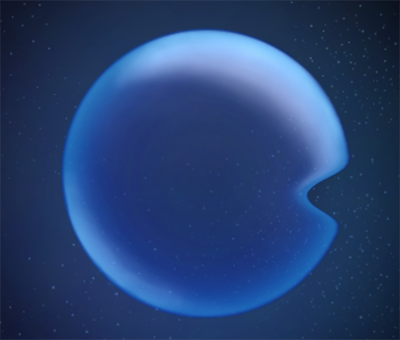
And here's the issue with texture repeat on. You can see the right side has the ripples, but the left side has some artifacts:

If I turn the filter scale way up, like to 1000, I get even weirder results:

pixi.jsversion: 5.0.0rc- Browser & Version: 72.0.3626.109
- OS & Version: OSX
- Running Example: https://www.pixiplayground.com/#/edit/gClnCCv0CEbxjnL77t7AG
 distinctdan
All 12 comments
Displacement is on repeat, that strange area takes pixels from the right and there's planet. With scale=100 it even reaches faaar to right side ;)
 ivanpopelyshev
on 20 Feb 2019
ivanpopelyshev
on 20 Feb 2019
I'm not sure I understand you, but if you're saying it's going to the right and wrapping around, it doesn't look like it's doing that. The displacement map has red > 0.5 in the bump area, which makes the pixels displace to the left, not the right. Also, you can see that it is displacing correctly on the right side, with the lighter orb border being pushed into the middle of the orb.
distinctdan
on 20 Feb 2019
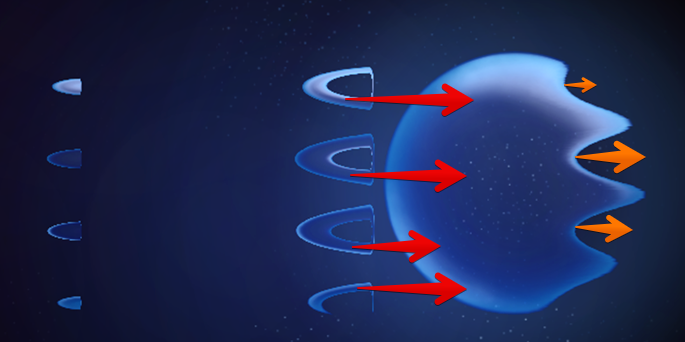
red>0.5, taking pixels from the right of original pixel.
ivanpopelyshev
on 20 Feb 2019
Hmm, so maybe the displacement filter isn't doing what I thought it was doing. In the world of 3d graphics, normally a displacement map moves the stuff directly under it. So if you have a pixel at (0, 0), and the displacement map pixel on top of it is (5, 0), it will move the source pixel 5 to the right. Are you saying pixi's displacement filter works in the opposite way, so that the displacement map doesn't actually move the pixels under it, but it instead looks up pixels according to the displacement?
distinctdan
on 20 Feb 2019
How fragment shader works: you are given a pixel on screen, please provide color for it, its true for 3d graphics too. Displacement takes color with shifted coordinates.
As for direction, it doesn't matter, i dont even remember which sign is in fragment shader. The point is, where it takes a pixel from right side, in the period it also takes from right side. Whether red is negative or positive i dont know ;)
ivanpopelyshev
on 20 Feb 2019
Ok, I see what you're saying. Now that I understand what it's actually doing, I can probably make it work. However, I would request that the docs be updated to be more clear. I'm coming from more of the 3d world, and this way of doing displacement is different from how 3d models are displaced, so I think it'd be good to be more explicit in the filter explanation.
I'd be open to doing a PR for it if you're ok with that.
distinctdan
on 20 Feb 2019
=)
ivanpopelyshev
on 20 Feb 2019
Yeah, try to explain it with your words and make PR. I cant imagine myself without this knowledge so its difficult to explain from my point of view. I'm loosy teacher
ivanpopelyshev
on 20 Feb 2019
Here's is a gif that shows exactly what you described ;) https://twitter.com/rezoner/status/1096166766454210561
ivanpopelyshev
on 20 Feb 2019
Interesting, makes sense. I guess for 3d displacement, it's different because you're moving vertices of a mesh instead of pixels, so you don't have to worry about interpolation because the verts are already connected by faces.
I did a PR with more documentation for the displacement filter. I'm open to feedback if you want to change something: https://github.com/pixijs/pixi.js/pull/5464
distinctdan
on 21 Feb 2019
I have vertex displacement in a v4 plugin: https://gameofbombs.github.io/examples-heaven/#/mesh/plane.js
ivanpopelyshev
on 21 Feb 2019
This thread has been automatically locked since there has not been any recent activity after it was closed. Please open a new issue for related bugs.
![lock[bot] picture](https://avatars1.githubusercontent.com/in/6672?v=4&s=40) lock[bot]
on 21 Feb 2020
lock[bot]
on 21 Feb 2020
Related issues
 samueller
·
3Comments
samueller
·
3Comments
 zcr1
·
3Comments
distinctdan
·
3Comments
zcr1
·
3Comments
distinctdan
·
3Comments
 courtneyvigo
·
3Comments
courtneyvigo
·
3Comments
 Makio64
·
3Comments
Makio64
·
3Comments