Pixi.js: Displacement filter causes black boxes around add blend mode sprites
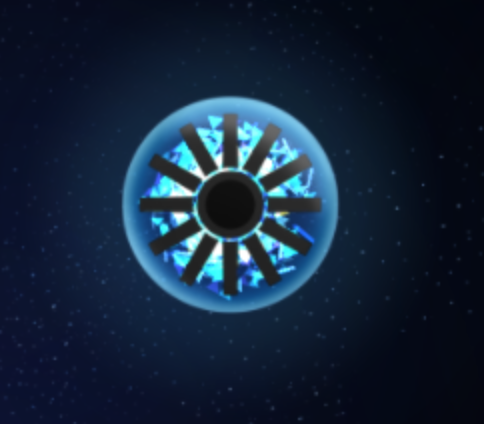
Hey, not sure if this is a known issue or not. I'm trying to use a displacement filter, but I'm getting nasty black boxes around any sprites that have their blend mode set to "ADD". Here's a before/after of applying a circular displace filter to the upper left of my object. I'd definitely be open to any workarounds.

pixi.jsversion: 4.8.5- Browser & Version: Chrome 71.0.3578.98
- OS & Version: OSX 10.14.3
 distinctdan
All 17 comments
Where exactly do you specify a blendMode? There are multiple ways to do it. Please maka a demo of it if you can.
Here, I copied displacement example for you: https://www.pixiplayground.com/#/edit/1_rsDXbjsvbl4HK~Yu432 , put your stuff there, dont need to clone it.
 ivanpopelyshev
on 15 Feb 2019
ivanpopelyshev
on 15 Feb 2019
My telepathy gives me some feeling but I can't distinguish it yet. Example will help that.
ivanpopelyshev
on 15 Feb 2019
Lol, sorry, thanks for the playground link. I guess sometimes I assume issues are easier to repro than they actually are. I think I got it figured out though: the black boxes seem to only happen if you have multiple overlapping ADD mode sprites that have alpha < 1. In this playground link, if you comment out the alpha line, the blend mode line, or the line adding the displacement filter, the boxes go away: https://www.pixiplayground.com/#/edit/1_rsDXbjsvbl4HK~Yu432
distinctdan
on 15 Feb 2019
Hi! yeah, it seems that it works if we use any filter, AlphaFilter works too, as you see in modified example.
Here is why: filters have empty framebuffer with alpha=0 background, and our demo bg is at alpha=0.4. If you set bg alpha to 1.0 or put black rectangle behind it, the effect goes away.
ADD mode does not actually add alpha, it works differently than just addition if destination alpha is not 1. This ADD is exactly the same as in Adobe Flash. I dont remember exactly why is there DST_ALPHA and ONE_MINUS_SRC_ALPHA, I'll investigate it. The fact is that pixel with alpha=0 affects background that has alpha less than 1, it multiplies background by its alpha one more time.
If you want [ONE, ONE] ADD mode, you can hack it like in post that is referenced at https://github.com/pixijs/pixi.js/wiki/v4-Gotchas#no-custom-webgl-blend-modes .
Of course, setting BG alpha to 1
ivanpopelyshev
on 15 Feb 2019
Hmm, thanks for the info. So not sure I understand totally, but I guess I would expect the overall scene to have a bg with alpha=1 if you haven't passed the {transparent: true} option. I could put a giant black opaque sprite behind everything, but that seems hacky. It does work though, here's a playground link where I added a black graphics behind everything on line 72: https://www.pixiplayground.com/#/edit/XL0YlJWoAUvZVcbl8rpxT
I tried this out in Photoshop, and it behaves the same way as PIXI does, but they've actually got a bug in their code. Their image's output alpha jumps depending on what order you adjust the top or bottom layer's alpha. However, if you put an opaque bg behind both layers, it works as expected.
I guess intuitively I might expect an ADD alpha to be the multiplication of the sprite's alpha with the highest value of each channel of the sprite's pixel. So if you've got a black image set to ADD, it'd have no effect, and a white image would have full effect:
layerAlpha = sprite.alpha * spritePixel.alpha * Math.max(spritePixel.r, spritePixel.g, spritePixel.b);
outAlpha = layerAlpha + bgAlpha*(1 - layerAlpha);
However, that's just a thought, I'm not an expert at this stuff.
distinctdan
on 16 Feb 2019
Their image's output alpha jumps depending on what order you adjust the top or bottom layer's alpha.
They also have sRGB blending enabled by default, it messes with things.
Yeah, that's basically how that formulae works. However sprite rgb is already premultiplied by alpha.
ivanpopelyshev
on 16 Feb 2019
Hmm, then perhaps could something be getting double premultiplied, or multiplied against something it shouldn't? Since the framebuffer's bg has an alpha of 0, seems like it shouldn't affect the sprites.
distinctdan
on 16 Feb 2019
By the way, I did the hack to add a custom ADD blendmode, and at first glance it appears to be working beautifully, so thanks for the help!
export enum CustomBlendMode {
    Add = 21,
}

// ------------------
// ****   HACK   ****
// ------------------
const gl = this.renderer['state'].gl;
this.renderer['state'].blendModes[Enums.CustomBlendMode.Add] = [gl.ONE, gl.ONE];

mySprite.blendMode = Enums.CustomBlendMode.Add;
Your call on closing the issue, this looks like it'll work for me.
distinctdan
on 16 Feb 2019
Just checking: do you know that you can place ADD mode on filter itself? like, displace all normal textures , then displace ADD but specify them as normal, and put filterOnAddContainer.blendMode = BLEND_MODES.ADD ?
ivanpopelyshev
on 16 Feb 2019
Btw I think we use number 21 at the moment but only for compressed textures stuff. That's why I posted that hack - sometimes we need non-standart blend-modes.
ivanpopelyshev
on 16 Feb 2019
Whoops, thanks for the heads up about 21. I had checked the source of pixi.js, but I only saw blend mode constants from 0-19. Maybe I should go higher, like 30?
For the filter container, I've actually got a mix of normal and add sprites, like for example, the black stripes on the orb are a normal mode sprite that's on top of all the glowing ADD mode sprites, which move. I want them all to distort together, so I don't think doing them all as normal mode would work in my case, if I understand correctly.
distinctdan
on 18 Feb 2019
it doesn't matter, 19-21 are very rare things anyway. You are right, there're several more modes in v5, up to 28 or so.
tint alpha=0 with NORMAL behaves the same way as ADD, if background has alpha=1. That trick is used by many Unity plugins, like spine-unity.
mix normal and add sprites => modify ParticleContainer that way it puts ALPHA=0 in sprite tint for ADD sprites (AFTER premultiplication, or everything will be 0).
If you dont use ParticleContainer, then SpriteRenderer has to be hacked , to force alpha=0 for tints for sprites that are supposed to be ADD - that's more difficult, it involves custom SpriteRenderer like in pixi-heaven plugin, and requires more things for me to explain, cant do that with my current headache.
I really don't know how to help you there, Maybe add more conditions? It still not enough.
ivanpopelyshev
on 18 Feb 2019
Well, you can make your sprite that is ALREADY DISTORTED BY SHADER. Masked renderer from pixi-heaven + extra displacement map can be modified to add this result, do it if you understand how it works.
Actually, I think you already have enough info to decide on effective algorithm for your case. We discussed , like , 5 different approaches here ;)
ivanpopelyshev
on 18 Feb 2019
I appreciate all the ideas, although just using a custom blend mode of [gl.ONE, gl.ONE] seems to be working fine. If I don't encounter any further issues with that, I'll probably keep doing it that way because it's a simple fix.
distinctdan
on 18 Feb 2019
Yep, its a good commutative blendmode ;)
ivanpopelyshev
on 19 Feb 2019
Appears this has been resolved.
 Dairnon
on 4 Mar 2019
Dairnon
on 4 Mar 2019
This thread has been automatically locked since there has not been any recent activity after it was closed. Please open a new issue for related bugs.
![lock[bot] picture](https://avatars1.githubusercontent.com/in/6672?v=4&s=40) lock[bot]
on 10 Mar 2020
lock[bot]
on 10 Mar 2020
Related issues
 readygosports
·
3Comments
readygosports
·
3Comments
 softshape
·
3Comments
softshape
·
3Comments
 Makio64
·
3Comments
Makio64
·
3Comments
 courtneyvigo
·
3Comments
courtneyvigo
·
3Comments
 lunabunn
·
3Comments
lunabunn
·
3Comments