
Hi,
I have a case like this above. I need to have 2 Containers with some children containers. Container B is scrollable - I'm changing position of children containers inside. In case when some content is out of the Container B top edge I would like to hide it... Basically I'm looking for something like "overflow: hidden" from CSS. Do you have some idea how to deal with it ???
 mezykr
All 6 comments
Masks :)
 themoonrat
on 22 Oct 2018
themoonrat
on 22 Oct 2018
Try something like this:
const mask = new PIXI.Sprite(Texture.WHITE);
mask.width = 100;
mask.height = 20;
containerB.addChild(mask); // make sure mask it added to display list somewhere!
containerB.mask = mask;
 bigtimebuddy
on 22 Oct 2018
bigtimebuddy
on 22 Oct 2018
Hi,
Thanks for your responses! In case when I would use mask, it will cover children elements from ContainerA. (ContainerA also is scrollable). It will look like this:
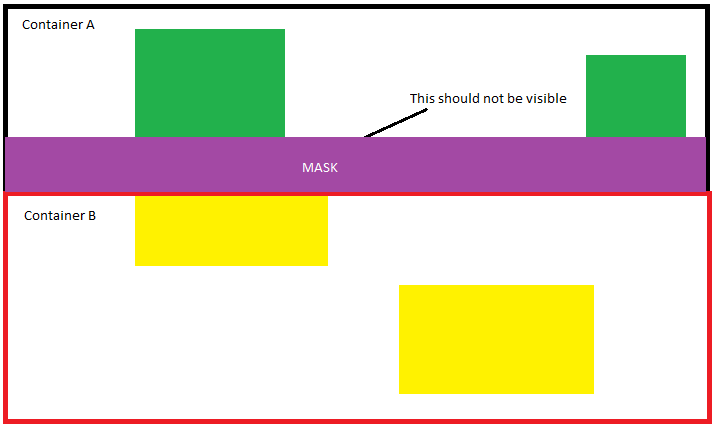
:(
mezykr
on 22 Oct 2018
Please provide some code of what you're doing.
bigtimebuddy
on 22 Oct 2018
YES!
@bigtimebuddy you are right!
containerB.mask = mask; did a trick ..
thank you very much I really appreciate your help.
mezykr
on 22 Oct 2018
This thread has been automatically locked since there has not been any recent activity after it was closed. Please open a new issue for related bugs.
![lock[bot] picture](https://avatars1.githubusercontent.com/in/6672?v=4&s=40) lock[bot]
on 22 Oct 2019
lock[bot]
on 22 Oct 2019
Related issues
 finscn
·
3Comments
finscn
·
3Comments
 Makio64
·
3Comments
Makio64
·
3Comments
 softshape
·
3Comments
softshape
·
3Comments
 gaccob
·
3Comments
gaccob
·
3Comments
 samueller
·
3Comments
samueller
·
3Comments
Most helpful comment
Try something like this: