PixiJS 4.6.2
Browser: nwjs-sdk-v0.28.3-win-x64 (chrome)
Pixi uses the default Chrome font when you point a custom font-face using the FontFace obj:
Sample code:
var fontFace = new FontFace('95845e56-1b06-457d-ac03-c765ad13ec9e.ttf','url(chrome-extension://fadmacekllolfgoklhinaljokeapepka/data/95845e56-1b06-457d-ac03-c765ad13ec9e.ttf)');
document.fonts.add(fontFace);
let pixapp = new PIXI.Application({width:810, height:41, transparent:true});
fnt_pix.appendChild(pixapp.view);
var style = new PIXI.TextStyle({ fontFamily:'95845e56-1b06-457d-ac03-c765ad13ec9e.ttf', fontSize:36 });
var richText = new PIXI.Text('ABCDEFGHIJKLMNOPQRSTUWVXYZ',style);
pixapp.stage.addChild(richText);
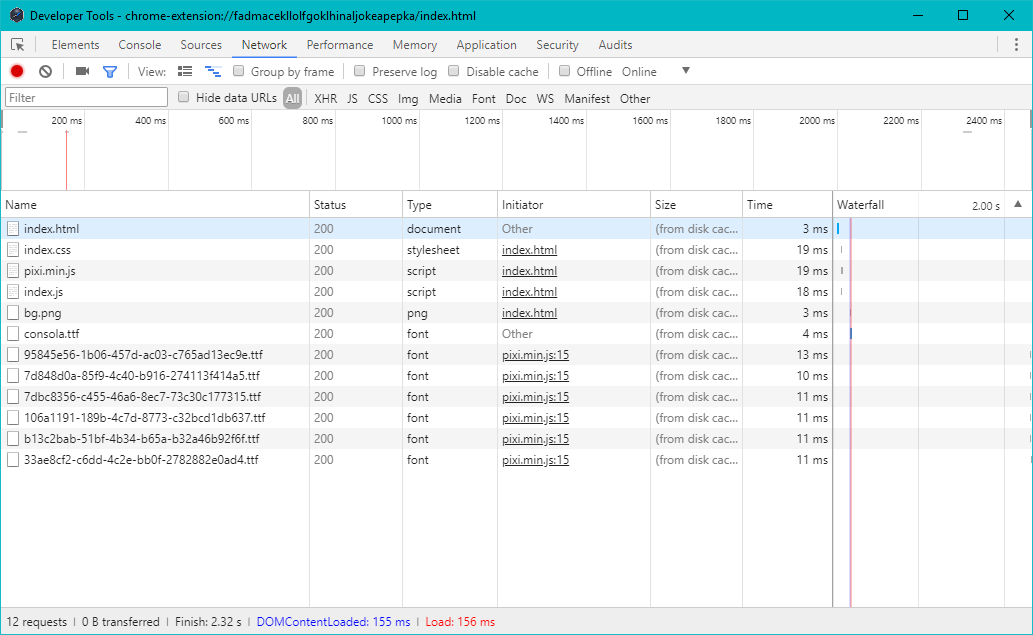
Pixi successfully donwloaded the font files:
But i suspect Chrome is handling the default font to Pixi, part of their "Webfonts Intervention" feature.
And because this only happens on the first moment, when Pixi is downloading the fonts:
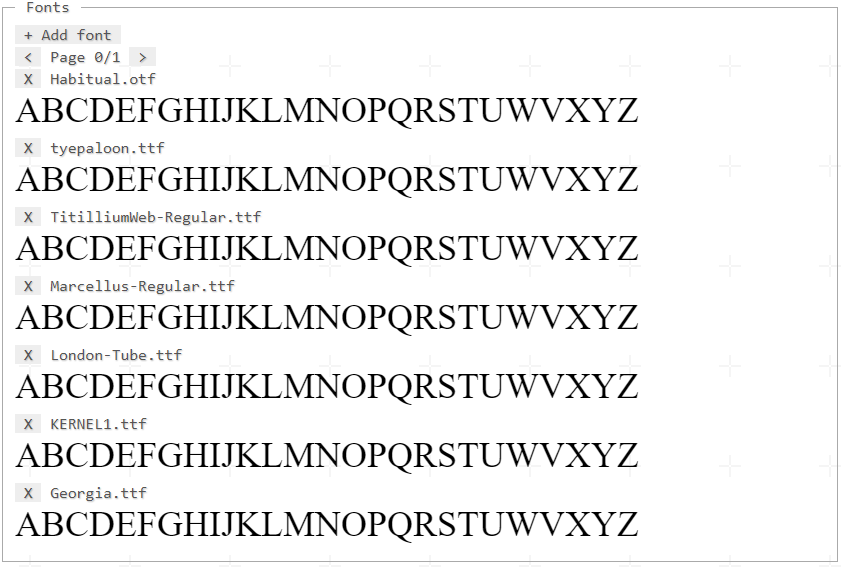
(Each line is an PIXI.Application)
On a second moment if i don't reload the page and create new PIXI.Application objects everything runs smooth:

Any hints?
 SilasMouraDev
All 5 comments
Produced another sample code to better illustrate the problem, you can run it on regular Chrome.
Observed the problem also occurs when font-faces loads directly from CSS.
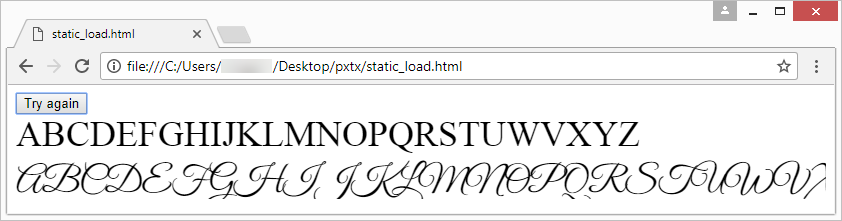
Here: pxtx.zip
SilasMouraDev
on 12 Mar 2018
A quick fix might be to add https://github.com/typekit/webfontloader to your project.
You could then do something like this to only display the content once the fonts were loaded
``javascript
let countLoadedFonts = 0;
WebFont.load({
custom: {
//font name set in css
families: ['css fontName1', 'css fontName2', 'css fontName3']
},
testStrings: {
'css fontName1': '\uE003\uE005',
'css fontName2': '\uE003\uE005',
'css fontName3': '\uE003\uE005'
},
loading: function () {
console.log('css font loading');
},
active: function () {
countLoadedFonts++;
console.log('css fontName active', countLoadedFonts);
//Display pixi content
}
});
 macguffin
on 12 Mar 2018
macguffin
on 12 Mar 2018
macguffin, your suggestion was effective!

But i still suggest the devs to give a chance to this issue.
I banged my head for many hours until your comment. =D
SilasMouraDev
on 12 Mar 2018
@Nocthan it can be a browser bug that exists using regular html and css with custom fonts. Not only does the font have to be loaded, but it has to be used once before it 'kicks in' as it were. Therefore you have libraries like the one given, or the one I use, https://github.com/bramstein/fontfaceobserver - which uses the font in the background, and measures the size of the area it has been used, and when the size changes it knows the custom font is loaded, active, and can be used.
Closing as I think we're covered here :)
 themoonrat
on 1 Jul 2018
themoonrat
on 1 Jul 2018
This thread has been automatically locked since there has not been any recent activity after it was closed. Please open a new issue for related bugs.
![lock[bot] picture](https://avatars1.githubusercontent.com/in/6672?v=4&s=40) lock[bot]
on 1 Jul 2019
lock[bot]
on 1 Jul 2019
Related issues
 lunabunn
·
3Comments
lunabunn
·
3Comments
 finscn
·
3Comments
finscn
·
3Comments
 distinctdan
·
3Comments
distinctdan
·
3Comments
 zcr1
·
3Comments
zcr1
·
3Comments
 samueller
·
3Comments
samueller
·
3Comments
Most helpful comment
A quick fix might be to add https://github.com/typekit/webfontloader to your project.
You could then do something like this to only display the content once the fonts were loaded
``
javascript
   let countLoadedFonts = 0;
         WebFont.load({
                custom: {
                    //font name set in css
                    families: ['css fontName1', 'css fontName2', 'css fontName3']
                },
                testStrings: {
                    'css fontName1': '\uE003\uE005',
                    'css fontName2': '\uE003\uE005',
                    'css fontName3': '\uE003\uE005'
                },
                loading: function () {
                    console.log('css font loading');
                },
                active: function () {
                    countLoadedFonts++;
                    console.log('css fontName active', countLoadedFonts);
                    //Display pixi content
                }
            });