Pixi.js: Alpha on container affects children in unexpected way
When two sibling Graphics objects (or Sprites) are overlapping and their parent's (in this case a container) alpha is being manipulated, the results are not what I'm expecting. When setting the container alpha to 0.5, both the children will behave as if themselves had an alpha of 0.5 (even though they have an alpha of 1)
What's actually happening:
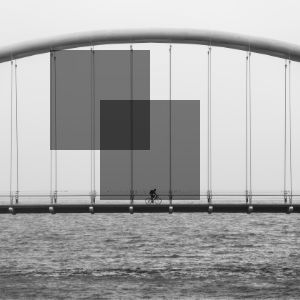
jsfiddle
What I was expecting:
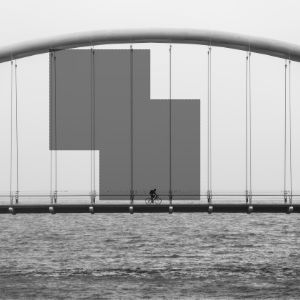
Is this a bug or am I thinking wrong about the behavior? If so, how do I get the behavior I am looking for? I'm used to change opacity of groups/layers and I was hoping it would work the same in Pixi. I tried to search for it but no success.
Thanks in advance
 partynikko
All 13 comments
Its not a bug. You need to do it in a separate layer, either using filter either renderTexture. It is not possible to do what you described without extra framebuffers.
Container != Layer.
Filter
//doesnt work due a bug
var voidFilter = new PIXI.filters.VoidFilter();
voidFilter.alpha = 0.5;
container.filters = [voidFilter];

//and that line will only make everything even worse
container.alpha = 0.5;
but in current pixi version it doesnt work with alpha, so for now you need a filter that treats alpha correctly. This filter has heavy fragment shader so it can affect performance more than just VoidFilter.
//this is fine!
var colorMatrix= new PIXI.filters.ColorMatrixFilter();
colorMatrix.alpha = 0.5;
container.filters = [colorMatrix];

//dont do that!!!
//container.alpha = 0.5;
@GoodBoyDigital @bigtimebuddy we really need to add alpha or tint to VoidFilter!
RenderTexture
This one doesnt work in realtime :( Its just snapshotting the container and then applying alpha on that texture. Im posting clear solution, without "cacheAsBitmap" and "generateTexture", those things have not enough info to do the alpha fix.
var bounds = container.getBounds();
var x2 = Math.ceil(bounds.x + bounds.width);
var y2 = Math.ceil(bounds.y + bounds.height);
bounds.x = Math.floor(bounds.x);
bounds.y = Math.floor(bounds.y);

var trans = new PIXI.Matrix();
trans.tx = -bounds.x;
trans.ty = -bounds.y;

var renderTexture = PIXI.RenderTexture.create(bounds.width, bounds.height);
renderer.render(container, renderTexture, null, trans);

var sprite = new PIXI.Sprite(renderTexture);
sprite.position.x = bounds.x;
sprite.position.y = bounds.y;
sprite.alpha = 0.5;
stage.addChild(sprite);
 ivanpopelyshev
on 28 Sep 2017
ivanpopelyshev
on 28 Sep 2017
Btw, other renderers also have that problem ;)
ivanpopelyshev
on 28 Sep 2017
@ivanpopelyshev Thanks alot for your explanation and suggestions of approaches. I now have a better understanding of it.
Regarding the ColorMatrixFilter approach. Isn't the alpha referring to the alpha of the applied filter (for example Hue), and not the container itself? How would I make the container itself semi-transparent?
Thanks in advance
partynikko
on 28 Sep 2017
Ugh, you are right!
Lets fix that.
var frag = `
varying vec2 vTextureCoord;

uniform sampler2D uSampler;
uniform float uAlpha;

void main(void)
{
   gl_FragColor = texture2D(uSampler, vTextureCoord) * uAlpha;
}
`;

var vert = `
attribute vec2 aVertexPosition;
attribute vec2 aTextureCoord;

uniform mat3 projectionMatrix;

varying vec2 vTextureCoord;

void main(void)
{
    gl_Position = vec4((projectionMatrix * vec3(aVertexPosition, 1.0)).xy, 0.0, 1.0);
    vTextureCoord = aTextureCoord;
}
`;

function AlphaFilter() {
   PIXI.Filter.call(this, vert, frag);
   this.alpha = 1.0;
}

AlphaFilter.prototype = new PIXI.Filter();
AlphaFilter.prototype.constructor = AlphaFilter;

Object.defineProperties(AlphaFilter.prototype, {
   alpha: {
       get: function() { return this.uniforms.uAlpha; }
       set: function(value) { this.uniforms.uAlpha = value; }
   }
});
I havent tested this yet, I just wrote it from scratch in this textarea, so you have to fix it if you see an error. Source is updated.
ivanpopelyshev
on 28 Sep 2017
And, updated again.
ivanpopelyshev
on 28 Sep 2017
It seems that I mixed ES5 and ES6 here.. please rewrite it that way it suits your codestyle.
class AlphaFilter extends PIXI.Filter {
    constructor() { super(vert,frag); this.alpha = 1.0; }
    get alpha { return this.uniforms.uAlpha; }
    set alpha(value) { this.uniforma.uAlpha = value; }
}
Thank you so much for your time and effort and I'm glad to say it is working!
I now get the desired effect and you can spot it here: jsfiddle
I just had to fix some typos in your class example, so I'll post the working one here:
class AlphaFilter extends PIXI.Filter {
    constructor() { super(vert,frag); this.alpha = 1.0; }
    get alpha() { return this.uniforms.uAlpha; }
    set alpha(value) { this.uniforms.uAlpha = value; }
}
Perhaps this could be added in future releases?
partynikko
on 4 Oct 2017
I'll make PR to add alpha to the VoidFilter itself.
ivanpopelyshev
on 4 Oct 2017
Can we rename VoidFilter to AlphaFilter? I think it should be named for the use-case.
 bigtimebuddy
on 4 Oct 2017
bigtimebuddy
on 4 Oct 2017
I took that name from VirtualDub: filter that does nothing but allows to use all the common features of filter. I agree, I'll rename it and put a deprecation notice.
ivanpopelyshev
on 4 Oct 2017
Thanks 👍
bigtimebuddy
on 4 Oct 2017
This thread has been automatically locked since there has not been any recent activity after it was closed. Please open a new issue for related bugs.
![lock[bot] picture](https://avatars1.githubusercontent.com/in/6672?v=4&s=40) lock[bot]
on 24 Feb 2019
lock[bot]
on 24 Feb 2019
Related issues
 softshape
·
3Comments
softshape
·
3Comments
 Makio64
·
3Comments
Makio64
·
3Comments
 courtneyvigo
·
3Comments
courtneyvigo
·
3Comments
 YuryKuvetski
·
3Comments
YuryKuvetski
·
3Comments
 gaccob
·
3Comments
gaccob
·
3Comments