Pixi.js: Support for Native Animate CC Atlas format
Hi,
In its last version Animate CC allows to export Atlas textures.
Have you plan to add a player that support natively this format in PixiJs v5 like for Spine ?
Thank you
 mathieuanthoine
All 21 comments
I believe that's a task for a hour or two. Day if you didnt make loaders before. How seriously you need it?
 ivanpopelyshev
on 31 Aug 2017
ivanpopelyshev
on 31 Aug 2017
One hour or two to create a player like Spine or GAF ? It seems really optimistic. Converting the Starling GAF player to Pixi took me days. It seems not easy to create a player from scratch but if you can, I would be extremely grateful :)
It's usage is critical in a pipe where Animate CC is the animation asset tool.
mathieuanthoine
on 31 Aug 2017
I think this would be a valuable feature.
If you are looking for alternative approaches with Animate, check out PixiAnimate extension: https://exchange.adobe.com/addons/products/14345#.WagFrdgpCEc
API: https://github.com/jiborobot/pixi-animate
Extension: API: https://github.com/jiborobot/pixi-animate-extension
 bigtimebuddy
on 31 Aug 2017
bigtimebuddy
on 31 Aug 2017
Thank you Matt for the link (I didn't know PixiAnimate), the problem is that vectors are kept as vectors and not converted in bitmap, that is a principle of atlas exporter.
A lot of Animate features (gradients, masks...) don't seem to work neither.
mathieuanthoine
on 31 Aug 2017
That's true, there are limits! I've used Animate a lot for PixiJS workflow. One tool that I created is a JSFL script that non-destructively converts vector to bitmaps. It's good where you want to keep some vectors and have some bitmaps.
bigtimebuddy
on 31 Aug 2017
Do you have any example Animate CC atlas files? I would have thought updating the loader to support those would be quite trivial, as they just need converting to the same internal data structure as if they were loaded from Texture Packer, etc.
But then you start talking about Spine / GAF player, which is nothing to do with an atlas file format, so I'm a bit confused which it is that's actually required.
 photonstorm
on 31 Aug 2017
photonstorm
on 31 Aug 2017
In its last version Animate CC allows to export Atlas textures.
one or two hours for atlas textures.
@photonstorm You're back into pixi? Good :) I still dont have enough time to help with spine in phaser, but i'll do it.
ivanpopelyshev
on 31 Aug 2017
I agree with @photonstorm, creating middleware or small tweaks to the Spritesheet parser, is pretty straightforward to load an Animate atlas.
bigtimebuddy
on 31 Aug 2017
The only difficulty is about trim/rotate but its managable.
ivanpopelyshev
on 31 Aug 2017
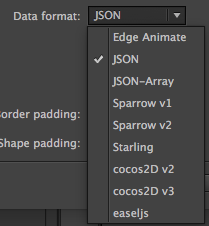
@mathieuanthoine When you export a Spritesheet from Animate, which Spritesheet format are you trying to use with PixiJS?
bigtimebuddy
on 31 Aug 2017
@all, be careful of confusion between Atlas and SpriteSheets.
Flash/Animate exports SpriteSheets since a long time and it's easy to create a compatible format for PixiJs with JSFL, no need to change things in PixiJs.
But since CC 2017, the Atlas export has been added to Animate and it's one of the best feature added since a long time.
Sometimes spriteSheets are called atlas, so it's confusing but I talk about Atlas as Atlas of Texture + player of animations described with a json file for example as Flump, GAF or Spine do.
@photonstorm , you're right it's not difficult to add in the Loader the capabilities to identify the Animate Json file and parse it to generate texture, just a Texture.fromAnimateFrame method to add and a plugin in the Loader.
I started working on this but I'm not too familiar with PixiJS as you, so if you want do it please :)
The more complex thing (or the longer) is to create the player that is capable of playing the animations, buttons behavior, filters, textfield, scale9 support etc. When I look at the work done by the GAFMedia team on its exporter/player, I'm not sure that creating this player is quick and easy but I think it would be a huge addition to PixiJS if it has been added.
@photonstorm I feed my daughters and send you the files just after ;)
mathieuanthoine
on 31 Aug 2017
Only Adobe would be stupid enough to fly in the face of convention and call a custom skeletal animation file format an 'atlas' :)
Don't worry about sample files. If they haven't published data format / structure documentation for their export files there is nothing anyone can do. Maybe they have though? Perhaps lurking in the Animate folder or in the depths of their site somewhere?
photonstorm
on 31 Aug 2017
Skeletal Animation file format means there's a skeletal. It's not the case each time. So Skeletal Animation is also too restrictive to describe this kind of format.
The format is totally clear, no documentation needed, it's close to the xfl format of Fla files.
Here are two animations with exports (a simple and a complex animation)
Atlas.zip
mathieuanthoine
on 31 Aug 2017
The structure is clear for that one example, but does it showcase every possible feature? Without actual docs it's just a minefield of guesswork.
photonstorm
on 1 Sep 2017
@mathieuanthoine Again, the main question is whether you need this thing yesterday, or you have a schedule, and do you want help with it?
Also, how is that different from stuff that @bigtimebuddy has made?
ivanpopelyshev
on 1 Sep 2017
@ivanpopelyshev Yes I certainly need this in a short time and help could be great but more than that, Animate is one of the most important 2D animation tool for games and is more and more agnostic from the player. Offering a native way in PixiJS to support atlas export format would be great, maybe more important than Spine support.
About Pixi-Animate, I explained above that it's too different.
What @bigtimebuddy is showing in the screenshot is not Atlas Exporter but SpriteSheet exporter.
mathieuanthoine
on 2 Sep 2017
Ok then, you have to talk to @bigtimebuddy because he knows animate CC formats. If you think of something concrete, I'll help with pieces of code from pixi-spine.
ivanpopelyshev
on 3 Sep 2017
I think having something like this will save a lot of time for the developers. Any one already started working on it?
There is an official unity plugin is available for AnimateCC atlas.
Will it be easy to port that to Pixi or Phaser? Even CreateJS also doesn't support AnimateCC atlasses at this moment.
https://helpx.adobe.com/in/animate/using/create-sprite-sheet.html
 vikramarka
on 22 Mar 2018
vikramarka
on 22 Mar 2018
just ctrl+C https://github.com/jiborobot/pixi-animate and make your own plugin. Also, https://github.com/rocket-ua/FlashLib, no english docs yet, but you can study the code if it contains atlas stuff
ivanpopelyshev
on 22 Mar 2018
This issue has been automatically marked as stale because it has not had recent activity. It will be closed if no further activity occurs. Thank you for your contributions.
![stale[bot] picture](https://avatars3.githubusercontent.com/in/1724?v=4&s=40) stale[bot]
on 24 Feb 2019
stale[bot]
on 24 Feb 2019
This thread has been automatically locked since there has not been any recent activity after it was closed. Please open a new issue for related bugs.
![lock[bot] picture](https://avatars1.githubusercontent.com/in/6672?v=4&s=40) lock[bot]
on 24 Feb 2020
lock[bot]
on 24 Feb 2020
Related issues
 samueller
·
3Comments
samueller
·
3Comments
 readygosports
·
3Comments
readygosports
·
3Comments
 finscn
·
3Comments
finscn
·
3Comments
 zcr1
·
3Comments
zcr1
·
3Comments
 softshape
·
3Comments
softshape
·
3Comments
Most helpful comment
Do you have any example Animate CC atlas files? I would have thought updating the loader to support those would be quite trivial, as they just need converting to the same internal data structure as if they were loaded from Texture Packer, etc.
But then you start talking about Spine / GAF player, which is nothing to do with an atlas file format, so I'm a bit confused which it is that's actually required.