Pixi.js: Large WebGL context dimensions do not match drawingBufferWidth and drawingBufferHeight
I can not say that this is really a bug but width and height of very large WebGL renderer do not match gl.drawingBufferWidth and gl.drawingBufferHeight (depending on hardware and browser). For example:
In chrome 59 with
var test = new PIXI.WebGLRenderer({width: 4000, height: 2000, resolution: 1.5});
We have:
test.width = test.view.width = 6000
//and
test.height = test.view.height = 3000
but:
test.gl.drawingBufferWidth = 5792
//and
test.gl.drawingBufferHeight = 2896
A possible fix for this could be to automatically lower resolution so that width (resp. height) matches drawingBufferWidth (resp. drawingBufferHeight): in the previous example, setting resolution to 1.5 * 5792 / 6000 = 1.448 leads to:
js
test.width = test.view.width = test.gl.drawingBufferWidth = 5792
//and
test.height = test.view.height = test.gl.drawingBufferHeight = 2896
What is your feeling on this? Should this be done on application side or on Pixi side?
 manubb
All 16 comments
That's serious issue, I think we need to think on it.
 ivanpopelyshev
on 10 Jul 2017
ivanpopelyshev
on 10 Jul 2017
FYI, in order to dynamically change resolution of a renderer, i need to set new resolution both on the renderer and on renderer.rootRenderTarget. Then a call on renderer.resize(width, height) does the job. (It appears that updating resolution on the renderer only is not sufficient.)
manubb
on 10 Jul 2017
Is this issue solved? I have the same problem and modifying the rootRenderTarget does not work in my application...
 imamik
on 6 Mar 2018
imamik
on 6 Mar 2018
It wasnt fixed. @imamik if its for mobiles , there's possible workaround with meta-tags on html page: https://github.com/pixijs/pixi.js/wiki/v4-Gotchas#mobile-devices-crashes-and-problems
ivanpopelyshev
on 6 Mar 2018
There's workaround:
A possible fix for this could be to automatically lower resolution so that width (resp. height) matches drawingBufferWidth (resp. drawingBufferHeight): in the previous example.
ivanpopelyshev
on 6 Mar 2018
I doubt it will be fixed before someone from core team reproduces it, so we need more details on how to reproduce it.
ivanpopelyshev
on 6 Mar 2018
I'm fixing this on application side. You can have an example here. Basically, i resize the renderer using initial resolution and if the renderer does not have the expected size, i lower the resolution and resize again.
manubb
on 6 Mar 2018
I've run into this same bug on bigger monitors :(
 geddski
on 18 May 2018
geddski
on 18 May 2018
Example screen size with no bug:
canvas size: 7680 x 1976
drawingBuffer: 7680 x 1976
Example screen size with bug:
canvas size: 7680 x 3008
drawingBuffer: 6544 x 2563
It appears Pixi is limiting the drawingBuffer size.
geddski
on 18 May 2018
What is the proper workaround for this? Changing my canvas width and height to match the drawingBuffer doesn't fix it.
geddski
on 18 May 2018
Oh nevermind I realized I just need to scale the stage down as well.
geddski
on 18 May 2018
This issue has been automatically marked as stale because it has not had recent activity. It will be closed if no further activity occurs. Thank you for your contributions.
![stale[bot] picture](https://avatars3.githubusercontent.com/in/1724?v=4&s=40) stale[bot]
on 24 Feb 2019
stale[bot]
on 24 Feb 2019
Got the same bug
When I use WebGLRenderer with width > 4000px it starts stretching
For test I draw rectangle 100x100 and when check its size it shows something like 160x100
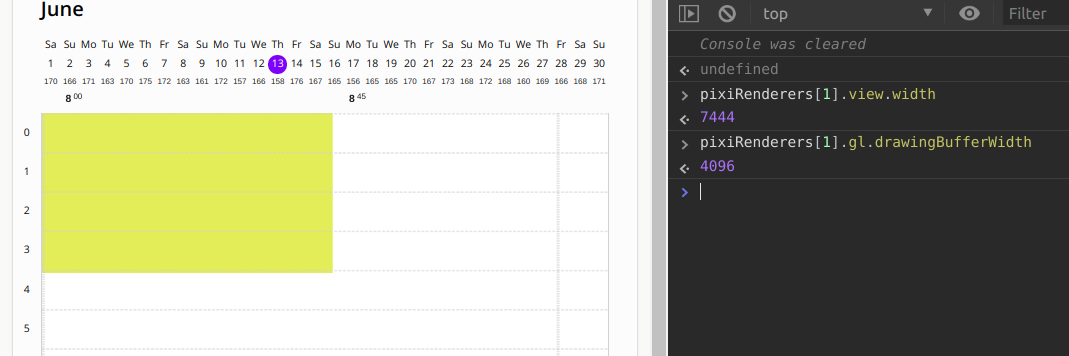
A bit less context's width
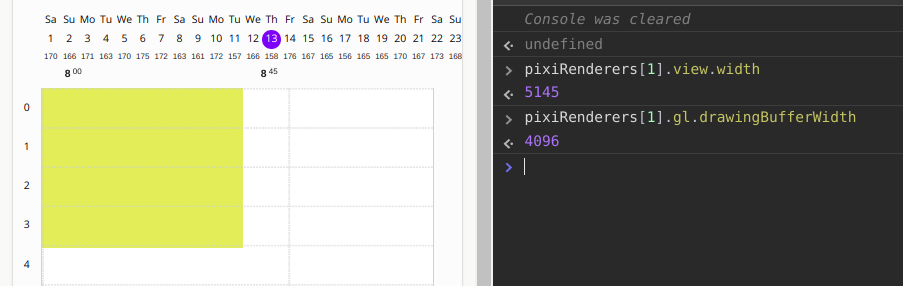
It seems like 4096 is max size for WebGLRenderer.
P.S.
Solved by changed resolution in order to increase render dimensions to 4096px (like mentioned upper)
 levabala
on 13 Jun 2019
levabala
on 13 Jun 2019
This thread has been automatically locked since there has not been any recent activity after it was closed. Please open a new issue for related bugs.
![lock[bot] picture](https://avatars1.githubusercontent.com/in/6672?v=4&s=40) lock[bot]
on 25 Jun 2020
lock[bot]
on 25 Jun 2020
This thread has been automatically locked since there has not been any recent activity after it was closed. Please open a new issue for related bugs.
lock[bot]
on 25 Jun 2020
This thread has been automatically locked since there has not been any recent activity after it was closed. Please open a new issue for related bugs.
lock[bot]
on 25 Jun 2020
Related issues
 readygosports
·
3Comments
readygosports
·
3Comments
 gaccob
·
3Comments
gaccob
·
3Comments
 neciszhang
·
3Comments
neciszhang
·
3Comments
 YuryKuvetski
·
3Comments
YuryKuvetski
·
3Comments
 gigamesh
·
3Comments
gigamesh
·
3Comments
Most helpful comment
FYI, in order to dynamically change resolution of a renderer, i need to set new resolution both on the
rendererand onrenderer.rootRenderTarget. Then a call onrenderer.resize(width, height)does the job. (It appears that updating resolution on the renderer only is not sufficient.)