Pivpn: Connect to VPN successfully but no internet access
Console output of pivpn debug
::: Generating Debug Output
:::                                     :::
::              PiVPN Debug              ::
:::                                     :::
::      Latest Commit                    ::
:::                                     :::
commit 7ed7e4652ebe322e51e85a0582907e83eea0d103
Author: Carlos Colaço <[email protected]>
Date:   Fri Oct 20 17:00:23 2017 +0200

    Added info regarding Raspbian Stretch

    added info about support for raspbian Strech, and changed the preference from Jessie to Stretch.

    Edited and merged directly since it is a minor edit.
:::                                     :::
::      Recursive list of files in       ::
::      /etc/openvpn/easy-rsa/pki        ::
:::                                     :::
/etc/openvpn/easy-rsa/pki/:
ca.crt
crl.pem
Default.txt
dh2048.pem
index.txt
index.txt.attr
index.txt.attr.old
index.txt.old
issued
Jeff.ovpn
private
serial
serial.old
ta.key
Test123.ovpn

/etc/openvpn/easy-rsa/pki/issued:
Jeff.crt
server_FLOxUmBRCvd9lTwI.crt
Test123.crt

/etc/openvpn/easy-rsa/pki/private:
ca.key
Jeff.key
server_FLOxUmBRCvd9lTwI.key
Test123.key
:::                                     :::
::      Output of /etc/pivpn/*           ::
:::                                     :::
:: START /etc/pivpn/DET_PLATFORM ::
Raspbian
:: END /etc/pivpn/DET_PLATFORM ::
:: START /etc/pivpn/INSTALL_PORT ::
1194
:: END /etc/pivpn/INSTALL_PORT ::
:: START /etc/pivpn/INSTALL_PROTO ::
udp
:: END /etc/pivpn/INSTALL_PROTO ::
:: START /etc/pivpn/INSTALL_USER ::
jeff
:: END /etc/pivpn/INSTALL_USER ::
:: START /etc/pivpn/NO_UFW ::
1
:: END /etc/pivpn/NO_UFW ::
:: START /etc/pivpn/pivpnINTERFACE ::
wlan0
:: END /etc/pivpn/pivpnINTERFACE ::
:::                                     :::
:: /etc/openvpn/easy-rsa/pki/Default.txt ::
:::                                     :::
client
dev tun
proto udp
remote jeff.myvnc.com 1194
resolv-retry infinite
nobind
persist-key
persist-tun
key-direction 1
remote-cert-tls server
tls-version-min 1.2
verify-x509-name server_FLOxUmBRCvd9lTwI name
cipher AES-256-CBC
auth SHA256
comp-lzo
verb 1
:::                                     :::
::      Debug Output Complete            ::
:::                                     :::
:::
::: Debug output completed above.
::: Copy saved to /tmp/debug.txt
:::
Issue
connect to VPN successfully (using OpenVPN Connect on iPhone) but cannot access to internet, maybe similar to #386?
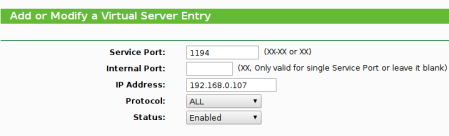
Port forwarding
Port 1194 already forwarded to my pi's internal IP
ifconfig log
br-a8e7dbec2762 Link encap:Ethernet  HWaddr 02:42:65:cc:b2:f3
          inet addr:172.18.0.1  Bcast:0.0.0.0  Mask:255.255.0.0
          UP BROADCAST MULTICAST  MTU:1500  Metric:1
          RX packets:0 errors:0 dropped:0 overruns:0 frame:0
          TX packets:0 errors:0 dropped:0 overruns:0 carrier:0
          collisions:0 txqueuelen:0
          RX bytes:0 (0.0 B)  TX bytes:0 (0.0 B)

docker0   Link encap:Ethernet  HWaddr 02:42:6e:de:ab:52
          inet addr:172.17.0.1  Bcast:0.0.0.0  Mask:255.255.0.0
          inet6 addr: fe80::ffa8:2d78:d906:a743/64 Scope:Link
          UP BROADCAST MULTICAST  MTU:1500  Metric:1
          RX packets:0 errors:0 dropped:0 overruns:0 frame:0
          TX packets:0 errors:0 dropped:0 overruns:0 carrier:0
          collisions:0 txqueuelen:0
          RX bytes:0 (0.0 B)  TX bytes:0 (0.0 B)

eth0      Link encap:Ethernet  HWaddr b8:27:eb:7c:f7:57
          inet6 addr: fe80::e459:15d4:db56:1a75/64 Scope:Link
          UP BROADCAST MULTICAST  MTU:1500  Metric:1
          RX packets:0 errors:0 dropped:0 overruns:0 frame:0
          TX packets:0 errors:0 dropped:0 overruns:0 carrier:0
          collisions:0 txqueuelen:1000
          RX bytes:0 (0.0 B)  TX bytes:0 (0.0 B)

lo        Link encap:Local Loopback
          inet addr:127.0.0.1  Mask:255.0.0.0
          inet6 addr: ::1/128 Scope:Host
          UP LOOPBACK RUNNING  MTU:65536  Metric:1
          RX packets:93 errors:0 dropped:0 overruns:0 frame:0
          TX packets:93 errors:0 dropped:0 overruns:0 carrier:0
          collisions:0 txqueuelen:1
          RX bytes:18440 (18.0 KiB)  TX bytes:18440 (18.0 KiB)

tun0      Link encap:UNSPEC  HWaddr 00-00-00-00-00-00-00-00-00-00-00-00-00-00-00-00
          inet addr:10.8.0.1  P-t-P:10.8.0.1  Mask:255.255.255.0
          UP POINTOPOINT RUNNING NOARP MULTICAST  MTU:1500  Metric:1
          RX packets:718 errors:0 dropped:0 overruns:0 frame:0
          TX packets:0 errors:0 dropped:0 overruns:0 carrier:0
          collisions:0 txqueuelen:100
          RX bytes:44757 (43.7 KiB)  TX bytes:0 (0.0 B)

wlan0     Link encap:Ethernet  HWaddr b8:27:eb:29:a2:02
          inet addr:192.168.0.107  Bcast:192.168.0.255  Mask:255.255.255.0
          inet6 addr: fe80::8290:9fe3:ae01:9925/64 Scope:Link
          UP BROADCAST RUNNING MULTICAST  MTU:1500  Metric:1
          RX packets:18080 errors:0 dropped:5890 overruns:0 frame:0
          TX packets:12673 errors:0 dropped:0 overruns:0 carrier:0
          collisions:0 txqueuelen:1000
          RX bytes:4242076 (4.0 MiB)  TX bytes:6144887 (5.8 MiB)
sudo iptables -t nat -S log
-P PREROUTING ACCEPT
-P INPUT ACCEPT
-P OUTPUT ACCEPT
-P POSTROUTING ACCEPT
-N DOCKER
-A PREROUTING -m addrtype --dst-type LOCAL -j DOCKER
-A OUTPUT ! -d 127.0.0.0/8 -m addrtype --dst-type LOCAL -j DOCKER
-A POSTROUTING -s 172.17.0.0/16 ! -o docker0 -j MASQUERADE
-A POSTROUTING -s 172.18.0.0/16 ! -o br-a8e7dbec2762 -j MASQUERADE
-A POSTROUTING -s 10.8.0.0/24 -o wlan0 -j MASQUERADE
-A DOCKER -i docker0 -j RETURN
-A DOCKER -i br-a8e7dbec2762 -j RETURN
sudo iptables -S log
-P INPUT ACCEPT
-P FORWARD DROP
-P OUTPUT ACCEPT
-N DOCKER
-N DOCKER-ISOLATION
-N DOCKER-USER
-A FORWARD -j DOCKER-USER
-A FORWARD -j DOCKER-ISOLATION
-A FORWARD -o docker0 -m conntrack --ctstate RELATED,ESTABLISHED -j ACCEPT
-A FORWARD -o docker0 -j DOCKER
-A FORWARD -i docker0 ! -o docker0 -j ACCEPT
-A FORWARD -i docker0 -o docker0 -j ACCEPT
-A FORWARD -o br-a8e7dbec2762 -m conntrack --ctstate RELATED,ESTABLISHED -j ACCEPT
-A FORWARD -o br-a8e7dbec2762 -j DOCKER
-A FORWARD -i br-a8e7dbec2762 ! -o br-a8e7dbec2762 -j ACCEPT
-A FORWARD -i br-a8e7dbec2762 -o br-a8e7dbec2762 -j ACCEPT
-A DOCKER-ISOLATION -i br-a8e7dbec2762 -o docker0 -j DROP
-A DOCKER-ISOLATION -i docker0 -o br-a8e7dbec2762 -j DROP
-A DOCKER-ISOLATION -j RETURN
-A DOCKER-USER -j RETURN
systemctl status openvpn log
● openvpn.service - OpenVPN service
   Loaded: loaded (/lib/systemd/system/openvpn.service; enabled)
   Active: active (exited) since Mon 2017-10-30 10:08:15 HKT; 1h 37min ago
  Process: 535 ExecStart=/bin/true (code=exited, status=0/SUCCESS)
 Main PID: 535 (code=exited, status=0/SUCCESS)
   CGroup: /system.slice/openvpn.service
dig google log
; <<>> DiG 9.9.5-9+deb8u13-Raspbian <<>> google.com
;; global options: +cmd
;; Got answer:
;; ->>HEADER<<- opcode: QUERY, status: NOERROR, id: 7638
;; flags: qr rd ra; QUERY: 1, ANSWER: 1, AUTHORITY: 0, ADDITIONAL: 1

;; OPT PSEUDOSECTION:
; EDNS: version: 0, flags:; udp: 4096
;; QUESTION SECTION:
;google.com.                    IN      A

;; ANSWER SECTION:
google.com.             208     IN      A       216.58.203.14

;; Query time: 10 msec
;; SERVER: 192.168.0.1#53(192.168.0.1)
;; WHEN: Mon Oct 30 11:46:42 HKT 2017
;; MSG SIZE  rcvd: 55
pico /etc/resolv.conf
# Generated by resolvconf
nameserver 192.168.0.1
pico /etc/openvpn/server.conf
dev tun
proto udp
port 1194
ca /etc/openvpn/easy-rsa/pki/ca.crt
cert /etc/openvpn/easy-rsa/pki/issued/server_FLOxUmBRCvd9lTwI.crt
key /etc/openvpn/easy-rsa/pki/private/server_FLOxUmBRCvd9lTwI.key
dh /etc/openvpn/easy-rsa/pki/dh2048.pem
topology subnet
server 10.8.0.0 255.255.255.0
# server and remote endpoints
ifconfig 10.8.0.1 10.8.0.2
# Add route to Client routing table for the OpenVPN Server
push "route 10.8.0.1 255.255.255.255"
# Add route to Client routing table for the OPenVPN Subnet
push "route 10.8.0.0 255.255.255.0"
# your local subnet
push "route 192.168.0.0 255.255.255.0"
# Set your primary domain name server address for clients
push "dhcp-option DNS 8.8.8.8"
push "dhcp-option DNS 8.8.4.4"
# Override the Client default gateway by using 0.0.0.0/1 and
# 128.0.0.0/1 rather than 0.0.0.0/0. This has the benefit of
# overriding but not wiping out the original default gateway.
push "redirect-gateway def1"
client-to-client
keepalive 10 120
remote-cert-tls client
tls-version-min 1.2
tls-auth /etc/openvpn/easy-rsa/pki/ta.key 0
cipher AES-256-CBC
auth SHA256
comp-lzo
user nobody
group nogroup
persist-key
persist-tun
crl-verify /etc/openvpn/crl.pem
status /var/log/openvpn-status.log 20
status-version 3
log /var/log/openvpn.log
verb 1
# Generated for use by PiVPN.io
one of my .opvn
dev tun
proto udp
remote (replace my domain here) 1194
resolv-retry infinite
nobind
persist-key
persist-tun
key-direction 1
remote-cert-tls server
tls-version-min 1.2
verify-x509-name server_FLOxUmBRCvd9lTwI name
cipher AES-256-CBC
auth SHA256
comp-lzo
verb 1
<ca>
-----BEGIN CERTIFICATE-----
CERT HERE
-----END CERTIFICATE-----
</ca>
<cert>
-----BEGIN CERTIFICATE-----
CERT HERE
-----END CERTIFICATE-----
 jeffffc
All 7 comments
Hi @jeffffc
I think your problem is more properly related to issue #380
I am not iptables Guru, and even less with docker since I don't use it ... I am yet to find some time to give it a try!
but I think the problem lies here:
-P PREROUTING ACCEPT
-P INPUT ACCEPT
-P OUTPUT ACCEPT
-P POSTROUTING ACCEPT
-N DOCKER
-A PREROUTING -m addrtype --dst-type LOCAL -j DOCKER
-A OUTPUT ! -d 127.0.0.0/8 -m addrtype --dst-type LOCAL -j DOCKER
-A POSTROUTING -s 172.17.0.0/16 ! -o docker0 -j MASQUERADE
-A POSTROUTING -s 172.18.0.0/16 ! -o br-a8e7dbec2762 -j MASQUERADE
-A POSTROUTING -s 10.8.0.0/24 -o wlan0 -j MASQUERADE
-A DOCKER -i docker0 -j RETURN
-A DOCKER -i br-a8e7dbec2762 -j RETURN
I am not sure where is the correct place for the
-A POSTROUTING -s 10.8.0.0/24 -o wlan0 -j MASQUERADE
but think that is not the correct place .. I recommend you to read the issue I mentioned ... there are some tips to help you to figure out.
If you are willing to role up your sleeves and help me out here ... the best way to start on this is to start isolating ... first I would comment all the lines except the one I mentioned, and see if it works with ONLY that line active .. which I am pretty sure it will in similarity to what happened in the mentioned issue.
 4s3ti
on 30 Oct 2017
4s3ti
on 30 Oct 2017
I tried to follow the other issue until this:
sudo iptables -t nat -S
-P PREROUTING ACCEPT
-P INPUT ACCEPT
-P OUTPUT ACCEPT
-P POSTROUTING ACCEPT
-A POSTROUTING -s 10.8.0.0/24 -o wlan0 -j MASQUERADE
and it is still not working :/ i even uninstalled docker (i installed it but was not using it anyways)
jeffffc
on 31 Oct 2017
I had the same issue and I solved editing the /etc/iptables/rules.v4
I had:
*nat
...
*filter
:FORWARD DROP[0:0]
and solved changing to
*nat
...
*filter
:FORWARD ACCEPT[0:0]
 bennesp
on 26 Dec 2017
bennesp
on 26 Dec 2017
Cool Thank you @bennesp , I completely missed the FORWARD default policy! =/
@jeffffc you still have the issue? try bannesp solution pls.
4s3ti
on 26 Dec 2017
I have the same issue after upgrading to Stretch.
I can connect ok, but there's no network access to both the internet and other machines on my local network.
Here's my iptables config.
$ iptables-save
# Generated by iptables-save v1.6.0 on Wed Jan  3 00:59:42 2018
*filter
:INPUT ACCEPT [436:49073]
:FORWARD ACCEPT [0:0]
:OUTPUT ACCEPT [191:19194]
COMMIT
# Completed on Wed Jan  3 00:59:42 2018
# Generated by iptables-save v1.6.0 on Wed Jan  3 00:59:42 2018
*nat
:PREROUTING ACCEPT [849:328814]
:INPUT ACCEPT [29:7343]
:OUTPUT ACCEPT [0:0]
:POSTROUTING ACCEPT [0:0]
-A POSTROUTING -s 10.8.0.0/24 -o wlan0 -j MASQUERADE
COMMIT
# Completed on Wed Jan  3 00:59:42 2018
All looks ok to me and I've tried the solutions in #380.
 biddster
on 3 Jan 2018
biddster
on 3 Jan 2018
Thank you so much @bennesp, i was getting crazy to solve the issue caused (i guess) by having docker together with pivpn, and that filter rule made my day ! :)
 flashbackpa
on 30 Apr 2018
flashbackpa
on 30 Apr 2018
I think the problem is, since Raspbian Stretch interface names are changed to a combination of for ethernet 'etx+MacAdress'. I have seen some configuration parameters such on /etc/iptables/rules.v4 there was the interface name eth0. But lan interface name was not eth0 rather etx+[my MAC address].
After fresh install of PiVPN my internet connection now works. I have not tested it only with renaming the interface to eth0. I have taking the following steps to get work:
- uninstall PiVPN with the command
pivpn -ufrom my pi (i also approved to uninstall openvpn and easy-rsa) - removed /etc/iptables/rules.v4 (created a backup before)
- add
net.ifnames=0to /boot/cmdline.txt to use default network interface names like (eth0 instead of enx+MAC or wlan0 instead of wlx+MAC). My cmdline.txt now looks like thisdwc_otg.lpm_enable=0 console=serial0,115200 console=tty1 root=/dev/mmcblk0p2 rootfstype=ext4 elevator=deadline fsck.repair=yes rootwait net.ifnames=0. - after that steps i installed PiVPN with
curl -L https://install.pivpn.io | bash
and now it works.
 kanuni89
on 13 Jun 2019
kanuni89
on 13 Jun 2019
Related issues
 InnovativeInventor
·
6Comments
InnovativeInventor
·
6Comments
 peterHendrickx
·
4Comments
peterHendrickx
·
4Comments
 andersonentwistle
·
6Comments
andersonentwistle
·
6Comments
 ilovelobster
·
4Comments
ilovelobster
·
4Comments
 burniej
·
6Comments
burniej
·
6Comments
Most helpful comment
I had the same issue and I solved editing the /etc/iptables/rules.v4
I had:
and solved changing to