Pipelines: Tensorboard not working with k8s secrets
What steps did you take:
I'm running kubeflow on an EKS cluster and have my tensorboard events file uploaded to s3. The "Open Tensorboard" button shows up on the kubeflow UI i.e. the kubeflow artifact is stored to s3 properly (the source on the /mlpipeline-ui-metadata.json is an s3 path .
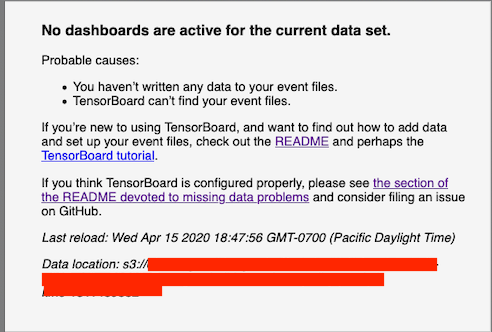
On clicking the button I get properly navigated to the tensorboard viewer page. But on that page the events file cannot be read from s3.
I've added the env var VIEWER_TENSORBOARD_POD_TEMPLATE_SPEC_PATH to the ml-pipeline-ui service and, the tensorboard spec there points to the correct the aws credentials stored as k8s secrets (tensorboard spec below):
tensorboard_spec.json: |-
{
  "spec": {
    "containers": [
      {
        "env": [
          {
            "name": "AWS_ACCESS_KEY_ID",
            "valueFrom": {
              "secretKeyRef": {
                "name": "aws-credentials",
                "key": "aws-access-key-id"
              }
            }
          },
          {
            "name": "AWS_SECRET_ACCESS_KEY",
            "valueFrom": {
              "secretKeyRef": {
                "name": "aws-credentials",
                "key": "aws-secret-access-key"
              }
            }
          },
          {
            "name": "AWS_REGION",
            "value": "us-west-2"
          }
        ]
      }
    ]
  }
}
What happened:
With the above configmap I get the standard tensorboard UI message that the files cannot be read from s3. However, if I change the configmap such that it has the raw AWS credentials (instead of the k8s secretKeyRef) the tensorboard pod works.
In both cases I've printed the env var from the tensorboard viewer pod and I can see that they both have the correct values (so it's not about some bad value in the secretKeyRef itself).
Additionally, (not sure if this is helpful) from the tensorboard pods logs I notice that the "good logs" have 6 response headers while the "bad logs" just have 4 headers.
Response header from "good logs" (when AWS secrets are given to the configmap raw)
6 response headers:
content-type : application/xml
date : Thu, 16 Apr 2020 00:27:16 GMT
server : AmazonS3
transfer-encoding : chunked
x-amz-id-2 : --redacted--
x-amz-request-id : --redacted--
"Bad logs" when the AWS credentials are a secretKeyRef:
4 response headers:
connection : close
date : Thu, 16 Apr 2020 00:49:17 GMT
server : AmazonS3
transfer-encoding : chunked
What did you expect to happen:
Tensorboard on kubelow pipeline UI to work with k8s secrets.
Environment:
How did you deploy Kubeflow Pipelines (KFP)?
KFP version: Build commit: 743746b
Anything else you would like to add:
[Miscellaneous information that will assist in solving the issue.]
/kind bug
 khani92
All 6 comments
@eterna2 @Jeffwan have you seen this before?
khani92
on 16 Apr 2020
Might want to check whether the service account assigned to the tensorboard pod has access to k8s secret.
I think the default sa has no access to secrets.
 eterna2
on 16 Apr 2020
eterna2
on 16 Apr 2020
Have a check on this tutorial as well https://www.kubeflow.org/docs/aws/pipeline/#support-tensorboard-in-kubeflow-pipelines
It has all the steps to enable Tensorboard if you install KFP via kubeflow manifest
 Jeffwan
on 16 Apr 2020
Jeffwan
on 16 Apr 2020
@Jeffwan thanks for sharing the document. Yep, I've done those steps.
@eterna2 : I'm using an opaque opaque secret so I don't think it's linked to a serviceaccount.
Besides I don't think it's a credentials issue because I see the correct values when I run the following command:
 $ kubectl exec -it viewer-67d7dd2ad9712aeb9f86502b641cefa2aa5d35a5-deploymentbpmc4 -- env | grep -i aws
AWS_ACCESS_KEY_ID=--correct access key--
AWS_SECRET_ACCESS_KEY=--correct secret key--
AWS_REGION=us-west-2
And here's how the env var show when I describe the pod just for reference:
$ kubectl describe pods viewer-67d7dd2ad9712aeb9f86502b641cefa2aa5d35a5-deploymentbpmc4 | grep -i aws
      AWS_ACCESS_KEY_ID:      <set to the key 'aws-access-key-id' in secret 'aws-credentials'>      Optional: false
      AWS_SECRET_ACCESS_KEY:  <set to the key 'aws-secret-access-key' in secret 'aws-credentials'>  Optional: false
      AWS_REGION:             us-west-2
This is very strange. Have u tried kubectl exec into the pod to look at the env?
Because if it works with raw env, there is no reason why it doesn't work with secrets, unless the credentials are wrong?
i.e. I did made a similar mistake before. When I use echo instead of echo -e, and accidentally introduced a new line into my secret.
I wish I can help. But I dun have a cluster at the moment.
eterna2
on 16 Apr 2020
Thanks @eterna2 ! I think you did help, it was an extra \n at the end of the creds. Not sure why I ruled that possibility out. Thanks! And sorry for the false alarm. I'll close this out.
khani92
on 16 Apr 2020
Related issues
 Toeplitz
·
4Comments
Toeplitz
·
4Comments
 xinbinhuang
·
3Comments
xinbinhuang
·
3Comments
 discordianfish
·
4Comments
discordianfish
·
4Comments
 Svendegroote91
·
3Comments
Svendegroote91
·
3Comments
 IronPan
·
4Comments
IronPan
·
4Comments
Most helpful comment
This is very strange. Have u tried
kubectl execinto the pod to look at the env?Because if it works with raw env, there is no reason why it doesn't work with secrets, unless the credentials are wrong?
i.e. I did made a similar mistake before. When I use
echoinstead ofecho -e, and accidentally introduced a new line into my secret.I wish I can help. But I dun have a cluster at the moment.