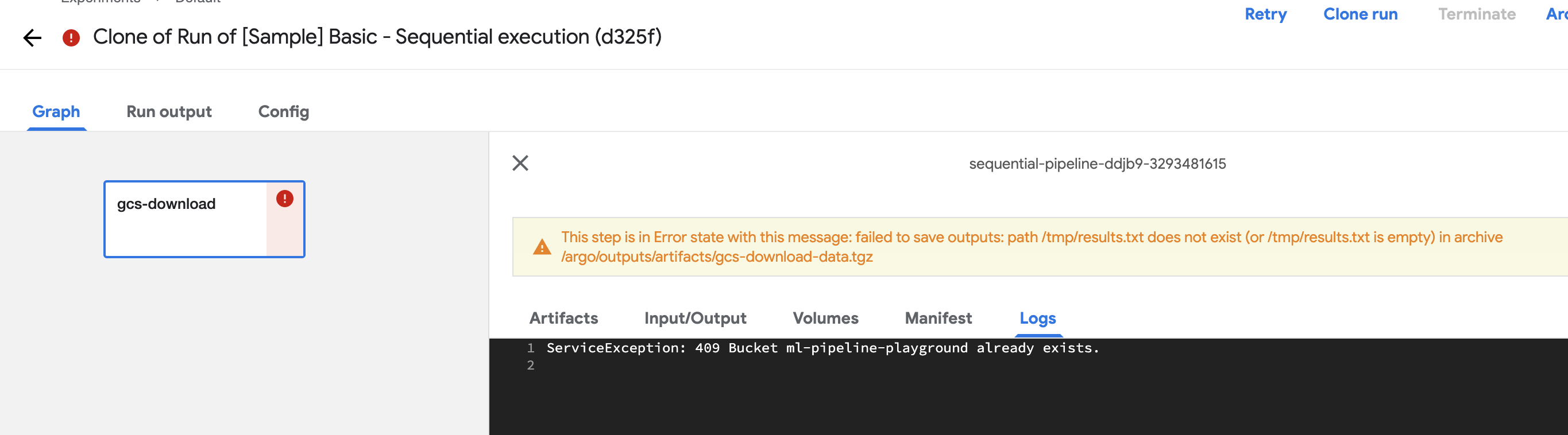
Pipelines: ServiceException: 409 Bucket ml-pipeline-playground already exists
What happened:
Runs of sample pipelines (for example https://github.com/kubeflow/pipelines/blob/0.1.40/samples/core/sequential/sequential.py) failed with single line in log
ServiceException: 409 Bucket ml-pipeline-playground already exists.
What did you expect to happen:
Run without errors
What steps did you take:
[A clear and concise description of what the bug is.]
Open kubeflow GUI, Pipelines, select sample pipeline, "Create run", task failed with that error
Anything else you would like to add:
[Miscellaneous information that will assist in solving the issue.]
Kubeflow, version 1.0.rc4, installed on GCP, via CLI
 Kulikovpavel
All 15 comments
that's wired, this bucket should be existing as it's used as read-only to read input data.
The error msg looks like want to create a bucket with this name.
Would you double check it is from this sequential sample?
 rmgogogo
on 13 Feb 2020
rmgogogo
on 13 Feb 2020
Agree, this is strange, there is only simple steps and no bucket should be created, only use of existing.
Description leads to this page: https://github.com/kubeflow/pipelines/blob/0.1.40/samples/core/sequential/sequential.py
I even tried new pipeline upload with that code above, same error
Kulikovpavel
on 13 Feb 2020
Umm. Indeed it's weird. Do you mind copy-pasting the pipeline yaml def here?
Pipeline panel -> [Sample] Basic - Sequential execution -> "Source" Tab (next to the "Graph" Tab)
Thanks!
 numerology
on 13 Feb 2020
Kulikovpavel
on 13 Feb 2020
numerology
on 13 Feb 2020
Kulikovpavel
on 13 Feb 2020
Experiencing the same issue with this tutorial. Kubeflow v0.7.0 installed with web installer running on GKE
 jetbasrawi
on 18 Feb 2020
jetbasrawi
on 18 Feb 2020
How about other preloaded sample pipelines? Is it only happens in the sequential pipeline?
I normally install KFP Standalone and I just tested it on KFP 0.2.3 sample pipeline and it works well.
rmgogogo
on 18 Feb 2020
Same error with other pipelines with gcp-download
Kulikovpavel
on 19 Feb 2020
Yes, it only happens with the gcp-download component in all the tutorials it is used in. Sequential and parallel
jetbasrawi
on 19 Feb 2020
I'm encountering the same issue when running gsutil copy commands within a Kubeflow pipeline:
import sh

from = gs://test/test.csv
to = /tmp/test.csv

sh.gsutil('cp', from, to)
 doepking
on 24 Feb 2020
doepking
on 24 Feb 2020
Seems to be a GKE metadata server related issue. Recently, usage of the Google Cloud SDK in Kubeflow was not possible at all, see: https://github.com/kubeflow/kubeflow/issues/4607
I tested a possible workaround, using a service account JSON file, i.e. specification within the Dockerfile and activation via:
ENV GOOGLE_APPLICATION_CREDENTIALS kubeflow-user.json
RUN gcloud auth activate-service-account --key-file kubeflow-user.json
Alternatively, activation within the Python code:
import os
import google.auth

os.environ["GOOGLE_APPLICATION_CREDENTIALS"]="kubeflow-user.json"
# Activates the application credentials
google.auth.default()
Still the same error with kubeflow 1.0
Kulikovpavel
on 2 Mar 2020
Hi all, this is a duplicate of https://github.com/kubeflow/kubeflow/issues/4803. The fix for it has been merged but hasn't been released.
The permission error is misleading, it should tell you don't have permission to use that bucket, because pipeline-runner service account isn't bound to any Google service account in KF 1.0 by default. (KF 1.0 now recommends using workload identity to provide GCP permissions to workloads.)
Or I recommend binding your pipeline-runner kubernetes service account to probably <cluster-name>-user google service account created by Kubeflow. You can use this convenience script to do that: https://github.com/kubeflow/pipelines/blob/00a2cad3cfa81fc6b6b00b4f15a9faf5cbfe5d59/manifests/kustomize/wi-utils.sh#L29
 Bobgy
on 5 Mar 2020
Bobgy
on 5 Mar 2020
You may still see intermittent timeouts with the gcp-download component released in KFP 0.2.0 (included in KF 1.0). That's because its google cloud sdk client version is too low, a fix was sent in later releases https://github.com/kubeflow/pipelines/pull/3019 (I think it went into 0.2.3).
Bobgy
on 5 Mar 2020
/close
Bobgy
on 17 Mar 2020
@Bobgy: Closing this issue.
In response to this:
/close
Instructions for interacting with me using PR comments are available here. If you have questions or suggestions related to my behavior, please file an issue against the kubernetes/test-infra repository.
 k8s-ci-robot
on 17 Mar 2020
k8s-ci-robot
on 17 Mar 2020
Related issues
 IronPan
·
4Comments
IronPan
·
4Comments
 rcleere
·
3Comments
rcleere
·
3Comments
 Toeplitz
·
4Comments
Toeplitz
·
4Comments
 radcheb
·
4Comments
radcheb
·
4Comments
 maggiemhanna
·
5Comments
maggiemhanna
·
5Comments
Most helpful comment
Still the same error with kubeflow 1.0