Pipeline: Too much tekton metrics which makes our monitoring system doesn't work well
Expected Behavior
Just have some high level scope metric collecting, so that admin can know the whole tekton overview in my monitoring system. Or allow end user to choose which metric we want to collect.
Actual Behavior
Currently, each metric is very fine-grained that have multiple labels:
https://github.com/tektoncd/pipeline/blob/master/docs/metrics.md
pipeline=<pipeline_name>
pipelinerun=<pipelinerun_name>
status=<status>
task=<task_name>
taskrun=<taskrun_name>
namespace=<pipelineruns-taskruns-namespace>
And tekton pipeline also have Histogram type, which include lots of data like:
tekton_taskrun_duration_seconds_bucket{namespace="2213a7c1-a282",status="failed",task="anonymous",taskrun="perf-br-test-10-fwmbg",le="10"} 0
tekton_taskrun_duration_seconds_bucket{namespace="2213a7c1-a282",status="failed",task="anonymous",taskrun="perf-br-test-10-fwmbg",le="30"} 0
tekton_taskrun_duration_seconds_bucket{namespace="2213a7c1-a282",status="failed",task="anonymous",taskrun="perf-br-test-10-fwmbg",le="60"} 0
tekton_taskrun_duration_seconds_bucket{namespace="2213a7c1-a282",status="failed",task="anonymous",taskrun="perf-br-test-10-fwmbg",le="300"} 1
tekton_taskrun_duration_seconds_bucket{namespace="2213a7c1-a282",status="failed",task="anonymous",taskrun="perf-br-test-10-fwmbg",le="900"} 1
tekton_taskrun_duration_seconds_bucket{namespace="2213a7c1-a282",status="failed",task="anonymous",taskrun="perf-br-test-10-fwmbg",le="1800"} 1
tekton_taskrun_duration_seconds_bucket{namespace="2213a7c1-a282",status="failed",task="anonymous",taskrun="perf-br-test-10-fwmbg",le="3600"} 1
tekton_taskrun_duration_seconds_bucket{namespace="2213a7c1-a282",status="failed",task="anonymous",taskrun="perf-br-test-10-fwmbg",le="5400"} 1
tekton_taskrun_duration_seconds_bucket{namespace="2213a7c1-a282",status="failed",task="anonymous",taskrun="perf-br-test-10-fwmbg",le="10800"} 1
tekton_taskrun_duration_seconds_bucket{namespace="2213a7c1-a282",status="failed",task="anonymous",taskrun="perf-br-test-10-fwmbg",le="21600"} 1
tekton_taskrun_duration_seconds_bucket{namespace="2213a7c1-a282",status="failed",task="anonymous",taskrun="perf-br-test-10-fwmbg",le="43200"} 1
tekton_taskrun_duration_seconds_bucket{namespace="2213a7c1-a282",status="failed",task="anonymous",taskrun="perf-br-test-10-fwmbg",le="86400"} 1
tekton_taskrun_duration_seconds_bucket{namespace="2213a7c1-a282",status="failed",task="anonymous",taskrun="perf-br-test-10-fwmbg",le="+Inf"} 1
tekton_taskrun_duration_seconds_sum{namespace="2213a7c1-a282",status="failed",task="anonymous",taskrun="perf-br-test-10-fwmbg"} 75
tekton_taskrun_duration_seconds_count{namespace="2213a7c1-a282",status="failed",task="anonymous",taskrun="perf-br-test-10-fwmbg"} 1
tekton_taskrun_duration_seconds_bucket{namespace="2213a7c1-a282",status="success",task="anonymous",taskrun="perf-br-k-1-tw4d4",le="10"} 0
tekton_taskrun_duration_seconds_bucket{namespace="2213a7c1-a282",status="success",task="anonymous",taskrun="perf-br-k-1-tw4d4",le="30"} 0
tekton_taskrun_duration_seconds_bucket{namespace="2213a7c1-a282",status="success",task="anonymous",taskrun="perf-br-k-1-tw4d4",le="60"} 0
tekton_taskrun_duration_seconds_bucket{namespace="2213a7c1-a282",status="success",task="anonymous",taskrun="perf-br-k-1-tw4d4",le="300"} 1
tekton_taskrun_duration_seconds_bucket{namespace="2213a7c1-a282",status="success",task="anonymous",taskrun="perf-br-k-1-tw4d4",le="900"} 1
tekton_taskrun_duration_seconds_bucket{namespace="2213a7c1-a282",status="success",task="anonymous",taskrun="perf-br-k-1-tw4d4",le="1800"} 1
tekton_taskrun_duration_seconds_bucket{namespace="2213a7c1-a282",status="success",task="anonymous",taskrun="perf-br-k-1-tw4d4",le="3600"} 1
tekton_taskrun_duration_seconds_bucket{namespace="2213a7c1-a282",status="success",task="anonymous",taskrun="perf-br-k-1-tw4d4",le="5400"} 1
tekton_taskrun_duration_seconds_bucket{namespace="2213a7c1-a282",status="success",task="anonymous",taskrun="perf-br-k-1-tw4d4",le="10800"} 1
tekton_taskrun_duration_seconds_bucket{namespace="2213a7c1-a282",status="success",task="anonymous",taskrun="perf-br-k-1-tw4d4",le="21600"} 1
tekton_taskrun_duration_seconds_bucket{namespace="2213a7c1-a282",status="success",task="anonymous",taskrun="perf-br-k-1-tw4d4",le="43200"} 1
tekton_taskrun_duration_seconds_bucket{namespace="2213a7c1-a282",status="success",task="anonymous",taskrun="perf-br-k-1-tw4d4",le="86400"} 1
tekton_taskrun_duration_seconds_bucket{namespace="2213a7c1-a282",status="success",task="anonymous",taskrun="perf-br-k-1-tw4d4",le="+Inf"} 1
tekton_taskrun_duration_seconds_sum{namespace="2213a7c1-a282",status="success",task="anonymous",taskrun="perf-br-k-1-tw4d4"} 96
tekton_taskrun_duration_seconds_count{namespace="2213a7c1-a282",status="success",task="anonymous",taskrun="perf-br-k-1-tw4d4"} 1

...

tekton_reconcile_latency_bucket{key="037c84c8-c864/perf-br-05-1bp-1-2sb4x",reconciler="TaskRun",success="true",le="10"} 0
tekton_reconcile_latency_bucket{key="037c84c8-c864/perf-br-05-1bp-1-2sb4x",reconciler="TaskRun",success="true",le="100"} 0
tekton_reconcile_latency_bucket{key="037c84c8-c864/perf-br-05-1bp-1-2sb4x",reconciler="TaskRun",success="true",le="1000"} 1
tekton_reconcile_latency_bucket{key="037c84c8-c864/perf-br-05-1bp-1-2sb4x",reconciler="TaskRun",success="true",le="10000"} 1
tekton_reconcile_latency_bucket{key="037c84c8-c864/perf-br-05-1bp-1-2sb4x",reconciler="TaskRun",success="true",le="30000"} 1
tekton_reconcile_latency_bucket{key="037c84c8-c864/perf-br-05-1bp-1-2sb4x",reconciler="TaskRun",success="true",le="60000"} 1
tekton_reconcile_latency_bucket{key="037c84c8-c864/perf-br-05-1bp-1-2sb4x",reconciler="TaskRun",success="true",le="+Inf"} 1
tekton_reconcile_latency_sum{key="037c84c8-c864/perf-br-05-1bp-1-2sb4x",reconciler="TaskRun",success="true"} 399
tekton_reconcile_latency_count{key="037c84c8-c864/perf-br-05-1bp-1-2sb4x",reconciler="TaskRun",success="true"} 1
tekton_reconcile_latency_bucket{key="037c84c8-c864/perf-br-05-2bp-1-qf9zc",reconciler="TaskRun",success="true",le="10"} 0
tekton_reconcile_latency_bucket{key="037c84c8-c864/perf-br-05-2bp-1-qf9zc",reconciler="TaskRun",success="true",le="100"} 0
tekton_reconcile_latency_bucket{key="037c84c8-c864/perf-br-05-2bp-1-qf9zc",reconciler="TaskRun",success="true",le="1000"} 1
tekton_reconcile_latency_bucket{key="037c84c8-c864/perf-br-05-2bp-1-qf9zc",reconciler="TaskRun",success="true",le="10000"} 1
tekton_reconcile_latency_bucket{key="037c84c8-c864/perf-br-05-2bp-1-qf9zc",reconciler="TaskRun",success="true",le="30000"} 1
tekton_reconcile_latency_bucket{key="037c84c8-c864/perf-br-05-2bp-1-qf9zc",reconciler="TaskRun",success="true",le="60000"} 1
tekton_reconcile_latency_bucket{key="037c84c8-c864/perf-br-05-2bp-1-qf9zc",reconciler="TaskRun",success="true",le="+Inf"} 1
tekton_reconcile_latency_sum{key="037c84c8-c864/perf-br-05-2bp-1-qf9zc",reconciler="TaskRun",success="true"} 458
tekton_reconcile_latency_count{key="037c84c8-c864/perf-br-05-2bp-1-qf9zc",reconciler="TaskRun",success="true"} 1
It mean, each taskrun will all collect metrics: tekton_pipelinerun_duration_seconds_[bucket, sum, count], tekton_pipelinerun_taskrun_duration_seconds_[bucket, sum, count], tekton_taskrun_duration_seconds_[bucket, sum, count], etc....
And each data won't be removed from metrics after any taskrun is completed or removed.
And we are using Prometheus and sysdig, we can only forward 3000 metrics each times (10 seconds), you can find that the info here:
https://docs.sysdig.com/en/limit-prometheus-metric-collection.html#UUID-0c740bd2-4666-061b-c224-9694e12e2276_section-idm231791561676295
max_metrics

The maximum number of Prometheus metrics that the agent can consume from the target.
The default is 1000.
The maximum limit is 10,000 on agent v10.0.0 and above.
The maximum limit is 3000 on agent versions below 10.0.0.
if we have more and more tekton taskrun metrics, which will make the metric count full and the other metrics after 3000 will be dropped and we cannot receive other anymore.
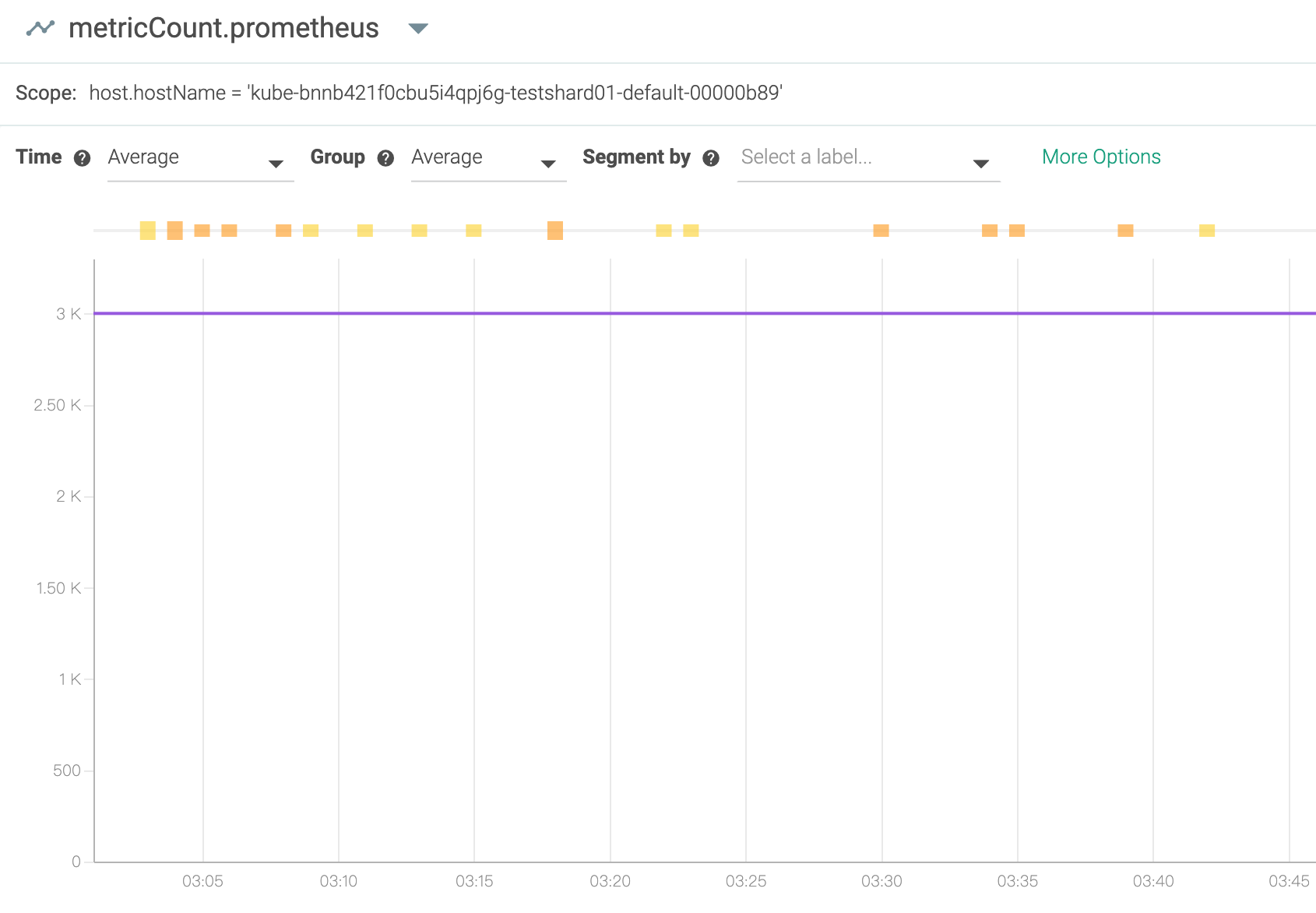
Steps to Reproduce the Problem
- Enable the tekton pipeline metrics
- Continue creating some taskrun
- see the metrics from local or sysdig console
- Tekton Pipeline version:
v0.11.3
So I am wondering, do we really need so fine-grained metric for each taskrun?
Can we select which metric we want to use?
If we have more and more taskruns be created, more and more metrics will be generated, the monitoring system will be full or slow or crash. I think in the end, on one would like to use this metric, because it is so fine-grained and so much info for a cluster or tekton admin and make other metrics don't work.
I suggest, it is better that each metric is just for some high level data, for example, the duration seconds for all taskruns, not record for each one.
Thanks!
 zhangtbj
All 19 comments
I'm seeing severe cluster performance degradations on my dev cluster if I have sysdig running unthrottled, so this might explain that.
 holly-cummins
on 22 Jun 2020
holly-cummins
on 22 Jun 2020
yes, me too.... :(
And we even cannot see other component metrics well because Tekton pipeline will take over 3000 metrics very soon if we have some stress on my cluster.
zhangtbj
on 23 Jun 2020
Hi all,
Our colleague already fixed the same problem in Knative/pkg, and I heard the Tekton also uses the same knati/pkg for metrics.
Can you please help check if it is helpful after update the knative/pkg in Tekton?
https://github.com/knative/pkg/pull/1494
Thanks!
zhangtbj
on 17 Jul 2020
Rotten issues close after 30d of inactivity.
Reopen the issue with /reopen.
Mark the issue as fresh with /remove-lifecycle rotten.
/close
Send feedback to tektoncd/plumbing.
 tekton-robot
on 16 Aug 2020
tekton-robot
on 16 Aug 2020
Stale issues rot after 30d of inactivity.
Mark the issue as fresh with /remove-lifecycle rotten.
Rotten issues close after an additional 30d of inactivity.
If this issue is safe to close now please do so with /close.
/lifecycle rotten
Send feedback to tektoncd/plumbing.
tekton-robot
on 16 Aug 2020
@tekton-robot: Closing this issue.
In response to this:
Rotten issues close after 30d of inactivity.
Reopen the issue with/reopen.
Mark the issue as fresh with/remove-lifecycle rotten./close
Send feedback to tektoncd/plumbing.
Instructions for interacting with me using PR comments are available here. If you have questions or suggestions related to my behavior, please file an issue against the kubernetes/test-infra repository.
tekton-robot
on 16 Aug 2020
/remove-lifecycle rotten
/remove-lifecycle stale
/reopen
 vdemeester
on 17 Aug 2020
vdemeester
on 17 Aug 2020
@vdemeester: Reopened this issue.
In response to this:
/remove-lifecycle rotten
/remove-lifecycle stale
/reopen
Instructions for interacting with me using PR comments are available here. If you have questions or suggestions related to my behavior, please file an issue against the kubernetes/test-infra repository.
tekton-robot
on 17 Aug 2020
For this PR: knative/pkg#1494, I think it only can reduce knative metrics counts. It removed knative service name key. For example:
Before modification, the metrics are:
controller_reconcile_latency_bucket{key="default/hello1-app-1-aaaa-1",reconciler="knative.dev-serving-pkg-reconciler-revision.Reconciler",success="true",le="10"} 1
controller_reconcile_latency_bucket{key="default/hello2-app-2-bbbb-1",reconciler="knative.dev-serving-pkg-reconciler-revision.Reconciler",success="true",le="10"} 1
After modification, above two metrics will be merged into one:
controller_reconcile_latency_bucket{reconciler="knative.dev-serving-pkg-reconciler-revision.Reconciler",success="true",le="10"} 2
However, for tekton side, the metrics counts also don't be reduced. By observing, I find the most metrics is tekton_taskrun_duration_seconds_, it's like below:
tekton_taskrun_duration_seconds_bucket{namespace="2213a7c1-a282",status="success",task="anonymous",taskrun="perf-br-test-10-fwmbg",le="10"} 0
tekton_taskrun_duration_seconds_bucket{namespace="2213a7c1-a282",status="success",task="anonymous",taskrun="perf-br-test-10-fwmbg",le="30"} 0
tekton_taskrun_duration_seconds_bucket{namespace="2213a7c1-a282",status="success",task="anonymous",taskrun="perf-br-test-10-fwmbg",le="60"} 0
tekton_taskrun_duration_seconds_bucket{namespace="2213a7c1-a282",status="success",task="anonymous",taskrun="perf-br-test-10-fwmbg",le="300"} 1
tekton_taskrun_duration_seconds_bucket{namespace="2213a7c1-a282",status="success",task="anonymous",taskrun="perf-br-test-10-fwmbg",le="900"} 1
tekton_taskrun_duration_seconds_bucket{namespace="2213a7c1-a282",status="success",task="anonymous",taskrun="perf-br-test-10-fwmbg",le="1800"} 1
tekton_taskrun_duration_seconds_bucket{namespace="2213a7c1-a282",status="success",task="anonymous",taskrun="perf-br-test-10-fwmbg",le="3600"} 1
tekton_taskrun_duration_seconds_bucket{namespace="2213a7c1-a282",status="success",task="anonymous",taskrun="perf-br-test-10-fwmbg",le="5400"} 1
tekton_taskrun_duration_seconds_bucket{namespace="2213a7c1-a282",status="success",task="anonymous",taskrun="perf-br-test-10-fwmbg",le="10800"} 1
tekton_taskrun_duration_seconds_bucket{namespace="2213a7c1-a282",status="success",task="anonymous",taskrun="perf-br-test-10-fwmbg",le="21600"} 1
tekton_taskrun_duration_seconds_bucket{namespace="2213a7c1-a282",status="success",task="anonymous",taskrun="perf-br-test-10-fwmbg",le="43200"} 1
tekton_taskrun_duration_seconds_bucket{namespace="2213a7c1-a282",status="success",task="anonymous",taskrun="perf-br-test-10-fwmbg",le="86400"} 1
tekton_taskrun_duration_seconds_bucket{namespace="2213a7c1-a282",status="success",task="anonymous",taskrun="perf-br-test-10-fwmbg",le="+Inf"} 1
tekton_taskrun_duration_seconds_sum{namespace="2213a7c1-a282",status="success",task="anonymous",taskrun="perf-br-test-10-fwmbg"} 75
tekton_taskrun_duration_seconds_count{namespace="2213a7c1-a282",status="success",task="anonymous",taskrun="perf-br-test-10-fwmbg"} 1
tekton_taskrun_duration_seconds_bucket{namespace="2213a7c1-a282",status="success",task="anonymous",taskrun="perf-br-k-1-tw4d4",le="10"} 0
tekton_taskrun_duration_seconds_bucket{namespace="2213a7c1-a282",status="success",task="anonymous",taskrun="perf-br-k-1-tw4d4",le="30"} 0
tekton_taskrun_duration_seconds_bucket{namespace="2213a7c1-a282",status="success",task="anonymous",taskrun="perf-br-k-1-tw4d4",le="60"} 0
tekton_taskrun_duration_seconds_bucket{namespace="2213a7c1-a282",status="success",task="anonymous",taskrun="perf-br-k-1-tw4d4",le="300"} 1
tekton_taskrun_duration_seconds_bucket{namespace="2213a7c1-a282",status="success",task="anonymous",taskrun="perf-br-k-1-tw4d4",le="900"} 1
tekton_taskrun_duration_seconds_bucket{namespace="2213a7c1-a282",status="success",task="anonymous",taskrun="perf-br-k-1-tw4d4",le="1800"} 1
tekton_taskrun_duration_seconds_bucket{namespace="2213a7c1-a282",status="success",task="anonymous",taskrun="perf-br-k-1-tw4d4",le="3600"} 1
tekton_taskrun_duration_seconds_bucket{namespace="2213a7c1-a282",status="success",task="anonymous",taskrun="perf-br-k-1-tw4d4",le="5400"} 1
tekton_taskrun_duration_seconds_bucket{namespace="2213a7c1-a282",status="success",task="anonymous",taskrun="perf-br-k-1-tw4d4",le="10800"} 1
tekton_taskrun_duration_seconds_bucket{namespace="2213a7c1-a282",status="success",task="anonymous",taskrun="perf-br-k-1-tw4d4",le="21600"} 1
tekton_taskrun_duration_seconds_bucket{namespace="2213a7c1-a282",status="success",task="anonymous",taskrun="perf-br-k-1-tw4d4",le="43200"} 1
tekton_taskrun_duration_seconds_bucket{namespace="2213a7c1-a282",status="success",task="anonymous",taskrun="perf-br-k-1-tw4d4",le="86400"} 1
tekton_taskrun_duration_seconds_bucket{namespace="2213a7c1-a282",status="success",task="anonymous",taskrun="perf-br-k-1-tw4d4",le="+Inf"} 1
tekton_taskrun_duration_seconds_sum{namespace="2213a7c1-a282",status="success",task="anonymous",taskrun="perf-br-k-1-tw4d4"} 96
tekton_taskrun_duration_seconds_count{namespace="2213a7c1-a282",status="success",task="anonymous",taskrun="perf-br-k-1-tw4d4"} 1
But to be honest, I think the metrics at namespace level is enough. That means if we can merge below two metrics into one:
tekton_taskrun_duration_seconds_bucket{namespace="2213a7c1-a282",status="success",task="anonymous",taskrun="perf-br-test-10-fwmbg",le="10"} 0
tekton_taskrun_duration_seconds_bucket{namespace="2213a7c1-a282",status="success",task="anonymous",taskrun="perf-br-k-1-tw4d4",le="10"} 0
For le=30, 60, 300, 900 etc, it's same. So we only need to remove the key of task and taskRun. That means if I'm running 100 taskRuns under a namespace, the number of metrics will be reduced from 100*15 to 100. If there has failed taskRuns, the metrics count will not be larger than 100*2.
Remove the key of task and taskRun is one proposal. Another method is we can keep current metrics, but if we can make metrics can be configurable or not. For example, we can provide a variable (such as onlyNamepaceLevel) in configmap to choose we want to record metrics at namespace level or taskRun level. Like below:
         var trView *view.View
    var onlyNamepaceLevel bool
    var configMap *corev1.ConfigMap
    if err := cm.Parse(configMap.Data,
        cm.AsBool("onlyNamepaceLevel.enable", &oc.onlyNamepaceLevel)); err != nil {
        return nil, err
    }
    if onlyNamepaceLevel == true {
        trView = &view.View {
            Description: trDuration.Description(),
            Measure:     trDuration,
            Aggregation: trDistribution,
            TagKeys:     []tag.Key{r.namespace, r.status},
        }
    } else {
        trView = &view.View{
            Description: trDuration.Description(),
            Measure:     trDuration,
            Aggregation: trDistribution,
            TagKeys:     []tag.Key{r.task, r.taskRun, r.namespace, r.status},
        }
    }
Any thoughts? Thanks in advance!
 xiujuan95
on 15 Sep 2020
xiujuan95
on 15 Sep 2020
Any ideas about this issue?
xiujuan95
on 3 Nov 2020
There are two ways to see this as problem,
1) Yes metrics volume is perhaps quite large and need re-thought if users/community is experiencing it. As suggested by @xiujuan95 and other folks, we can provide certain option configuration option to corse grain the metrics.
2) There could be problem with metrics aggregators or collectors, which could be solved at metrics collector level to handle such volume.
Progressive step could be to provide optional configuration to emit low number of metrics.
cc: @vdemeester @ImJasonH
 hrishin
on 17 Nov 2020
hrishin
on 17 Nov 2020
+1 to a ConfigMap option to only report namespace-level metrics.
I'd love to get more data about how users are using these metrics, since I suspect based on the relative lack of urgency on this issue that people don't actually depend on the task and taskRun keys, and we can just remove them via feature flag or config-observability option. I'd prefer not to plan to have the option exist indefinitely, and instead use it to phase out support for fine-grained metrics.
In general I think metrics are most useful as a high-level view, and shouldn't include information about the specific workflow (pipeline name, task name, etc.) -- if you want to track the latency of a pipeline execution over time, you can do that by scraping kubectl get pipelinerun and eventually by querying Tekton Results -- and maybe emitting your own metrics based on that aggregation, that's up to you.
So I think my proposal would be to add a feature flag to only report at the namespace level, default it to false for 1+ release, mention this in release notes, and if there's no significant user pushback default it to true for 1+ release, then remove it entirely. If there _is_ user pushback, we can use their input to guide future decisions, but my belief is that nobody depends on this today.
wdyt?
 ImJasonH
on 17 Nov 2020
ImJasonH
on 17 Nov 2020
Hello all,
I am not sure if we can allow the Tekton user to customize the label by themselves?
Like what we did in our project: https://github.com/shipwright-io/build/blob/master/docs/metrics.md#configuration-of-histogram-labels
Some of the end users like admin, may just care about the statistics to see the overall status to make sure Tekton works fine, but some of the end users maybe a single user, who may care about each of the tekton taskrun, the execution time, how many failures, etc...
For example about this metric: tekton_taskruns_pod_latency, its labels are:
namespace=<taskruns-namespace>pod= < taskrun_pod_name>task=<task_name>taskrun=<taskrun_name>
How about we add a capability to config the label which end user want to use in his deployment.yaml easily, like:
[...]
  env:
  - name: PROMETHEUS_HISTOGRAM_ENABLED_LABELS
    value: namespace,task
[...]
If it is an acceptable solution, we can plan and provide a PR for it.
zhangtbj
on 18 Nov 2020
That seems doable, but I'd prefer to make that available with some signal from a user that they'd want it, and how best to express it. We got into this situation in the first place because we assumed users would want all these labels and that supporting them would be relatively cheap, and that turned out to be false (at least the last part, maybe the first part too).
I do like the idea of operators being able to customize the metrics, I wonder if there's some way to configure that in whatever metrics injestor they're using (i.e, tell Prometheus to just drop the task run name key that Tekton emits). I don't know enough about K8s monitoring solutions to be able to know whether that's possible.
ImJasonH
on 18 Nov 2020
I wonder if there's some way to configure that in whatever metrics injestor they're using (i.e, tell Prometheus to just drop the task run name key that Tekton emits). I don't know enough about K8s monitoring solutions to be able to know whether that's possible.
@ImJasonH As far as I know,
Prometheuscan be configurable to filter metrics, there has an example, the prerequisite is we need to enableuse_promscrapefirst.
xiujuan95
on 19 Nov 2020
Yes, We tried the Prometheus and Sysdig monitoring systems before, yes we can filter the metrics by using some condition configuration like above ^^. So I think when end user uses the metrics in one of monitoring systems, they can customize the metrics to choose which they need by filter.
But for each metric, right now, Tekton doesn't provide a chance to customize it (About the label)
zhangtbj
on 19 Nov 2020
Following are possible optimisations we could think as well?
1) Coarse grained metric
Instead of detailed metrics we could allow the coarse grained metrics such as counts mostly. Provide configuration switch for coarse grained vs detailed metrics. Which in-turn can reduce number of metrics and corresponding labels too which leads less burden on metrics ingester.
2) Dynamic labels
Its better to have consistent metrics labels set on producer side if metrics provider(Prometheus, Stackdriver etc) don't support label filtering.
However, on the every unique value of the label name would increase the metrics volume. Let's add as this as a part of documentation.
3) Propose changes in metrics types:(not in the favour but we can think)
Initial idea was to provide durations kind as histogram, thus user can observe the pipeline performance and determine x percentile for task_run_durations and pipeline_run_durations to optimise the pipeline tasks/establish the SLA/SLO. However if at all we require the duration dimension we can switch the ~ count or gauge in prometheus terms. Wonders if we need to rethink the type of duration metrics.
Hence it could reduce the volume of metrics in the first place by *12 while trading it purpose.
4) Drop some metric(s):
We can drop the tekton_pipelinerun_taskrun_duration_seconds as tekton_taskrun_duration_seconds has those metrics.
On the implantation notes for providing the metrics configuration, it would be nice to use the observability configuration. Support it from the operator to community helm charts.
Last but the least, I definitely agree on not including the label which value could be unique across task and pipeline execution. 🙇
hrishin
on 19 Nov 2020
Hi all that might be interested in, I wrote a TEP https://github.com/tektoncd/community/pull/286 on this issue. It has integrated some thoughts from your comments. Love to hear your feedback!
 yaoxiaoqi
on 7 Dec 2020
yaoxiaoqi
on 7 Dec 2020
Thanks for the quick action @yaoxiaoqi !
We will also review that TEP later soon.
Thanks!
zhangtbj
on 8 Dec 2020
Related issues
 sujithjoseph
·
3Comments
sujithjoseph
·
3Comments
 bobcatfish
·
4Comments
bobcatfish
·
4Comments
 JCzz
·
3Comments
JCzz
·
3Comments
 csantanapr
·
3Comments
bobcatfish
·
4Comments
csantanapr
·
3Comments
bobcatfish
·
4Comments
Most helpful comment
Hi all that might be interested in, I wrote a TEP https://github.com/tektoncd/community/pull/286 on this issue. It has integrated some thoughts from your comments. Love to hear your feedback!