Pinpoint: Response time in filter wizard is not set appropriately
When I try to filter requests by response time it doesn't make query that I want.
For example if I want to filter requests which have response time between 10 seconds to 20 seconds as shown below:

Generated url will be like this:
http://localhost:8079/filteredMap/myapp@SPRING_BOOT/5m/2020-05-15-15-56-47?filter=%5B%7B%22fa%22:%22myapp_SPRING_BOOT%22,%22fst%22:%22USER%22,%22ta%22:%22myapp%22,%22tst%22:%22SPRING_BOOT%22,%22ie%22:null,%22rf%22:10,%22rt%22:20%7D%5D&hint=%7B%7D
decoded version of the same url:
http://localhost:8079/filteredMap/myapp@SPRING_BOOT/5m/2020-05-15-15-56-47?filter=[{"fa":"myapp_SPRING_BOOT","fst":"USER","ta":"myapp","tst":"SPRING_BOOT","ie":null,"rf":10,"rt":20}]&hint={}
As a result it return requests which have response time between 10ms to 20 ms. (It should be 10000ms to 20000ms)
 cagri387
All 9 comments
@cagri387 Hi, I've tried reproducing this case in a couple of conditions but I didn't get to see this case occur. How often do you see this issue? And what version of pinpoint are you using?
 binDongKim
on 18 May 2020
binDongKim
on 18 May 2020
Hi @binDongKim my pinpoint version is 2.0.2 and I experience this situation all the time I want to use response time filter in filter wizard. I also reproduced this situation in pinpoint demo too. (link: http://125.209.240.10:10123/main/ApiGateway@SPRING_BOOT/5m?inbound=1&outbound=4&wasOnly=false&bidirectional=false)
This ss is from pinpoint demo:
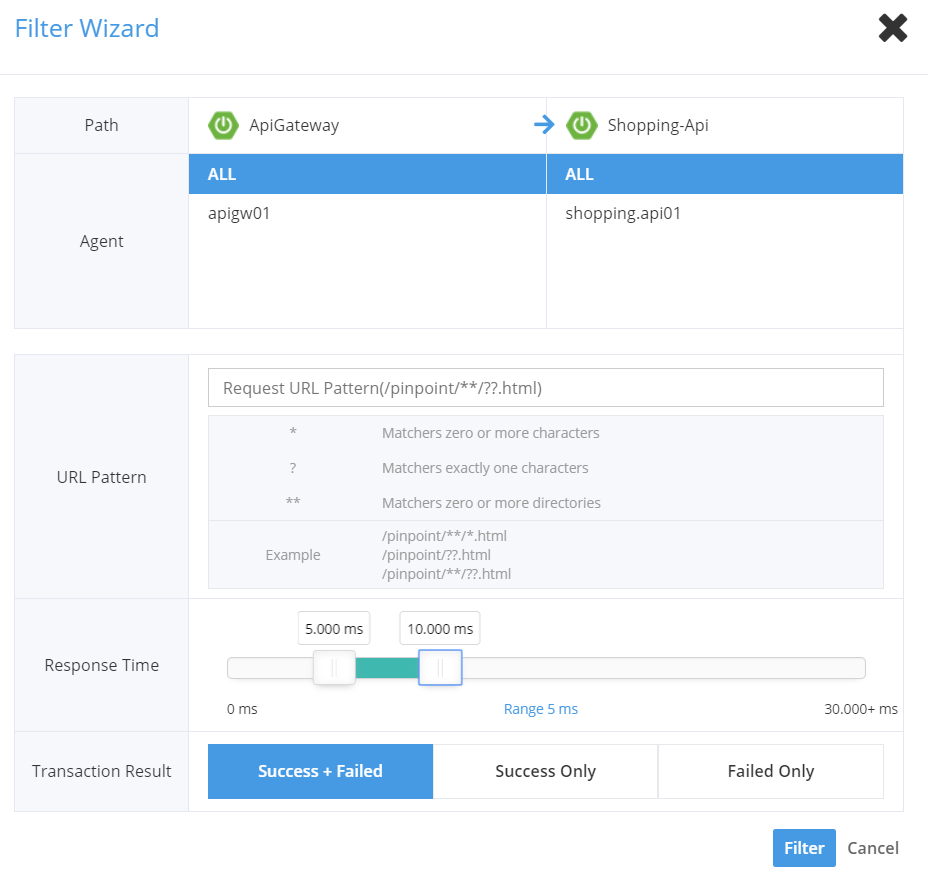
And the generated url after using this filter:
http://125.209.240.10:10123/filteredMap/ApiGateway@SPRING_BOOT/5m/2020-05-18-12-12-56?filter=[{"fa":"ApiGateway","fst":"SPRING_BOOT","ta":"Shopping-Api","tst":"SPRING_BOOT","ie":null,"rf":5,"rt":10}]&hint={"Shopping-Api":[]}
cagri387
on 18 May 2020
@binDongKim I just realized that this situation doesn't happen in Firefox but in Chrome. But I think there is still a problem even in Firefox. For example if I want to get requests that have response time greater than 10 sec. Then I set lower bound as 10000 and leave upper bound as 30.000+ ms. But generated url will be like this:
http://localhost:8079/filteredMap/mayapp@SPRING_BOOT/20m/2020-05-18-12-47-55?filter=[{"fa":"myapp_SPRING_BOOT","fst":"USER","ta":"myapp","tst":"SPRING_BOOT","ie":null,"rf":10000,"rt":30000}]&hint={}
Or even I don't set any upper or lower bounds and just click filter button in fiter wizard, generated url will be like this:
http://localhost:8079/filteredMap/mayapp@SPRING_BOOT/20m/2020-05-18-12-47-55?filter=[{"fa":"myapp_SPRING_BOOT","fst":"USER","ta":"myapp","tst":"SPRING_BOOT","ie":null,"rf":0,"rt":30000}]&hint={}
So it seems it is impossible to get requests that have response time greater than 30 seconds. Because upper bound is set to 30000 ms.
cagri387
on 18 May 2020
@cagri387 This is weird because I don't see any of this in my local. Would you tell me your environment such as os and Chrome version? And please check if there's any error in browser console.
binDongKim
on 19 May 2020
@binDongKim
OS: Windows 10 Enterprise 64-bit (10.0, Build 16299)
Chrome: 81.0.4044.138 (64 bit)
Firefox: 76.0.1 (64-bit)
There is no error in console.
cagri387
on 19 May 2020
@cagri387
Sorry I've tested it out in a various of conditions such as os or browsers but I didn't get to reproduce the issue. Really wonder what really causes the issue :(
Plus, according to your explanation, it does seem to work fine in Firefox:
For example if I want to get requests that have response time greater than 10 sec. Then I set lower bound as 10000 and leave upper bound as 30.000+ ms. But generated url will be like this:
http://localhost:8079/filteredMap/mayapp@SPRING_BOOT/20m/2020-05-18-12-47-55?filter=[{"fa":"myapp_SPRING_BOOT","fst":"USER","ta":"myapp","tst":"SPRING_BOOT","ie":null,"rf":10000,"rt":30000}]&hint={}
=> rf and rt have set correctly as you requested.
even I don't set any upper or lower bounds and just click filter button in fiter wizard, generated url will be like this:
http://localhost:8079/filteredMap/mayapp@SPRING_BOOT/20m/2020-05-18-12-47-55?filter=[{"fa":"myapp_SPRING_BOOT","fst":"USER","ta":"myapp","tst":"SPRING_BOOT","ie":null,"rf":0,"rt":30000}]&hint={}
So it seems it is impossible to get requests that have response time greater than 30 seconds. Because upper bound is set to 30000 ms.
=> As you can see from the view, the max response time range is 30,000+, not 30,000 so it's possible to get requests that have response time greater than 30 seconds.
binDongKim
on 21 May 2020
@binDongKim
First of all thanks for your interest. But I want to make it clear the situation in Firefox to avoid misunderstanding.
it does seem to work fine in Firefox
-No. It doesn't unfortunately.
Let me explain it in detail:
These are some requests in my system:

And I want to filter requests has URL ending with "ExcelRaporu" by using filter wizard as shown below. (I didn't change reponse time, I just entered exact URL and click filter button):
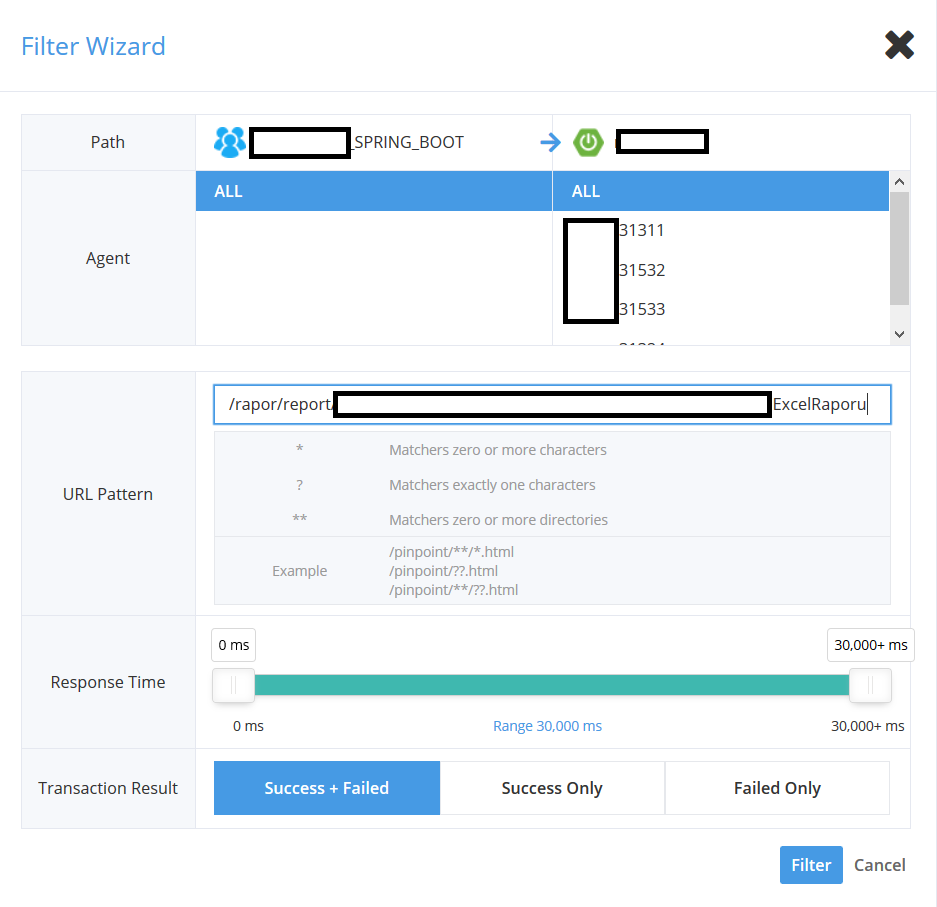
Result is like this. (There is only one request returned from filter):
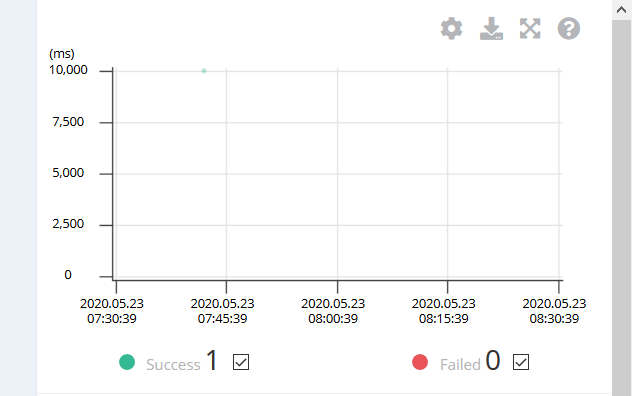
When I open this request by selecting the dot. I see that request that has response time greater than 30 seconds is missing.

URL for this filter is:
http://localhost:8079/filteredMap/myapp@SPRING_BOOT/1h/2020-05-23-08-30-39?filter=[{"fa":"myapp_SPRING_BOOT","fst":"USER","ta":"myapp","tst":"SPRING_BOOT","ie":null,"rf":0,"rt":30000,"url":"L3JhcG9yL3JlcG9ydC9tdWhhc2ViZXJhcG9ybGFyaS91cmV0SGFyY2FtYUJpcmltaUJhemxpSGVzYXBLb250cm9sRXhjZWxSYXBvcnU="}]&hint={}
In my opinion, the reason of that is, rt is set exactly to 30000. (I see that in the view upper bound is shown as 30000+ but in the url generated rt is set to 30000) So request that has response time greater than 30 seconds cannot be retrieved from filter in my situation.
I understand that it seems not reproducable by your side, but me and my colleagues facing this issue and it really affect us. (we are mainly using pinpoint to detect requests which have slow reponse, however because response time greater than 30 seconds is ignored we cannot take advantage of filter wizard for this use case)
I understand it is really hard to find a solution without reproducing the issue but if you suggest a workaround solution (like use this browser version etc.) for the issue we faced, I will be grateful.
Note:
We are using Pinpoint Docker version 2.0.2 and Pinpoint agent version 2.0.1
Firefox version that I experienced the issue above: 76.0.1 (64-bit)
OS: Windows 10 Enterprise 64-bit (10.0, Build 16299)
Thanks again.
Regards.
cagri387
on 23 May 2020
@cagri387
Turns out there's a hole in setting the max bound of the response time. I was supposed to transfer max indicator instead of 30,000 when user sets the max bound as you did but it's not implemented like that at the moment. I'll be working on it. Sorry for your inconvenience in the meantime.
binDongKim
on 25 May 2020
@cagri387 The issue about setting the max range has been fixed by #6835. I'll remain this issue open till the weird range numbering issue is fixed. Thanks.
binDongKim
on 29 May 2020
Related issues
 wodedaidaibaobei
·
5Comments
wodedaidaibaobei
·
5Comments
 ing-arriola
·
3Comments
ing-arriola
·
4Comments
ing-arriola
·
3Comments
ing-arriola
·
4Comments
 vedantgoenka
·
6Comments
vedantgoenka
·
6Comments
 yanpeng-ali
·
3Comments
yanpeng-ali
·
3Comments
Most helpful comment
@cagri387
Turns out there's a hole in setting the max bound of the response time. I was supposed to transfer
maxindicator instead of30,000when user sets the max bound as you did but it's not implemented like that at the moment. I'll be working on it. Sorry for your inconvenience in the meantime.