Pinpoint: Some questions about the UI
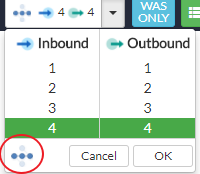
What does the "WAS only" mean?
Why the "Inbound" and "Outbound" are limited smaller than 4?
And what does ths points mean in the red circle of the following picture?
 JackeyLee007
All 2 comments
Hi @JackeyLee007
Selecting WAS only removes terminal nodes such as database, cache or unknown rpc nodes from the server map. It might be helpful to select when you have too many such nodes cluttering up the server map.
Inbound and outbound are limited to 4 currently because of complex server maps may be too large with 4 depth. However, this might change in the future with more optimization.
The red circle's description is under the help menu on the top right corner of the screen.
Renders inbound/outbound nodes for each and every node (within limit) even if they are not directly related to the selected node.
Note that checking this option may lead to overly complex server maps.
 Xylus
on 16 Apr 2018
Xylus
on 16 Apr 2018
Hi @Xylus,
That's clear! Thanks for your answer.
Regards
JackeyLee007
on 23 Apr 2018
Related issues
 ing-arriola
·
3Comments
ing-arriola
·
3Comments
 igo3r
·
3Comments
igo3r
·
3Comments
 Allive1
·
5Comments
Allive1
·
5Comments
 08s011003
·
3Comments
08s011003
·
3Comments
 geniuszhe
·
3Comments
geniuszhe
·
3Comments
Most helpful comment
Hi @JackeyLee007
Selecting WAS only removes terminal nodes such as database, cache or unknown rpc nodes from the server map. It might be helpful to select when you have too many such nodes cluttering up the server map.
Inbound and outbound are limited to 4 currently because of complex server maps may be too large with 4 depth. However, this might change in the future with more optimization.
The red circle's description is under the help menu on the top right corner of the screen.