Pinocchio: Usage about gepetto-gui?
Hi, @jcarpent
Sorry to bother you again, but I can't make through the visualization. I have two questions here.
- I install _gepetto-viewer_ v4.3.0 through
sudo apt install robotpkg-gepetto-viewer, and
_gepetto-viewer-corba_ throughsudo apt install robotpkg-qt4-gepetto-viewer-corba.
After I runpython load-urdf.pyon one terminal (I toggle DISPLAY=True here), the output ofgepetto-guishows:
gepetto_run_debug.txt
Seems lack of some pkg? - Could gepetto-gui be called (plugin?) by c++? Current usage is by python.
 littleggghost
All 16 comments
You need to install the osg plugin for DAE.
You can proceed as follows:
sudo apt-get install robotpkg-osg-dae
 jcarpent
on 27 Feb 2019
jcarpent
on 27 Feb 2019
Concerning your second remark, current use of gepetto-gui is in Python with Pinocchio for easy prototyping. I would advise you to do all the developments you have to perform in Python by using bindings of critical code written in C++.
jcarpent
on 27 Feb 2019
The osg plugin has been installed robotpkg-osg-dae is already the newest version (3.2.1r1) . But it stills the same.
littleggghost
on 27 Feb 2019
It looks like this package should be on 3.2.1r2: http://robotpkg.openrobots.org/rbulk/robotpkg-wip/wip/osg-dae
Can you check that you have the lines
deb [arch=amd64] http://robotpkg.openrobots.org/wip/packages/debian/pub xenial robotpkg
deb [arch=amd64] http://robotpkg.openrobots.org/packages/debian/pub xenial robotpkg
Where the xenial part should correspond to the output of the command lsb_release -cs, somewhere in your /etc/apt/sources.list or in a .list file in /etc/apt/sources.list.d, and then run apt update, to check that you have the right version of the repository ?
 nim65s
on 27 Feb 2019
nim65s
on 27 Feb 2019
Check that /opt/openrobots/lib64 is in your LD_LIBRARY_PATH.
 jmirabel
on 27 Feb 2019
jmirabel
on 27 Feb 2019
@jmirabel : the r2 remove the need for lib64, as this this the convention in robotpkg, so I think @littleggghost should better get this r2.
nim65s
on 27 Feb 2019
Yes, you are right. It's OK now.
littleggghost
on 27 Feb 2019
For the second question, I wonder if there has a direct way to perform robot from c++ to gepetto through C++ plugins.
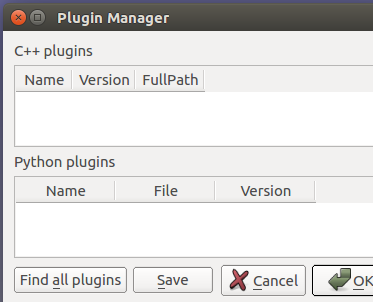
I will develop my own core algorithms using c++. If I have to rewrite many codes just for visualization using python bindings, then it really inconvenient. Or in other words, if can't do visual test in c++, what c++ API is mainly using for?
What's your opinion about this?
My regards!
littleggghost
on 27 Feb 2019
The C++ API is made for implementing critical codes. It is then easier to deploy scripts using Python, also for the visualization part.
If you plan to use Plugins, please see with @jmirabel who is the master of these.
jcarpent
on 27 Feb 2019
This question becomes out of scope of Pinocchio, except if Pinocchio is interested in a GUI for class Model.
It depends on what you want but, in both cases, you will have to work a bit. Likely, you should have a look at the usage of class gepetto.corbaserver.Client in robot_wrapper and mimic it in C++ (for the viewer side).
There are two ways:
- through CORBA: use the C++ class
Clientprovided in gepetto-viewer-corba. It has exactly the same API as the Client in Python. To instantiate it:
graphics::corbaServer::Client client (argc, argv); // (0, NULL) if you don't know what to give.
client.connect ();
// Then use client as the Python class gepetto.corbaserver.Client.
client.gui(). ...
- using C++ within the GUI (no CORBA needed). Have a look at
gepetto-viewer-corba/plugins/pyqgvfor an example. Once you are able to create and load a plugin, you can play with the interface. The entry point for you will be:
using namespace gepetto::gui;
MainWindow* main = MainWindow::instance ();
WindowsManagerPtr_t wsm = main->osg();
// Object wsm has (more or less) the same API as the Python attribute gui of class Client.
You may consider continue the discussion here:
https://github.com/Gepetto/gepetto-viewer
IMHO a lot of people are using rviz or rqt_gui to make C++ display of their algorithms.
The main reason behind gepetto-viewer is to avoid relying on ROS.
 olivier-stasse
on 27 Feb 2019
olivier-stasse
on 27 Feb 2019
Hi, @olivier-stasse
Could pinocchio use rviz to achieve visualization?
I want to use pinocchio with c++, and the visualization is confusing me. Gepetto viewer seems not friendly to c++ right now, there is still lots of works to achieving this.
littleggghost
on 28 Feb 2019
@littleggghost Do you think we can close this issue?
jcarpent
on 5 Mar 2019
Sure.
littleggghost
on 6 Mar 2019
@littleggghost Yes sure, we tend to separate core libraries like pinocchio from their use inside a control structure (such as the SoT). For rviz, in our structure we simply create a topic which is giving the state of the robot (or the state of the robot after applying the control). You can then use a robot_state_publisher node to compute the pose of each bodies in the tf frame and then use rviz to display the pose of the bodies. Hope it helps.
olivier-stasse
on 6 Mar 2019
libpng warning: iCCP: known incorrect sRGB profile
libpng warning: iCCP: known incorrect sRGB profile
libpng warning: iCCP: known incorrect sRGB profile
List of GroupNodes :
gepetto-gui
hpp-gui
python-pinocchio
BOX does not exist.: iostream error
BOX does not exist.: iostream error
BOX does not exist.: iostream error
BOX does not exist.: iostream error
Node "world/pinocchio/collisions/ee_link_0" does not exist.
Node "world/pinocchio/collisions/tool0_0" does not exist.
Node "world/pinocchio/collisions/tool0_1" does not exist.
Node "world/pinocchio/collisions/tool0_2" does not exist.
You must initialize a Geode on world/pinocchio/visuals/base_link_0 to use Alpha
You must initialize a Geode on world/pinocchio/visuals/shoulder_link_0 to use Alpha
You must initialize a Geode on world/pinocchio/visuals/upper_arm_link_0 to use Alpha
You must initialize a Geode on world/pinocchio/visuals/forearm_link_0 to use Alpha
You must initialize a Geode on world/pinocchio/visuals/wrist_1_link_0 to use Alpha
You must initialize a Geode on world/pinocchio/visuals/wrist_2_link_0 to use Alpha
You must initialize a Geode on world/pinocchio/visuals/wrist_3_link_0 to use Alpha
BOX does not exist.: iostream error
BOX does not exist.: iostream error
When I try to visualize robot ur5.urdf in gepetto-gui, I get this message and only one segment is showed in the visualization screen. Can somebody explain what is happening and how I can fix this?
Thank you in advance.
 perak96
on 13 Feb 2020
perak96
on 13 Feb 2020
Related issues
 markusgft
·
12Comments
markusgft
·
12Comments
 gsutanto
·
6Comments
gsutanto
·
6Comments
 GiulioRomualdi
·
10Comments
GiulioRomualdi
·
10Comments
 alejandroastudillo
·
10Comments
jcarpent
·
8Comments
alejandroastudillo
·
10Comments
jcarpent
·
8Comments