Pinocchio: [documentation] Tutorials not working
Hi all,
I tried to install and experience Pinocchio as a simple user and I can report on some difficulties I met during the process.
In the beginning, I was on the tutorial of the home page of the project http://projects.laas.fr/gepetto/doc/stack-of-tasks/pinocchio/master/index.html which does generally not work by following the displayed steps (I can provide details if needed) then @jcarpent sent me to this more recent tutorial http://projects.laas.fr/gepetto/index.php/Teach/Supaero2018 which maybe could replace the official one.
I'm on Ubuntu 16.04 and here are my remarks
-the installation procedure misses the essential package robotpkg-py27-pinocchio (and hence its dependency robotpkg-py27-eigenpy)
-If we try to install the UR5 gripper description through robotpkg-ur5-description, the URDF is installed by default in /opt/openrobots/share/ur5_description, and the model cannot be loaded unless one renames the directory into ur_description instead. However, the zip provided in the tutorial works well.
-Loading the urdf model from the zip file went well, but the display was buggy. Here is a screen capture.
https://drive.google.com/open?id=0B5Qp1o1Z6OarOHlDTmJrZ1Q2M2lsTjRteHJWREVOWVZpWXh3
-I stopped there. All these steps were performed on a raw virtual machine that you can download and load in VirtualBox from here
https://drive.google.com/file/d/1gRseDTwK5Nvhydla20Yq6yXLX6z7HAF4/view?usp=sharing
the user password is carpentier
For my personal use I do _not_ need the display, and I am actually using it successfully for some tests in C++. So there is no emergency for me, but I wanted to know if I did anything wrong.
 mehdi-benallegue
All 17 comments
Hi! As for the loading, it is not a bug. initDisplay just loads the meshes and puts them in the gui, but does not place them. If after initDisplay you do robot.display(<whathever>), it should be correct. Maybe it can be a good idea to have this first call done automatically so to show a correct robot
 gabrielebndn
on 29 Nov 2018
gabrielebndn
on 29 Nov 2018
Why do you say the installation procedure misses robotpkg-py27-pinocchio ?
It seems to be correctly indicated in https://stack-of-tasks.github.io/pinocchio/download.html. The installation line is provided as
sudo apt install robotpkg-py27-pinocchio
Ok, you were referring to the tutorial at http://projects.laas.fr/gepetto/index.php/Teach/Supaero2018. Yes, it misses robotpkg-py27-pinocchio, thanks for reporting it.
gabrielebndn
on 29 Nov 2018
OK for the display, it means that the error messages on the gepetto-gui terminal must be ignored. I should have gone further. I am actually having other troubles with another robot (Sawyer), but this is not relevant to this issue.
With regard to the official tutorial:
-The installation procedure here http://projects.laas.fr/gepetto/doc/stack-of-tasks/pinocchio/master/md_doc_d-labs_1-directgeom.html is not enough since it misses the environment variables update.
-There is a typo in the line 5 of http://projects.laas.fr/gepetto/doc/stack-of-tasks/pinocchio/master/md_doc_c-tutorials_direct-geometry.html
-And I still think the "supaero" lessons' tutorial should be the default instead.
Thank you for your replies.
mehdi-benallegue
on 29 Nov 2018
We are in the process of re-making the whole documentation.
You can find more up-to-date tutorials in the topic/doc-v2 branch, which has just been updated to Pinocchio 2.0
gabrielebndn
on 29 Nov 2018
Yes, gepetto-gui produces a lot of noisy warnings which can usually be ignored, but that's a matter with gepetto-gui.
gabrielebndn
on 29 Nov 2018
As for the URDF, I do not understand why you changed the name of the ur5 directory, instead of simply changing, in the tutorial
urdf = pkg + '/ur_description/urdf/ur5_gripper.urdf'
to
urdf = pkg + '/ur5_description/urdf/ur5_gripper.urdf'
I think the robotpkg naming scheme is the correct one. Both the ZIP and the tutorial should be modified to reflect it.
gabrielebndn
on 29 Nov 2018
Thanks for reporting these problems! I think we can close the issue
gabrielebndn
on 29 Nov 2018
It seems not that simple!
https://drive.google.com/open?id=12x9XyFymDuznMF8QGsshChX36QgXHrDs
mehdi-benallegue
on 29 Nov 2018
Install ros-kinetic-ur-description to get it work.
Having a package ur5_description in robotpkg is a bad idea. We should only rely on ur_description. However, as of now, it is not possible to generate the URDF string from xacro file and pass this to Pinocchio. It should not be hard to achieve as Pinocchio can parse URDF passed as string.
 jmirabel
on 29 Nov 2018
jmirabel
on 29 Nov 2018
I am not having this problem.
I think I understood why.
From what you posted, it seems robotpkg-ur5-description contains a mistake, but mine doesn't.
I guess that's because I have robotpkg/wip in my apt list. The version there is correct and overrides the normal one. I'll check
gabrielebndn
on 29 Nov 2018
@jmirabel his example is working fine for me. I explain above a possible cause, but I'll check
gabrielebndn
on 29 Nov 2018
@jmirabel that is what I did. But it means ROS is necessary just to get URDF description. I don't know if the zip solution is good either.
@gabrielebndn you may want to try on the virtual machine
mehdi-benallegue
on 29 Nov 2018
@mehdi-benallegue I will
gabrielebndn
on 29 Nov 2018
P.S. I mean I installed the ros package on my desktop PC but I noticed this fix (renaming) on the virtual machine.
mehdi-benallegue
on 29 Nov 2018
I confirm that the error is originating from the robotpkg-ur5-description folder being broken, but repaired in robotpkg/wip. The problem is solved by
> sudo tee /etc/apt/sources.list.d/robotpkg.list <<EOF
deb [arch=amd64] http://robotpkg.openrobots.org/wip/packages/debian/pub $codename robotpkg
deb [arch=amd64] http://robotpkg.openrobots.org/packages/debian/pub $codename robotpkg
EOF
> sudo apt-get update
> sudo apt-get install --only-upgrade robotpkg-ur5-description

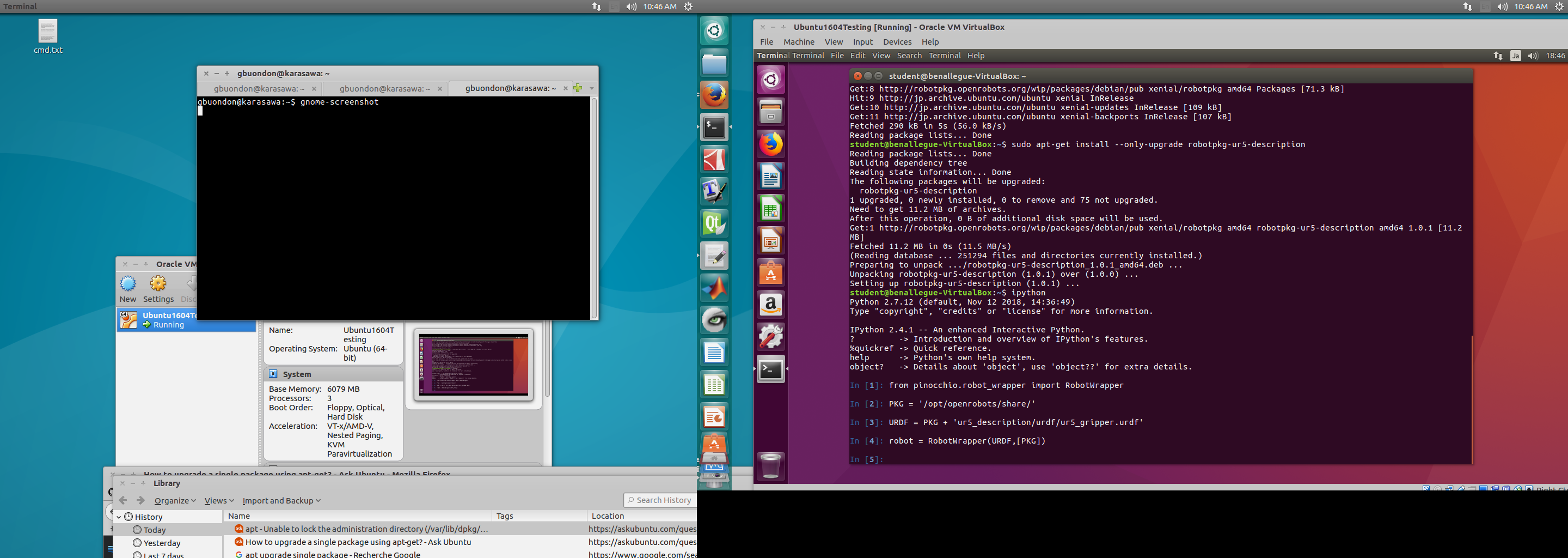
I will push for the repo to be updated. Thanks a lot for your help!
I think all doubts are solved now, we can close the issue
gabrielebndn
on 30 Nov 2018
Yes, I fixed it in robotpkg-wip, but this is not a satisfactory solution… I still have to work on it.
 nim65s
on 30 Nov 2018
nim65s
on 30 Nov 2018
Related issues
 markusgft
·
12Comments
markusgft
·
12Comments
 GiulioRomualdi
·
10Comments
GiulioRomualdi
·
10Comments
 CWEzio
·
9Comments
CWEzio
·
9Comments
 cmastalli
·
12Comments
cmastalli
·
12Comments
 mkatliar
·
7Comments
mkatliar
·
7Comments