Pillow cannot read from array gray image?
I have a pic:

Do some conversion:
AB = Image.open("./391.jpg").convert('RGB')
arr=np.array(AB)
[email protected]([0.2125, 0.7154, 0.0721]) # gray scale now
Whatever mode you use, it just looks like fucked up:

But if you use scipy.misc.toimage
it is still usable:

I don't know how. Just very strange
 zjplab
All 6 comments
Taking your code, I find that fromarray with L looks as you described, but if I omit the mode, it looks fine. Does this look okay for you? If not, what operating system and Pillow version are you using?
import numpy as np
from PIL import Image

AB = Image.open("im.jpg")
arr=np.array(AB)
[email protected]([0.2125, 0.7154, 0.0721])

# I agree that this does not look good
im = Image.fromarray(arr, 'L')

# This looks fine however
im = Image.fromarray(arr)

im.convert('RGB').save('out.jpg')
 radarhere
on 10 Apr 2019
radarhere
on 10 Apr 2019
@radarhere This is very strange since fromarray by default should read data as RGB. I checked the code from scipy.misc.toimage they use a different way to circumvent this bug:
    if len(shape) == 2:
        shape = (shape[1], shape[0])  # columns show up first
        if mode == 'F':
            data32 = data.astype(numpy.float32)
            image = Image.frombytes(mode, shape, data32.tostring())
            return image
        if mode in [None, 'L', 'P']:
            bytedata = bytescale(data, high=high, low=low,
                                 cmin=cmin, cmax=cmax)
            image = Image.frombytes('L', shape, bytedata.tostring())
            if pal is not None:
                image.putpalette(asarray(pal, dtype=uint8).tostring())
                # Becomes a mode='P' automagically.
            elif mode == 'P':  # default gray-scale
                pal = (arange(0, 256, 1, dtype=uint8)[:, newaxis] *
                       ones((3,), dtype=uint8)[newaxis, :])
                image.putpalette(asarray(pal, dtype=uint8).tostring())
            return image
        if mode == '1':  # high input gives threshold for 1
            bytedata = (data > high)
            image = Image.frombytes('1', shape, bytedata.tostring())
            return image
        if cmin is None:
            cmin = amin(ravel(data))
        if cmax is None:
            cmax = amax(ravel(data))
        data = (data*1.0 - cmin)*(high - low)/(cmax - cmin) + low
        if mode == 'I':
            data32 = data.astype(numpy.uint32)
            image = Image.frombytes(mode, shape, data32.tostring())
        else:
            raise ValueError(_errstr)
        return image
'fromarray by default should read data as RGB' - What leads you to this conclusion?
https://pillow.readthedocs.io/en/stable/reference/Image.html#PIL.Image.fromarray
mode – Mode to use (will be determined from type if None) See: Modes.
scipy's toimage doesn't even read it as RGB by default, it reads it as L.
>>> import numpy as np
>>> import scipy.misc
>>> from PIL import Image
>>> AB = Image.open("391.jpg").convert('RGB')
>>> arr=np.array(AB)
>>> [email protected]([0.2125, 0.7154, 0.0721]) # gray scale now
>>> scipy.misc.toimage(gray).mode
'L'
I'm confused. Could you clarify what you are after in this issue? Do you feel that Image.fromarray(arr, 'L') should work, and are asking why it does not?
radarhere
on 13 Apr 2019
@radarhere Yes I used scipy.misc.toimage in my code and I issued this just because I think Image.fromarray(arr, 'L') should work(many users might think this way too) but it does not.
zjplab
on 14 Apr 2019
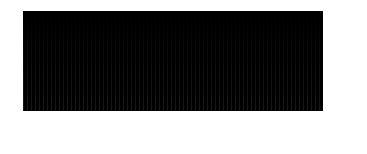
Here's an even simpler example that triggers this behavior:
from PIL import Image
import numpy as np
x = np.tile(np.arange(0,100).reshape(-1,1),300)
Image.fromarray(x,mode='L').show()
Should get this (with scipy.misc.toimage):
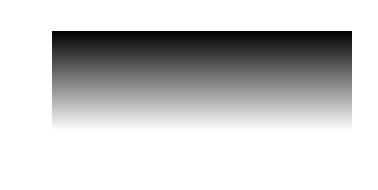
Instead get this:
 jgodwin
on 20 Jun 2019
jgodwin
on 20 Jun 2019
Having been dealing with similar problems for a waay to long time, I realized that the issue was resolved by tacking on .astype(np.uint8) to your array before passing it into Image.fromarray(), as such:
AB = Image.open("im.jpg")
arr=np.array(AB)
[email protected]([0.2125, 0.7154, 0.0721])
im = Image.fromarray(arr.astype(np.uint8), 'L')
or
x = np.tile(np.arange(0,100).reshape(-1,1),300)
Image.fromarray(x.astype(np.uint8), mode='L').show()
Although the most intuitive approach from the PIL library in my opinion would be to cast whatever array that is passed in as an argument to a uint8 since that's what the format mode="L" supports, I guess for now we can simply do it ourselves.
 dettmar
on 28 Jan 2020
dettmar
on 28 Jan 2020
Related issues
 readyready15728
·
4Comments
readyready15728
·
4Comments
 damianmoore
·
4Comments
damianmoore
·
4Comments
 HansHirse
·
3Comments
HansHirse
·
3Comments
 hxzhao527
·
4Comments
hxzhao527
·
4Comments
 anonymous530
·
3Comments
anonymous530
·
3Comments
Most helpful comment
@radarhere Yes I used
scipy.misc.toimagein my code and I issued this just because I thinkImage.fromarray(arr, 'L')should work(many users might think this way too) but it does not.