Picotorrent: PicoTorrent saves to Temp instead of Save Path.
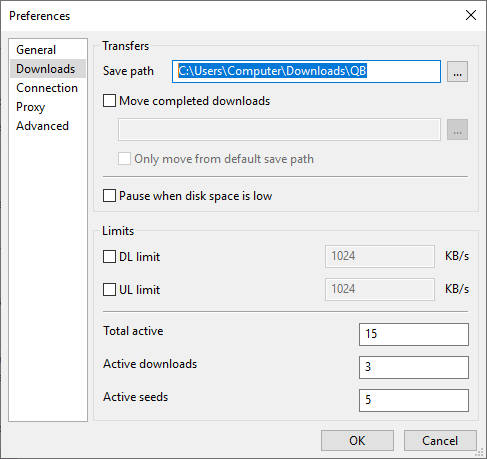
While "Save Path" in Preferences->Downloads was set to "C:\Users\Computer\Downloads\QB" the download appears in "C:\Users\Computer\AppData\Local\Temp".
Steps I took:
- scoop install vcredist
- scoop install picotorrent
- picotorrent -> change preferences
- restart picotorrent; verify save path
- add magnet link
- torrent -> open in explorer
 S2F0amEgS2xvdmVy
All 7 comments
What preferences did you change?
If you select the torrent in the list view, which save path does it show in the Overview tab?
 vktr
on 8 Sep 2020
vktr
on 8 Sep 2020
@vktr Just this setting, vktr.
S2F0amEgS2xvdmVy
on 8 Sep 2020
If you select the torrent in the list view, which save path does it show in the Overview tab?
And also, did the correct save path show in the add torrent dialog?
vktr
on 8 Sep 2020
If you select the torrent in the list view, which save path does it show in the Overview tab?
And also, did the correct save path show in the add torrent dialog?
In the Overview tab it says "C:\Users\Computer\AppData\Local\Temp".
And yes the add torrent dialog shows (...)\Downloads\QB as a correct file path, as does Explorer, and as does Qbittorrent.
S2F0amEgS2xvdmVy
on 8 Sep 2020
I haven't seen similar behavior. Let me check
vktr
on 8 Sep 2020
Sorry, forgot to mention: running on Windows 1809.
S2F0amEgS2xvdmVy
on 8 Sep 2020
I haven’t been able to replicate this issue, so I will close it unless someone is able to replicate it again.
Thanks for the attention, vktr!
S2F0amEgS2xvdmVy
on 10 Sep 2020
Related issues
 vaguiners
·
4Comments
vaguiners
·
4Comments
 detrophy
·
5Comments
detrophy
·
5Comments
 Dyras
·
4Comments
Dyras
·
4Comments
 haggen
·
6Comments
haggen
·
6Comments
 nxrighthere
·
3Comments
nxrighthere
·
3Comments