Picongpu: Limit GPU memory occupation
Hi
There is a problem, but this is only a problem for me, because I am a student.
I haven't found it myself, and I would like to ask if there is a way to limit memory occupation in PIConGPU?
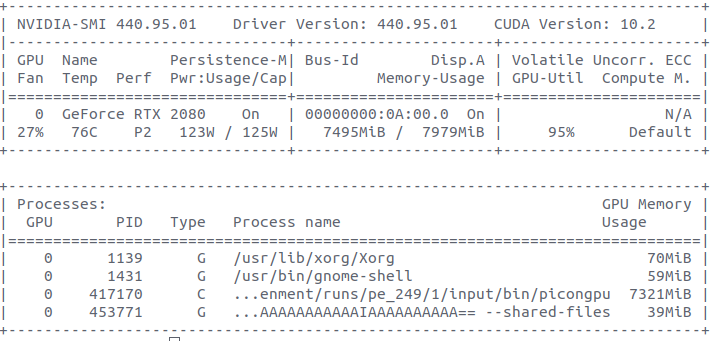
When I ran PIConGPU simulation, its process occupies all the memory of GPU except last 300MB, no matter simulation needs 2GB or 3GB.
From experience from other projects, I can make an assumption, that it is needed for solving memory defragmentation problem. And it's absolute solution.
But for me as for student, multitasking is more important than peak performance of one task. But when I run PIConGPU my PC becomes a pumpkin. I understand that the performance of each of the two parallel running tasks will halve. But for me it is more important to start something now.
Thanks
 Theodotus1243
All 6 comments
@Theodotus1243 we usually asume that PIConGPU is the only process running on the GPU. I am not entirely sure whether running more than just PIConGPU on the GPU will cause problems besides the memory occupation (I at least had problems on the jetson boards, but this might not be a general problem, for which I switched to a non GUI start of the OS).
If memory is your only problem, you can increase the amount of memory on each GPU that PIConGPU leaves free in your setup's memory.param.
 PrometheusPi
on 4 Jan 2021
PrometheusPi
on 4 Jan 2021
I am also not sure if and how PIConGPU behaves if it's not the only application utilizing the GPU. But the suggestion sounds reasonable to me, please share the results so that we know @Theodotus1243 !
 sbastrakov
on 4 Jan 2021
sbastrakov
on 4 Jan 2021
When changing that line, please remember of integer overflow. If you need more that 2 GB free, use literal constants of a type larger than int on the right side of that expression.
sbastrakov
on 4 Jan 2021
Thanks @PrometheusPi, @sbastrakov
On the previous photo You can see that 70 MiB is used by Xorg.
So on my rtx 2080 GPU I can run multiple applications at the same time (GUI+PIConGPU). There are no problems like @PrometheusPi mentioned about Jetson board. I can run PIConGPU and then surf the internet and watch videos, but no more, because no free VRAM.
I freed 3 GiB of memory by this change in memory.param:
constexpr size_t reservedGpuMemorySize = 3ull *1024*1024*1024; //Set 3 GiB free
But more important is the behavior of multiple heavy apps running.
And all as I read on the forums. Applications will not run in parallel, they will split GPU processor cycles between each other.
So it is typical Multithreading, as in CPU.
By running multiple processes in parallel, GPU can take every cycle(if some are free).
But this way you cannot achieve better parallelism within Streaming Multiprocessors or solve the problem of idle while waiting for reading from VRAM.
This is how I understood it, I could be wrong.
I will present the principle of this mechanism as follows. Based on my observations:
- Two applications occupies the GPU by 100%. If run simultaneously, the execution time of each application will double, and the utilization of the GPU will be 100%.
Deviations are possible. For example, PIConGPU and Machine learning share 40% / 60% GPU time, respectively. - Two applications occupies the GPU by 50%. If run simultaneously, the execution time of each application will not change, and the utilization of the GPU will be 100%.
- Two applications occupies the GPU by 100% and 50%. If run simultaneously, the execution time of first application will double, and second not change, and the utilization of the GPU will be 100%.
This method has one drawback - the execution time is shared, and the memory used is summed up.
But I knew about these shortcomings, and it suits me. Now I can run PIConGPU and
small app at the same time if I want to quickly test some idea. Any way this freed memory is not used by PIConGPU, as I can see from Memory calculator.
Thanks
Theodotus1243
on 4 Jan 2021
Nice that all is running!
This method has one drawback - the execution time is shared, and the memory used is summed up.
Only on expensive HPC NVIDIA GPUs e.g. A100 you can create partitions to create virtual GPUs (compute resources and memory) so that you can have real parallel running applications.
If an application e.g. PIConGPU uses internally streams, what we do, we can have multiple kernel running in parallel. As I know the driver can not schedule kernel from different processes in parallel. This means even if you have two or more applications on the GPU the utilization can be 10% if the application uses the GPU not efficient e.g. uses always one CUDA block per kernel
Note: If you have an XServer running then no kernel is allowed to run longer than 13 seconds, maybe less I have not checked the exact numbers for a while. It could also be that your system will become laggy because you can not render often enough to have a real-time feeling. If you run our standard examples KelvinHelmholtz or LaserWakeField acceleration this should not be a problem. Keep it in mind if you start to run your own configurations or you try to use the radiation plugin.
 psychocoderHPC
on 5 Jan 2021
psychocoderHPC
on 5 Jan 2021
Thanks for sharing @Theodotus1243 ! I believe this issue is now resolved, closing. Please feel free to reopen if needed.
sbastrakov
on 5 Jan 2021
Related issues
 steindev
·
4Comments
sbastrakov
·
3Comments
steindev
·
4Comments
sbastrakov
·
3Comments
 ax3l
·
4Comments
ax3l
·
4Comments
ax3l
·
4Comments
ax3l
·
4Comments
 mikewang2000
·
3Comments
mikewang2000
·
3Comments
Most helpful comment
Nice that all is running!
Only on expensive HPC NVIDIA GPUs e.g. A100 you can create partitions to create virtual GPUs (compute resources and memory) so that you can have real parallel running applications.
If an application e.g. PIConGPU uses internally streams, what we do, we can have multiple kernel running in parallel. As I know the driver can not schedule kernel from different processes in parallel. This means even if you have two or more applications on the GPU the utilization can be 10% if the application uses the GPU not efficient e.g. uses always one CUDA block per kernel
Note: If you have an XServer running then no kernel is allowed to run longer than 13 seconds, maybe less I have not checked the exact numbers for a while. It could also be that your system will become laggy because you can not render often enough to have a real-time feeling. If you run our standard examples KelvinHelmholtz or LaserWakeField acceleration this should not be a problem. Keep it in mind if you start to run your own configurations or you try to use the radiation plugin.