Picongpu: Remove Probes from isaac.param to build successfully([email protected])
Hello
I have been using PIConGPU for my bachelor's thesis for half a year now.
Based on the example LaserWakefield with changed parameters. Used version 0.4.3. And besides the isaac-server --dump bug, there is no image in the isaac-client, everything was cool.
I'm using desktop PC with GeForce GPU
I decided to upgrade to version 0.5.0 to try PML and isaac update. Did a clean install using spack.
When compiling a 2D case, everything works as before. But when enabling simdim = DIM3, compilation error.
(Therefore, I believe that the problem with isaac)
You can see output here output.txt
At your request, I will provide the required data so that the root of the error will become clear to you.
I'm asking for Your help. Already accustomed to thin PML layer.
 Theodotus1243
All 17 comments
It looks like you forgot the 'pic-create' step and compiled with the default settings where no species is enabled.
Please create firat you case e.g. the laser wakefield example and than call pic-build
 psychocoderHPC
on 26 Oct 2020
psychocoderHPC
on 26 Oct 2020
Hello @Theodotus1243 ,
So this could be caused by several reasons. To help us investigate, could you check that you compile in a freshly created (from current PIConGPU version) input directory from the standard LaserWakefile example, and without your parameter changes? It is just to separate the cases where the issue is already there out of the box vs. it is caused by your parameter changes (there it can be just that something got renamed or slightly changed in the last release).
 sbastrakov
on 26 Oct 2020
sbastrakov
on 26 Oct 2020
@psychocoderHPC @sbastrakov thanks for Your answer
For Your question I have 3 files
LaserWakefield.txt - original [email protected] example build
PlasmaTransillumination2D.txt -my modification in 2D
PlasmaTransillumination3D.txt - my modification in 3D
As You can see 2D variant build successfully as LWFA too
But 3D don't.
I made a compare of 2D and 3D simulation and didn't find any difference, except simDim and density initialization across 3rd dimension
(I use custom density profile called HomogeneousWithEdgesFunctor)
Based on this I decided that the problem with Isaac
Because it activated only in 3D, and also its output seen in build log, but I can't knowingly read this log, as well as to confidently draw conclusions
If something is wrong with my OS and picongpu installation, it's my fault
But if it is a bug with package I will be happy to do whatever it takes
Any way I'm asking for your help
Theodotus1243
on 26 Oct 2020
Thanks for the provided info @Theodotus1243 . From these files, it seems you are right and something indeed goes wrong with ISAAC. However, with only this output it is hard to say what exactly went wrong there, and so how to fix it. For that I would need your whole set of .param files for the failing-to-build 3D case, that is the contents of directory include/picongpu/param inside your input directory.
In case you do not need ISAAC for this simulation, you can disable it by removing it from your CMAKE_PREFIX_PATH environment variable just before running pic-build. Then it will report Could NOT find ISAAC - set ISAAC_DIR or check your CMAKE_PREFIX_PATH (as opposed to currently Found ISSAC ...) and this whole piece of code will be excluded from compilation.
sbastrakov
on 26 Oct 2020
Thanks @sbastrakov
I like ISAAC
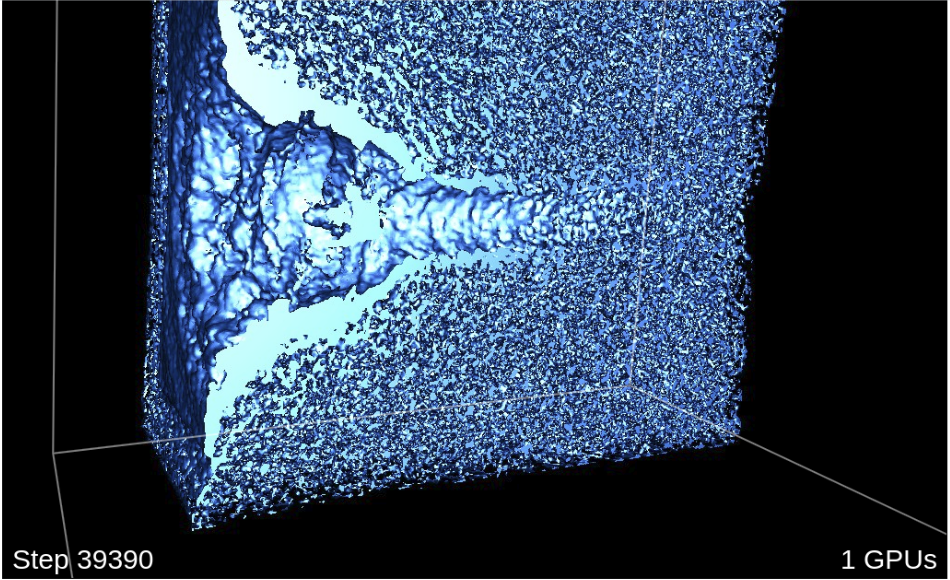
With its help, such visualizations are available to me, which I can study in detail by pausing the simulation
Here is my param files as a zip archive
So anyone can access them for similar issues
Theodotus1243
on 26 Oct 2020
Thanks @Theodotus1243 .
From the very first look, the issue may be that you don't have a custom isaac.param in your input directory and so the standard one is used. And it tries to use all particle species, including your PIC_Probes that lack some attributes of "normal" particle species required by issac. Could you try copying the standard isaac.param file (manually or via pic-edit) and replacing there
using Particle_Seq = VectorAllSpecies; with using Particle_Seq = MakeSeq_t< PIC_Electrons, PIC_Ions>;. I did not try it myself yet, but just seems like a first candidate of what went wrong.
edit: I now see that you have VectorAllPhysicalSpecies as well, so can just do using Particle_Seq =VectorAllPhysicalSpecies;
sbastrakov
on 26 Oct 2020
I would also like to use Isaac if it generates such beautiful images. Could anyone tell me how to start, please? I remember there was a key to import in order to access a server but I failed last time.
http://computationalradiationphysics.github.io/isaac/doc/server/index.html
Does it mean that server will process data in my local computer? What format of data is acceptable? Does it have to be a live rendering or I can ask some images only at the end?
There are instructions here but will there be an option to install Isaac through Spack, with spack install isaac as most of dependencies are there already? But then, how to setup the server connection?
thank you
 cbontoiu
on 26 Oct 2020
cbontoiu
on 26 Oct 2020
Hi @cbontoiu
It will be a mix of issues. But it's all about isaac, so maybe it's ok.
I will describe my path of isaac setup, and anyone can supplement or correct it
- spack install picongpu +isaac. It will install isaac and isaac-server. It's picongpu compile and runtime dependencies.
- Add this or similar rows to Your cfg file
TBG_isaac="--isaac.period 10 --isaac.name transparency --isaac.url 127.0.0.1"

TBG_plugins="!TBG_pngYX                    \
             !TBG_isaac"
- Download and run isaac-client (visualisation.html)
Find installation path of isaac-server binary in spack and run it
This is a good starting point. I myself have to find out the answer to the rest of the questions.
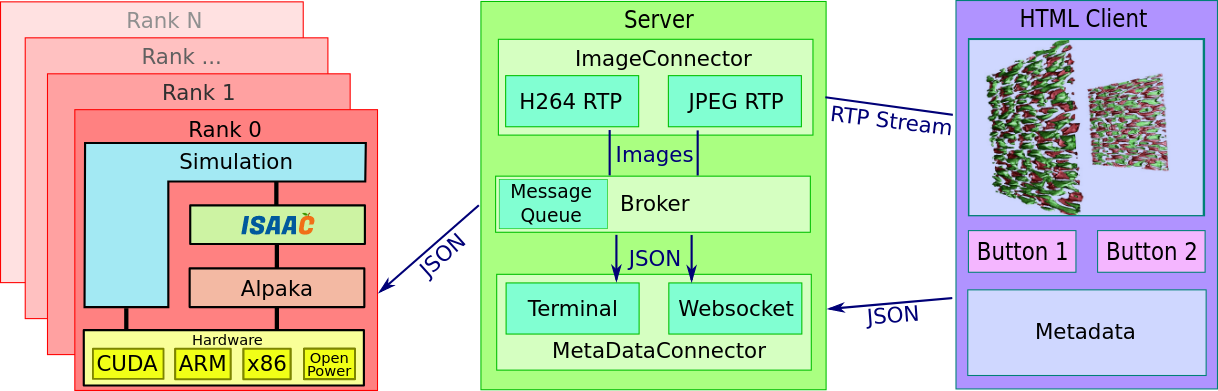
This image explains well that Your local computer will only have realtime image rendering. All processing happens in simulation in situ.
I'm running simulation, isaac-server and isaac-client on one desktop PC, so using localhost IP
So I don't know how to setup it on a cluster
Theodotus1243
on 27 Oct 2020
@cbontoiu Images willbe stored locally. You need to adjust what you like to see at runtime (interactive).
Please note currently ISAAC is not showing units of values. The values are in PIConGPU units and therefore you will not have a color bar with units. ISACC also requires a 3D simulation, 2D is currently not supported.
psychocoderHPC
on 27 Oct 2020
Thanks @Theodotus1243 for a great description! I think that's a really good way to start, and then one could address further issues (if any) with our help.
@Theodotus1243 did my suggestion help your issue?
sbastrakov
on 27 Oct 2020
Thanks @sbastrakov
using Particle_Seq = MakeSeq_t< PIC_Electrons, PIC_Ions>;
(In my case VectorAllPhysicalSpecies, as You mentioned)
Started working immediately
Interesting, that without this additions simulation has been building in [email protected]
Now I see, that in 0.4.3 there is no using Particle_Seq = VectorAllSpecies; line in isaac.param
So no need to edit, and it's working as is
Any way Your contribution is very important for me, So Thank You
I will take some days to double check, and if ok, will close the issue
I cannot fail to mention the isaac --dump issue
Which is still present in ISAAC 1.4.0, 1.5.0
But with Pull request#106 fixed it in curent isaac@develop
Maybe it might be useful to comment this case in the mentioned issue
So I used
spack install picongpu +adios +isaac %[email protected] ^isaac@develop ^isaac-server@develop
Glad it helped.
Thanks for mentioning the other ISAAC issue. I am by far not an expert there, but I guess @PrometheusPi and @FelixTUD are aware of it?
sbastrakov
on 27 Oct 2020
Particle_Seq is not in PIConGPU 0.4.3 because particle visualization is a newer feature in ISAAC which we use in PIC since 0.5.0.
You can now visualize particles as small balls. Before that feature there was only the way to visualize particles based on derived fields.
psychocoderHPC
on 27 Oct 2020
Hello all and special thanks to @Theodotus1243 for the introduction on ISAAC. I did
spack install picongpu@develop +adios +isaac %[email protected] and when trying to compile the distribution LWFA model it have me some errors related to ISAAC:
```/home/cristi/src/spack/opt/spack/linux-linuxmint20-westmere/gcc-9.3.0/isaac-1.5.0-tovnke4ba2mv56czpdnqwp7hiebxqv7y/include/isaac.hpp(1593): error #135: namespace "std" has no member "uniform_real_distribution"
/home/cristi/src/spack/opt/spack/linux-linuxmint20-westmere/gcc-9.3.0/isaac-1.5.0-tovnke4ba2mv56czpdnqwp7hiebxqv7y/include/isaac.hpp(1593): error #254: type name is not allowed

/home/cristi/src/spack/opt/spack/linux-linuxmint20-westmere/gcc-9.3.0/isaac-1.5.0-tovnke4ba2mv56czpdnqwp7hiebxqv7y/include/isaac.hpp(1593): error #20: identifier "randomFloats" is undefined

/home/cristi/src/spack/opt/spack/linux-linuxmint20-westmere/gcc-9.3.0/isaac-1.5.0-tovnke4ba2mv56czpdnqwp7hiebxqv7y/include/isaac.hpp(1594): error #135: namespace "std" has no member "default_random_engine"
```
which leads to

This problem does not exist on my other computer where I installed as
spack install picongpu@develop +adios +isaac %[email protected] so it is a compiler issue.
Any idea of what I can do here?
Thank you
cbontoiu
on 27 Oct 2020
Hello all and special thanks to @Theodotus1243 for the introduction on ISAAC. I did
spack install picongpu@develop +adios +isaac %[email protected]and when trying to compile the distribution LWFA model it have me some errors related to ISAAC:/home/cristi/src/spack/opt/spack/linux-linuxmint20-westmere/gcc-9.3.0/isaac-1.5.0-tovnke4ba2mv56czpdnqwp7hiebxqv7y/include/isaac.hpp(1593): error #254: type name is not allowed /home/cristi/src/spack/opt/spack/linux-linuxmint20-westmere/gcc-9.3.0/isaac-1.5.0-tovnke4ba2mv56czpdnqwp7hiebxqv7y/include/isaac.hpp(1593): error #20: identifier "randomFloats" is undefined /home/cristi/src/spack/opt/spack/linux-linuxmint20-westmere/gcc-9.3.0/isaac-1.5.0-tovnke4ba2mv56czpdnqwp7hiebxqv7y/include/isaac.hpp(1594): error #135: namespace "std" has no member "default_random_engine"which leads to
This problem does not exist on my other computer where I installed as
spack install picongpu@develop +adios +isaac %[email protected]so it is a compiler issue.
Any idea of what I can do here?
Thank you
This is a bug in the last ISAAC releases and is fixed in the dev branch of ISAAC https://github.com/ComputationalRadiationPhysics/isaac/pull/107
We will soon release a new version of ISAAC. Somehow you can say spack to build with the develop branch of isaac but my spackisch is to bad to know how to do it.
psychocoderHPC
on 27 Oct 2020
There should be ISAAC version called develop accessible via spack, which corresponds to that branch.
sbastrakov
on 28 Oct 2020
There should be ISAAC version called
developaccessible via spack, which corresponds to that branch.
I used @Theodotus1243 suggestion spack install picongpu +adios +isaac %[email protected] ^isaac@develop ^isaac-server@develop, and now the model can be compiled.
Thank you.
cbontoiu
on 28 Oct 2020
Related issues
 PrometheusPi
·
3Comments
PrometheusPi
·
3Comments
 ax3l
·
4Comments
ax3l
·
4Comments
 berceanu
·
4Comments
cbontoiu
·
3Comments
ax3l
·
4Comments
berceanu
·
4Comments
cbontoiu
·
3Comments
ax3l
·
4Comments
Most helpful comment
Hi @cbontoiu
It will be a mix of issues. But it's all about isaac, so maybe it's ok.
I will describe my path of isaac setup, and anyone can supplement or correct it
Find installation path of isaac-server binary in spack and run it
This is a good starting point. I myself have to find out the answer to the rest of the questions.
This image explains well that Your local computer will only have realtime image rendering. All processing happens in simulation in situ.

I'm running simulation, isaac-server and isaac-client on one desktop PC, so using localhost IP
So I don't know how to setup it on a cluster