Picongpu: Allow lasers to be defined at an angle
All 14 comments
@BifengLei, I believe, unfortunately, both laser and moving window can only move along the Y axis.
One can achieve the effect you want manually using FieldBackground as a soft source for your laser.
 sbastrakov
on 23 Oct 2019
sbastrakov
on 23 Oct 2019
@sbastrakov Thanks a lot.
Do you mean to load the laser pulse as an external background fields propagating with an angle?
I will have a look for how FieldBackground works.
 BifengLei
on 23 Oct 2019
BifengLei
on 23 Oct 2019
Yes. I believe with the field background there are two different ways to accomplish it.
First, you can use a combination of FieldBackgroundE and FieldBackgroundB. In this case, the background is applied as follows. At the start of each time step the background fields are added to the grid values of E and B, the particle push and all plugins see that resulting combined fields. However, before the field solver starts, the background is subtracted to get back the original fields and only they are propagated in time. So roughly speaking this background only affects how particles see the field, but does not influence the time evolution of the original E and B. Practically this means that your laser does not move as part of the PIC loop and so your background should be just raw laser values at given time, not any kind of difference between the previous and current time step.
Secondly, you can use the current background FieldBackgroundJ in the same file. This way you specify additional values of current density, to be added to the particle-created current. Since this one is added as part of Maxwell's equations, your background impact is remembered in grid values for next simulation steps, unlike the first way. As far as I understand, this is how most PIC codes implement soft sources (antennas).
sbastrakov
on 23 Oct 2019
Add-up: the second approach is used in one of our examples.
sbastrakov
on 24 Oct 2019
in PoGit we have a version of laser antenna via FieldBackgroundJ. It should not be a problem to write a rotation using it as an example. We have used it to create multiple counter-propagating lasers, it worked fine.
 hightower8083
on 25 Oct 2019
hightower8083
on 25 Oct 2019
Thanks @hightower8083 !
@BifengLei which approach do you plan to take (or neither)? We can assist you.
sbastrakov
on 25 Oct 2019
@hightower8083 Thank you so much. It is very helpful. I will definitely refer to your method.
@sbastrakov I am not sure yet. I am thinking of a 3D simulation with a laser pulse as following:
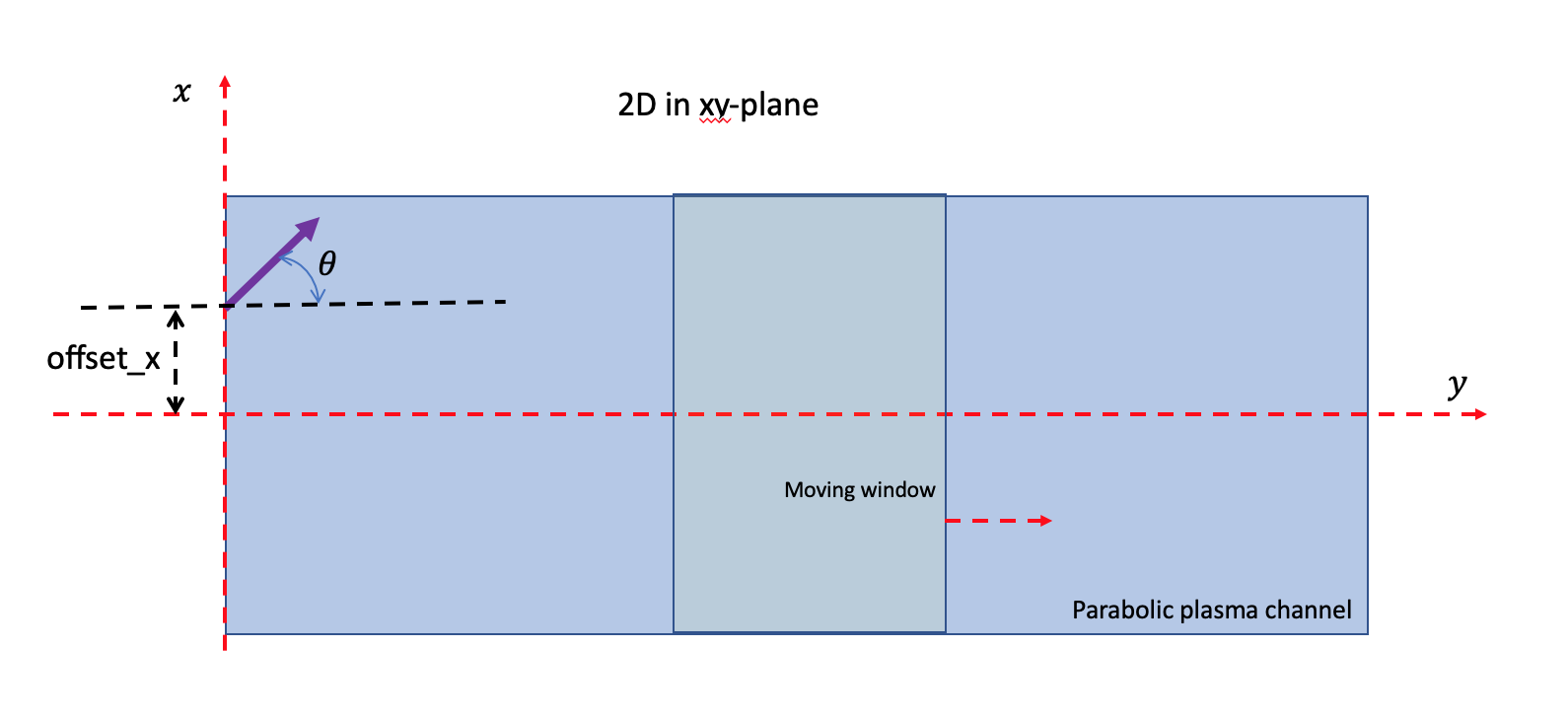
The angle and offset should be set both in x and y directions. The offset has been easily set. But, I still do not quite understand how to set up angle by using the backgroundfield.
Since we also need to see how the laser pulse evolves as propagating, it seems the second method is better. Is that correct?
I are now reading the examples provided here.
BifengLei
on 25 Oct 2019
@BifengLei thanks for clarifications.
Yes, to have PIConGPU simulating laser pulse evolution, one should choose the current background (that was the second method in my earlier message). I think the way to program this is roughly speaking as follows. But please take this with a grain of salt, we can of course discuss further.
I assume it is more natural to express equations for background values not in the PIConGPU standard coordinate system (with Y being the moving window axis), but in another one that is somehow aligned to your actual laser propagation axis. You can implement this coordinate transformation as part of the FieldBackgroundJ::operator(). This function is called for each cell and takes cellIdx as a parameter. These indexes are in our usual PIConGPU domain and you can easily compute the corresponding spatial coordinates (x, y, z), again in our domain. This point can be transformed to your laser coordinate system (via some shifts and rotations) and then used to compute the background value to be added to the PIConGPU fieldJ( cellIdx ).
sbastrakov
on 25 Oct 2019
Btw one can also consider this alternative way, although this is probably too impractical for most setups. In case you can afford to extend the simulation area so much that the whole pulse fits it, the pulse can be set as just initial conditions for E and B. This is conceptually very simple, although as noted, probably way too impractical for real simulations.
sbastrakov
on 25 Oct 2019
@BifengLei In pogit for the antenna we are doing FieldBackgroundJ::operator() as @sbastrakov suggests, but also use a lot of other templating to autogenerate the input files.
You can either use pogit and add your own LaserAntenna["GaussianTilted"] entry in the codelets file for antenna with rotation. Otherwise you may manually produce the corresponding code into the fieldBackground.param within the class FieldBackgroundJ (as we also do in our template )
hightower8083
on 25 Oct 2019
@BifengLei do you need any help from us on this matter?
sbastrakov
on 5 Nov 2019
@sbastrakov So sorry for no reply in time.
So far, the simulation can work preliminarily. I may come back if more help are needed.
Thank you so much for your patient assistance.
BifengLei
on 5 Nov 2019
@BifengLei no problem, I was just wondering if you encountered any issues that need help. Glad that you did not. Should we close this issue? In case you have more questions, please feel free to re-open or create a new one.
sbastrakov
on 5 Nov 2019
@sbastrakov Yes, please close this issue.
BifengLei
on 5 Nov 2019
Related issues
 steindev
·
4Comments
hightower8083
·
4Comments
steindev
·
4Comments
hightower8083
·
4Comments
 PrometheusPi
·
3Comments
PrometheusPi
·
3Comments
 berceanu
·
3Comments
berceanu
·
4Comments
berceanu
·
3Comments
berceanu
·
4Comments
Most helpful comment
in PoGit we have a version of laser antenna via
FieldBackgroundJ. It should not be a problem to write a rotation using it as an example. We have used it to create multiple counter-propagating lasers, it worked fine.