Picom: How to remove frame from such types of menus-windows
Platform
Manjaro 20.2 Nibia
GPU, drivers, and screen setup
integrated Intel Haswell-ULT
Environment
Mate
picom version
picom --version
vgit-af991
Configuration:
// Paste your configuration here
cat ~/.config/picom.conf`
#################################
#          Animations           #
#################################
# requires https://github.com/jonaburg/picom
# (These are also the default values)
# transition-length = 600
# transition-pow-x = 0.1
# transition-pow-y = 0.1
# transition-pow-w = 0.1
# transition-pow-h = 0.1
# size-transition = true

# Shadow
shadow = true;
detect-rounded-corners = false;
shadow-radius = 50;
shadow-offset-x = -45;
shadow-offset-y = -45;
shadow-opacity = 0.45;
shadow-exclude = [
    "name = 'Notification'",
   "window_type = 'dock'",
     "window_type = 'dialog'",
     #"window_type = 'menu'",
     #"window_type = 'dropdown_menu'",
     #"window_type = 'popup_menu'", #start-menu and r-click men
     "window_type = 'tooltip'",
     "window_type = 'dialog'",
     "window_type = 'splash'",
     "window_type = 'utility'",
    "class_g = 'Conky'",
    "class_g ?= 'Notify-osd'",
    "class_g = 'slop'",
  "class_g = 'Firefox' && argb",
  # "class_g *?= 'rofi'",
    "class_g = 'awesome'",
];

blur: {
  method = "dual_kawase";
  strength = 5.0;
  # kernel = "11x11gaussian";
   #background = false;
  #background-frame = false;
  # background-fixed = false
}

blur-background-exclude = [
     #"window_type = 'dock'",
     #"window_type = 'desktop'",
     #"window_type = 'utility'",
     #"window_type = 'dialog'",
     #"window_type = 'popup_menu'", #start_menu
     #"window_type = 'menu'",
     #"window_type = 'dropdown_menu'",
     #"window_type = 'tooltip'",
     #"window_type = 'splash'",
    #"class_g = 'slop'",
    #"_GTK_FRAME_EXTENTS@:c"
];

corner-radius = 0;
round-borders = 1;
rounded-corners-exclude = [
  "window_type = 'dock'",
  "window_type = 'panel'",
    "window_type = 'popup_menu'",
  "class_g *?= 'rofi'",
  "window_type = 'tooltip'",
   "class_g *?= 'dead-notification-center'"
];
opacity-rule = [#"window_type = 'dropdown_menu'",
  "90:class_g = 'Xfce4-power-manager-settings'",
  "92:class_g *?= 'chromium'",
  "90:class_g *?= 'spotify'",
  "100:class_g *?= 'vscodium'",
  "95:class_g *?= 'bitwarden'",
  "75:class_g = 'xob'",
  "98:class_g *?= 'qutebrowser'",
  "90:window_type = 'tooltip'",
  #"90:window_type = 'menu'",
  "87:window_type = 'popup_menu'",
  "87:window_type = 'dialog'",
  "87:window_type = 'splash'",
  "87:window_type = 'toolbar'",
  "87:window_type = 'utility'",
  "87:window_type = 'dock'",
    "60:window_type = 'dropdown_menu'",
  "85:window_type *?= '[Ss]xiv'"
];

# Fading
fading = true;
fade-delta = 5;
fade-in-step = 0.028;
fade-out-step = 0.03;
no-fading-openclose = false;

# fade-exclude = [
#   "class_g != 'bspc'"
# ];

# Other
# picom --experimental-backends --backend glx
experimental-backends = true;# no sense mofo
backend = "glx";
mark-wmwin-focused = true;
mark-ovredir-focused = true;
# use-ewmh-active-win = true;
detect-client-opacity = true;
refresh-rate = 0;
vsync = true;

focus-exclude = [
  "class_g = 'Cairo-clock'",
  "class_g ?= 'slop'",
  "name = 'rofi'",
  "class_g ?= 'Steam'"
];

# Logs
# log-level = "ERROR";
# log-file = "~/.cache/picom-log.log";

glx-no-stencil = true;
# glx-no-rebind-pixmap = true;
# xrender-sync-fence = true;
use-damage = true;
Steps of reproduction
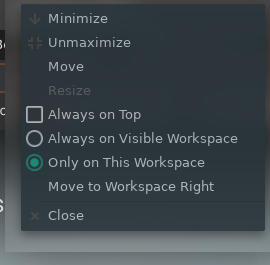
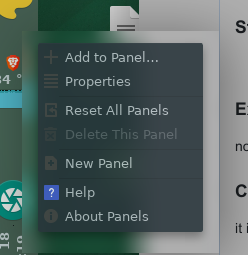
- right mouse click on windows header or panel
Expected behavior
no frame
Current Behavior
it is frame
Stack trace
Other details
 Ygarr
Ygarr
All 10 comments
Duplicate of https://github.com/yshui/picom/issues/552.
Possible workarounds:
1) Use a different GTK Theme without client side rendered shadows
2) Hack the theme yourself to disable the client side shadows
3) Disable background bluring using something along these lines in your config:
blur-background-exclude = [
  "window_type = 'menu'";
  "window_type = 'dropdown_menu'";
  "window_type = 'popup_menu'";
  "window_type = 'tooltip'";
];
or by using the blur-background = false option in the wintypes section.
We currently can't restrict the blurred region to only the semantically visible window because the whole area you see is the actual window. Would you mind posting the output of xprop for one of those windows if possible?
 tryone144
on 18 Dec 2020
tryone144
on 18 Dec 2020
I wonder if the menu window sets its Shape. If it does, then maybe we could fix this as we implement rounded corners (which needs blur clipping as well) for the newe backends
 yshui
on 18 Dec 2020
yshui
on 18 Dec 2020
IIRC I read in a google result there should be a property with _GTK prefix indicating the actual window region similar to _NET_FRAME_EXTENTS.
Update: It seems it's called _GTK_FRAME_EXTENTS. Here is the PR from kwin. However, I might have "hacked" my system to the point where all my GTK apps don't exhibit this property so I can't verify this right now.
Edit: The sample config already contains the _GTK_FRAME_EXTENTS@:c rule to disable background blur on CSD windows with exactly this property.
tryone144
on 19 Dec 2020
@tryone144 what does xwininfo -shape say?
yshui
on 19 Dec 2020
@tryone144 what does
xwininfo -shapesay?
  No window shape defined
  No border shape defined
But I also don't see the behaviour mentioned above. I'll have to get a new isolated setup up for testing this.
tryone144
on 19 Dec 2020
FYI, I've checked with xfce4 and they seem to set a window shape on the parent wm-window (for both CSD windows and "normal" ones). Probably due to the default theme having rounded titlebars?
We should be able to take _GTK_FRAME_EXTENTS to calculate the visible window rect and use that. Should help with the original issue, except for the rounded corners.
tryone144
on 19 Dec 2020
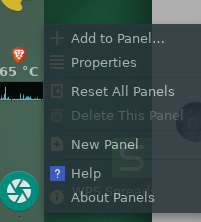
So far, relatively the best(and simple) option that I have achieved is just by making transparent(without blur) of problematic windows
with
blur-background-exclude = [
....
"_GTK_FRAME_EXTENTS@:c"
];
Ygarr
on 21 Dec 2020
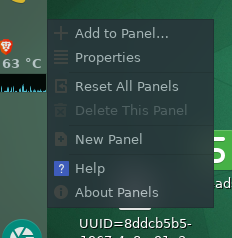
I fixed blurred frame (and blur remains inside window) for windows right-click menu on panel.
BUT windows
right-click on desktop and right-click on windows header STILL have frames.
This does the hack-trick:
cat  ~/.config/gtk-3.0/gtk.css
.window-frame {box-shadow: none;
                margin: 0}

.titlebar {
  border-radius: 0;
  box-shadow: none;
                margin: 0
}
Ygarr
on 21 Dec 2020
And seems this in gtk.css does the rest and exhausts the problem
{
    border-radius: 6px 6px 0 0;
    border-width: 0px;
    /*box-shadow: 1px 12px 12px 12px rgba(0, 0, 0, 0.4), 0 0 0 1px rgba(0, 0, 0, 0.18);*/
    box-shadow: none;
    margin: 4px;
}

decoration:backdrop
{
    border-radius: 6px 6px 0 0;
    border-width: 0px;
    /*box-shadow: 1px 12px 12px 12px rgba(0, 0, 0, 0.4), 0 0 0 1px rgba(0, 0, 0, 0.18);*/
    box-shadow: none;
    margin: 4px;
}
.window-frame:backdrop {box-shadow: none;}

tooltip {
  /*color: #4a4a4a;*/
  border-radius: 0px;
  border: 0px solid #d0d0d0;
  box-shadow: none;
    margin: 1px;}
tooltip.background {
    /*background-color: #6c92d7;*/
    background-clip:padding-box;
    box-shadow: none;
    margin: 1px; }
tooltip.background label {
      padding: 0px;
      box-shadow: none;
    margin: 0px;}
}
~/.config/gtk-3.0/gtk.css
@Ygarr I found something similar on my system. This seems to be the "hack" to get rid of client-side shadows. :+1:
This should work for all gtk windows except for the stupid firefox menues with their arrow.
GTK Inspector seems to be a good tool to check what rules have to be changed. I think this issue is a good candidate for a new wiki entry.
tryone144
on 22 Dec 2020
Related issues
 btstream
·
7Comments
btstream
·
7Comments
 BurhanDanger
·
7Comments
BurhanDanger
·
7Comments
 ghost
·
6Comments
ghost
·
6Comments
 TheConfuZzledDude
·
6Comments
TheConfuZzledDude
·
6Comments
 aufkrawall
·
7Comments
aufkrawall
·
7Comments