Pi-hole: DNS service not running on Raspberry pi after update?
In raising this issue, I confirm the following: {please fill the checkboxes, e.g: [X]}
- [X] I have read and understood the contributors guide.
- [X] The issue I am reporting can be replicated.
- [X] The issue I am reporting isn't a duplicate (see FAQs, closed issues, and open issues).
How familiar are you with the the source code relevant to this issue?:
3
Expected behaviour:
DNS service should be running.
Actual behaviour:
The DNS service is not running.
`During the update to version 4.0, I've got the following messages:
Error: Unable to get latest release location from GitHub and
[✗] DNS resolution is currently unavailable
[✗] DNS resolution is not available
Steps to reproduce:
Run the installer also after a reboot
Debug token provided by uploading pihole -d log:
`Because of the DNS failure I cannot upload the log. So I paste it here:
pi@raspberrypi:/etc $ pihole -d
[3;J
This process collects information from your Pi-hole, and optionally uploads it to a unique and random directory on tricorder.pi-hole.net.
The intent of this script is to allow users to self-diagnose their installations. This is accomplished by running tests against our software and providing the user with links to FAQ articles when a problem is detected. Since we are a small team and Pi-hole has been growing steadily, it is our hope that this will help us spend more time on development.
NOTE: All log files auto-delete after 48 hours and ONLY the Pi-hole developers can access your data via the given token. We have taken these extra steps to secure your data and will work to further reduce any personal information gathered.
*** [ INITIALIZING ]
[i] 2018-08-06:11:56:42 debug log has been initialized.
*** [ INITIALIZING ] Sourcing setup variables
[i] Sourcing /etc/pihole/setupVars.conf...
*** [ DIAGNOSING ]: Core version
[i] Core: v4.0 (https://discourse.pi-hole.net/t/how-do-i-update-pi-hole/249)
[i] Branch: master
[i] Commit: v4.0-0-gddbdb51
*** [ DIAGNOSING ]: Web version
[i] Web: v4.0 (https://discourse.pi-hole.net/t/how-do-i-update-pi-hole/249)
[i] Branch: master
[i] Commit: v4.0-0-gaf8c926
*** [ DIAGNOSING ]: FTL version
[✓] FTL: v3.0 (https://discourse.pi-hole.net/t/how-do-i-update-pi-hole/249)
*** [ DIAGNOSING ]: dnsmasq version
[i] 2.76
*** [ DIAGNOSING ]: lighttpd version
[i] 1.4.35
*** [ DIAGNOSING ]: php version
[i] 5.6.36
*** [ DIAGNOSING ]: Operating system
[✓] Raspbian GNU/Linux 8 (jessie)
*** [ DIAGNOSING ]: SELinux
[i] SELinux not detected
*** [ DIAGNOSING ]: Processor
[✓] armv7l
*** [ DIAGNOSING ]: Networking
[✓] IPv4 address(es) bound to the eth0 interface:
192.168.1.23/24 matches the IP found in /etc/pihole/setupVars.conf
[✓] IPv6 address(es) bound to the eth0 interface:
fe80::2c22:b331:8bd2:8068 matches the IP found in /etc/pihole/setupVars.conf
^ Please note that you may have more than one IP address listed.
As long as one of them is green, and it matches what is in /etc/pihole/setupVars.conf, there is no need for concern.
The link to the FAQ is for an issue that sometimes occurs when the IPv6 address changes, which is why we check for it.
[i] Default IPv4 gateway: 192.168.1.1
* Pinging 192.168.1.1...
[✓] Gateway responded.
*** [ DIAGNOSING ]: Ports in use
*:5900 vncserver- (IPv6)
*:5900 vncserver- (IPv4)
*:3389 xrdp (IPv4)
127.0.0.1:3350 xrdp-sesma (IPv4)
*:31416 boinc (IPv4)
127.0.0.1:25 exim4 (IPv4)
[::1]:25 exim4 (IPv6)
*:80 lighttpd (IPv4)
*:80 lighttpd (IPv6)
127.0.0.1:4711 pihole-FTL (IPv4)
[::1]:4711 pihole-FTL (IPv6)
*** [ DIAGNOSING ]: Name resolution (IPv4) using a random blocked domain and a known ad-serving domain
[✗] Failed to resolve 192.168.1.23 agatameblekonkurs.pl via localhost (127.0.0.1)
[✗] Failed to resolve 192.168.1.23 agatameblekonkurs.pl via Pi-hole (192.168.1.23)
[✓] doubleclick.com is 172.217.17.78 via a remote, public DNS server (8.8.8.8)
*** [ DIAGNOSING ]: Name resolution (IPv6) using a random blocked domain and a known ad-serving domain
[✗] Failed to resolve 192.168.1.23 ioms.bfmio.com via localhost (::1)
[✗] Failed to resolve 192.168.1.23 ioms.bfmio.com via Pi-hole (fe80::2c22:b331:8bd2:8068)
[✗] Failed to resolve doubleclick.com via a remote, public DNS server (2001:4860:4860::8888)
*** [ DIAGNOSING ]: Pi-hole processes
[✗] dnsmasq daemon is failed
[✓] lighttpd daemon is active
[✓] pihole-FTL daemon is active
*** [ DIAGNOSING ]: Setup variables
DHCP_ACTIVE=false
DNSMASQ_LISTENING=single
DNS_FQDN_REQUIRED=true
DNS_BOGUS_PRIV=true
DNSSEC=false
PIHOLE_INTERFACE=eth0
IPV4_ADDRESS=192.168.1.23/24
IPV6_ADDRESS=fe80::2c22:b331:8bd2:8068
PIHOLE_DNS_1=208.67.222.222
PIHOLE_DNS_2=208.67.220.220
QUERY_LOGGING=true
INSTALL_WEB_SERVER=true
INSTALL_WEB_INTERFACE=true
LIGHTTPD_ENABLED=true
*** [ DIAGNOSING ]: Dashboard and block page
[✗] Block page X-Header: X-Header does not match or could not be retrieved.
HTTP/1.1 200 OK
Content-type: text/html; charset=UTF-8
Date: Mon, 06 Aug 2018 09:57:00 GMT
Server: lighttpd/1.4.35
[✓] Web interface X-Header: X-Pi-hole: The Pi-hole Web interface is working!
*** [ DIAGNOSING ]: Gravity list
-rw-r--r-- 1 root root 11289309 Aug 5 03:38 /etc/pihole/gravity.list
-----head of gravity.list------
192.168.1.23 0.0.0.0
fe80::2c22:b331:8bd2:8068 0.0.0.0
192.168.1.23 0.r.msn.com
fe80::2c22:b331:8bd2:8068 0.r.msn.com
-----tail of gravity.list------
192.168.1.23 zzzpooeaz-france.com
fe80::2c22:b331:8bd2:8068 zzzpooeaz-france.com
192.168.1.23 zzzrtrcm2.com
fe80::2c22:b331:8bd2:8068 zzzrtrcm2.com
*** [ DIAGNOSING ]: contents of /etc/pihole
-rw-r--r-- 1 root root 633 May 2 2017 /etc/pihole/adlists.list
https://raw.githubusercontent.com/StevenBlack/hosts/master/hosts
https://mirror1.malwaredomains.com/files/justdomains
http://sysctl.org/cameleon/hosts
https://zeustracker.abuse.ch/blocklist.php?download=domainblocklist
https://s3.amazonaws.com/lists.disconnect.me/simple_tracking.txt
https://s3.amazonaws.com/lists.disconnect.me/simple_ad.txt
https://hosts-file.net/ad_servers.txt
-rw-rw-rw- 1 root root 0 Sep 22 2017 /etc/pihole/blacklist.txt
-rw-r--r-- 1 root root 118 Aug 5 03:38 /etc/pihole/local.list
192.168.1.23 raspberrypi
fe80::2c22:b331:8bd2:8068 raspberrypi
192.168.1.23 pi.hole
fe80::2c22:b331:8bd2:8068 pi.hole
-rw-r--r-- 1 root root 234 Aug 6 11:08 /etc/pihole/logrotate
/var/log/pihole.log {
su root root
daily
copytruncate
rotate 5
compress
delaycompress
notifempty
nomail
}
/var/log/pihole-FTL.log {
su root root
weekly
copytruncate
rotate 3
compress
delaycompress
notifempty
nomail
}
-rw-rw-rw- 1 root root 239 May 5 11:31 /etc/pihole/whitelist.txt
raw.githubusercontent.com
adblock.gjtech.net
mirror1.malwaredomains.com
sysctl.org
zeustracker.abuse.ch
s3.amazonaws.com
hosts-file.net
ransomwaretracker.abuse.ch
time.nist.gov
ddns.synology.com
sf.net
support.microsoft.com
js.users.51.la
*** [ DIAGNOSING ]: contents of /etc/dnsmasq.d
-rw-r--r-- 1 root root 1547 Aug 6 11:09 /etc/dnsmasq.d/01-pihole.conf
addn-hosts=/etc/pihole/gravity.list
addn-hosts=/etc/pihole/black.list
addn-hosts=/etc/pihole/local.list
localise-queries
no-resolv
cache-size=10000
log-queries=extra
log-facility=/var/log/pihole.log
local-ttl=2
log-async
server=208.67.222.222
server=208.67.220.220
domain-needed
bogus-priv
interface=eth0
*** [ DIAGNOSING ]: contents of /etc/lighttpd
-rw-r--r-- 1 root root 3027 Aug 6 11:08 /etc/lighttpd/lighttpd.conf
server.modules = (
"mod_access",
"mod_accesslog",
"mod_auth",
"mod_expire",
"mod_compress",
"mod_redirect",
"mod_setenv",
"mod_rewrite"
)
server.document-root = "/var/www/html"
server.error-handler-404 = "pihole/index.php"
server.upload-dirs = ( "/var/cache/lighttpd/uploads" )
server.errorlog = "/var/log/lighttpd/error.log"
server.pid-file = "/var/run/lighttpd.pid"
server.username = "www-data"
server.groupname = "www-data"
server.port = 80
accesslog.filename = "/var/log/lighttpd/access.log"
accesslog.format = "%{%s}t|%V|%r|%s|%b"
index-file.names = ( "index.php", "index.html", "index.lighttpd.html" )
url.access-deny = ( "~", ".inc", ".md", ".yml", ".ini" )
static-file.exclude-extensions = ( ".php", ".pl", ".fcgi" )
compress.cache-dir = "/var/cache/lighttpd/compress/"
compress.filetype = ( "application/javascript", "text/css", "text/html", "text/plain" )
include_shell "/usr/share/lighttpd/use-ipv6.pl " + server.port
include_shell "/usr/share/lighttpd/create-mime.assign.pl"
include_shell "find /etc/lighttpd/conf-enabled -name '*.conf' -a ! -name 'letsencrypt.conf' -printf 'include \"%p\"
' 2>/dev/null"
$HTTP["url"] =~ "^/admin/" {
setenv.add-response-header = (
"X-Pi-hole" => "The Pi-hole Web interface is working!",
"X-Frame-Options" => "DENY"
)
$HTTP["url"] =~ ".ttf$" {
setenv.add-response-header = ( "Access-Control-Allow-Origin" => "*" )
}
}
$HTTP["url"] =~ "^/admin/\.(.*)" {
url.access-deny = ("")
}
include_shell "cat external.conf 2>/dev/null"
*** [ DIAGNOSING ]: contents of /etc/cron.d
-rw-r--r-- 1 root root 1496 Aug 6 11:08 /etc/cron.d/pihole
18 3 * * 7 root PATH="$PATH:/usr/local/bin/" pihole updateGravity
00 00 * * * root PATH="$PATH:/usr/local/bin/" pihole flush once quiet
@reboot root /usr/sbin/logrotate /etc/pihole/logrotate
*/10 * * * * root PATH="$PATH:/usr/local/bin/" pihole updatechecker local
27 15 * * * root PATH="$PATH:/usr/local/bin/" pihole updatechecker remote
@reboot root PATH="$PATH:/usr/local/bin/" pihole updatechecker remote reboot
*** [ DIAGNOSING ]: contents of /var/log/lighttpd
-rw-r--r-- 1 www-data www-data 72276 Aug 6 11:09 /var/log/lighttpd/error.log
2016-07-31 17:24:02: (log.c.164) server started
2016-07-31 17:24:29: (server.c.1558) server stopped by UID = 0 PID = 1
2016-07-31 17:25:34: (log.c.164) server started
2016-07-31 17:25:34: (mod_fastcgi.c.1112) the fastcgi-backend /usr/bin/php-cgi failed to start:
2016-07-31 17:25:34: (mod_fastcgi.c.1116) child exited with status 2 /usr/bin/php-cgi
2016-07-31 17:25:34: (mod_fastcgi.c.1119) If you're trying to run your app as a FastCGI backend, make sure you're using the FastCGI-enabled version.
If this is PHP on Gentoo, add 'fastcgi' to the USE flags.
2016-07-31 17:25:34: (mod_fastcgi.c.1406) [ERROR]: spawning fcgi failed.
2016-07-31 17:25:34: (server.c.1022) Configuration of plugins failed. Going down.
2016-07-31 21:10:57: (log.c.164) server started
2016-07-31 21:10:57: (mod_fastcgi.c.1112) the fastcgi-backend /usr/bin/php-cgi failed to start:
2016-07-31 21:10:57: (mod_fastcgi.c.1116) child exited with status 2 /usr/bin/php-cgi
2016-07-31 21:10:57: (mod_fastcgi.c.1119) If you're trying to run your app as a FastCGI backend, make sure you're using the FastCGI-enabled version.
If this is PHP on Gentoo, add 'fastcgi' to the USE flags.
2016-07-31 21:10:57: (mod_fastcgi.c.1406) [ERROR]: spawning fcgi failed.
2016-07-31 21:10:57: (server.c.1022) Configuration of plugins failed. Going down.
2016-08-01 14:15:01: (log.c.164) server started
2016-08-01 14:15:01: (mod_fastcgi.c.1112) the fastcgi-backend /usr/bin/php-cgi failed to start:
2016-08-01 14:15:01: (mod_fastcgi.c.1116) child exited with status 2 /usr/bin/php-cgi
2016-08-01 14:15:01: (mod_fastcgi.c.1119) If you're trying to run your app as a FastCGI backend, make sure you're using the FastCGI-enabled version.
If this is PHP on Gentoo, add 'fastcgi' to the USE flags.
2016-08-01 14:15:01: (mod_fastcgi.c.1406) [ERROR]: spawning fcgi failed.
2016-08-01 14:15:01: (server.c.1022) Configuration of plugins failed. Going down.
2016-08-01 15:04:10: (log.c.164) server started
2016-08-01 15:04:10: (mod_fastcgi.c.1112) the fastcgi-backend /usr/bin/php-cgi failed to start:
*** [ DIAGNOSING ]: contents of /var/log
-rw-r--r-- 1 pihole pihole 17316 Aug 6 11:09 /var/log/pihole-FTL.log
-----head of pihole-FTL.log------
[2018-08-06 00:00:05.320] NOTICE: pihole.log has been flushed
[2018-08-06 00:00:05.320] Resetting internal data structure
[2018-08-06 00:00:05.320] Queries in memory before flushing: 51004
[2018-08-06 00:00:05.874] Gravity list entries: 133608
[2018-08-06 00:00:05.875] No blacklist present
[2018-08-06 00:00:05.875] Notice: Increasing wildcards struct size from 0 to 1 (17.89 KB)
[2018-08-06 00:00:05.875] Wildcard blocking list entries: 1
[2018-08-06 00:00:05.877] Notice: Increasing queries struct size from 0 to 10000 (457.91 KB)
[2018-08-06 00:00:05.878] Notice: Increasing domains struct size from 0 to 1000 (477.91 KB)
[2018-08-06 00:00:05.878] Notice: Increasing clients struct size from 0 to 10 (478.07 KB)
[2018-08-06 00:00:05.889] New client: 192.168.1.151 (0/10)
[2018-08-06 00:00:05.889] Notice: Increasing overTime struct size from 0 to 100 (482.10 KB)
[2018-08-06 00:00:05.900] New client: 192.168.1.13 (1/10)
[2018-08-06 00:00:05.912] New client: 192.168.1.10 (2/10)
[2018-08-06 00:00:05.912] Notice: Increasing forwarded struct size from 0 to 4 (482.23 KB)
[2018-08-06 00:00:05.945] New forward server: 208.67.220.220 resolver2.opendns.com (0/4)
[2018-08-06 00:00:05.956] New client: 192.168.1.35 (3/10)
[2018-08-06 00:00:05.993] New forward server: 208.67.222.222 resolver1.opendns.com (1/4)
[2018-08-06 00:00:06.005] New client: 192.168.1.1 (4/10)
[2018-08-06 00:00:06.019] New client: 192.168.1.29 (5/10)
[2018-08-06 00:00:06.032] New client: 192.168.1.24 (6/10)
[2018-08-06 00:00:06.044] New client: 192.168.1.21 (7/10)
[2018-08-06 00:00:06.059] New client: 192.168.1.26 (8/10)
[2018-08-06 00:00:06.060] New client: 127.0.0.1 localhost (9/10)
[2018-08-06 00:00:06.060] Notice: Increasing clients struct size from 10 to 20 (484.25 KB)
[2018-08-06 00:00:06.227] Notice: Increasing queries struct size from 10000 to 20000 (928.74 KB)
[2018-08-06 00:00:06.492] Notice: Increasing overTime struct size from 100 to 200 (938.42 KB)
[2018-08-06 00:00:06.504] Notice: Increasing queries struct size from 20000 to 30000 (1.38 MB)
[2018-08-06 00:00:06.674] New client: 192.168.1.100 (10/20)
[2018-08-06 00:00:06.692] New client: 192.168.1.11 (11/20)
[2018-08-06 00:00:06.804] Imported 27949 queries from the long-term database
[2018-08-06 00:00:06.806] Reading from /var/log/pihole.log (rw-r--r--)
[2018-08-06 00:01:00.220] Notice: Database size is 916.20 MB, deleted 13 rows
[2018-08-06 00:59:01.199] Notice: Database size is 916.20 MB, deleted 333 rows
[2018-08-06 01:59:01.271] Notice: Database size is 916.20 MB, deleted 601 rows
-----tail of pihole-FTL.log------
[2018-08-06 11:09:05.229] New client: 192.168.1.10 (1/10)
[2018-08-06 11:09:05.229] Notice: Increasing forwarded struct size from 0 to 4 (464.44 KB)
[2018-08-06 11:09:05.230] New forward server: 208.67.222.222 (0/4)
[2018-08-06 11:09:05.230] New forward server: 208.67.220.220 (1/4)
[2018-08-06 11:09:05.231] New client: 192.168.1.13 (2/10)
[2018-08-06 11:09:05.233] New client: 192.168.1.24 (3/10)
[2018-08-06 11:09:05.234] New client: 192.168.1.21 (4/10)
[2018-08-06 11:09:05.239] New client: 192.168.1.35 (5/10)
[2018-08-06 11:09:05.261] New client: 192.168.1.26 (6/10)
[2018-08-06 11:09:05.262] New client: 127.0.0.1 localhost (7/10)
[2018-08-06 11:09:05.320] New client: 192.168.1.29 (8/10)
[2018-08-06 11:09:05.382] New client: 192.168.1.1 (9/10)
[2018-08-06 11:09:05.382] Notice: Increasing clients struct size from 10 to 20 (471.61 KB)
[2018-08-06 11:09:05.604] Notice: Increasing queries struct size from 10000 to 20000 (914.66 KB)
[2018-08-06 11:09:05.676] New client: 192.168.1.100 (10/20)
[2018-08-06 11:09:05.682] New client: 192.168.1.11 (11/20)
[2018-08-06 11:09:05.906] Notice: Increasing overTime struct size from 100 to 200 (921.12 KB)
[2018-08-06 11:09:06.007] Notice: Increasing queries struct size from 20000 to 30000 (1.36 MB)
[2018-08-06 11:09:06.251] Imported 24939 queries from the long-term database
[2018-08-06 11:09:06.253] Starting initial log file parsing
[2018-08-06 11:09:06.253] Reading from /var/log/pihole.log (rw-r--r--)
[2018-08-06 11:09:07.343] Finished initial log file parsing
[2018-08-06 11:09:07.343] -> Total DNS queries: 24940
[2018-08-06 11:09:07.343] -> Cached DNS queries: 17634
[2018-08-06 11:09:07.343] -> Forwarded DNS queries: 5812
[2018-08-06 11:09:07.343] -> Exactly blocked DNS queries: 1415
[2018-08-06 11:09:07.343] -> Wildcard blocked DNS queries: 79
[2018-08-06 11:09:07.343] -> Unknown DNS queries: 0
[2018-08-06 11:09:07.344] -> Unique domains: 538
[2018-08-06 11:09:07.344] -> Unique clients: 12
[2018-08-06 11:09:07.344] -> Known forward destinations: 2
[2018-08-06 11:09:07.344] Successfully accessed setupVars.conf
[2018-08-06 11:09:07.345] Listening on port 4711 for incoming IPv4 telnet connections
[2018-08-06 11:09:07.345] Listening on port 4711 for incoming IPv6 telnet connections
[2018-08-06 11:09:07.346] Listening on Unix socket
*** [ DIAGNOSING ]: Locale
LANG=en_AG
LANGUAGE=
LC_CTYPE="en_AG"
LC_NUMERIC="en_AG"
LC_TIME="en_AG"
LC_COLLATE="en_AG"
LC_MONETARY="en_AG"
LC_MESSAGES="en_AG"
LC_PAPER="en_AG"
LC_NAME="en_AG"
LC_ADDRESS="en_AG"
LC_TELEPHONE="en_AG"
LC_MEASUREMENT="en_AG"
LC_IDENTIFICATION="en_AG"
LC_ALL=
*** [ DIAGNOSING ]: Pi-hole log
-rw-r--r-- 1 dnsmasq root 3184593 Aug 6 11:09 /var/log/pihole.log
-----head of pihole.log------
Aug 6 00:00:05 dnsmasq[651]: 1918010 127.0.0.1/42488 query[AAAA] raspberrypi from 127.0.0.1
Aug 6 00:00:05 dnsmasq[651]: 1918010 127.0.0.1/42488 /etc/pihole/local.list raspberrypi is fe80::2c22:b331:8bd2:8068
Aug 6 00:00:05 dnsmasq[651]: 1918011 127.0.0.1/39742 query[AAAA] raspberrypi from 127.0.0.1
Aug 6 00:00:05 dnsmasq[651]: 1918011 127.0.0.1/39742 /etc/pihole/local.list raspberrypi is fe80::2c22:b331:8bd2:8068
Aug 6 00:00:05 dnsmasq[651]: 1918012 127.0.0.1/33906 query[PTR] 151.1.168.192.in-addr.arpa from 127.0.0.1
Aug 6 00:00:05 dnsmasq[651]: 1918012 127.0.0.1/33906 config 192.168.1.151 is NXDOMAIN
Aug 6 00:00:05 dnsmasq[651]: 1918013 127.0.0.1/42533 query[PTR] 13.1.168.192.in-addr.arpa from 127.0.0.1
Aug 6 00:00:05 dnsmasq[651]: 1918013 127.0.0.1/42533 config 192.168.1.13 is NXDOMAIN
Aug 6 00:00:05 dnsmasq[651]: 1918014 127.0.0.1/60583 query[PTR] 10.1.168.192.in-addr.arpa from 127.0.0.1
Aug 6 00:00:05 dnsmasq[651]: 1918014 127.0.0.1/60583 config 192.168.1.10 is NXDOMAIN
Aug 6 00:00:05 dnsmasq[651]: 1918015 127.0.0.1/39130 query[PTR] 220.220.67.208.in-addr.arpa from 127.0.0.1
Aug 6 00:00:05 dnsmasq[651]: 1918015 127.0.0.1/39130 forwarded 220.220.67.208.in-addr.arpa to 208.67.220.220
Aug 6 00:00:05 dnsmasq[651]: 1918015 127.0.0.1/39130 forwarded 220.220.67.208.in-addr.arpa to 208.67.222.222
Aug 6 00:00:05 dnsmasq[651]: 1918015 127.0.0.1/39130 reply 208.67.220.220 is resolver2.opendns.com
Aug 6 00:00:05 dnsmasq[651]: 1918016 127.0.0.1/47843 query[PTR] 35.1.168.192.in-addr.arpa from 127.0.0.1
Aug 6 00:00:05 dnsmasq[651]: 1918016 127.0.0.1/47843 config 192.168.1.35 is NXDOMAIN
Aug 6 00:00:05 dnsmasq[651]: 1918017 127.0.0.1/49897 query[PTR] 222.222.67.208.in-addr.arpa from 127.0.0.1
Aug 6 00:00:05 dnsmasq[651]: 1918017 127.0.0.1/49897 forwarded 222.222.67.208.in-addr.arpa to 208.67.222.222
Aug 6 00:00:05 dnsmasq[651]: 1918017 127.0.0.1/49897 reply 208.67.222.222 is resolver1.opendns.com
Aug 6 00:00:05 dnsmasq[651]: 1918018 127.0.0.1/48114 query[PTR] 1.1.168.192.in-addr.arpa from 127.0.0.1
********************************************
********************************************
[✓] ** FINISHED DEBUGGING! **
Troubleshooting undertaken, and/or other relevant information:
In the pi-hole web-gui I also see the message:  DNS service not running
My other PC still is able to connect to the internet via another dns server so the connection itself seems to be OK.
I also tried to repair pi-hole with pihole -r. That did not help.
 josvliet
All 5 comments
I have read this issue before starting the update...
Was hoping that it will not affect me, but meh it did:
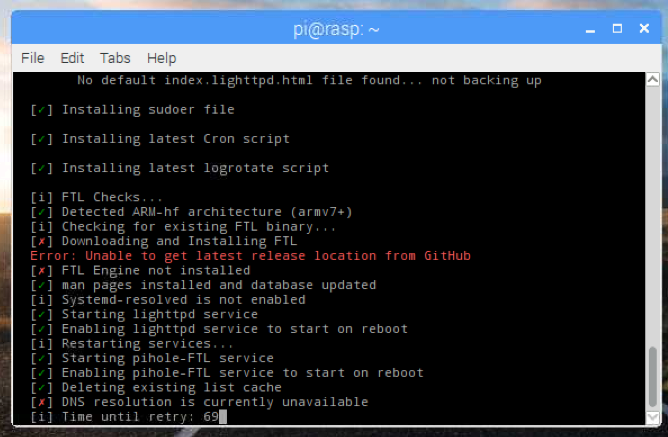
What can we do now?
 maciboy
on 6 Aug 2018
maciboy
on 6 Aug 2018
Fixed it by edditing /etc/resolv.conf to a working dns (1.1.1.1)
Then do pihole -up
 Linkje
on 6 Aug 2018
Linkje
on 6 Aug 2018
Linkje, I've tried this and it helps.
sudo nano /etc/resolv.conf
added: nameserver 1.1.1.1
Saved the file
Ran # pihole -r and choose "Repair"
And than.... voila.... it worked.
Linkje thanks for this tip.
josvliet
on 6 Aug 2018
Hi macibou,
There is a work around. See the issue #2323
Good luck
Op 6-8-2018 15:04:09, maciboy notifications@github.com schreef:
I have read this issue before starting the update...
Was hoping that it will not affect me, but meh it did:
[bildschirmfoto 2018-08-06 um 14 52 12] [https://user-images.githubusercontent.com/19333006/43718103-ea23204c-9989-11e8-8c36-39c7f444ae26.png]
What can we do now?
—
You are receiving this because you authored the thread.
Reply to this email directly, view it on GitHub [https://github.com/pi-hole/pi-hole/issues/2323#issuecomment-410700672], or mute the thread [https://github.com/notifications/unsubscribe-auth/AoL6-qk1w4-vLZCsxlirZMOJikYagAyrks5uOD7IgaJpZM4VwGVX].
josvliet
on 6 Aug 2018
Thanks, I've it already up und running - thought my reaction-emojis were sufficient :P
maciboy
on 6 Aug 2018
Related issues
 davidreverett
·
4Comments
davidreverett
·
4Comments
 Solaris17
·
5Comments
Solaris17
·
5Comments
 flo80
·
5Comments
flo80
·
5Comments
 wioxjk
·
4Comments
wioxjk
·
4Comments
 DrGeoff
·
3Comments
DrGeoff
·
3Comments
Most helpful comment
Fixed it by edditing /etc/resolv.conf to a working dns (1.1.1.1)
Then do pihole -up