Phpunit: Trying to generate code coverage report tells me: "No whitelist configured, no code coverage will be generated"
According to the documentation "Chapter 11. Code Coverage Analysis":
By default, all source files that contain at least one line of code that has been executed (and only these files) are included in the code coverage report.

...

It is best practice to use a whitelist instead of the blacklist mentioned above.
I understand from this that whitelists are not compulsory. My phpunit.xml file thus does not reference any white- or blacklist:
<?xml version="1.0" encoding="UTF-8"?>
<phpunit colors="true">
    <testsuites>
        <testsuite name="Application Test Suite">
            <directory>mycode/test/</directory>
        </testsuite>
    </testsuites>
</phpunit>
When I try to get code coverage, however, I get the error:
./vendor/bin/phpunit --version
PHPUnit 5.0.8 by Sebastian Bergmann and contributors.
./vendor/bin/phpunit --coverage-html coverage
Error:         No whitelist configured, no code coverage will be generated
I at first thought this was due to #1872, but that change is included in version 5.0.8, which I'm using.
How can I get phpunit to just generate code coverage for "all source files that contain at least one line of code that has been executed", as is described in the documentation?
It seems that the code which outputs this error would not run if the "whitelist" argument is set. I thought I could set it to empty by adding this to my xml file:
<filter>
  <whitelist processUncoveredFilesFromWhitelist="true">
  </whitelist>
</filter>
But I'm still getting the same output.
Thanks!
 alberto56
All 9 comments
Just a note that this error can occur when XDebug is not loaded, as described in #347.
However, in my case XDebug seems to be loaded correctly:
$ php -ini|grep 'xdebug support'
xdebug support => enabled
No clue how #347 should be related here.
 sebastianbergmann
on 1 Nov 2015
sebastianbergmann
on 1 Nov 2015
There was a bug in the documentation (https://github.com/sebastianbergmann/phpunit-documentation/issues/335) that has been fixed now.
sebastianbergmann
on 1 Nov 2015
Much appreciated @sebastianbergmann !
Thanks for the quick response, I am no longer getting this error.
alberto56
on 1 Nov 2015
Dear @sebastianbergmann
Should I update my phpunit version?
Which version that solved this bug?
Thank You.
 hierony94
on 21 Jul 2016
hierony94
on 21 Jul 2016
I have exactly the same problem.
Howto resolve it ?
Thanks
 BorderCloud
on 11 Aug 2016
BorderCloud
on 11 Aug 2016
@hierony94 @BorderCloud @luisgjb @diego3 You need to configure a whitelist in your phpunit.xml file, per this documentation.
 su-narthur
on 5 Oct 2016
su-narthur
on 5 Oct 2016
sebastianbergmann commented on Nov 1, 2015
thanks
 xthyjdy
on 4 Aug 2017
xthyjdy
on 4 Aug 2017
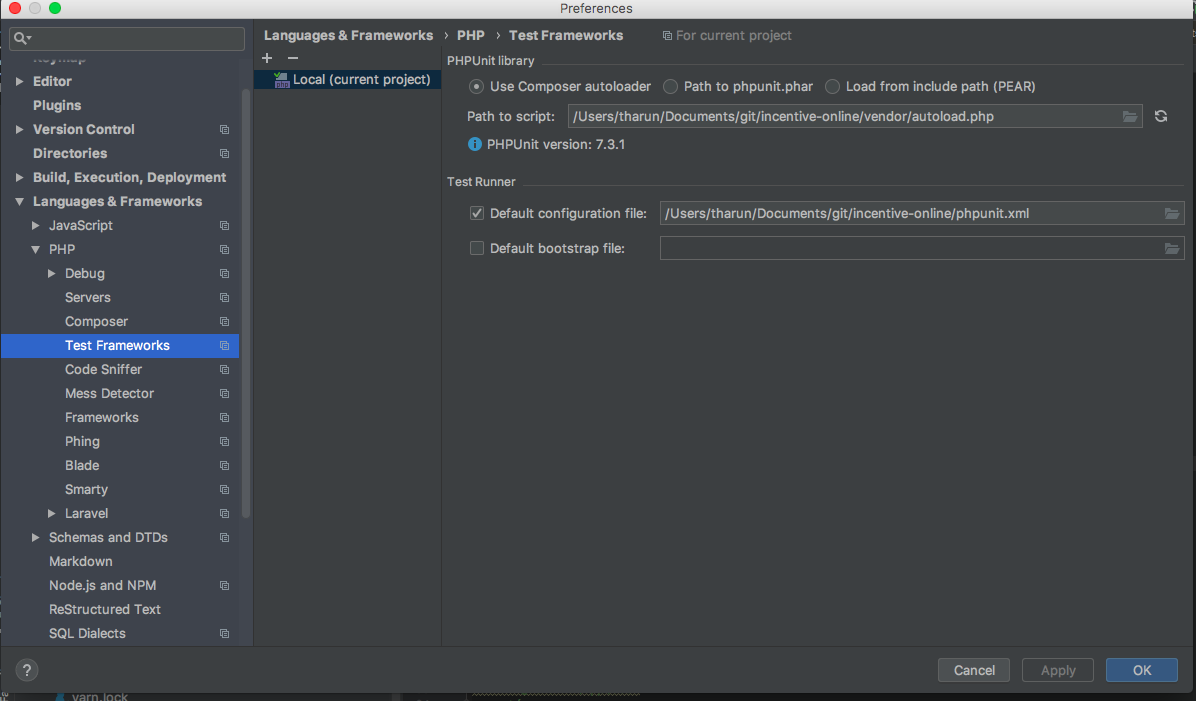
had the same issue. solved it by ensuring 2 things
- xdebug is installed and loaded in phpstorm.
2.loading[Pointing] phpunil.xml in php storm

 tharun15
on 23 Aug 2018
tharun15
on 23 Aug 2018
Related issues
 marcioAlmada
·
41Comments
sebastianbergmann
·
57Comments
marcioAlmada
·
41Comments
sebastianbergmann
·
57Comments
 kubawerlos
·
19Comments
sebastianbergmann
·
33Comments
kubawerlos
·
19Comments
sebastianbergmann
·
33Comments
 vicb
·
21Comments
vicb
·
21Comments
Most helpful comment
had the same issue. solved it by ensuring 2 things
2.loading[Pointing] phpunil.xml in php storm