Phpspreadsheet: PHP 7.1: Numbers shown with scientific notation even if explicitely formatted as text
This is:
- [x] a bug report
With PHP 7.1, if I put a number in a cell and set explicitely a text format, it's shown with scientific notation in Excel, instead of showing the number "as is".
Maybe related with this BC break introduced in 7.1?
https://secure.php.net/manual/fr/migration71.incompatible.php#migration71.incompatible.numerical-strings-scientific-notation
It's worth to know that it works perfectly fine in LibreOffice 5.4!
What is the expected behavior?
Numbers shown as real text (ex : 150000197301), because I explicitely specify a text format style.
What is the current behavior?
Numbers shown with scientific notation (ex: 1,5E+11).
What are the steps to reproduce?
The following code works as expected with PHP 5.6 (value shown = 150000197301), but fails with PHP 7.1 (value shown = 1,5E+11).
<?php
require 'vendor/autoload.php';
$data = array('foo' => '150000197301');
$spreadsheet = new \PhpOffice\PhpSpreadsheet\Spreadsheet();
$sheet = $spreadsheet->getSheet(0);
$sheet->fromArray($data, null, 'A1');
$sheet->getStyle('A1:A1')
    ->getNumberFormat()
    ->setFormatCode(\PhpOffice\PhpSpreadsheet\Style\NumberFormat::FORMAT_TEXT);
$writer = new \PhpOffice\PhpSpreadsheet\Writer\Xlsx($spreadsheet);
$filename = 'test_' . PHP_VERSION . '.xlsx';
$writer->save($filename);
Which versions of PhpSpreadsheet and PHP are affected?
PhpSpreasheet 1.1.0
PHP 7.1.2
Tested on Windows french and Excel 2016 french.
 oveach
All 23 comments
I actually cannot reproduce that on PHP 7.1 nor 7.2. I'll close it for now. But feel free to comment further if you find out how to reproduce systematically.
 PowerKiKi
on 11 Feb 2018
PowerKiKi
on 11 Feb 2018
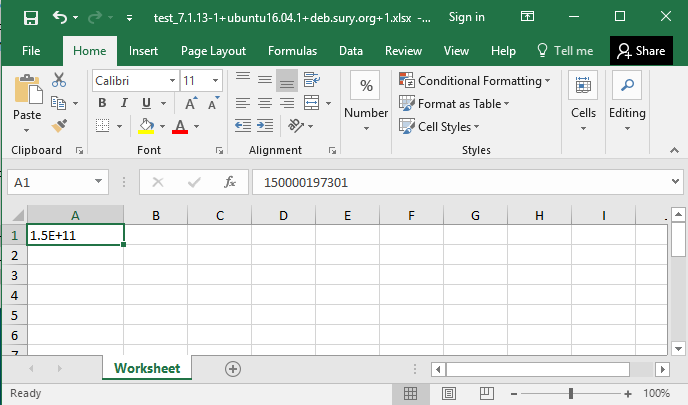
The screenshot you posted shows that you actually reproduced the problem!
This is how it looks in Excel with PHP 5.6 :

You see the difference?
The problem is not the content of the cell itself, but how it's displayed in the table.
oveach
on 12 Feb 2018
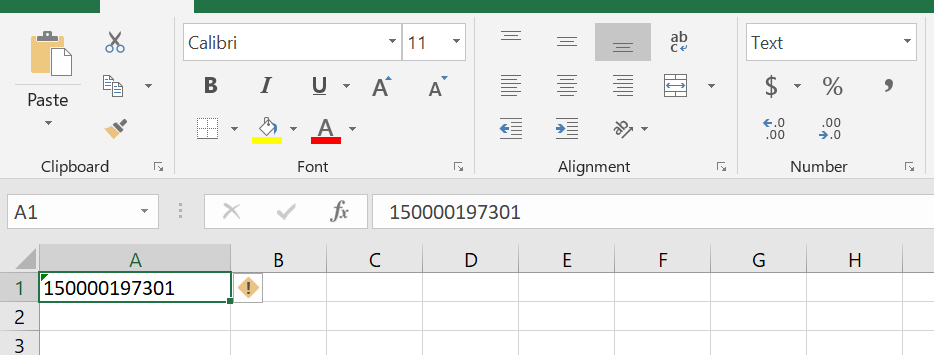
Still cannot reproduce. Here is a comparison of PHP 5.6 and PHP 7.1 side by side. They show exactly the same way:

This also correspond to Excel 2016 behavior if I input 150000197301 into the formula bar for cell A1 manually, and then change formatting to "text".
PowerKiKi
on 25 Feb 2018
I have seen this problem described as resulting from 32-bit vs 64-bit php. I am using 64-bit php.
The problem is that the number is displayed as "1.5E+11" in the table cell A1.

The objective is to have the the values displayed as "1500000197301" in the table cell A1.
When the cell format is set to "text" it should display the value as "1500000197301" in table cell A1.
 username31480
on 12 Feb 2019
username31480
on 12 Feb 2019
Also same problem here! It seams to be impossible to save a number as text. The only workaround for me was to us a formula as cell value e.g. =TEXT(15343242342, "0")
 stefanhuber
on 22 Feb 2019
stefanhuber
on 22 Feb 2019
Add one white space to your data
$data = array('foo' => '150000197301 ');
 webmindstech
on 20 Mar 2019
webmindstech
on 20 Mar 2019
I was having the same issue with an XLSX export/import code I was writing. I needed:
- Very large values (like SSN's) to not show up in scientific notation.
- To not modify the cell value in any way, as it will need to be read by importing code.
- Be able to modify the value of the cell in Excel (or other spreadsheet programs) and not disturb the text formatting.
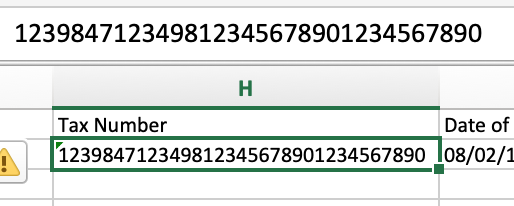
I've tried stefanhuber's solution and, while the cells looked okay, editing yielded trouble:
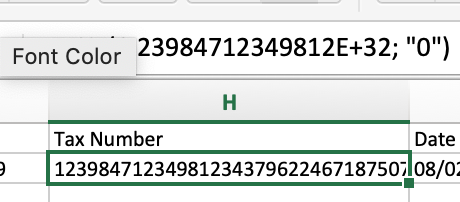
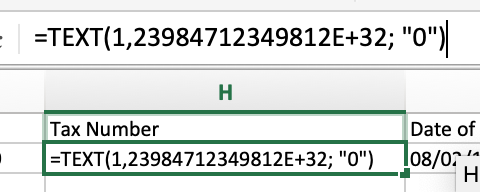
As you can see, clicking on the field to edit it reveals the formula.
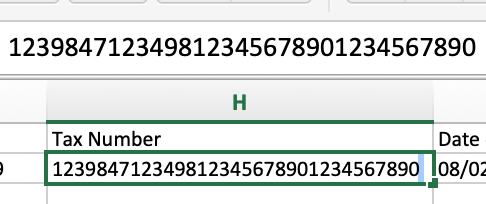
webmindstech's solution was more subtle, but you can still see the space when trying to edit. It's hard to see, so I've highlighted it in the second screenshot:
I dug around in the PHPSpreadsheet documentation and managed to cobble this together:
// @Note: You don't need to format the cell as text if you're
// only interested in displaying it correctly to the user, but
// the cell value will revert to scientific notation as soon as
// the user edits the cell in Excel, unless you've set the
// formatting.
$worksheet
->getStyleByColumnAndRow($columnIndex, $rowIndex)
->getNumberFormat()
->setFormatCode(NumberFormat::FORMAT_TEXT)
;
$value = $worksheet->getCellByColumnAndRow($columnIndex, $rowIndex);
// @Note: This is the actual bit of magic, which allows you to
// force the cell value type. If you don't explicitly set the type,
// PHPSpreadsheet tries to implicitly convert it, which is where
// we run into trouble.
$worksheet->getCellByColumnAndRow($columnIndex, $rowIndex)->setValueExplicit(
$value,
\PhpOffice\PhpSpreadsheet\Cell\DataType::TYPE_STRING
);
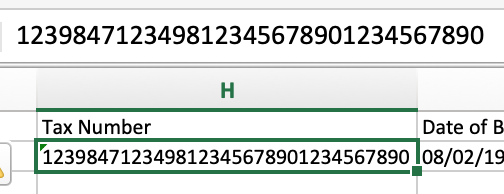
Here's the results of doing things this way:
- Large numbers display correctly as text:
- No unexpected surprises when editing the cell, and the formatting is retained after edits:

 Yavor-Ivanov
on 26 Mar 2019
Yavor-Ivanov
on 26 Mar 2019
None of these solutions worked for me. However I resolved the problem by using "#" instead of NumberFormat::FORMAT_TEXT, which is essentially custom formatting.
$worksheet
    ->getStyleByColumnAndRow($columnIndex, $rowIndex)
    ->getNumberFormat()
    ->setFormatCode('#')
;
 epedder
on 28 Jun 2019
epedder
on 28 Jun 2019
If you don't want a large number to be dispayed using scientific format, then you don't store it as a number, but as text, using setCellValueExplicit(). The value must be __stored__ as a string to avoid loss of precision. Simply specifying a number format mask of text will not change the underlying value, number format is for display purposes.
 MarkBaker
on 1 Jul 2019
MarkBaker
on 1 Jul 2019
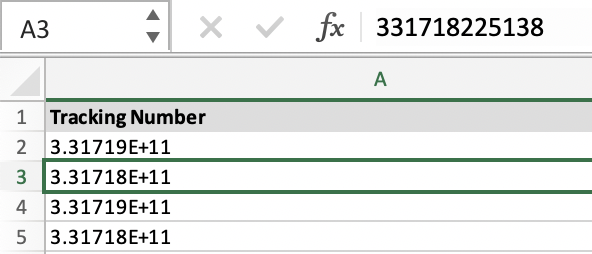
@MarkBaker you are right that the value should be stored as a string. However, Excel will display strings in scientific notation even if you set the display format to be text.
$cell->setDataType(DataType::TYPE_STRING);
$style = $this->sheet->getStyleByColumnAndRow($columnIndex, $this->rowIndex);
$style->getNumberFormat()->setFormatCode(NumberFormat::FORMAT_TEXT);
Results in
While
$cell->setDataType(DataType::TYPE_STRING);
$style = $this->sheet->getStyleByColumnAndRow($columnIndex, $this->rowIndex);
$style->getNumberFormat()->setFormatCode('#');
$style->getAlignment()->setHorizontal(Alignment::HORIZONTAL_LEFT);
Results in

epedder
on 2 Jul 2019
@MarkBaker you are right that the value should be stored as a string. However, Excel will display strings in scientific notation even if you set the display format to be text.
$cell->setDataType(DataType::TYPE_STRING);
$style = $this->sheet->getStyleByColumnAndRow($columnIndex, $this->rowIndex);
$style->getNumberFormat()->setFormatCode(NumberFormat::FORMAT_TEXT);
Results in
While
$cell->setDataType(DataType::TYPE_STRING);
$style = $this->sheet->getStyleByColumnAndRow($columnIndex, $this->rowIndex);
$style->getNumberFormat()->setFormatCode('#');
$style->getAlignment()->setHorizontal(Alignment::HORIZONTAL_LEFT);
Results in
This solves my problem successfully! Thank you!
 Jedliu
on 7 Jul 2019
Jedliu
on 7 Jul 2019
$cell->setDataType(DataType::TYPE_STRING);
Does not automagically convert numeric values that have already been loaded into a cell to a string.
If you want to store a numeric value as a string, then use setCellValueExplicit() instead of setCellValue().
MarkBaker
on 8 Jul 2019
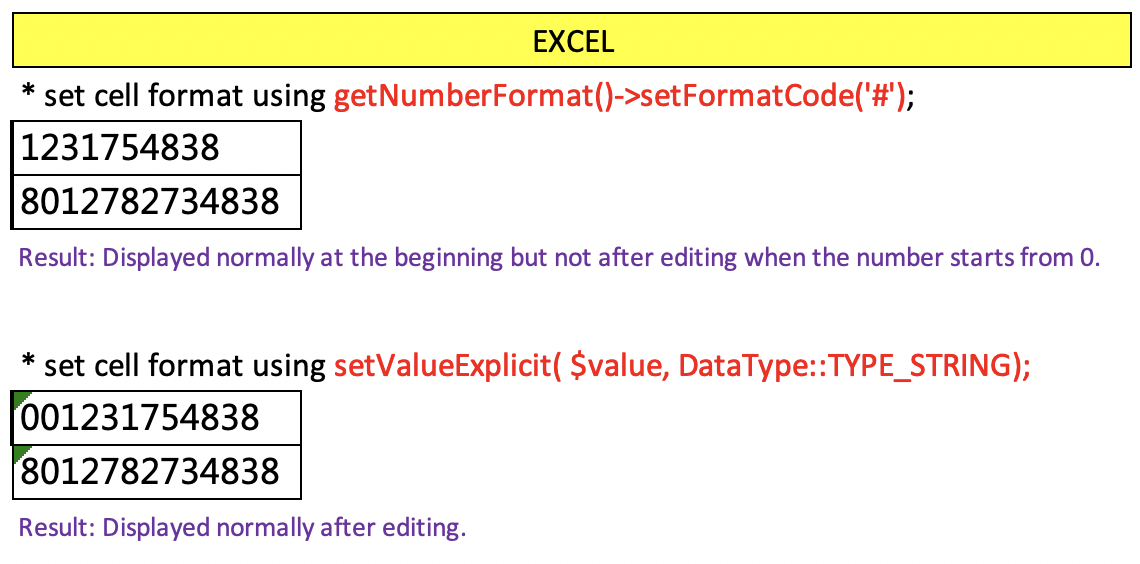
setValueExplicit( $value, \PhpOffice\PhpSpreadsheet\Cell\DataType::TYPE_STRING);
This works but not always. I did the test and found that when you opened the excel by Numbers in MacOS it was displayed correctly but it's still in scientific notation in Excel (both MacOS and Windows).
getNumberFormat()->setFormatCode('#');
This works both for Numbers and Excel. However, if the number starts with 0 and edit the value when you double click it, the numbers will be shown without 0. That's really wired.
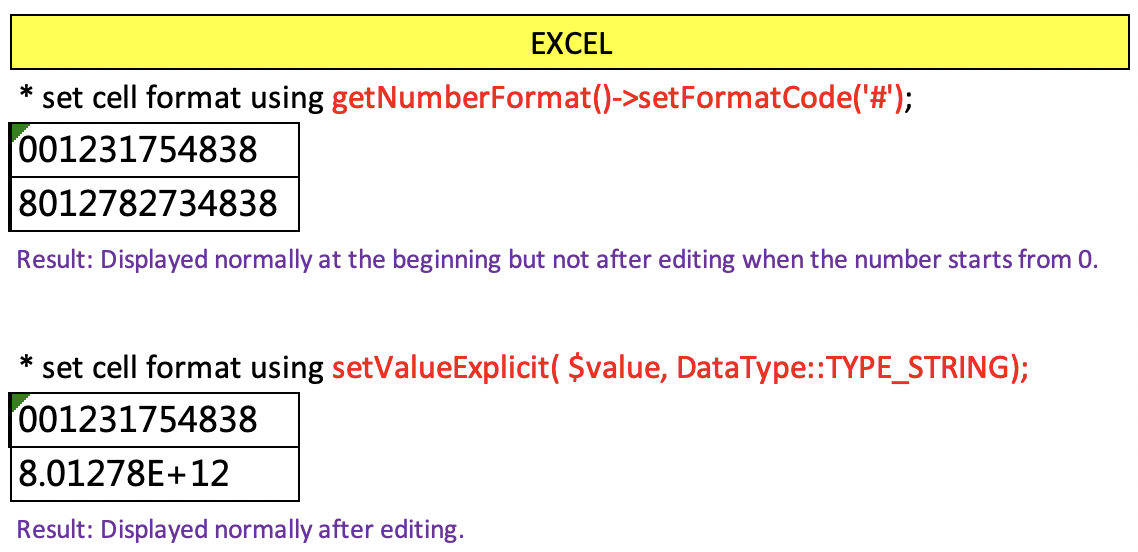
After double click to edit:
Jedliu
on 9 Jul 2019
Its 2019 almost 2020! Why this issue still exists?
 prinze77
on 24 Jul 2019
prinze77
on 24 Jul 2019
Its 2019 almost 2020! Why this issue still exists?
because Excel sucks and that's what you get when you want to force something which hasn't designed to be a database to be a database
 gianlucag
on 4 Aug 2019
gianlucag
on 4 Aug 2019
Its 2019 almost 2020! Why this issue still exists?
because Excel sucks and that's what you get when you want to force something which hasn't designed to be a database to be a database
It's not because of excel. Before I copy data and paste to excel, I choose all cells and format them to text. After pasting, everything work perfect. Problem is at the framework, not excel,
 thanhkhanhcntt
on 4 Aug 2019
thanhkhanhcntt
on 4 Aug 2019
We tried the above but for cell values starting from 1-9 are getting a leading '
How do we get an excel without starting '
 supportreq
on 5 Sep 2019
supportreq
on 5 Sep 2019
One possible solution is to use RichText (use PhpOffice\PhpSpreadsheet\RichText\RichText)
Example:
$val = 896503031905050127; // Any long numerical text.

$rt = new RichText();
$rt->createText($val);

// Adding the above to a cell
// $col = 'A'; $row = 2;
$sheet->setCellValue($col.$row, $rt);
When the sheet is opened in Excel, the value is displayed as text. Not truncated or sci. notation.
If you edit the cell in Excel, _it will re-format to sci. notation_. Solution:
When you create the Excel template XLSX, format entire columns as Text. Then populate the cells using the above code. Now you can edit the values and the values will stay as text.
Tested on:
Excel for Mac, version 16.33 (20011301).
PhpOffice\PhpSpreadsheet\Spreadsheet, version [1.8.2] - 2019-07-08
[Edit]
Server info: Ubuntu 16.04, PHP 7.0.33
You can wrap the $rt part into a small function.
 georgetony
on 21 Jan 2020
georgetony
on 21 Jan 2020
Why has this issue not been reopened? 2 years on and people are still having this issue!
 delboy1978uk
on 27 Feb 2020
delboy1978uk
on 27 Feb 2020
@georgetony thanks for your suggestion, it helped resolve my issue, but I still consider it to be a cheap hack! This issue should be reopened IMHO
delboy1978uk
on 27 Feb 2020
Agree with @delboy1978uk, issue still exists - unsure why this isn't considered a bug. Setting formatting to '@' does not work. For those interested, it'll work if you set formatting to '#'.
In our case we were using PhpSpreadsheet to construct a CSV file from array, so explicitly setting every single field wasn't ideal.
 myzticman
on 24 Jul 2020
myzticman
on 24 Jul 2020
This is still an issue. It's unfortunate that this has not only failed to be repaired but has been outright neglected. Thankfully people in this thread found some useful workarounds.
 titansoftime
on 8 Feb 2021
titansoftime
on 8 Feb 2021
One possible solution is to use RichText (use PhpOffice\PhpSpreadsheet\RichText\RichText)
Thank you @georgetony georgetony . Your solution works for me (March 2021).
Like you said, using RichText solve the first issue (view properly), then combining with this solved the edit issue:
$sheet->getStyle('A1')->getNumberFormat()->setFormatCode('@')
 coisox
on 3 Mar 2021
coisox
on 3 Mar 2021
Related issues
 alexbog8
·
4Comments
PowerKiKi
·
5Comments
alexbog8
·
4Comments
PowerKiKi
·
5Comments
 ariefbayu
·
3Comments
ariefbayu
·
3Comments
 leandrogm
·
5Comments
leandrogm
·
5Comments
 ionesculiviucristian
·
4Comments
ionesculiviucristian
·
4Comments
Most helpful comment
None of these solutions worked for me. However I resolved the problem by using "#" instead of NumberFormat::FORMAT_TEXT, which is essentially custom formatting.