Phpservermon: Feature request: Import / Export from / to CSV, JSON
Would make it easier if we could import / export to or from a csv or json
 nitrocode
All 10 comments
I concur that, easier to add large amount of servers
 brumle80
on 24 Feb 2016
brumle80
on 24 Feb 2016
Yes I duplicated issue https://github.com/phpservermon/phpservermon/issues/677 my bad
 leshacat
on 15 Nov 2018
leshacat
on 15 Nov 2018
Great idea. What data do you want to see exported? Exporting all of the updates would make for a pretty big file.
 TimZ99
on 22 Nov 2018
TimZ99
on 22 Nov 2018
@TimZ99 it would be nice to have backup/restore where it just gives a .tar.gz file
As for import/export options, export to CSV for example, just all the settings data or notification/email logs (not the update logs)
server 1, mdomain.com,80,service,1,true,true
server 2, mdomain2.com,80,service,1,true,true
server 3, mdomain3.com,80,service,1,true,true
and
Mogwaicoin (45.77.205.34:20000),Server 'Mogwaicoin' is RUNNING: ip=45.77.205.34, port=20000, it was down for 1 minute,11/21/18 05:07:01
Rapturecoin (45.77.205.34:20020),Server 'Rapturecoin' is DOWN: ip=45.77.205.34, port=20020, it was down for 1 minute,11/21/18 05:07:01
Securetag (45.77.205.34:20030),Server 'Securetag' is DOWN: ip=45.77.205.34, port=20030, it was down for 1 minute,11/21/18 05:07:01
For above to work you would have to change delimiter, or remove all ',' from the error messages.
Or you could read the log data, then parse/export it as such:
Mogwaicoin,45.77.205.34,20000,RUNNING,down for 1 minute,11/21/18 05:07:01
Ravencoin,45.77.205.34,20020,RUNNING,down for 9 minute,11/21/18 05:07:01
Securetag,45.77.205.34,20030,RUNNING,down for 5 minute,11/21/18 05:07:01
[EDITED]
leshacat
on 23 Nov 2018
@TimZ99 @leshacat yes I like this format because that it something techops can easily configure in a google spreadsheet and we could automate downloading the spreadsheet as a csv and importing into phpservermon
nitrocode
on 23 Nov 2018
We need more brains for more input here LOl ":P
leshacat
on 23 Nov 2018
I verry interesting by export prob data, not only uptime, but also Latency.
G.
 gmoulard
on 9 Jan 2019
gmoulard
on 9 Jan 2019
Hi
That would be indeed a good feature to have.
I have hundreds of websites to monitor and adding them manually is painful :)
 Yacine-krk
on 2 May 2020
Yacine-krk
on 2 May 2020
Referencing import:
As far as I see, the import may not be too difficult, as the relating "psm_servers" table has already easy related colums. Maybe you simply want to have a look if import could not be done in phpmyadmin or so, filling out these columns.
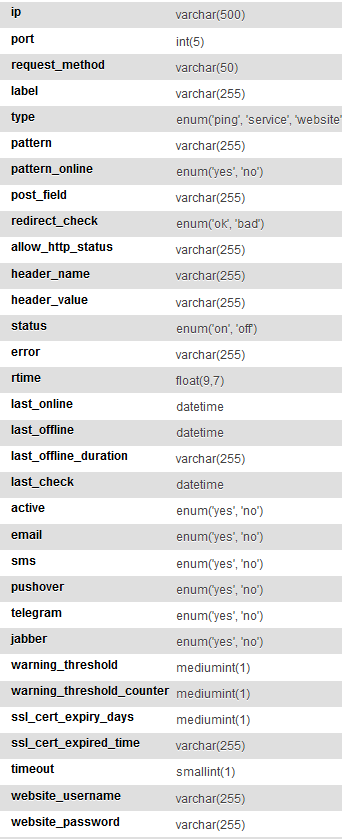
Mass-adding users related to the servers may get much more difficult, as those are represented by a single table reating only server id to user id ... but if there is only one single user, a simple sql statement may help on this as well - it creates a entry for every server for a single user with 1 in this example (it ignores possible exiting entries so only adds new created ones):
INSERT IGNORE INTO psm_users_servers SELECT 1,server_id FROM psm_servers
 wienfuchs
on 2 May 2020
wienfuchs
on 2 May 2020
Thanks a lot for you answer.
That's already what I did. And even for multiple users, as the ID is incremental, it can be done with SQL.
Yacine-krk
on 2 May 2020
Related issues
 gaia
·
3Comments
gaia
·
3Comments
 ptrj
·
3Comments
ptrj
·
3Comments
 Engineer-of-Stuff
·
10Comments
Engineer-of-Stuff
·
10Comments
 djexthreme
·
4Comments
djexthreme
·
4Comments
 dmonaay
·
7Comments
dmonaay
·
7Comments
Most helpful comment
I concur that, easier to add large amount of servers