Phpinspectionsea: Global Yoda/Regular switch
Is it possible to set a global setting for Yoda vs Regular in the main settings for the plugin (PhpStorm settings > Other settings) that will change all of the inspections options together?
I've been using PHP Inspections EA for over month now, and really like it. The only small annoyance I had was that applying automatic fixes were done with Yoda-style conditions, but I'd do the fix and then swap the condition to regular style.
It wasn't until today (after doing that process 100+ times) that I discovered that those inspections have an option for changing from "Yoda fix style" to "Regular fix style". I'd rather not have to scan through every inspection to change them all to Regular one-by-one.
If there had been a global setting I'd have found it on the first day of using the plugin.
 fraserredmond
All 18 comments
Yeah, it is a problem. I was going to see this at the end of last week, but I could not. Another option is use the own Yoda settings to make it work, instead of create an option on Other settings, but I will work on that and I will keep updating this issue.
 rentalhost
on 28 Jun 2018
rentalhost
on 28 Jun 2018
Thanks. Using the "own Yoda settings" would let you change them all... but it would probably be even harder to find.
Also, I don't know if you want it as a separate issue, but it turns out the inspection that I wanted it for the most doesn't have the Yoda/Regular option anyway. It's:
'substr(...)' could be replaced with 'strpos(...)'
fraserredmond
on 28 Jun 2018
@kalessil what do you prefer? The Yoda as "other settings" is reasonable, but it still needs an inspection "is that". Will be a bit hacky we enable the "Yoda inspection" and use the "other settings" to configure that, not does?
rentalhost
on 29 Jun 2018
Yep, setting under "File | Settings | Other Settings | Php Inspections (EA Extended)" is preferred. I'll integrate the settings into "Yoda inspection" myself, it's tricky as you mentioned.
But feel free to pickup other inspections =)
 kalessil
on 29 Jun 2018
kalessil
on 29 Jun 2018
Will be a bit hacky we enable the "Yoda inspection" and use the "other settings" to configure that, not does?
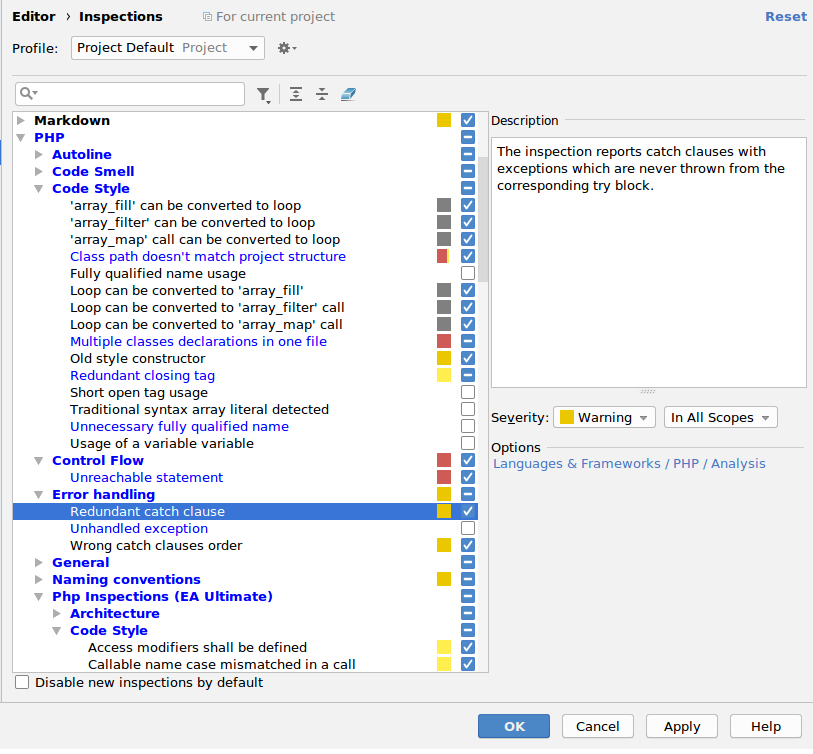
Some internal phpstorm inspections use this approach.
 funivan
on 1 Jul 2018
funivan
on 1 Jul 2018
Thanks @funivan! I had thought of that. But what about allowing the option to be configured directly in both locations? I say, when I change there, it changes in the "others settings", and vice versa.
rentalhost
on 2 Jul 2018
JetBrains team has recommended to detach setting as we did originally for privacy. They also recommended to not depend on their settings.
kalessil
on 2 Jul 2018
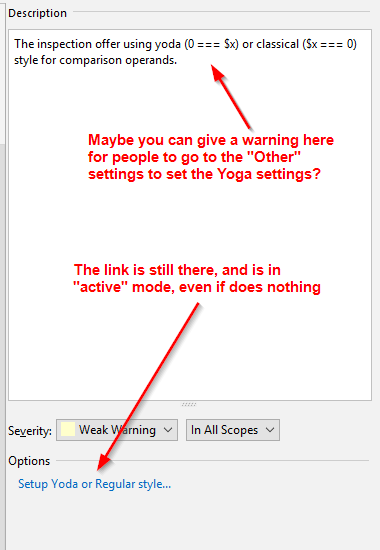
I was going to file an issue, after my Yoda settings didn't work anymore after today's update, and actually did the opposite, i.e. converted to the "regular" style , and I couldn't understand why I can't switch to Yoda, even if the link is there as before.
But after reading it I understand what is going on...
Suggestion: for people like me who are not aware of the change, please remove the link "to switch" in the Yoda settings, and place info to go to the general settings.
Personally, I think, it's the wrong decision on part of the PhpStorm team, because the "user friendly" approach is to change the settings at the location, instead of being forced to search for them all over the place. Lack of consistency is always counter-productive :(
 mambax7
on 17 Jul 2018
mambax7
on 17 Jul 2018
@mambax7, if I understand correctly you are suggesting to remove the link and update the inspection description. Did I get it correct?
kalessil
on 21 Jul 2018
Since the link doesn't work, this probably would be the best way.
Unless you can convince JetBrains to keep it as it used to be, i.e. that we can change the settings right here.
mambax7
on 21 Jul 2018
Ouch, it did work when I merged the PR. What's the IDE version?
kalessil
on 21 Jul 2018
The latest EAP
Build #PS-182.3684.40, built on July 17, 2018
mambax7
on 21 Jul 2018
Same version here, and it works on click on link as expected (video). Do you receives some exception error on click on link, maybe?
About keep configuration on inspection as generally is, the problem is that exists a lot of inspections that depends of that same definition, which is better move it to a global scope instead of a local one which make it confuses (for instance, if I disable the inspection, but prefer to autofix to Yoda style).
And about JetBrains, there are some inspections that links to another places too. It is not an exclusive decision from us. For instance, CSS / Code quality tools / Stylelint will links to another place. Including our code is based on the JetBrains code itself, which makes it strange that it does not work for you.
rentalhost
on 21 Jul 2018
Sometimes there might be a difference based on OS. I'm on Windows 10, and it doesn't work. Unless there is a conflict with some other plugin that I have?
mambax7
on 21 Jul 2018
It should be investigated, but I am on Windows 10 too and works for me. It is very strange. Could you try to check if the CSS / Code quality tools / Stylelint link does works for you?
rentalhost
on 22 Jul 2018
I'll take a deeper look into this issues after vacation.
kalessil
on 26 Jul 2018
@rentalhost : while I remember, folks from Twitter really like the new setting and saying "Thank you!"
kalessil
on 28 Jul 2018
Having trouble following this issue, but just to be clear, if Yoda is disabled, I should get conditions like this, no?
            strpos(
                $oProcess->getOutput(),
                "syntax is incorrect") !== false
Right now, whether Yoda is checked or not, I get this, which I do not like:
            false !== strpos(
                $oProcess->getOutput(),
                "syntax is incorrect")
 laurin1
on 29 Jul 2019
laurin1
on 29 Jul 2019
Related issues
 niconoe-
·
23Comments
kalessil
·
26Comments
niconoe-
·
23Comments
kalessil
·
26Comments
 nightlinus
·
19Comments
nightlinus
·
19Comments
 BenMorel
·
24Comments
BenMorel
·
24Comments
 orklah
·
26Comments
orklah
·
26Comments