Phpinspectionsea: _<magic method> - missing underscore
 kalessil
All 20 comments
I am interested in contributing this feature. I think it is feasible for a beginner.
 zf2timo
on 15 Nov 2017
zf2timo
on 15 Nov 2017
Hi Timo, why not =)
1) Dev-environment: https://github.com/kalessil/phpinspectionsea/blob/master/docs/DEVELOPERS.md
2) Target code: https://github.com/kalessil/phpinspectionsea/tree/master/src/main/java/com/kalessil/phpStorm/phpInspectionsEA/inspectors/magicMethods (please create a separate strategy-class for the feature)
kalessil
on 15 Nov 2017
Thank you. That helps a lot.
I will have a detailed look this evening.
zf2timo
on 15 Nov 2017
@kalessil
When I executed the Unit Test, all tests are failing.
I think It is beacause I am using the JetBrains Toolbox
Don't use the suggested directory containing app path since it does not contain all needed dependencies.
But how I can find the correct directory?
zf2timo
on 15 Nov 2017
How does failures message look like?
kalessil
on 16 Nov 2017
As an Example from the MagicMethodsValidityInspectorTest::testIfFindsInconsistentGetsSetsPatterns test
java.lang.NullPointerException
at com.intellij.openapi.application.impl.ApplicationImpl.isDispatchThread(ApplicationImpl.java:376)
at com.intellij.testFramework.EdtTestUtilKt.runInEdtAndWait(EdtTestUtil.kt:38)
at com.intellij.testFramework.EdtTestUtil$Companion.runInEdtAndWait(EdtTestUtil.kt:29)
at com.intellij.testFramework.EdtTestUtil.runInEdtAndWait(EdtTestUtil.kt)
at com.intellij.testFramework.UsefulTestCase.runBare(UsefulTestCase.java:413)
at junit.framework.TestResult$1.protect(TestResult.java:122)
at junit.framework.TestResult.runProtected(TestResult.java:142)
at junit.framework.TestResult.run(TestResult.java:125)
at junit.framework.TestCase.run(TestCase.java:129)
at junit.framework.TestSuite.runTest(TestSuite.java:252)
at junit.framework.TestSuite.run(TestSuite.java:247)
at org.junit.internal.runners.JUnit38ClassRunner.run(JUnit38ClassRunner.java:86)
at org.junit.runners.Suite.runChild(Suite.java:128)
at org.junit.runners.Suite.runChild(Suite.java:27)
at org.junit.runners.ParentRunner$3.run(ParentRunner.java:290)
at org.junit.runners.ParentRunner$1.schedule(ParentRunner.java:71)
at org.junit.runners.ParentRunner.runChildren(ParentRunner.java:288)
at org.junit.runners.ParentRunner.access$000(ParentRunner.java:58)
at org.junit.runners.ParentRunner$2.evaluate(ParentRunner.java:268)
at org.junit.runners.ParentRunner.run(ParentRunner.java:363)
at org.junit.runner.JUnitCore.run(JUnitCore.java:137)
at com.intellij.junit4.JUnit4IdeaTestRunner.startRunnerWithArgs(JUnit4IdeaTestRunner.java:68)
at com.intellij.rt.execution.junit.IdeaTestRunner$Repeater.startRunnerWithArgs(IdeaTestRunner.java:47)
at com.intellij.rt.execution.junit.JUnitStarter.prepareStreamsAndStart(JUnitStarter.java:242)
at com.intellij.rt.execution.junit.JUnitStarter.main(JUnitStarter.java:70)
My configuration looks like this
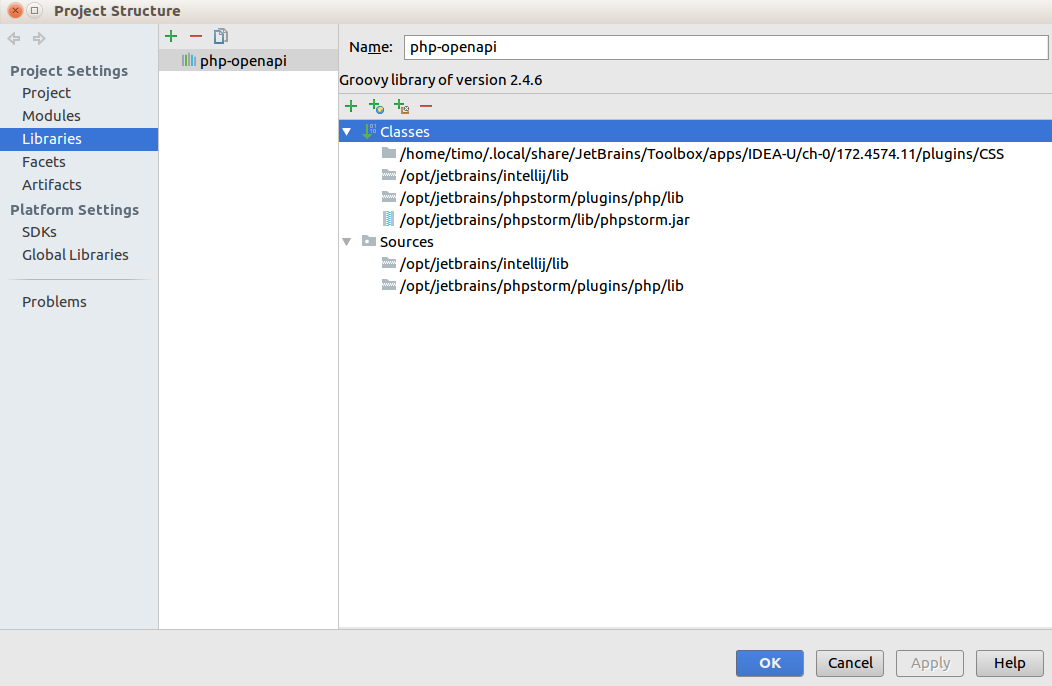
zf2timo
on 16 Nov 2017
That's something new, trying to reproduce.
kalessil
on 16 Nov 2017
Manage to reproduce, seems like project SDK is not configured properly. Investigating root-cause.
kalessil
on 16 Nov 2017
Here are my configurations for the Project SDK

zf2timo
on 17 Nov 2017
@funivan @rentalhost : I got stuck, any ideas what needs to be configured additionally?
kalessil
on 17 Nov 2017
Maybe is something wrong whit my java environment?
$ java -version
openjdk version "1.8.0_151"
OpenJDK Runtime Environment (build 1.8.0_151-8u151-b12-0ubuntu0.16.04.2-b12)
OpenJDK 64-Bit Server VM (build 25.151-b12, mixed mode)
$ javac -version
Is the openJDK suitable to for this project?
zf2timo
on 18 Nov 2017
Nope, you should be able to build the plugin. Problem is in running tests only (that's more about how IDE loading dependent plugins).
E.g. currently my test are broken as well =) but I build plugin and install it in PhpStorm or push to repo and travis will run tests for me.
Question is what am I missing ...
kalessil
on 18 Nov 2017
@kalessil it is hard to believe but my tests are broken too. We should find some JB documentation about testing and plugin loading.
@zf2timo try to just write the implementation. Check it in old manner (run plugin write some code and see what happens) Then you can add tests and push it to Github. Travis will do the rest.
P.S. Maybe we should involve someone from JB team? )
 funivan
on 18 Nov 2017
funivan
on 18 Nov 2017
I'm checking docs ATM, hope to find a clue how to make tests running.
@zf2timo: sorry for this mess, it's not how we normally do things here =)
@funivan: I'll ping guys from JB once documentation checked =)
kalessil
on 18 Nov 2017
I create a PR with my current implementation.
@funivan Is there a guide, how to test the plugin in "the old manner"? I am not sure how the plugin can be execute outside of a PHP Project.
zf2timo
on 19 Nov 2017
Good news: all works (I had to clean up my old code and decided to add a QF for the new strategy).
@zf2timo : I pushed a fresh binary, can you try it out, please?
kalessil
on 20 Nov 2017
I'm able to run tests on 2017.2 only, this is SDK confiuration:

Will try to repair dev-env on the second laptop as well.
kalessil
on 21 Nov 2017
Thank you @kalessil. I will check my environment this evening.
zf2timo
on 22 Nov 2017
@kalessil Sorry for my delay. Had a few busy days.
Where can I download the binary and how it can be installed in PHPStorm?
zf2timo
on 28 Nov 2017
No problems =) You can take the binary from master branch (I just pushed a fresh build)
kalessil
on 28 Nov 2017
Related issues
 veewee
·
37Comments
veewee
·
37Comments
 orklah
·
26Comments
orklah
·
26Comments
 niconoe-
·
23Comments
kalessil
·
26Comments
niconoe-
·
23Comments
kalessil
·
26Comments
 rob006
·
15Comments
rob006
·
15Comments
Most helpful comment
I am interested in contributing this feature. I think it is feasible for a beginner.