Php: PDO extension will not compile on 7.0.29
docker-php-ext-install pdo on 7.0.29 will result in an error during make, however 7.0.28 compiles
Resulting error is:
(cd /usr/src/php/ext/pdo; re2c --no-generation-date -o ext/pdo/pdo_sql_parser.c ext/pdo/pdo_sql_parser.re)
re2c: error: cannot open ext/pdo/pdo_sql_parser.re
Makefile:201: recipe for target '/usr/src/php/ext/pdo/pdo_sql_parser.c' failed
make: *** [/usr/src/php/ext/pdo/pdo_sql_parser.c] Error 1
 Sharsie
All 17 comments
+1
 naucon
on 6 Apr 2018
naucon
on 6 Apr 2018
+1
 svs-valiton
on 6 Apr 2018
svs-valiton
on 6 Apr 2018
Same for me, since yesterday makefile is unable to compile with the php:7.0 docker image.
 svenbrandenburger
on 6 Apr 2018
svenbrandenburger
on 6 Apr 2018
Same here. The first time I noticed it was yesterday, but didn't have enough time to investigate.
Does anyone have an idea of why is this happening?
 elboletaire
on 6 Apr 2018
elboletaire
on 6 Apr 2018
Ok it's directly related to php 7.0.29, using 7.0.28 doesn't show the issue (so I've forced that version in my Dockerfiles).
After seeing this, I guess that this is not a dockerfile issue, but a php one. I've been searching in the php bugs repo and couldn't find an issue about this. Am I missing something? :confused:
elboletaire
on 6 Apr 2018
+1
 giboow
on 6 Apr 2018
giboow
on 6 Apr 2018
Instead of just saying +1 you can use the emoji button to add a :+1: to the post, and then use the subscribe button in the right side to receive notifications about this issue.
Please, stop filling issues with +1 everywhere.
elboletaire
on 6 Apr 2018
Honestly I can't really tell what happened between these two versions, I compared the sources for 7.0.29 and 7.0.28 and cannot find anything that would break the pdo installation, but then again, I'm not much of a makefile master, it could just be bad paths or something
Sharsie
on 6 Apr 2018
I am quoting tianon's solution to this problem in #618 because his solution worked for me.
@yosifkit pointed out to me that this isn't actually necessary -- PDO is included in the images already, so you should be able to simply do pdo_pgsql (without pdo) and it should work properly. 👍
Basically pdo is now included in some images, e.g php:7.0 and must not be added again. Don't use docker-php-ext-install pdo and you should be fine.
svenbrandenburger
on 6 Apr 2018
Thanks @svenbrandenburger I'll give it a try!
elboletaire
on 6 Apr 2018
Duplicate of #618.
Also pdo has been already included in the 7.0 image since php:7.0.0.
$ docker pull php:7.0.0
7.0.0: Pulling from library/php
d4bce7fd68df: Pull complete
a3ed95caeb02: Pull complete
77a07a807b0b: Pull complete
8e9dd06f34b8: Pull complete
bdeb40d51bd7: Pull complete
101dc323852a: Pull complete
ca509a84d8e9: Pull complete
5ee663921daf: Pull complete
Digest: sha256:2332e573611d394e1ff5755a7cfd93bdf4d926ad85330a2ae87bed3d1ecb36ea
Status: Downloaded newer image for php:7.0.0
$ docker run -it --rm php:7.0.0 php -m | grep -i pdo
PDO
pdo_sqlite
To speed up your FROM php builds in the future, it might be better to see what modules are already included before compiling locally with docker-php-ext-install.
 yosifkit
on 6 Apr 2018
yosifkit
on 6 Apr 2018
Hi @yosifkit
The PDO extension is already installed in the php:7.0-apache, but it's not enabled. /usr/local/etc/php/conf.d/docker-php-ext-pdo.ini folder not exist that make a symfony issue :
An exception occured in driver: could not find driver pdo
 BilelKrichen
on 9 Apr 2018
BilelKrichen
on 9 Apr 2018
Ok, taken into account, I thought it strange when it worked without instaling it, but maybe it would be a good idea to fail the install script with a different error message, when the extension is already installed, rather than letting the install script fail on compilation error
@BilelKrichen since the extension is installed, we should use docker-php-ext-enable to enable the PDO extension.
However a note somewhere would be very helpful to indicate this.
Sharsie
on 9 Apr 2018
@Sharsie
i use the command docker-php-ext-enable pdo but an issue occured.
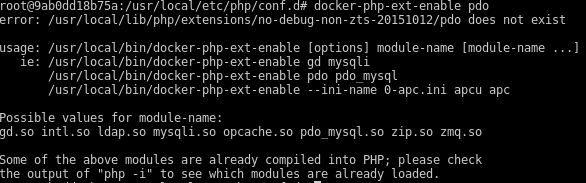
BilelKrichen
on 9 Apr 2018
@BilelKrichen
Ok that seems to be a mistake on my part, as @yosifkit mentioned the PDO is indeed already loaded, you might be missing the driver which symfony uses, that could be pdo_pgsql, pdo_mysql or whatever else is configured. Try enabling the one you have configured in symfony and see if this fixes your problem.
Sharsie
on 9 Apr 2018
thanks @Sharsie for the response, when i add docker-php-ext-pdo.ini file contain extension=pdo.so the issue of symfony resolved, but i want to be added automatically
BilelKrichen
on 9 Apr 2018
Thanks, I updated my Dockerfile to the below and mysql was enabled again!
FROM php:7.0-cli-alpine
RUN docker-php-ext-install pdo_mysql
 thomaslorentsen
on 21 Apr 2018
thomaslorentsen
on 21 Apr 2018
Related issues
 ephrin
·
25Comments
ephrin
·
25Comments
 SinErgy84
·
22Comments
SinErgy84
·
22Comments
 AustinMaddox
·
31Comments
AustinMaddox
·
31Comments
 polds
·
21Comments
polds
·
21Comments
 mahnunchik
·
21Comments
mahnunchik
·
21Comments
Most helpful comment
Instead of just saying
+1you can use the emoji button to add a :+1: to the post, and then use thesubscribebutton in the right side to receive notifications about this issue.Please, stop filling issues with
+1everywhere.