Php-webdriver: Fatal error: Uncaught Facebook\WebDriver\Exception\WebDriverCurlException: Curl error thrown for http POST
What are you trying to achieve? (Expected behavior)
Just did a fresh install via composer and running a single line of code to get to a web-site (after setting up the browser), but it returns an error.
Not sure if it's releated to dependencies
What's strange is that when installing it via
php require php-webdriver/webdriver it only created 3 folders (composer, php-webdriver, symfony) and doing composer update does not add any additional folders. I also tried copying over the composer.json and running the "composer install" but this time it setups up a larger amount of files but there's no autoload.php
What do you get instead? (Actual behavior)
Error
Fatal error: Uncaught Facebook\WebDriver\Exception\WebDriverCurlException: Curl error thrown for http POST to /session with params: {"capabilities":{"firstMatch":[{"browserName":"chrome"}]},"desiredCapabilities":{"browserName":"chrome","platform":"ANY"}}
Operation timed out after 30004 milliseconds with 0 bytes received in /Applications/MAMP/htdocs/selenium/vendor/php-webdriver/webdriver/lib/Remote/HttpCommandExecutor.php:331
Stack trace:
#0 /Applications/MAMP/htdocs/selenium/vendor/php-webdriver/webdriver/lib/Remote/RemoteWebDriver.php(136): Facebook\WebDriver\Remote\HttpCommandExecutor->execute(Object(Facebook\WebDriver\Remote\WebDriverCommand))
#1 /Applications/MAMP/htdocs/selenium/scraper.php(23): Facebook\WebDriver\Remote\RemoteWebDriver::create('http://localhos...', Object(Facebook\WebDriver\Remote\DesiredCapabilities))
#2 {main}
  thrown in /Applications/MAMP/htdocs/selenium/vendor/php-webdriver/webdriver/lib/Remote/HttpCommandExecutor.php on line 331
How could the issue be reproduced? (Steps to reproduce)
Installed the dependencies via composer and executed the test script
namespace Facebook\WebDriver;

use Facebook\WebDriver\Remote\DesiredCapabilities;
use Facebook\WebDriver\Remote\RemoteWebDriver;
require_once(__DIR__ . '/vendor/autoload.php');

$host = 'http://localhost:4444/wd/hub';

$driver = RemoteWebDriver::create(
    $host,
    DesiredCapabilities::chrome()
);

$driver->get("http://somesite.com");
Details
- Php-webdriver version: 1.8
- PHP version: 7.1.33
- Selenium server version: selenium-server-standalone-3.141.59.jar
- Operating system: MacOS
- Browser used + version: ChromeDriver 81.0.4044.69
 ildarius
All 11 comments
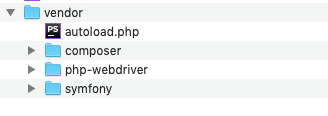
^ that's all the folder in vendor that get setup when running composer install, not sure if it's normal
Also here are contents of composer.json that gets created
{
    "require": {
        "php-webdriver/webdriver": "^1.8"
    }
}
contents of composer.lock
{
    "_readme": [
        "This file locks the dependencies of your project to a known state",
        "Read more about it at https://getcomposer.org/doc/01-basic-usage.md#installing-dependencies",
        "This file is @generated automatically"
    ],
    "content-hash": "406ad7aabd5370ef89d331551c3fa852",
    "packages": [
        {
            "name": "php-webdriver/webdriver",
            "version": "1.8.2",
            "source": {
                "type": "git",
                "url": "https://github.com/php-webdriver/php-webdriver.git",
                "reference": "3308a70be084d6d7fd1ee5787b4c2e6eb4b70aab"
            },
            "dist": {
                "type": "zip",
                "url": "https://api.github.com/repos/php-webdriver/php-webdriver/zipball/3308a70be084d6d7fd1ee5787b4c2e6eb4b70aab",
                "reference": "3308a70be084d6d7fd1ee5787b4c2e6eb4b70aab",
                "shasum": ""
            },
            "require": {
                "ext-curl": "*",
                "ext-json": "*",
                "ext-zip": "*",
                "php": "^5.6 || ~7.0",
                "symfony/polyfill-mbstring": "^1.12",
                "symfony/process": "^2.8 || ^3.1 || ^4.0 || ^5.0"
            },
            "require-dev": {
                "friendsofphp/php-cs-fixer": "^2.0",
                "jakub-onderka/php-parallel-lint": "^1.0",
                "php-coveralls/php-coveralls": "^2.0",
                "php-mock/php-mock-phpunit": "^1.1",
                "phpunit/phpunit": "^5.7",
                "sebastian/environment": "^1.3.4 || ^2.0 || ^3.0",
                "sminnee/phpunit-mock-objects": "^3.4",
                "squizlabs/php_codesniffer": "^3.5",
                "symfony/var-dumper": "^3.3 || ^4.0 || ^5.0"
            },
            "suggest": {
                "ext-SimpleXML": "For Firefox profile creation"
            },
            "type": "library",
            "extra": {
                "branch-alias": {
                    "dev-master": "1.8.x-dev"
                }
            },
            "autoload": {
                "psr-4": {
                    "Facebook\\WebDriver\\": "lib/"
                },
                "files": [
                    "lib/Exception/TimeoutException.php"
                ]
            },
            "notification-url": "https://packagist.org/downloads/",
            "license": [
                "MIT"
            ],
            "description": "A PHP client for Selenium WebDriver. Previously facebook/webdriver.",
            "homepage": "https://github.com/php-webdriver/php-webdriver",
            "keywords": [
                "Chromedriver",
                "geckodriver",
                "php",
                "selenium",
                "webdriver"
            ],
            "time": "2020-03-04T14:40:12+00:00"
        },
        {
            "name": "symfony/polyfill-mbstring",
            "version": "v1.15.0",
            "source": {
                "type": "git",
                "url": "https://github.com/symfony/polyfill-mbstring.git",
                "reference": "81ffd3a9c6d707be22e3012b827de1c9775fc5ac"
            },
            "dist": {
                "type": "zip",
                "url": "https://api.github.com/repos/symfony/polyfill-mbstring/zipball/81ffd3a9c6d707be22e3012b827de1c9775fc5ac",
                "reference": "81ffd3a9c6d707be22e3012b827de1c9775fc5ac",
                "shasum": ""
            },
            "require": {
                "php": ">=5.3.3"
            },
            "suggest": {
                "ext-mbstring": "For best performance"
            },
            "type": "library",
            "extra": {
                "branch-alias": {
                    "dev-master": "1.15-dev"
                }
            },
            "autoload": {
                "psr-4": {
                    "Symfony\\Polyfill\\Mbstring\\": ""
                },
                "files": [
                    "bootstrap.php"
                ]
            },
            "notification-url": "https://packagist.org/downloads/",
            "license": [
                "MIT"
            ],
            "authors": [
                {
                    "name": "Nicolas Grekas",
                    "email": "[email protected]"
                },
                {
                    "name": "Symfony Community",
                    "homepage": "https://symfony.com/contributors"
                }
            ],
            "description": "Symfony polyfill for the Mbstring extension",
            "homepage": "https://symfony.com",
            "keywords": [
                "compatibility",
                "mbstring",
                "polyfill",
                "portable",
                "shim"
            ],
            "funding": [
                {
                    "url": "https://symfony.com/sponsor",
                    "type": "custom"
                },
                {
                    "url": "https://github.com/fabpot",
                    "type": "github"
                },
                {
                    "url": "https://tidelift.com/funding/github/packagist/symfony/symfony",
                    "type": "tidelift"
                }
            ],
            "time": "2020-03-09T19:04:49+00:00"
        },
        {
            "name": "symfony/process",
            "version": "v4.4.7",
            "source": {
                "type": "git",
                "url": "https://github.com/symfony/process.git",
                "reference": "3e40e87a20eaf83a1db825e1fa5097ae89042db3"
            },
            "dist": {
                "type": "zip",
                "url": "https://api.github.com/repos/symfony/process/zipball/3e40e87a20eaf83a1db825e1fa5097ae89042db3",
                "reference": "3e40e87a20eaf83a1db825e1fa5097ae89042db3",
                "shasum": ""
            },
            "require": {
                "php": "^7.1.3"
            },
            "type": "library",
            "extra": {
                "branch-alias": {
                    "dev-master": "4.4-dev"
                }
            },
            "autoload": {
                "psr-4": {
                    "Symfony\\Component\\Process\\": ""
                },
                "exclude-from-classmap": [
                    "/Tests/"
                ]
            },
            "notification-url": "https://packagist.org/downloads/",
            "license": [
                "MIT"
            ],
            "authors": [
                {
                    "name": "Fabien Potencier",
                    "email": "[email protected]"
                },
                {
                    "name": "Symfony Community",
                    "homepage": "https://symfony.com/contributors"
                }
            ],
            "description": "Symfony Process Component",
            "homepage": "https://symfony.com",
            "funding": [
                {
                    "url": "https://symfony.com/sponsor",
                    "type": "custom"
                },
                {
                    "url": "https://github.com/fabpot",
                    "type": "github"
                },
                {
                    "url": "https://tidelift.com/funding/github/packagist/symfony/symfony",
                    "type": "tidelift"
                }
            ],
            "time": "2020-03-27T16:54:36+00:00"
        }
    ],
    "packages-dev": [],
    "aliases": [],
    "minimum-stability": "stable",
    "stability-flags": [],
    "prefer-stable": false,
    "prefer-lowest": false,
    "platform": [],
    "platform-dev": [],
    "plugin-api-version": "1.1.0"
}
@ildarius Could you fence all the traces and code blocks you send, please :)
```json/php/(empty)
```
 williamdes
on 24 Apr 2020
williamdes
on 24 Apr 2020
I would recommend to delete the vendor folder and to composer update
That will create the vendor folders in vendor and create the autoload.php file
williamdes
on 24 Apr 2020
@williamdes thank you for the reply, just fenced everything. I deleted vendor folder and ran composer update and see the following, so looks like it hasn't changed. There should be more folders in vendor than this right?

ildarius
on 24 Apr 2020
@ildarius Thank you :relieved:
for example
--- /
--- /vendor
--- /src
--- /src/myfile.php
Would give require_once(__DIR__ . '/../vendor/autoload.php');
So, for me there is no vendor or auto-loader bug but a connectivity bug.
Did you start a Selenium hub ?
Do you have docker ?
williamdes
on 24 Apr 2020
you're right, I didn't notice there was an error when starting up the server, I resolved it and relaunched the test script from example.php and it's returning the following error now. Anyways original problem was just me not starting up the server properly, sorry. Looks like this one has something to do with paths. Sorry for the bother!
Fatal error: Uncaught Facebook\WebDriver\Exception\SessionNotCreatedException: Unable to create new service: ChromeDriverService
Build info: version: '3.141.59', revision: 'e82be7d358', time: '2018-11-14T08:25:53'
System info: host: 'Ildars-iMac.local', ip: '192.168.2.12', os.name: 'Mac OS X', os.arch: 'x86_64', os.version: '10.14.6', java.version: '14.0.1'
Driver info: driver.version: unknown in /Applications/MAMP/htdocs/selenium/vendor/php-webdriver/webdriver/lib/Exception/WebDriverException.php:125
Stack trace:
#0 /Applications/MAMP/htdocs/selenium/vendor/php-webdriver/webdriver/lib/Remote/HttpCommandExecutor.php(370): Facebook\WebDriver\Exception\WebDriverException::throwException('session not cre...', 'Unable to creat...', Array)
#1 /Applications/MAMP/htdocs/selenium/vendor/php-webdriver/webdriver/lib/Remote/RemoteWebDriver.php(136): Facebook\WebDriver\Remote\HttpCommandExecutor->execute(Object(Facebook\WebDriver\Remote\WebDriverCommand))
#2 /Applications/MAMP/htdocs/selenium/test2.php(15): Facebook\WebDriver\Remote\ in /Applications/MAMP/htdocs/selenium/vendor/php-webdriver/webdriver/lib/Exception/WebDriverException.php on line 125
@ildarius How do you run the selenium server/hub ?
williamdes
on 24 Apr 2020
@williamdes i do
$ java -jar selenium-server-standalone-3.141.59.jar
and it returns
03:40:40.877 INFO [GridLauncherV3.parse] - Selenium server version: 3.141.59, revision: e82be7d358
03:40:40.975 INFO [GridLauncherV3.lambda$buildLaunchers$3] - Launching a standalone Selenium Server on port 4444
2020-04-24 03:40:41.112:INFO::main: Logging initialized @569ms to org.seleniumhq.jetty9.util.log.StdErrLog
03:40:41.656 INFO [WebDriverServlet.<init>] - Initialising WebDriverServlet
03:40:41.770 INFO [SeleniumServer.boot] - Selenium Server is up and running on port 4444
03:40:51.089 INFO [ActiveSessionFactory.apply] - Capabilities are: {
  "browserName": "chrome"
}
03:40:51.091 INFO [ActiveSessionFactory.lambda$apply$11] - Matched factory org.openqa.selenium.grid.session.remote.ServicedSession$Factory (provider: org.openqa.selenium.chrome.ChromeDriverService)
This is strange, you are up to date and something seem not to work when creating sessions.
I not not know to help you more for now maybe @OndraM has an idea
I would recommend to try using a docker version https://github.com/wdesportes/phpmyadmin-local-setup/blob/cd1386bb0528ee35a316eab28b0cb9f872a01543/docker-compose.yml#L553
williamdes
on 24 Apr 2020
Here's the solution to my problem once the server issue got fixed https://github.com/SeleniumHQ/selenium/issues/4818#issuecomment-375087580
just dropped the chromedriver executable into the same folder as the javascript server executable
Merci bcp pour ton temps, c'est tres apprecié!
ildarius
on 24 Apr 2020
Merci bcp pour ton temps, c'est tres apprecié!
Merci !
Bon testing ;)
williamdes
on 24 Apr 2020
Related issues
 Gadzillion
·
6Comments
Gadzillion
·
6Comments
 Alexander-0x80
·
10Comments
Alexander-0x80
·
10Comments
 DmitrySkibitsky
·
9Comments
DmitrySkibitsky
·
9Comments
 olleharstedt
·
4Comments
olleharstedt
·
4Comments
 xiejie
·
11Comments
xiejie
·
11Comments
Most helpful comment
This is strange, you are up to date and something seem not to work when creating sessions.
I not not know to help you more for now maybe @OndraM has an idea
I would recommend to try using a docker version https://github.com/wdesportes/phpmyadmin-local-setup/blob/cd1386bb0528ee35a316eab28b0cb9f872a01543/docker-compose.yml#L553