Php-ffmpeg: Your FFProbe version is too old and does not support `-show_streams` option, please upgrade.
Hello i am using this package https://github.com/spatie/laravel-medialibrary wich uses your package to generate a thumbnail but i get this error
Your FFProbe version is too old and does not support-show_streamsoption, please upgrade.
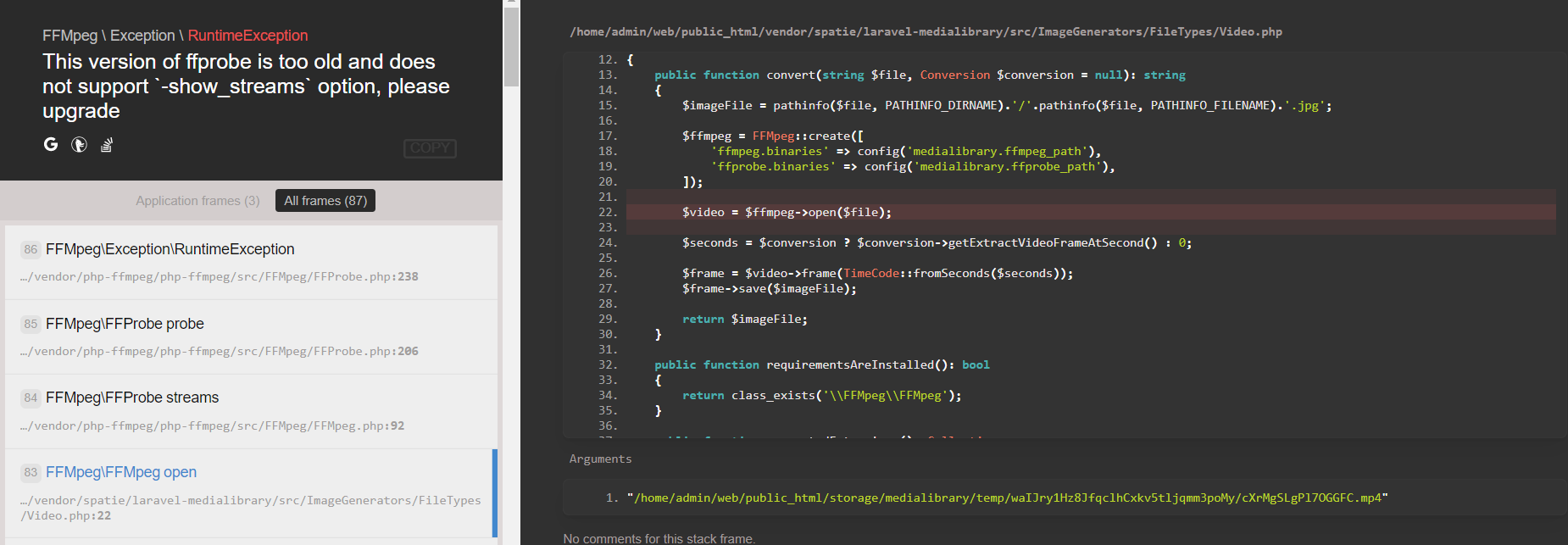
i can run ffprobe -i tumblr_oizgy3X4fP1vigkjr_480.mp4 -show_streams throug command line without any error
 laravelish
All 14 comments
Could you please verify that there are enough permissions for the user hosting php to execute those files?
 jens1o
on 2 Apr 2018
jens1o
on 2 Apr 2018
Hi, how do i do that ?
i ran ps aux | grep -E '[p]hp|[n]ginx' | grep -v root | head -1 | cut -d\ -f1
the ouput is admin
laravelish
on 2 Apr 2018
Often it is the www-data user, and this user(group) needs access to all input files, the binaries itself(ffmpeg, ffprobe..) and the output folders.
jens1o
on 2 Apr 2018
@jens1o this is my php-fpm conf
# php7.2-fpm - The PHP FastCGI Process Manager

description "The PHP 7.2 FastCGI Process Manager"
author "Ondřej Surý <[email protected]>"

start on runlevel [2345]
stop on runlevel [016]

# you can uncomment this with recent upstart
# reload signal USR2

pre-start script
mkdir -p /run/php
chmod 0755 /run/php
chown www-data:www-data /run/php
end script

respawn
exec /usr/sbin/php-fpm7.2 --nodaemonize --fpm-config /etc/php/7.2/fpm/php-fpm.conf
i changed chown user to admin and root but its the same error again
laravelish
on 2 Apr 2018
Could you just allow the folders to be accessed by www-data? I do not use linux as a daily-driver, yet. I'm sorry. But this issue is more likely a permission problem...
jens1o
on 2 Apr 2018
@jens1o i get mkdir(): Permission denied if use www-data
laravelish
on 2 Apr 2018
i dont think it has to do with permission
because admin:admin has root access
it can read write delete edit
laravelish
on 2 Apr 2018
Unfortunately, then, I don't know why that should fail. Do you allow proc_open in your php.ini files?
jens1o
on 2 Apr 2018
only these are disabled
disable_functions = pcntl_alarm,pcntl_fork,pcntl_waitpid,pcntl_wait,pcntl_wifexited,pcntl_wifstopped,pcntl_wifsignaled,pcntl_wifcontinued,pcntl_wexitstatus,pcntl_wtermsig,pcntl_wstopsig,pcntl_signal,pcntl_signal_get_handler,pcntl_signal_dispatch,pcntl_get_last_error,pcntl_strerror,pcntl_sigprocmask,pcntl_sigwaitinfo,pcntl_sigtimedwait,pcntl_exec,pcntl_getpriority,pcntl_setpriority,pcntl_async_signals,
laravelish
on 2 Apr 2018
if i disable proc_open i get this error
The Process class relies on proc_open, which is not available on your PHP installation.
so it is enabled by default
laravelish
on 2 Apr 2018
@jens1o i'm a idiot !
i added the ffprobe.binaries path to look for ffmpeg instead of ffprobe ! thats why i get the error
so i changed
'ffprobe.binaries' => '/usr/bin/ffmpeg',
to
'ffprobe.binaries' => '/usr/bin/ffprobe',
now everything works perfectly
if anyone else get similar error they should check their binary paths !
laravelish
on 4 Apr 2018
Puuhh.. Okay, thanks. I'll remember that.
jens1o
on 4 Apr 2018
@laravelish Thanks for sharing dude ) Helped a lot
 4unkur
on 26 Oct 2018
4unkur
on 26 Oct 2018
@laravelish Where did you change it, because I tried it here but not working
$ffprobe = \FFMpeg\FFProbe::create([
                'ffmpeg.binaries'  => '/usr/bin/ffmpeg',
                'ffprobe.binaries' => '/usr/bin/ffprobe',
        ]);
 marwan2
on 2 Sep 2019
marwan2
on 2 Sep 2019
Related issues
 sheikhasadmuneer
·
4Comments
sheikhasadmuneer
·
4Comments
 jack-fdrv
·
7Comments
jack-fdrv
·
7Comments
 theDTD
·
4Comments
theDTD
·
4Comments
 Mahdi-Mohammadi
·
4Comments
Mahdi-Mohammadi
·
4Comments
 Gemorroj
·
8Comments
Gemorroj
·
8Comments
Most helpful comment
@jens1o i'm a idiot !
i added the ffprobe.binaries path to look for ffmpeg instead of ffprobe ! thats why i get the error
so i changed
'ffprobe.binaries' => '/usr/bin/ffmpeg',to
'ffprobe.binaries' => '/usr/bin/ffprobe',now everything works perfectly
if anyone else get similar error they should check their binary paths !