Photos: The folder listing in My Album also list the subfolders
Instead of showing only the folders of the current location, it shows all the albums available deeper in the folder tree, making the navigation difficult.
 tillwf
All 14 comments
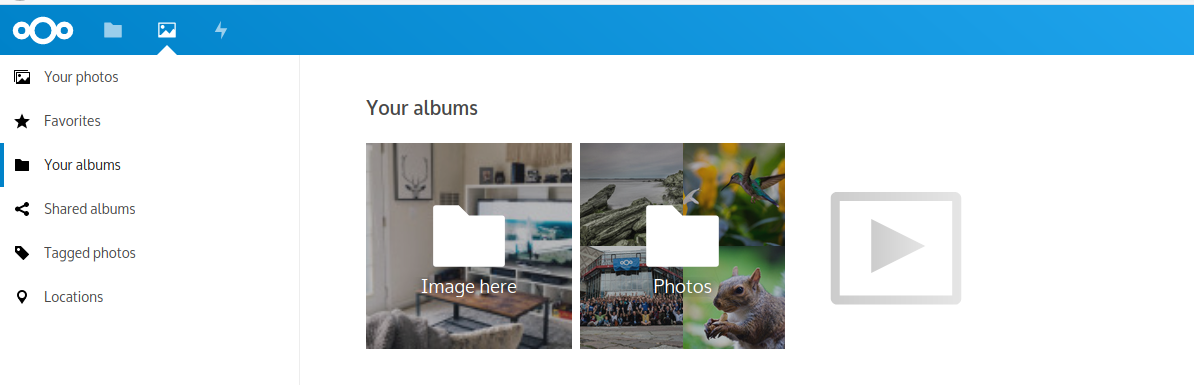
Example, the expected file is in Documents/image%20here:
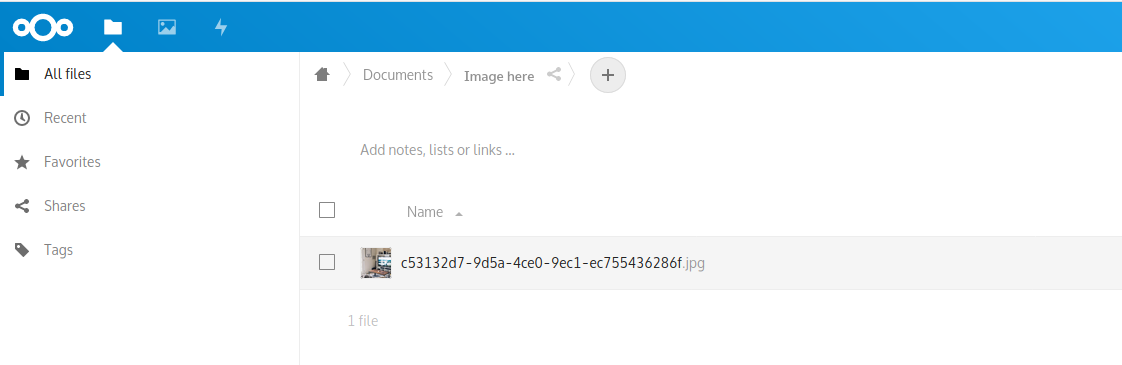
But it appears as a root folder in the Album tab:
 Mikescops
on 26 Dec 2019
Mikescops
on 26 Dec 2019
This is done on purpose.
This is the current behaviour of the old gallery :)
cc @jancborchardt
 skjnldsv
on 26 Dec 2019
skjnldsv
on 26 Dec 2019
@skjnldsv
On the previous gallery when I had this configuration of folder:
└── pictures
    ├── 2017
    │   ├── 2017-01
    │   └── 2017-02
    ├── 2018
    │   └── 2018-03
    └── 2019
        ├── 2019-11
        └── 2019-12
with pictures only in the last folders, I would first see one folder pictures then, after clicking on it, I would see 3 folders 2019, 2018 and 2017 and then etc.
Now what I see in pictures is 2017-01, 2017-02, 2018-03 etc.
The behavior is not the same. Do you agree ?
tillwf
on 27 Dec 2019
Was there pictures in the 'pictures' folder ?
skjnldsv
on 27 Dec 2019
Only pictures in folders %Y-%M. Currently I have hundreds of folders per year thus with the new gallery I see thousands of folders and the sorting does not help as it seems not to work either.
tillwf
on 27 Dec 2019
Interesting!
So the goal is to show the first subfolder containing pictures.
so if there is none in the pictures folder, you'll directly see
the first items.
This has been thoroughly discussed. :)
skjnldsv
on 27 Dec 2019
I'm not sure I understand your explanation: what is the first items ?
I think the behavior I describe is the same as any file browser: You are in a folder A, you see thumbnails of pictures in this folder and the name of the folders inside A (not the ones deeper). The fact that there are pictures or not inside the folder or in the middle of the path is not important I guess.
At least, this was the behavior of the old gallery.
tillwf
on 27 Dec 2019
I do agree with @tillwf this should be an optin thing.
I use the same thing, images sorted in year subfolder then month subfolder. That will end up in multiple folders having the same name.
Mikescops
on 27 Dec 2019
We do it like this intentionally because otherwise it’s not a "Your albums" view, but just a grid view of the Files app. And we do have a grid view in the Files app. ;)
As also described in https://github.com/nextcloud/photos/issues/6#issuecomment-569519672, the current albums design is mostly based on our current possibilities, and the intention is definitely to not necessitate this level of manual organization. Because if everyone would need to organize their pictures like that, it would equate to millions of hours wasted where software could do this better – makes sense? :)
 jancborchardt
on 29 Dec 2019
jancborchardt
on 29 Dec 2019
It makes sense, however, lot of people use nextcloud to synchronize their hard drive, and you can not have this "computed" organization reflected on the hard-drive or maybe it's up to this project to implement it.
So maybe it would be nice to select the photos folder to avoid having images froms documents (like my scanned documents) and in case there are duplicate names in albums prefix the parent directory to the name of the album. What you think ?
Mikescops
on 30 Dec 2019
Yep, there are definitely details we need to get right there. For example one option would be to let people choose the root folder of their photos. We went with the dead simple root folder for now for simplicity, but can always adjust.
Will you be at the Contributor Week in January?
jancborchardt
on 30 Dec 2019
What is this?
Mikescops
on 30 Dec 2019
@Mikescops this nice regular get-together of everyone! :) https://nextcloud.com/blog/time-for-the-next-contributor-week-in-berlin/
Since you are a contributor, you can request travel support, 80% of travel and hotel – all details are in the blog post, make sure to contact before booking anything. :)
jancborchardt
on 30 Dec 2019
Oh great, It's a really good idea, I'm facing the strikes in France but I can take a look for sure!
Mikescops
on 30 Dec 2019
Related issues
 Bodenseematze
·
7Comments
Bodenseematze
·
7Comments
 iwanttobefreak
·
7Comments
iwanttobefreak
·
7Comments
 grenzverkehr
·
7Comments
grenzverkehr
·
7Comments
 DanBenHa
·
12Comments
Mikescops
·
5Comments
DanBenHa
·
12Comments
Mikescops
·
5Comments
Most helpful comment
It makes sense, however, lot of people use nextcloud to synchronize their hard drive, and you can not have this "computed" organization reflected on the hard-drive or maybe it's up to this project to implement it.
So maybe it would be nice to select the photos folder to avoid having images froms documents (like my scanned documents) and in case there are duplicate names in albums prefix the parent directory to the name of the album. What you think ?