Phonegap-plugin-barcodescanner: ReferenceError: cordova is not defined
Hi all. A bit of a newbie here to Cordova so please be patient. I am happy to write a getting started guide etc for folks like me if I can get this to work. Thanks in advance.
My code fails in both the browser and my Nexus 4.
My index.html contains this:
<!DOCTYPE html>
<html>
<head>
    <meta charset="utf-8">
    <meta name="viewport" content="width=device-width, initial-scale=1.0, user-scalable=no, minimum-scale=1.0, maximum-scale=1.0">
</head>
<body>

<script src="lib/jquery.js"></script>
<script src="lib/handlebars.js"></script>
<script src="js/services/memory/EmployeeService.js"></script>
<script src="js/app.js"></script>
<script src="cordova.js"></script>
</body>
</html>
In app.js I have the following:
(function () {
  scan();
    /* ---------------------------------- Local Variables ---------------------------------- */
    var homeTpl = Handlebars.compile($("#home-tpl").html());
    var employeeListTpl = Handlebars.compile($("#employee-list-tpl").html());

    var service = new EmployeeService();
    service.initialize().done(function () {
      renderHomeView();
    });

    /* --------------------------------- Event Registration -------------------------------- */
    //$('.search-key').on('keyup', findByName);
    /*$('.help-btn').on('click', function() {
        alert("Employee Directory v3.4");
    });*/

    document.addEventListener('deviceready', function () {
      StatusBar.overlaysWebView( false );
      StatusBar.backgroundColorByHexString('#ffffff');
      StatusBar.styleDefault();

      if (navigator.notification) { // Override default HTML alert with native dialog
        window.alert = function (message) {
          navigator.notification.alert(
            message,    // message
            null,       // callback
            "Workshop", // title
            'OK'        // buttonName
          );
        };
      }
    }, false);


    /* ---------------------------------- Local Functions ---------------------------------- */
    function findByName() {
      service.findByName($('.search-key').val()).done(function (employees) {
        $('.content').html(employeeListTpl(employees));
      });
    }

    function renderHomeView() {
      $('body').html(homeTpl());
      $('.search-key').on('keyup', findByName);
    }

    /* ---------------------------------- Barcode Scanner ---------------------------------- */
    function scan() {
      alert("Scanning start: ");
      cordova.plugins.barcodeScanner.scan( //<------------- The code breaks at the word cordova
        function (result) {
          alert("We got a barcode\n" +
          "Result: " + result.text + "\n" +
          "Format: " + result.format + "\n" +
          "Cancelled: " + result.cancelled);
        },
        function (error) {
          alert("Scanning failed: " + error);
        }
      );
    }
}());
 quorth0n
All 12 comments
Same error here. :/
 morcegon
on 30 Jun 2015
morcegon
on 30 Jun 2015
you are loading cordova.js after app.js.
you are calling scan(); from app.js.
your scan function is called, shows an alert() and calls cordova.plugins.barcodeScanner.scan() which breaks because at this point in time no object called "cordova" exists yet
-> load cordova.js before app.js
additionally you should call scan() only after "deviceready" has been fired, not at script load time. hth.
 rocco
on 1 Jul 2015
rocco
on 1 Jul 2015
Thanks @rocco, it works now :D
quorth0n
on 5 Jul 2015
@whirish can you shared, how you fix cordova undefined
 usernamesalah
on 11 Sep 2017
usernamesalah
on 11 Sep 2017
@Apranta as I said before:
-> load cordova.js before app.js
additionally you should call scan() only after "deviceready" has been fired, not at script load time.
rocco
on 11 Sep 2017
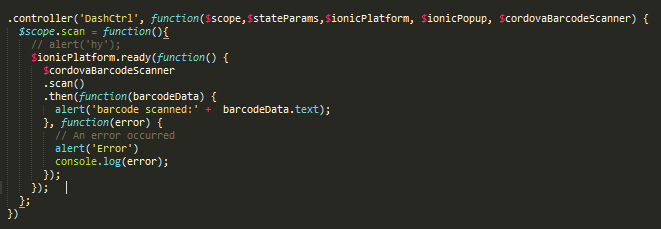
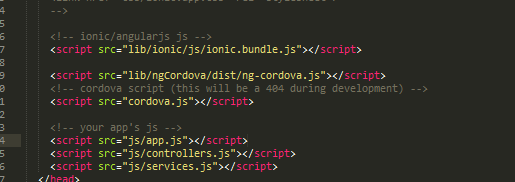
still not work :(
usernamesalah
on 11 Sep 2017
A bit more context would be good here. Are you testing on a device (cordova object exists only there)? What's your exact error message, @Apranta ?
rocco
on 11 Sep 2017
i had tested in my device and the error didnt view, and in my laptop only show cordova undefined
usernamesalah
on 11 Sep 2017
well, it's a native function, it will only work on devices
rocco
on 11 Sep 2017
yah but in my device didnt view the error :"
usernamesalah
on 11 Sep 2017
Download the ngCordova plugin and enable it, it's wok for me:

 SANGED
on 22 Dec 2017
SANGED
on 22 Dec 2017
This thread has been automatically locked.
![lock[bot] picture](https://avatars.githubusercontent.com/in/6672?v=4&s=40) lock[bot]
on 7 Jun 2018
lock[bot]
on 7 Jun 2018
Related issues
 klickagent
·
3Comments
klickagent
·
3Comments
 IYABAO
·
7Comments
IYABAO
·
7Comments
 HallmediaDigital
·
4Comments
HallmediaDigital
·
4Comments
 brunovinny
·
6Comments
brunovinny
·
6Comments
 SunboX
·
9Comments
SunboX
·
9Comments
Most helpful comment
you are loading cordova.js after app.js.
you are calling scan(); from app.js.
your scan function is called, shows an alert() and calls cordova.plugins.barcodeScanner.scan() which breaks because at this point in time no object called "cordova" exists yet
-> load cordova.js before app.js
additionally you should call scan() only after "deviceready" has been fired, not at script load time. hth.