Phoenix_live_view: toOutputBuffer error on 0.4
Environment
- Elixir version (elixir -v): 1.9.2
- Phoenix version (mix deps): 1.4.10
- NodeJS version (node -v): 8.11
- NPM version (npm -v): 5.6
- Operating system: OSX
Actual behavior
Loading up a LiveView route after upgrading to 0.4.0 and 0.4.1 throws a client error:
phoenix_live_view.js:1 Uncaught TypeError: Cannot read property '0' of undefined
    at Object.toOutputBuffer (phoenix_live_view.js:1)
    at Object.toString (phoenix_live_view.js:1)
    at e.value (phoenix_live_view.js:1)
    at Object.eval [as callback] (phoenix_live_view.js:1)
    at eval (phoenix_live_view.js:1)
    at Array.forEach (<anonymous>)
    at e.value (phoenix_live_view.js:1)
    at Object.eval [as callback] (phoenix_live_view.js:1)
    at e.value (phoenix_live_view.js:1)
    at Object.eval [as callback] (phoenix_live_view.js:1)
The unminified locations is here: https://github.com/phoenixframework/phoenix_live_view/blob/448e22642e89de7c26fc8eeb12a49c64d925a496/assets/js/phoenix_live_view.js#L148
This error will be logged each time a live_link is clicked that routes to this component. For example, take the following route:
live "/path/:param", LiveViewComponent
Then when i want to change the param, I use:
live_link("Change Params", to: Routes.live_path(assigns.socket, __MODULE__, :new_param))
Triggering that link fires off that same uncaught type error mentioned above.
Expected behavior
Clicking a live_link changes to the provided route.
 cadebward
All 11 comments
Can you provide a minimal template + LV module which reproduces this? That would be extremely helpful. Thanks!
 chrismccord
on 7 Nov 2019
chrismccord
on 7 Nov 2019
I wiped all my node_modes and _build, added in the new socket in the app.js, and now its all working. Thanks
cadebward
on 7 Nov 2019
Just wanted to comment that I got this exact same error message on 0.4.1. I didn't have any problem at all while developing locally, but the error shows up whenever I deploy my project to Gigalixir. So clearing node_modules and _build isn't really an option for me.
Just letting you know in case you want to reopen the issue.
Downgrading to 0.3.1 fixed the issue for me
 trentjones21
on 17 Nov 2019
trentjones21
on 17 Nov 2019
I also have this issue when deploying to Heroku, I can confirm that clearing the cache in the buildpack setting settings fixed it.
 JonRowe
on 24 Dec 2019
JonRowe
on 24 Dec 2019
I also got this issue when upgrading to 0.4.1. Like @trentjones21, it only shows up for me when deploying to Gigalixir.
My error was slightly different though:
TypeError: n is undefined
    toOutputBuffer app-c0dabded916a5897aa0c6c09e2985f34.js:2042
    toString app-c0dabded916a5897aa0c6c09e2985f34.js:2036
    value app-c0dabded916a5897aa0c6c09e2985f34.js:2794
    value app-c0dabded916a5897aa0c6c09e2985f34.js:2997
    value app-c0dabded916a5897aa0c6c09e2985f34.js:552
    forEach self-hosted:227
    value app-c0dabded916a5897aa0c6c09e2985f34.js:551
    value app-c0dabded916a5897aa0c6c09e2985f34.js:580
    value app-c0dabded916a5897aa0c6c09e2985f34.js:809
    e app-c0dabded916a5897aa0c6c09e2985f34.js:667
    value app-c0dabded916a5897aa0c6c09e2985f34.js:809
    value app-c0dabded916a5897aa0c6c09e2985f34.js:1218
    decode app-c0dabded916a5897aa0c6c09e2985f34.js:890
    value app-c0dabded916a5897aa0c6c09e2985f34.js:1208
    onmessage app-c0dabded916a5897aa0c6c09e2985f34.js:999
Which relates to n being undefined in this code:
          toOutputBuffer: function (e, t) {
            if (e.dynamics) return this.comprehensionToBuffer(e, t);
            var n = e.static;
            t.buffer += n[0];
            for (var i = 1; i < n.length; i++) this.dynamicToBuffer(e[i - 1], t),
            t.buffer += n[i]
          },
 overture8
on 4 Jan 2020
overture8
on 4 Jan 2020
@overture8 its due to a stale JS cache.
In your phoenix_static_buildpack.config add (or create with):
clean_cache=true
To the config file, push a deploy, and then if you wish remove / revert it and this problem should go away.
JonRowe
on 4 Jan 2020
@JonRowe Sorry, I completely missed your initial reply to this thread somehow. I tried your suggestion and it worked! Thanks - it has been driving me crazy.
overture8
on 4 Jan 2020
I just noticed what I think is the same or a similar issue on 0.14.1 when calling pushEvent. I see an update occur in debug output but then I get the following error on Chrome instead of the expected DOM update:
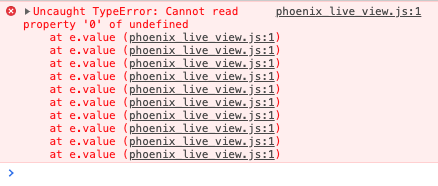
Source trace shows: t.buffer+=n[0] as the location of the error.
Unfortunately removing _build and node_modules did not resolve the issue.
"phoenix_live_view": {:hex, :phoenix_live_view, "0.14.1", "92a5a6e4227a9bc546f602373bc7b24bb031457b015ec078d3b3bbcecd29611d", [:mix], [{:jason, "~> 1.0", [hex: :jason, repo: "hexpm", optional: true]}, {:phoenix, "~> 1.5.3", [hex: :phoenix, repo: "hexpm", optional: false]}, {:phoenix_html, "~> 2.14", [hex: :phoenix_html, repo: "hexpm", optional: false]}, {:telemetry, "~> 0.4.2 or ~> 0.5", [hex: :telemetry, repo: "hexpm", optional: false]}], "hexpm",
 tfwright
on 19 Aug 2020
tfwright
on 19 Aug 2020
@tfwright please try 0.14.1 and report back (with the usual deps dance). Thanks!
chrismccord
on 19 Aug 2020
I was actually able to find a work around for this, but I'm not entirely sure what's happening. I suspect you will, but otherwise I will be happy to help track down the root cause.
I tracked the error back to a specific commit where I refactored some list code into a live component. Depending on the content of the assigns, certain members of the list should be hidden. To achieve this, I added a helper that filtered them, looking something like this:
          <%= for item <- @items |> filter(assigns) do %>
            <%= live_component @socket, MyApp.Live.Component, id: 'id', ... %>
          <% end %>
On a hunch I removed that filter logic and used it to hide the item via css instead. That solved the error. I am guessing this has something to do with how LV derives DOM updates?
tfwright
on 19 Aug 2020
I'm also getting this error after upgrading from 0.12.1 to 0.14.4.
In my case it seems to be dependant on the order I click on things. If I click first on UI element A, then I get the error, and clicking anything else also throws the error from then on. If I click first on UI element B then I don’t get the error and everything works normally (including clicking on A).
Sorry this is a bit vague...
P.S. I have definitely cleared all caches and rebuilt all assets
P.P.S. I tested upgrading one version at a time, and for me this is introduced in 0.14.0.
 ccapndave
on 15 Sep 2020
ccapndave
on 15 Sep 2020
Related issues
 SebastianSzturo
·
5Comments
ccapndave
·
4Comments
chrismccord
·
4Comments
SebastianSzturo
·
5Comments
ccapndave
·
4Comments
chrismccord
·
4Comments
 LightningK0ala
·
5Comments
LightningK0ala
·
5Comments
 lukegalea
·
3Comments
lukegalea
·
3Comments
Most helpful comment
@overture8 its due to a stale JS cache.
In your
phoenix_static_buildpack.configadd (or create with):To the config file, push a deploy, and then if you wish remove / revert it and this problem should go away.