Phoenix_live_view: Invalid CSRF token when using livesocket
I'm trying to submit a form normally, without using phx-submit, but my requests get rejected, because the CSRF token seems to be invalid.
I tried both forms, but they failed:
<%= f = form_for(@changeset Routes.model_path(@socket, :create), [phx_change: "update"]) %>
<%= form_for @changeset, Routes.model_path(@socket, :create), [phx_change: "update"], fn f -> %>
Environment
- Elixir version (elixir -v):
Erlang/OTP 21 [erts-10.2.3] [source] [64-bit] [smp:4:4] [ds:4:4:10] [async-threads:1] [hipe]
Elixir 1.8.1 (compiled with Erlang/OTP 20)
- Phoenix version (mix deps): 1.4.2
- NodeJS version (node -v): v11.10.1
- NPM version (npm -v): 6.7.0
- Operating system: macOS 10.13.6
Actual behavior
The _csrf_token is in the headers, but it is invalid for some reason
[debug] ** (Plug.CSRFProtection.InvalidCSRFTokenError) invalid CSRF (Cross Site Request Forgery) token, make sure all requests include a valid '_csrf_token' param or 'x-csrf-token' header
    (plug) lib/plug/csrf_protection.ex:233: Plug.CSRFProtection.call/2
Expected behavior
To be able to submit a form normally from liveView
 Awlexus
All 19 comments
I came here to report the very same thing. Instead, I'll give a workaround I found. To have those forms working, you need to pass the token from the controller to the live view:
Phoenix.LiveView.Controller.live_render(conn, Crowdnews.NewsLiveView, session: %{ post: post, csrf_token: Phoenix.Controller.get_csrf_token() })
and then include it manually in the form:
<%= f = form_for @post, Routes.update_path(@socket, :create) %>
  <input type="hidden" name="_csrf_token" value="<%= @csrf_token %>" />
this gives you ugly HTML
<form accept-charset="UTF-8" action="/updates" method="post" _lpchecked="1">
  <input name="_csrf_token" type="hidden" value="GBo0MWo+WhkdaBtdcjMUMRBvTxoxJgAAnxqDXjiZ/QI+ETGfIW++YQ==">
  <input name="_utf8" type="hidden" value="✓">
  <input type="hidden" name="_csrf_token" value="GzxjGxApETwVKlQ0dT4vQjQMUQIhAAAAYqTKXQVnay1wGjL/pn57qQ==">
But it works ;)
 katafrakt
on 23 Mar 2019
katafrakt
on 23 Mar 2019
I tried looking at how the form is getting generated and where rendering the form from a LiveView but handling its POST from its controller would generate invalid/colliding csrf tokens.
I'm not sure how Process works in Elixir, but it seems like the 2nd render triggered by the LiveView once the web socket is connected is creating a new Process, or reseting the existing one?
Assuming a PostController handling new to render the page,
with a FormLive live view to live_render the form,
- calling
Plug.CSRFProtection.get_csrf_tokeninsidenew - then
IO.puts Process.get(:plug_masked_csrf_token)insidenew_and_ insideFormLive.mountwill correctly print the same token. mountis then called during the 2nd render (web socket connecting) and prints aniltoken.- Finally,
IO.puts Process.get(:plug_masked_csrf_token)insidehandle_eventprints a different token.
So it seems like a new token gets generated after the web socket connects (after assign is called from mount the 2nd time). I can't find anything related to that inside phoenix_live_view.js so I'm not sure where this happens :)
Happy to look more into it, but I'd love some guidance @chrismccord 👍
 Jauny
on 24 Mar 2019
Jauny
on 24 Mar 2019
@katafrakt you might want to use the csrf_token option on the form_for tag instead of manually adding the hidden input in your form and ending with 2 csrf_inputs.
lang=elixir
<%= f = form_for @post, Routes.update_path(@socket, :create), csrf: @csrf_token %>
Jauny
on 24 Mar 2019
I'm seeing the same issue, except I'm using LiveView's router to render the leex template (so there's no associated controller).
 danieljaouen
on 28 Mar 2019
danieljaouen
on 28 Mar 2019
@danieljaouen do you have a form submit event handler in your LiveView? The csrf token will get replaced when the live view's web socket connects, so if you are using a default action instead of the live view events to submit the form, that won't work, afaik
Jauny
on 28 Mar 2019
@Jauny No, I'm using the default action (which doesn't work, as mentioned). The reason I mention LiveView's routers is because the previous workaround seems to depend on calling LiveView.Controller.live_render from a regular (non-LiveView) controller.
danieljaouen
on 28 Mar 2019
yeah so that's the thing. When using the live view render, the csrf token hidden field is being overwritten when the web socket connects to the live view - that means the form hold a csrf token known by the live view, which is different than the csrf token expected by the default controller.
The workaround if you want to keep using the default controller is to, as you mention, use the LiveView.Controller.live_render from the regular controller, but _manually passing it the controller csrf token in the sessions_.
If you look at @katafrakt example, csrf_token: Phoenix.Controller.get_csrf_token() is passed into the session and manually set on the form <%= f = form_for @post, Routes.update_path(@socket, :create), csrf: @csrf_token %>.
This way the csrf token in the form is the controller csrf token, and not the live view csrf token.
Does that make sense?
I'd like to fix that and have the liveview and the controller both use the csrf token, but I'm waiting for @chrismccord to give me some hints about where the live view handle the csrf token generation/replacement is done by LiveView as I'm not finding this myself.
Jauny
on 28 Mar 2019
@Jauny Yeah, that makes sense. Thanks for looking into this issue.
danieljaouen
on 28 Mar 2019
So Plug v1.8.0 is out and it allows you to dump the CSRF token from one process and load into another. So when building the LiveView session, LV should dump the token and load it into the LiveView process. Here is the proper commit from Plug: https://github.com/elixir-plug/plug/commit/e2b5e7f4beed8c845292aa242348c8ab7d38f64f
LV will have to require Plug ~> 1.8 but it is not a major problem as Phoenix v1.5 will require the same as well due to the telemetry integration.
 josevalim
on 31 Mar 2019
josevalim
on 31 Mar 2019
Thanks everyone for this workaround. BTW, the option to form_for is csrf_token:, not csrf:.
So just to spell it out a bit more, the workaround looks like this.
In the controller action:
live_render(conn, MyApp.MyLiveView, session: %{
  csrf_token: Phoenix.Controller.get_csrf_token()
})
In the LiveView:
def mount(%{csrf_token: csrf_token}, socket) do
  {:ok, assign(socket, :csrf_token, csrf_token)}
end

def render(assigns) do
  MyApp.SomeView.render(
    "something.html",
    changeset: get_a_changeset(),
    csrf_token: assigns.csrf_token
  )
end
In the template:
<%= form_for @changeset, some_url, [csrf_token: @csrf_token], fn f -> %>
<% end %>
 nathanl
on 30 May 2019
nathanl
on 30 May 2019
With the change in #239, you can now also pass the token in through the client. Make sure you have the following in your layout app.html.eex in the <head> block:
<head>
  <%= csrf_meta_tag() %>
</head>
Change your app.js:
const csrf_token = document.querySelector("meta[name='csrf-token']").getAttribute("content");
const liveSocket = new LiveSocket("/live", {params: {csrf_token}});
liveSocket.connect();
And then use the following to get the csrf token:
get_connect_params(socket)["csrf_token"]
Rest is already described above (assign to socket, set csrf_token option on form_for etc)
 oskarkook
on 24 Jul 2019
oskarkook
on 24 Jul 2019
UPDATE:
This has been solved (for this particular scenario) below, by a suggestion from @speeddragon.
My apologies -- false positive. The app redirected in a way that only appeared to have worked. Still looking for a viable solution.
UPDATE:
After playing with it just a bit more, I was able to figure out a solution that worked for my use case. I ended up having to remove method: :delete from the link helper and add a _method hidden field to the form along with the _csrf_token field:
<form>
    <input type="hidden" name="_method" value="delete" />
    <input type="hidden" name="_csrf_token" value="<%= @csrf_token %>" />
    ...
</form
Adding that, along with the implementations described above worked like a charm!
ORIGINAL QUESTION:
@danieljaouen were you ever able to get this working with a :delete link in the form? What both @katafrakt and @Jauny have explained makes sense, and I've implemented it in that way, however I'm still observing a behavior where when the form is submitted, the CSRF token that is sent is the one generated in data-csrf on the link, rather than from the hidden form field (as described here)
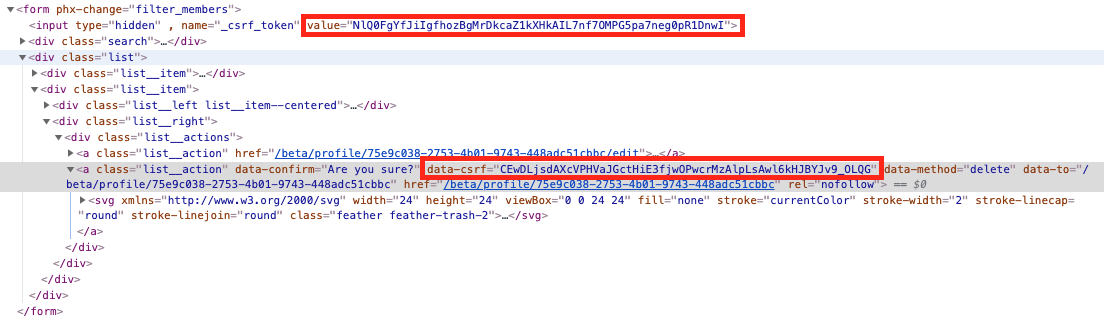

I've also tried manually overwriting data-csrf with the value I'm passing into the Lv template, however, it's very sporadic. It will sometimes override the value and work properly, and other times I'll see the correct token get placed in the attribute, then immediately overwritten by another one.

 sdomino
on 30 Aug 2019
sdomino
on 30 Aug 2019
Hey,
my problem seems kinda similar, but I'm trying to delete something via link, which is outside any form and it is rendered via live_render.
<div id="live-renderer">
  <%= live_render(@conn, MyAppWeb.AdvertsLive, session: %{csrf_token: Phoenix.Controller.get_csrf_token()}) %>
</div>
mount function is too long to paste here, but it passes csrf_token from session to assigns.
Links pasted below belong to the table of adverts. :show and :edit functions are working perfectly.
<%= link gettext("Show"), to: Routes.adverts_path(@socket, :show, advert) %>
<%= link gettext("Edit"), to: Routes.adverts_path(@socket, :edit, advert) %>
<%= link gettext("Delete"), to: Routes.adverts_path(@socket, :delete, advert), method: :delete %>
After clicking Delete link I'm getting
** (Plug.CSRFProtection.InvalidCSRFTokenError) invalid CSRF (Cross Site Request Forgery) token, make sure all requests include a valid '_csrf_token' param or 'x-csrf-token' header
I tried to pass csrf_token as an argument but it didn't work for me. Any workarounds for this situation?
EDIT: Well, I just realised that even without any passing there is a _csrf_token in parameters. But it seems that it isn't correct. Params:
_csrf_token:
"token"
_method:
"delete"
id:
"4"
 Kaquadu
on 3 Sep 2019
Kaquadu
on 3 Sep 2019
@Kaquadu, This should work.
<%= link "Delete", to: Routes.user_path(@socket, :delete, user), csrf_token: @csrf_token, method: :delete, data: [confirm: "Are you sure?"], class: "text-danger" %>
 speeddragon
on 3 Sep 2019
speeddragon
on 3 Sep 2019
@speeddragon, settingcsrf_token on the form wasn't working, but when set on the link it appears to work perfectly (where manually overriding the data-csrf attributes was failing).
I no longer need to manually include any hidden tags in the form and I can just use a plain <form> element instead of having to use a form_for (which I don't need in this particular case). This was exactly what I was looking for, thanks!
sdomino
on 3 Sep 2019
@Kaquadu, This should work.
<%= link "Delete", to: Routes.user_path(@socket, :delete, user), csrf_token: @csrf_token, method: :delete, data: [confirm: "Are you sure?"], class: "text-danger" %>
Welp, it works fine. Thanks! :)
Kaquadu
on 4 Sep 2019
It seems that a consensus has been established that a go to workaround is to provide csrf_token in the opts to live_render, while calling it either from controller or from template, and then explicitly pass that csrf_token to the funcs which need a CSRF Token, like form or a DELETE link generators, e.g.:
# Provide `csrf_token` from controller...
live_render(conn, MyApp.MyLiveView, session: %{
  csrf_token: Phoenix.Controller.get_csrf_token()
})

# ...or from template
<div id="live-renderer">
  <%= live_render(@conn, MyAppWeb.AdvertsLive, session: %{csrf_token: Phoenix.Controller.get_csrf_token()}) %>
</div>

# ...and explicitly pass it to `link` func
<%= link "Delete", to: Routes.user_path(@socket, :delete, user), csrf_token: @csrf_token, method: :delete %>
But is there a way to provide the csrf_token option if I use the live router macro, and so don't call live_render directly? 🤔 It seems liver_render is called from Phoenix.LiveView.Plug#34, when the live macro is used, and there is no way to add an extra csrf_token option to it.
 anatoliyarkhipov
on 20 Oct 2019
anatoliyarkhipov
on 20 Oct 2019
@anatoliyarkhipov, you can create a custom plug which loads a new CSRF token into the conn session which can be passed to the LV session with the live macro.
# router.ex
pipeline :browser do
    ...
    plug :put_secure_browser_headers
    plug MyAppWeb.GenerateCSRF
  end
...
live "/registration", RegistrationLive, session: [:csrf_token]

# generate_csrf.ex
defmodule MyAppWeb.GenerateCSRF do
  def init(_opts), do: nil

  def call(conn, _opts), do: put_session(conn, :csrf_token, Phoenix.Controller.get_csrf_token())
end
Finally, in the mount function of the LiveView load the token from the LV session into socket assigns with assign_new(socket, :csrf_token, fn -> session[:csrf_token] end) then it can be used in the templates as shown above (i.e. in link or form_for)
 tmepple
on 29 Oct 2019
tmepple
on 29 Oct 2019
Closing in favor of #488.
josevalim
on 19 Nov 2019
Related issues
 bannmoore
·
3Comments
bannmoore
·
3Comments
 chrismccord
·
4Comments
chrismccord
·
4Comments
 morgz
·
5Comments
morgz
·
5Comments
 ccapndave
·
4Comments
ccapndave
·
4Comments
 jamilabreu
·
5Comments
jamilabreu
·
5Comments
Most helpful comment
So Plug v1.8.0 is out and it allows you to dump the CSRF token from one process and load into another. So when building the LiveView session, LV should dump the token and load it into the LiveView process. Here is the proper commit from Plug: https://github.com/elixir-plug/plug/commit/e2b5e7f4beed8c845292aa242348c8ab7d38f64f
LV will have to require Plug ~> 1.8 but it is not a major problem as Phoenix v1.5 will require the same as well due to the telemetry integration.