Phoenix_live_view: Explore image uploads
As discussed, we Array buffers for binary uploads over websockets
 chrismccord
All 20 comments
Sorry to bother you @chrismccord but are there any plans for this to be handled in the near future? Thank you for you work on this by the way. 🙇
 albertoramires
on 27 Jun 2019
albertoramires
on 27 Jun 2019
I'm also interested, but not specifically for images, rather for files in general. LiveView is going to be great for scenarios like "live analysis / reporting based on an uploaded file" (e.g. CSV file), which are quite frequent in enterprise apps.
If someone has a temporary work-around to handle that, it's more than welcome!
 thbar
on 27 Jun 2019
thbar
on 27 Jun 2019
Oh yeah, I should probably work on that thing. https://elixirconf.com/2019/speakers/61 :)
 Gazler
on 27 Jun 2019
Gazler
on 27 Jun 2019
@Gazler
Is there a chance for the work that has been done on the gr-upload-channel branch to be merged in an alpha version before the Sep. 30th deadline for the Phoenix Phrenzy contest?
Just curious :-)
 joerichsen
on 18 Sep 2019
joerichsen
on 18 Sep 2019
Uploads won't be ready for several releases as we make sure we're hardened on the security front, as well as making sure our JS upload interop is in place. You're free to use the branch in the meantime if it meets your needs :)
chrismccord
on 19 Sep 2019
In case anyone needs a (slightly convoluted & messy) workaround, here's what I did:
- Implement a standard non-liveview controller to provide a file upload endpoint. I used https://www.poeticoding.com/step-by-step-tutorial-to-build-a-phoenix-app-that-supports-user-uploads/ for guidance, but tweaked router config and response to accept and emit JSON. The context broadcasts a pub-sub message when the file is successfully received.
In the liveview, I created an assign called "token", set to Phoenix.Controller.get_csrf_token() - i.e. grabbed a valid csrf token that I could use to post to controller created above.
In my liveview template I implemented a dropzone.js target (with phx-update="ignore") and set the options for dropzone as follows:
paramName: "file", url: '/uploads', // or whatever your path is for the controller set up in 1 - could probably use Route helpers headers: { 'x-csrf-token': '<%= @token %>' },- The liveview listens for the pubsub message so can respond when a new file arrives.
It's not ideal (you need to touch the router, create a controller, fire pubsub messages, listen for pubsub messages, manually create csrf tokens and have javascript embedded in a liveview template) but it works pretty nicely, and it's a key part of what I'm working on so happy to eat the cost of refactoring later when we have slick file uploading in LV.
BTW - not shown here, but I also tied in some image cropping (cropper.js) between dropping the file and pushing it up. I'm sure it is being considered for the JS interop, but thought I'd mention it as it would be a pretty common use case I would think.
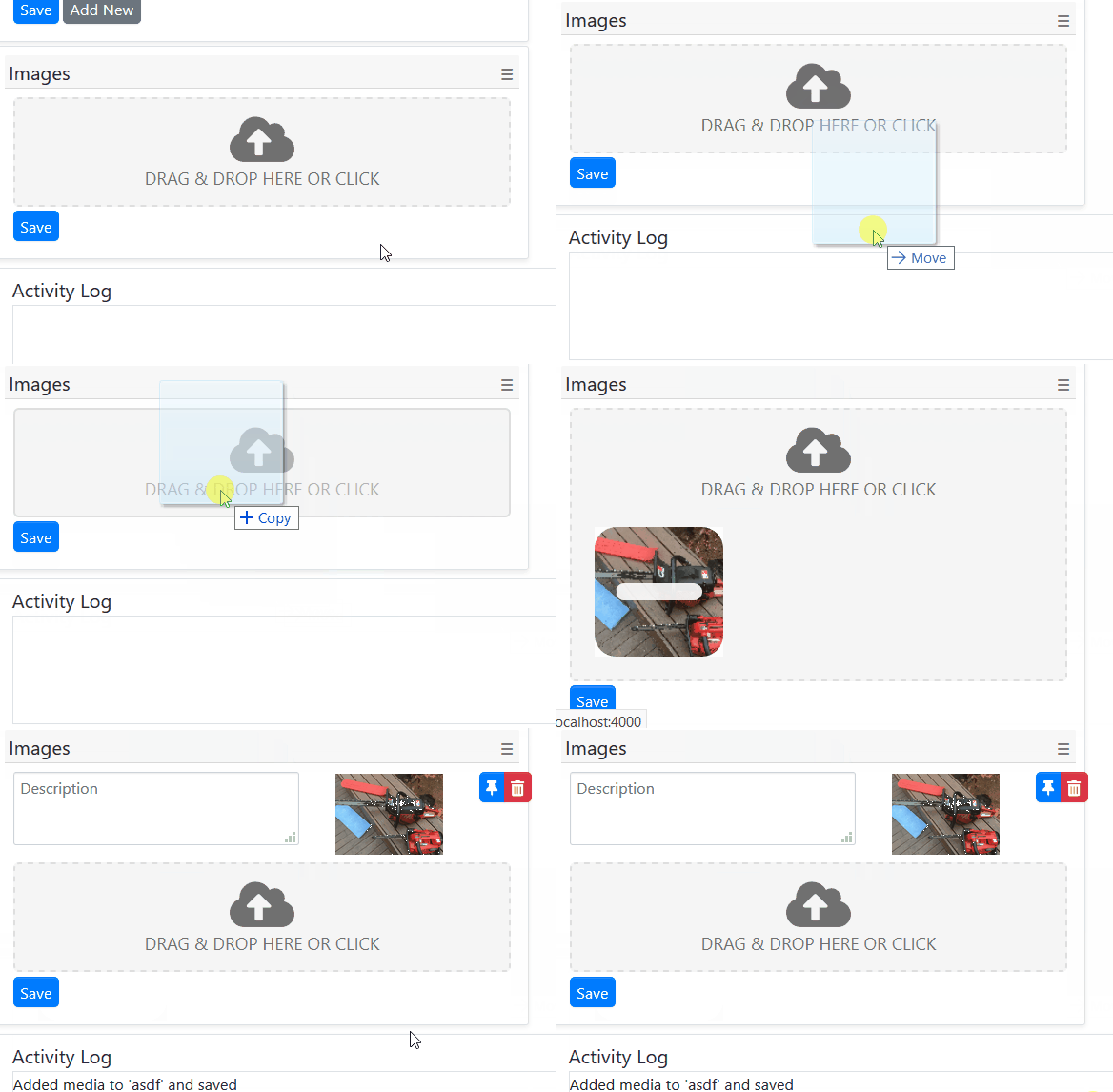
 mindok
on 5 Nov 2019
mindok
on 5 Nov 2019
I'd like to offer an alternative "hack" in the meanwhile, which is using only live view.
The idea is to add a hidden input, which will be populated by the base64 of the file on change with a live view hook. The base64 is then accessible on the server side and can be converted back to a file if needed (for my needs I just upload to google storage).
Here is the html:
<div class="form-group">
    <%= label f, :evidence_upload, "Statement of Attainment" %>
    <%= file_input f, :evidence_upload, [class: "form-control", phx_hook: "evidence_upload", required: true, accept: "image/gif, image/jpeg, image/jpg, image/png, application/pdf"] %>
    <%= error_tag f, :evidence_upload %>
    <div class="info">Accepted formats: .pdf, .gif, .jpg, .jpeg, .png</div>
    <%= hidden_input f, :evidence_upload_base64, [phx_update: "ignore"] %>
</div>
The javascript to handle the base64 population:
const hooks = {
    evidence_upload: {
        mounted() {
            this.el.addEventListener("change", e => {

                toBase64(this.el.files[0]).then(base64 => {
                    var hidden = document.getElementById("values_evidence_upload_base64") // change this to the ID of your hidden input
                    hidden.value = base64;
                    hidden.focus() // this is needed to register the new value with live view
                });
            })
        }
    }
}

let liveSocket = new LiveSocket("/live", Socket, { hooks: hooks })
liveSocket.connect()

const toBase64 = file => new Promise((resolve, reject) => {
    const reader = new FileReader();
    reader.readAsDataURL(file);
    reader.onload = () => resolve(reader.result);
    reader.onerror = error => reject(error);
});
There are just a few small things to note:
- The hidden input has to be marked as
phx_update: "ignore"otherwise updating any other input clears the value - We need to call
hidden.focus()in the JS after setting the value
Also note that this won't work well with phx_change (sending the fields on any input update), as the base64 text is pretty big to send over the wire. Best to use only phx_submit.
 ryan-senn
on 24 Nov 2019
ryan-senn
on 24 Nov 2019
We just worked around this pain point by using dedicated forms in an iframe within the original form. Cumbersome, but manageable. But really, do you have any idea when direct file uploads might be available in master? Would help a lot :)
 Anonyfox
on 27 Nov 2019
Anonyfox
on 27 Nov 2019
Thanks @mindok!
Based on your suggestion I did something very similar but used a hook instead of phx-ignore to integrate with dropzone.js.
Initially I had a traditional upload field in the middle of my LiveView and was tolerating a page reload to get it to work. Yuck.
I rewrote it to use dropzone.js after reading your comment. It seems like phx-ignore should be avoided when possible and there were a couple little gotcha's to get it to work as a hook.
- Passing the CSRF token:
- the token still has to be generated and added to the assigns but you can just include the token in your form and dropzone.js will find it in the params:
 <div phx-hook="Dropzone">
   <%= form_for MyApp.change_upload(%Snap.Assets.Upload{}), Routes.upload_path(@socket, :create), [csrf_token: @csrf_token, class: "dropzone", multipart: true], fn f -> %>
     <%= file_input f, :file, class: "is-hidden" %>
   <% end %>
 </div>
 ```

**Note:** If you are on 0.5.dev or 0.5 has come out, the way to pass the token has changed since the CSRF token is automatically loaded and passed to live views:  https://github.com/phoenixframework/phoenix_live_view/pull/488/files.


2. Dropzone fails to re-initialize when it is called by the hook. Below is my hook code - I just set the dropzone on the element to null to allow it to re-initialize. It's a bit hacky but it works without having to patch dropzone.js.
function addDropzone() {
var dropzones = this.el.getElementsByClassName("dropzone");
var i;
for (i = 0; i < dropzones.length; i++) {
// this allows dropzone to be re-instantiated
// after LiveView rewrites it's markup
if (dropzones[i].dropzone) {
dropzones[i].dropzone = null;
}
}
var myDropzone = new Dropzone(".dropzone", {
dictDefaultMessage: "Drop files or click here to upload",
createImageThumbnails: false,
paramName: "file"
});
}
Hooks.Autofocus = {
mounted() {
focusOnFirstField.call(this);
},
updated() {
focusOnFirstField.call(this);
}
}
```
Note: I use arc to resize images on the server rather than using dropzone (hence createImageThumbnails: false in the dropzone config). This gives me thumbnails that load quickly as the pubsub messages are received by the live view and the list of uploaded images is updated.
Otherwise my implementation is pretty much the same!
I am looking forward to seeing official image upload support when it comes. In the meantime, this implementation works well though and I don't think it was too much code or effort for a slick multi-file upload with drag & drop support.
 montebrown
on 10 Jan 2020
montebrown
on 10 Jan 2020
Thanks @montebrown - your tweaks have helped me fix the Dropzone initialisation bug that was bothering me, but not high enough priority to sort out right now...
I also made an additional "tweak" for the case where there is no natural id for the pubsub messaging (e.g. where you are creating a new entity) or where you don't want to write controllers and hooks for each liveview, using nanoid to create a unique enough id for matching. This allows me to send the file contents back to the liveview for processing with a single controller and have the liveview do the processing. I apply file size limits at the client end and the controller end to prevent huge files overwhelming the liveviews. I now have multiple liveviews that have to operate on small files in different ways so this allows me to share the controller and JS hook code. :
  @nanoid_alphabet "abcdefghijklmnopqrstuvwxyzABCDEFGHIJKLMNOPQRSTUVWXYZ"
  defp init_uploader(socket) do
    # Bit of a workaround while we are waiting for liveview file uploader. Relies on poking the upload id
    # into the HTML, and Dropzone adds it to the formdata sent back with the file. The upload controller
    # picks up both and sends us the parsed contents of the file via pubsub...
    upload_id = Nanoid.generate(21, @nanoid_alphabet)
    Phoenix.PubSub.subscribe(Reaction.PubSub, "upload:" <> upload_id )

    assign(socket, upload_id: upload_id)
  end
@thbar Asked about enterprise solutions for files like CSV, but nobody yet asked about possible streaming support instead of sending whole file. It's really important in many production cases and allows to parse said CSV file as soon as possible which is really useful in cases of slow and/or unstable connections between client and server apps.
Another topic is directory upload, but this can be skipped for now due to lack of support on mobile browsers. For reference please see: https://caniuse.com/#feat=input-file-directory
 Eiji7
on 13 Jun 2020
Eiji7
on 13 Jun 2020
@Gazler I was wondering: what is the status/plans of the gr-upload-channel branch, is there anything I could help with to get it moving again? By the way: nice presentation 👍!
 dvic
on 4 Aug 2020
dvic
on 4 Aug 2020
@thbar Asked about enterprise solutions for files like
CSV, but nobody yet asked about possible streaming support instead of sending whole file. It's really important in manyproductioncases and allows to parse saidCSVfile as soon as possible which is really useful in cases of slow and/or unstable connections between client and server apps.Another topic is directory
upload, but this can be skipped for now due to lack of support on mobile browsers. For reference please see: https://caniuse.com/#feat=input-file-directory
It is exactly what I need now. Is there any recommendations how realise it with Phoenix Live View?
 Bogdan1001
on 7 Aug 2020
Bogdan1001
on 7 Aug 2020
Ooooo yeah file(image) upload would be nice. I'm about to tackle this now too. Thanks for sharing all the work arounds. I think I'll probably use dropzone too and see how that feels. 🤞🏼
 Hossman333
on 24 Aug 2020
Hossman333
on 24 Aug 2020
I have run into this problem where entries in socket.assigns.uploads is always empty after uploading a file.
I traced the problem to https://github.com/phoenixframework/phoenix_live_view/blob/675dd4b79695fedda4873866ba8a8ec51c3b193c/assets/js/phoenix_live_view.js#L311
DOM.private(input, "files") returns undefined even though input.files would contain a FileList with the uploaded file.
 jfcloutier
on 30 Oct 2020
jfcloutier
on 30 Oct 2020
@jfcloutier I have the same issue.
 barttenbrinke
on 2 Dec 2020
barttenbrinke
on 2 Dec 2020
@barttenbrinke I no longer have this issue. My problem was that I was making a release that contained old JS files from Phoenix or LiveView.
jfcloutier
on 2 Dec 2020
@jfcloutier I am using https://github.com/phoenixframework/phoenix_live_view/ - master branch Is there anything I need to manually do here besides npm install ? After upload it nicely says "2 files" next to the button, but the @uploads.photo.entries is empty.
barttenbrinke
on 2 Dec 2020
@barttenbrinke Try
npm install --force phoenix_live_view --prefix assets
cd assets && node node_modules/webpack/bin/webpack.js --mode development
@jfcloutier Found this youtube comment (https://www.youtube.com/watch?v=PffpT2eslH8) :
Bob Stockdale: Awesome feature! For anyone that gets stuck with uploads not showing,
be sure you have a "phx-change" attribute and handler, even if it does nothing.
It took me a while to figure out why entries were not showing up.
That what was messing me up too, so I just added:
 def handle_event("validate", _params, socket) do
    {:noreply, socket}
  end
And it works 👍 Leaving this here for the next person to find it. Thank you for pointing me in the right direction!
barttenbrinke
on 2 Dec 2020
Related issues
 tfwright
·
3Comments
tfwright
·
3Comments
 lukegalea
·
3Comments
lukegalea
·
3Comments
 drapergeek
·
5Comments
drapergeek
·
5Comments
 ccapndave
·
4Comments
ccapndave
·
4Comments
 tmepple
·
4Comments
tmepple
·
4Comments
Most helpful comment
I'd like to offer an alternative "hack" in the meanwhile, which is using only live view.
The idea is to add a hidden input, which will be populated by the base64 of the file on change with a live view hook. The base64 is then accessible on the server side and can be converted back to a file if needed (for my needs I just upload to google storage).
Here is the html:
The javascript to handle the base64 population:
There are just a few small things to note:
phx_update: "ignore"otherwise updating any other input clears the valuehidden.focus()in the JS after setting the valueAlso note that this won't work well with phx_change (sending the fields on any input update), as the base64 text is pretty big to send over the wire. Best to use only phx_submit.