Phaser: Body.onWorldBounds is read-only and cannot be set
Version
- Phaser Version: 3.24.1
- Operating system: Windows 10 Pro
- Browser: Not browser specific
Description
Using Typescript
Cannot set Physics body 'onWorldBounds' property as it is read-only.
I expected to be able to use something.body.onWorldBounds = true since that's what is shown in every example I find to enable worldbounds collision event.
Example Test Code
    const bomb = this.physics.add.image(400, 200, 'bomb')
    bomb.setCollideWorldBounds(true)
    bomb.body.onWorldBounds = true // LINT ERROR: Cannot assign to 'onWorldBounds' because it is a read-only property. ts(2540)
    bomb.setBounce(1)
    bomb.setVelocity(200, 20)
Additional Information
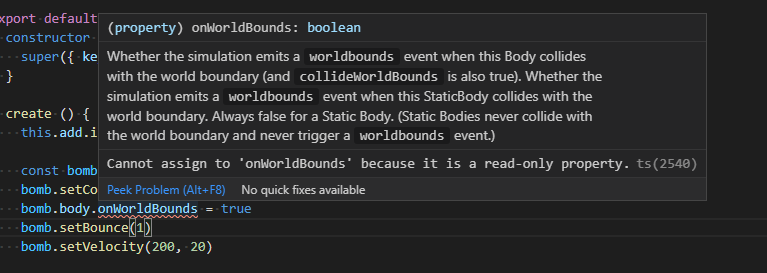
How come everywhere it is specified to be used to set a flag but on the source code is indeed read-only ?
Should always work wonders under Javascript.
 ingles98
All 13 comments
I just checked and it's only readonly on type Phaser.Physics.Arcade.StaticBody which does make sense.
But my .body is of type Phaser.Physics.Arcade.Body | Phaser.Physics.Arcade.StaticBody how would i define it as a static or non static is perhaps the point and maybe not so an issue/bug.
Before closing if you can guide me as to the object's body type setting i'd be really thankful. For now I'll just typecast it.
ingles98
on 26 Sep 2020
That's weird. In v3.24.1 physics.add.image() should give ImageWithDynamicBody.
 samme
on 27 Sep 2020
samme
on 27 Sep 2020
It definitely does return that type @samme : @return {Phaser.Types.Physics.Arcade.ImageWithDynamicBody} - I think this may just be an out-of-date defs error perhaps, because if you look at the TS defs it definitely returns the correct type:
image(x: number, y: number, texture: string | Phaser.Textures.Texture, frame?: string | integer): Phaser.Types.Physics.Arcade.ImageWithDynamicBody;
 photonstorm
on 28 Sep 2020
photonstorm
on 28 Sep 2020
@ingles98 there's no need to call setCollideWorldBounds _and_ also set onWorldBounds as the first method does exactly that:
    /**
     * Sets whether this Body collides with the world boundary.
     *
     * Optionally also sets the World Bounce and `onWorldBounds` values.
     *
     * @method Phaser.Physics.Arcade.Body#setCollideWorldBounds
     * @since 3.0.0
     *
     * @param {boolean} [value=true] - `true` if the Body should collide with the world bounds, otherwise `false`.
     * @param {number} [bounceX] - If given this replaces the Body's `worldBounce.x` value.
     * @param {number} [bounceY] - If given this replaces the Body's `worldBounce.y` value.
     * @param {boolean} [onWorldBounds] - If given this replaces the Body's `onWorldBounds` value.
     *
     * @return {Phaser.Physics.Arcade.Body} This Body object.
     */
    setCollideWorldBounds: function (value, bounceX, bounceY, onWorldBounds)
@ingles98 there's no need to call
setCollideWorldBounds_and_ also setonWorldBoundsas the first method does exactly that:/** * Sets whether this Body collides with the world boundary. * * Optionally also sets the World Bounce and `onWorldBounds` values. * * @method Phaser.Physics.Arcade.Body#setCollideWorldBounds * @since 3.0.0 * * @param {boolean} [value=true] - `true` if the Body should collide with the world bounds, otherwise `false`. * @param {number} [bounceX] - If given this replaces the Body's `worldBounce.x` value. * @param {number} [bounceY] - If given this replaces the Body's `worldBounce.y` value. * @param {boolean} [onWorldBounds] - If given this replaces the Body's `onWorldBounds` value. * * @return {Phaser.Physics.Arcade.Body} This Body object. */ setCollideWorldBounds: function (value, bounceX, bounceY, onWorldBounds)
Thank you for clearing that 👍
Should've checked the source code to be honest, I apologize.
Several tutorial examples have both the method and the attribution for some reason, probably outdated.
ingles98
on 28 Sep 2020
It definitely does return that type @samme :
@return {Phaser.Types.Physics.Arcade.ImageWithDynamicBody}- I think this may just be an out-of-date defs error perhaps, because if you look at the TS defs it definitely returns the correct type:image(x: number, y: number, texture: string | Phaser.Textures.Texture, frame?: string | integer): Phaser.Types.Physics.Arcade.ImageWithDynamicBody;
It does return a Phaser.Physics.Arcade.Image type but the body is a Phaser.Physics.Arcade.Body | Phaser.Physics.Arcade.StaticBody and yet Phaser.Physics.Arcade.Body.onWorldBounds is not read-only.
ingles98
on 28 Sep 2020
So to fix this issue I'd assume .setCollideWorldBounds() alone should work just well, I can work with that.
I'd close the issue but I'm not yet sure if the type of Phaser.Physics.Arcade.Sprite.body should be a union of two types where one has the read-only property onWorldBounds and the other doesn't. Maybe both should be read-only ?
Eitherway the method to set the flag alone makes way more sense to me anyways but I didn't know what to expect from the tutorials where they use both, thought it could be some weird quirk...
ingles98
on 28 Sep 2020
@ingles98 check that your Phaser type definitions are also for v3.24.1. In v3.24.1, the method returns ImageWithDynamicBody, which avoids the problem you're seeing.
The Arcade Physics sprite classes must have a union type for body, because they can use either dynamic or static bodies.
samme
on 28 Sep 2020
@ingles98 check that your Phaser type definitions are also for v3.24.1. In v3.24.1, the method returns
ImageWithDynamicBody, which avoids the problem you're seeing.The Arcade Physics sprite classes must have a union type for
body, because they can use either dynamic or static bodies.
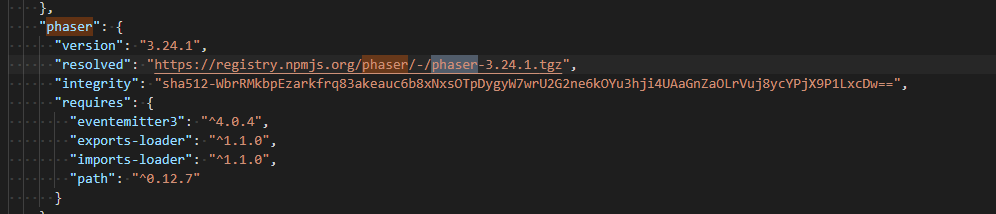
The installation is a brand new one @3.24.1 so there wouldn't be any old type defs I trust.
Following up the image() method, VS Code hints at the Image type yet when F12 it, it does indeed have the definition you're mentioning:

Upon closer inspection, it seems that ImageWithDynamicBody is simply an alias for just Phaser.Physics.Arcade.Image on types/phaser.d.ts line 56490, not sure if that's any issue at all or meant to be, but it probably extends somewhere?

ingles98
on 28 Sep 2020
Upon closer inspection, it seems that
ImageWithDynamicBodyis simply an alias for justPhaser.Physics.Arcade.Imageon types/phaser.d.ts line 56490
That must be the problem, yes. 😦
samme
on 28 Sep 2020
Thank you for submitting this issue. We have fixed this and the fix has been pushed to the master branch. It will be part of the next release. If you get time to build and test it for yourself we would appreciate that.
photonstorm
on 29 Sep 2020
Hello,
I get the same problem but not with ImageWithDynamicBody, but with creating a Text and adding it to physics.
To achieve the correct types I used this type definition:
private char: Phaser.GameObjects.Text & { body: Phaser.Physics.Arcade.Body };
this.char.body.onWorldBounds = true;
will give me the read-only error, but using any as type to pass the ts compiler, everything works as expected.
 mattcrn
on 10 Oct 2020
mattcrn
on 10 Oct 2020
Hello,
I get the same problem but not withImageWithDynamicBody, but with creating a Text and adding it to physics.
To achieve the correct types I used this type definition:private char: Phaser.GameObjects.Text & { body: Phaser.Physics.Arcade.Body };this.char.body.onWorldBounds = true;will give me the read-only error, but using
anyas type to pass the ts compiler, everything works as expected.
I could not check at this moment for the type definitions for those but it could be the same issue with type aliasing instead of the expected type extending.
Not an issue in nature but I believe in all types, that property should always be read-only and that you should use the method mentioned above to toggle the world bounds event. Should work perfectly for you without weird type definitions but this could be looked into a little bit more.
One of the contributors fixed for my specific type issue but this could be more widespread to text and other gameobject derived types.
For now just use the setCollideWorldBounds method instead of manually setting the property.
ingles98
on 11 Oct 2020
Related issues
 JarLowrey
·
4Comments
JarLowrey
·
4Comments
 Secretmapper
·
3Comments
Secretmapper
·
3Comments
 hugoruscitti
·
3Comments
hugoruscitti
·
3Comments
 SKEPDIMI
·
4Comments
SKEPDIMI
·
4Comments
 lilijreey
·
4Comments
lilijreey
·
4Comments