Phaser: Cannot change some data of the initial game settings.
Version
- Phaser Version: 3.24.1
- Operating system: Windows 10
- Browser: Chrome / Edge
Description
I cannot change some values in the config game for example gameTitle or gameVersion, but concretely I was interested in change the value of loaderPath, as the docs says:
_A URL path used to resolve relative paths given to the loader. Example: 'images/sprites/'._
https://photonstorm.github.io/phaser3-docs/Phaser.Core.Config.html#loaderPath
Example Test Code
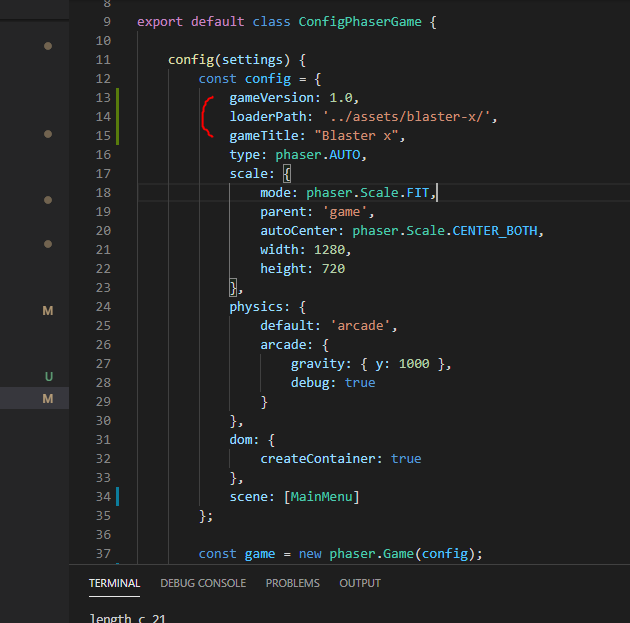
then a console.log(this.game); in the _main.menu_ Scene

This values never are changed
Additional Information
Amazing game engine!
 shimozurdo
All 2 comments
Hello @shimozurdo ,
The properties should be like following:
const config = {
    title: 'Blaster x',
    version: '1.0',
    url: ''  //some url if you also need url :)
}
In src/core/Config.js code is following this:
/**
 * @const {string} Phaser.Core.Config#gameTitle - The title of the game.
 */
this.gameTitle = GetValue(config, 'title', '');

/**
 * @const {string} Phaser.Core.Config#gameURL - The URL of the game.
 */
this.gameURL = GetValue(config, 'url', 'https://phaser.io');

/**
 * @const {string} Phaser.Core.Config#gameVersion - The version of the game.
 */
this.gameVersion = GetValue(config, 'version', '');
Also you might wanna check on Game Config examples
Hopefully this solves your problem =)
 halilcakar
on 13 Sep 2020
halilcakar
on 13 Sep 2020
👍1
Awesome! thank you @halilcakar .
shimozurdo
on 13 Sep 2020
😄1
👍1
Was this page helpful?
0 / 5 - 0 ratings
Related issues
 rexrainbow
·
4Comments
rexrainbow
·
4Comments
 sercand
·
3Comments
sercand
·
3Comments
 Secretmapper
·
3Comments
Secretmapper
·
3Comments
 Colbydude
·
4Comments
Colbydude
·
4Comments
 samme
·
3Comments
samme
·
3Comments
Most helpful comment
Awesome! thank you @halilcakar .