Phaser: Graphics.strokeEllipse and Graphics.strokeCircle don't close properly for higher stroke width values
Version
- Phaser Version: 3.21.0
- Operating system: Windows 10
- Browser: Google Chrome 79.0.3945.88 (Official Build) (64-bit)
Description
Graphics.strokeEllipse and Graphics.strokeCircle don't close properly for higher stroke width values.
Example Test Code
A slightly modified code from following example:
https://labs.phaser.io/view.html?src=src\game%20objects\graphics\primitive%20types.js
var config = {
    width: 800,
    height: 600,
    type: Phaser.AUTO,
    parent: 'phaser-example',
    scene: {
        create: create
    }
};

var game = new Phaser.Game(config);

function create ()
{
    var graphics = this.add.graphics();

    graphics.lineStyle(4, 0x00ff00, 1);

    graphics.strokeRect(32, 32, 256, 256);

    graphics.fillStyle(0xff0000, 0.8);

    graphics.lineStyle(34, 0xff00ff, 1);
    graphics.strokeEllipse(400, 250, 200, 128);

    graphics.lineStyle(64, 0x00ffff, 1);
    graphics.strokeCircle(260, 260, 120);

    // graphics.setAlpha(0.5);
}
Additional Information
Phaser.WEBGLrenderer:
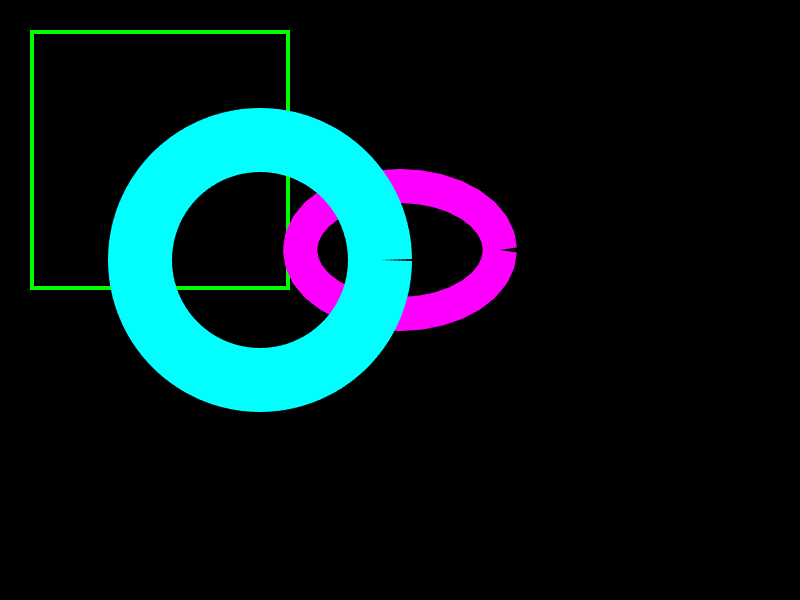
Phaser.CANVASrenderer:

 pavle-goloskokovic
All 5 comments
That is what the overshoot parameter is for:
* @param {number} [overshoot=0] - This value allows you to increase the segment iterations in WebGL rendering. Useful if the arc has a thick stroke and needs to overshoot to join-up cleanly. Use small numbers such as 0.01 to start with and increase as needed.
 photonstorm
on 8 Jan 2020
photonstorm
on 8 Jan 2020
overshoot is a parameter of Graphics.arc method:
https://github.com/photonstorm/phaser/blob/4892cc7feb6e718031cc177f1cf98b5821b6e6bf/src/gameobjects/graphics/Graphics.js#L1245
and it might solve the issue with Graphics.strokeCircle if anticlockwise and overshoot were added as optional parameters of strokeCircle and passed to Graphics.arc call.
https://github.com/photonstorm/phaser/blob/4892cc7feb6e718031cc177f1cf98b5821b6e6bf/src/gameobjects/graphics/Graphics.js#L623
They can potentially also be added to Graphics.fillCircle for consistency.
https://github.com/photonstorm/phaser/blob/4892cc7feb6e718031cc177f1cf98b5821b6e6bf/src/gameobjects/graphics/Graphics.js#L602
But in that case the issue with Graphics.strokeEllipse remains since this method uses Graphics.strokePoints internally instead of Graphics.arc.
https://github.com/photonstorm/phaser/blob/4892cc7feb6e718031cc177f1cf98b5821b6e6bf/src/gameobjects/graphics/Graphics.js#L1169
pavle-goloskokovic
on 8 Jan 2020
There's nothing you can do about it for an ellipse. If you wish to use a thick line, use arc instead of the other methods.
photonstorm
on 11 Jan 2020
Going to close this off as I'm afraid it's a known limitation of the way the arcs are created internally. I've tried increasing the iterStep in the Graphics renderer to a lower value, such as 0.0001, which works in that the first circle in your example now closes properly but at the expense of generating over 10,000 vertices! And even with that, the ellipse still didn't work. The way Graphics works would need recoding entirely, I think, so it used a triangle strip instead, rather than a fan arrangement, but then it wouldn't batch at all either. Frustrating, but a non-trivial change at this late stage.
photonstorm
on 24 Sep 2020
For future reference, more reading on the topic: https://mattdesl.svbtle.com/drawing-lines-is-hard
photonstorm
on 24 Sep 2020
Related issues
 hugoruscitti
·
3Comments
hugoruscitti
·
3Comments
 MarkSky
·
3Comments
MarkSky
·
3Comments
 frob
·
4Comments
frob
·
4Comments
 cncolder
·
4Comments
cncolder
·
4Comments
 sercand
·
3Comments
sercand
·
3Comments