Phaser: Mouse input goes through overlay HTML
Version
- Phaser Version: 3.16.2
- Operating system: Win10
- Browser: Chrome and Firefox
Description
Mouse input on overlayed HTML elements goes through the overlay. For example, if there is an interactive sprite underneath the DOM button, clicking the button also triggers sprite's pointerdown event. Bug does not exist on 3.15.1.
On Chrome mouse down events sometimes gets handled twice on a single click.
Tried playing with various settings (input.globalTopOnly, input.useQueue, input.addDownCallback()), but couldn't manage to make it work properly.
Example Test Code
<head>
   <style type="text/css">
    #ui{
      position: absolute;
      top: 0;
      left: 0;
      width: 50%;
      height: 100%;
      background-color: rgba( 0,0,0,0.3);
    }
    button{
      height: 200px;
    }
    </style>
  </head>
  <body>
    <div id="game"></div>
    <div id="ui">
      <button onclick="alert('TEST'); ">test</button>
    </div>
    <script src="bundle.js"></script>
  </body>
Additional Information
I guess, it's the same issue: https://phaser.discourse.group/t/click-on-div-under-phaser-object/1656/13
 fobaz
fobaz
All 8 comments
Did you try to use event.stopPropagation?
For your example:
in HTML: <button onclick="buttonOnClick()">test</button>
in code: function buttonOnClick(event) {
event.stopPropagation();
alert('TEST');
}
 LoolzRules
on 27 Mar 2019
LoolzRules
on 27 Mar 2019
Tried event.stopPropagation(), didn't do anything, click still goes through and gets also handled by Phaser.
fobaz
on 27 Mar 2019
So, you tried my code above with input.useQueue set to false?
As cited from https://photonstorm.github.io/phaser3-docs/Phaser.Input.InputManager.html#useQueue__anchor:
Use the internal event queue or not?
Set this via the Game Config with the inputQueue property.
Phaser 3.15.1 and earlier used a event queue by default.
Also, have you tried preventDefault()?
LoolzRules
on 27 Mar 2019
Yes, I have tried preventDefault(). With input.useQueue set to false it's the same. With set to true, no input event listeners are called (it seems, Phaser does not register any input). The following callback gets called, with input.useQueue = true, but it also goes through overlay: (it's TypeScript)
    this.input.addDownCallback((ev:any) => {
      console.log(ev); //this works, but gets called no matter if clicked on overlay or canvas
      this.input.events.emit("pointerdown", ev); //listeners not triggered
      this.events.emit("pointerdown", ev); //listeners not triggered
      this.scene.getScenes(true).forEach( (scene) => {
        scene.input.emit("pointerdown", ev); //listeners not triggered
      });
    }, false);
To sum up: overlay works with 3.15.1, doesn't with 3.16.2. Tried:
- e.stopPropagation();
- e.preventDefault();
- input.useQueue = true/false
- config.inputQueue = true/false
and probably all combinations of these.
fobaz
on 27 Mar 2019
You need to call stopPropagation() from the button's mousedown handler, not click. https://codepen.io/samme/pen/LvYrEo?editors=0010
 samme
on 1 Apr 2019
samme
on 1 Apr 2019
Just want to state you might want to use stop stopPropagation() with mouseup too.
 rgk
on 2 Apr 2019
rgk
on 2 Apr 2019
As @samme wrote above, this needs stopping in the correct handler.
 photonstorm
on 5 Apr 2019
photonstorm
on 5 Apr 2019
if anyone ever needs this, I had the same issue, sort of, had a UI over a phaser canvas and the clicks were going through.
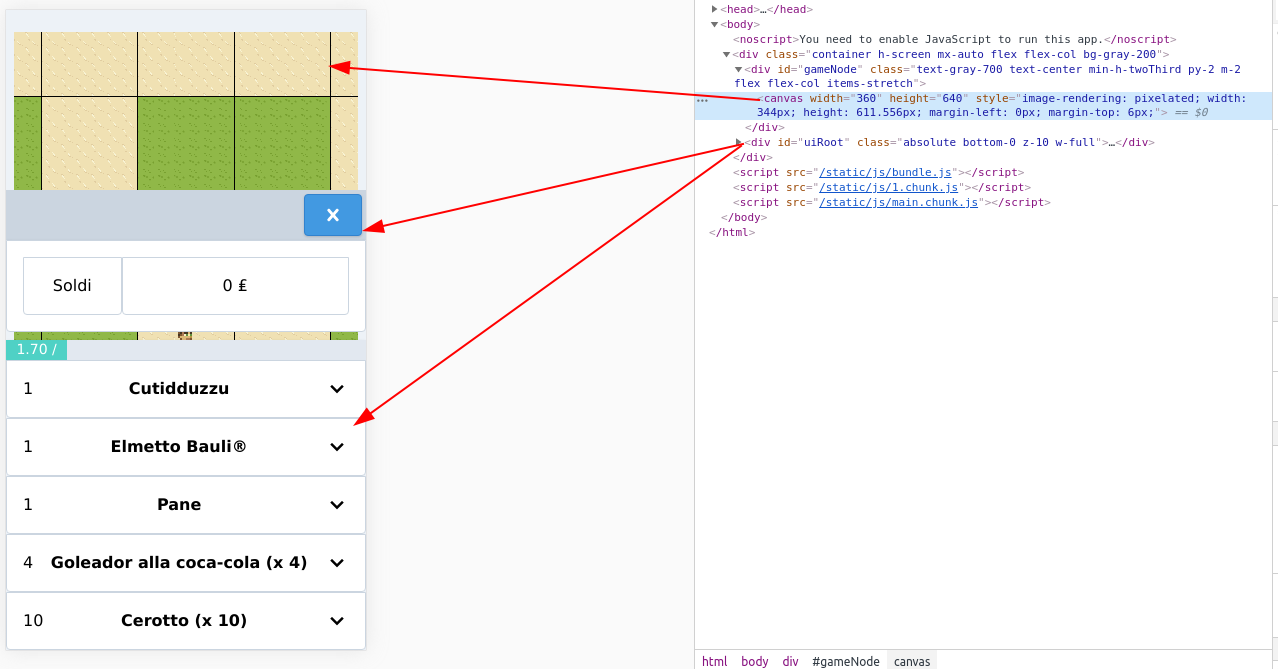
I solved doing this just before creating the game on the phaser bootstrap phase
const uiRoot = document.getElementById('uiRoot');
for (const eventName of ['mouseup','mousedown', 'touchstart', 'touchmove', 'touchend', 'touchcancel']){
    uiRoot.addEventListener(eventName, e => e.stopPropagation());
}
 vikkio88
on 14 May 2020
vikkio88
on 14 May 2020
Related issues
 rexrainbow
·
4Comments
rexrainbow
·
4Comments
 cncolder
·
4Comments
cncolder
·
4Comments
 Legomite
·
4Comments
Legomite
·
4Comments
 MarkSky
·
3Comments
MarkSky
·
3Comments
 Secretmapper
·
3Comments
Secretmapper
·
3Comments
Most helpful comment
You need to call stopPropagation() from the button's
mousedownhandler, notclick. https://codepen.io/samme/pen/LvYrEo?editors=0010