Phaser: Scale manager bug for iOS PWA
Phaser Version: 3.16.1
Operating system: iOS 11, iOS 12
- Browser: Safari PWA
Description
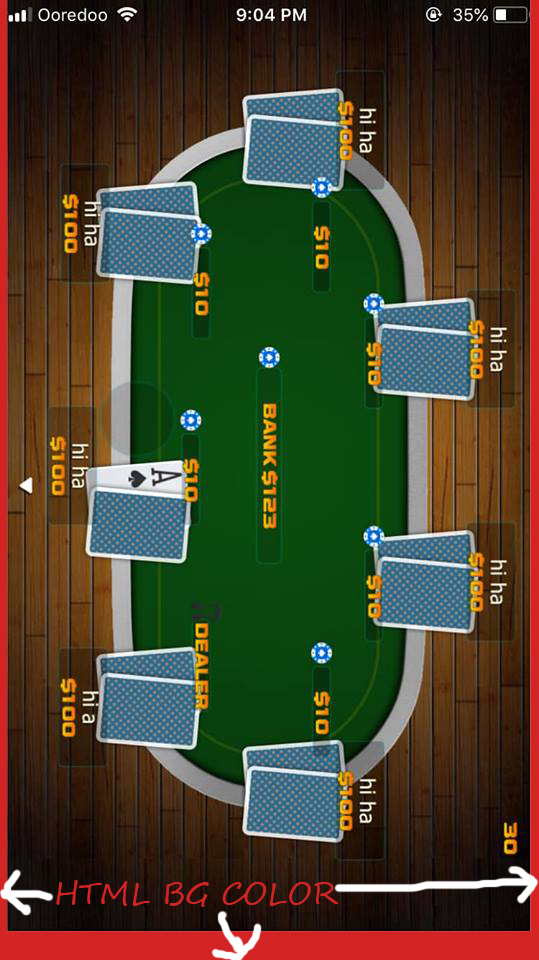
If I use viewport-fit=cover for iOS PWA app, the scale manager FIT method will not accurately calculate the biggest height of canvas' parent. There is small space left at the bottom of the device because the game move up to fill the notch area. (battery percentage area on older i-Phones) this is not just centering issue. because of FIT nature, I also get smaller game width. Since html background color is now taking the whole screen on PWA mode, the canvas should be able to use all the area of the device on PWA mode with viewport-fit-cover as well.
Example Test Code
<meta name="viewport" content="width=device-width,initial-scale=1.0, user-scalable=no, viewport-fit=cover">
scale:
 {
     mode: Phaser.Scale.FIT,
     autoCenter: Phaser.Scale.CENTER_BOTH,
}
Additional Information
 charmingny
All 20 comments
I do not think this is a Phaser issue. I have also built PWAs with Phaser and it takes the whole screen size on both iOS and Android.
This is how I did it.
https://github.com/yandeu/phaser-project-template/tree/master/src
 yandeu
on 14 Feb 2019
yandeu
on 14 Feb 2019
I will test your code and see what's different.
charmingny
on 14 Feb 2019
Actually, the example above does not scale.
But this game scales and installs a ServiceWorker for offline usage.
https://github.com/yandeu/phaser3-typescript-platformer-example
Hope it helps :)
yandeu
on 14 Feb 2019
actually my issue is not about full-screen api. it is about viewport-fit=cover and Phaser.Scale.FIT, does not work well together. do you have any example that use viewport-fit=cover meta tag?
charmingny
on 14 Feb 2019
Oh, no sorry I don't :/
yandeu
on 14 Feb 2019
Thanks for the help, yandeu. I have run your game on my devices. Your example doesn't actually fill up the notch area on iPhone-X. Also it deosn't really fill up all available area as well in landscape mode. (It is just HTML background is black , so, it is not obvious. please set the HTML background to something else to see the issue) If you try to fill up the whole screen including notch area without actually using iOS excremental full screen API feature (because it is turn-off by default on clients' phones), you will see the bug/issue I am facing.

charmingny
on 14 Feb 2019
I see.
My example does not use the fullscreen api neither.
I will change the bgcolor during this day.
I'm curious how to solve it. Unfortunately, I do not have a phone with a notch to test it.
yandeu
on 14 Feb 2019
Thanks. Please test with distinct bg color and wider aspect ratio game canvas. a phone with a notch is not compulsory though. It can be found on all kind of phones I supposed. the game with Portrait mode is more obvious to see the issue as well.
charmingny
on 14 Feb 2019
I have added the red background color and the viewport-fit=cover
I also tested the game on my Pixel 2 XL with a virtual notch. This is how it looks:
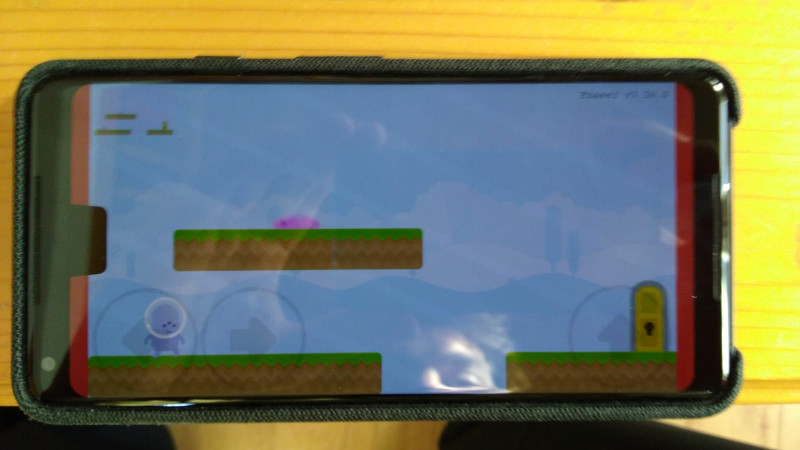
I actually do think I know what the issue is. I had a similar issue with a splashscreen for cordova. I hope I can test my thoughts this evening or tomorrow. (I'm on a trip for 2 days)
yandeu
on 14 Feb 2019
thanks a lot for taking time to test. on your phone, your game still look correct and it is taking entire available height space. May be if you increase game width ( wider aspect ratio) , my problem will be more visible to you?? or may be, is it just my other css problem?? btw, my game is in portrait mode. I just rotate all the image to 90'. I try to set the aspect ratio to my phone max resolution 1125x2436. that way, I found out the issue. If I set other resolution with different aspect ratio, which doesn't need to involve notch area by default, the issue is not obvious to me as well with my game.
charmingny
on 14 Feb 2019
It works now on my Pixel 2 XL.
Try the game again. You should see a violet loading screen and then the game in fullsize.
The ServiceWorker caches, so you have to reload the PWA several times until you see the violet loading screen.
yandeu
on 14 Feb 2019
wow!! what did you change?
charmingny
on 14 Feb 2019
Coool. I guess it works now perfectly on your iPhone X?
It's a simple "bug" how PWA are loaded. I will commit the code and explain how and why it works like this as soon I find another 15 min. 😁
yandeu
on 14 Feb 2019
yes, it works now.
charmingny
on 14 Feb 2019
Solution
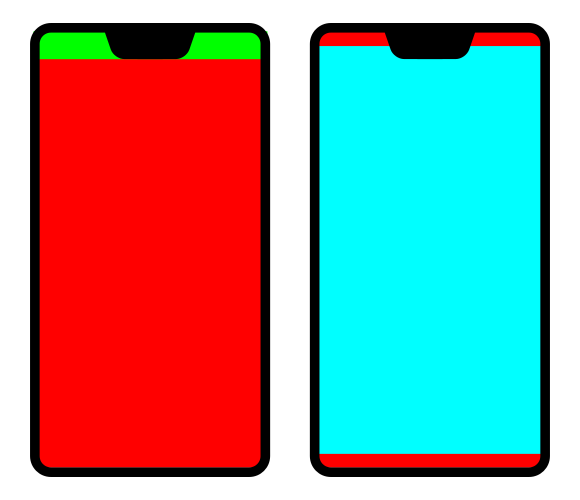
- Green = Top Bar
- Red = Html Area
- Blue = Phaser Canvas
What the problem was
The problem is how PWA are started. At first the PWA starts with the top bar active and the html below it. After this, the PWA looks at the manifest.json file and finds the "display": "fullscreen", entry. It will then remove the top bar and set the html to the full size.
Now the problem is that the html area resizes, but the Phaser Canvas does not.
How to solve this
There are two ways to solve this. Either your Phaser game does automatically resize based on the onresize. Or (the simple solution I choose) you just wait a while until the PWA is fully loaded and then create your Phaser instance like so:
window.addEventListener('load', () => {
  window.setTimeout(() => {
    const config = {
      // all your game configs
    }
    new Phaser.Game(config)
  }, 2000)
})
Prerequisites
To make this work, you need two things. A meta tag with viewport-fit=cover:
<meta name="viewport" content="width=device-width, initial-scale=1.0, viewport-fit=cover" />
Second, your Phaser scale strategy should already scale to full size on all phone without a notch.
In my game I use a very simple scaling strategy. I fix the height, and adjust the width according to the device screen ratio. Like so:
const ratio = Math.max(window.innerWidth / window.innerHeight, window.innerHeight / window.innerWidth)
const DEFAULT_HEIGHT = 720
const DEFAULT_WIDTH = ratio * DEFAULT_HEIGHT

const config = {
  // ...
  scale: {
    mode: Phaser.Scale.FIT,
    autoCenter: Phaser.Scale.CENTER_BOTH,
    width: DEFAULT_WIDTH,
    height: DEFAULT_HEIGHT
  }
  // ...
}
Improvements
I guess it would be good to know if it is possible to get an event triggered if the PWA has finished loading. But I do not know if there is a native solution to this.
[I do really hope this helps you finish your game :)]
yandeu
on 15 Feb 2019
still no luck for me. I will test more and report back. Thank you sir. both resize and setTimeout delay mode doesn't do the trick for me.
my game setting
Portrait
720 x 1334 game resolution ( and I tested with iPhone 6s because it is its native resolution )
background-color: red;<meta name="viewport" content="width=device-width,initial-scale=1.0, user-scalable=no, viewport-fit=cover"><meta name="apple-mobile-web-app-status-bar-style" content="black-translucent">I also use
apple-touch-startup-imagefor splash screen. ( somehow that splash screen is fullscreen though )scale: { mode: Phaser.Scale.FIT, autoCenter: Phaser.Scale.CENTER_BOTH, }
Some debug information outputting to screen
screen.width x screen.height = 375 x 667
window.innerWidth x windows.innerHeight = 375 x 647
charmingny
on 16 Feb 2019
You got the resolution wrong. The 6s has a dpr of 2 and a native resolution of 750 x 1334.
2x (375x667)
Why don you have this line <meta name="apple-mobile-web-app-status-bar-style" content="black-translucent"> instead of just removing the status bar. Just set "display": "fullscreen" in your manifest.json no?
yandeu
on 16 Feb 2019
my game resolution is already 750 x 1334. It is not wrong.
Finally I got it, yayyy! the solution for me is div
{
margin: 0px;
padding: 0px;
height: 100vh;
width: 100vw;
} to parent div of the canvas.
without div
{
margin: 0px;
padding: 0px;
height: 100vh;
width: 100vw;
}
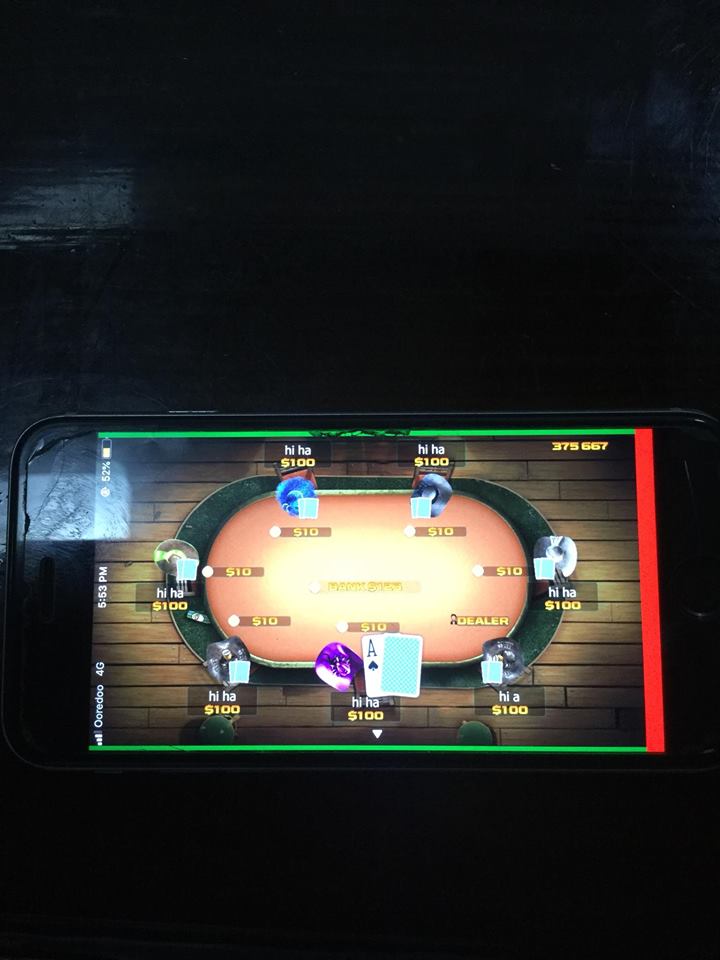
(red = html bg color. green = div bg color )
with div
{
margin: 0px;
padding: 0px;
height: 100vh;
width: 100vw;
}
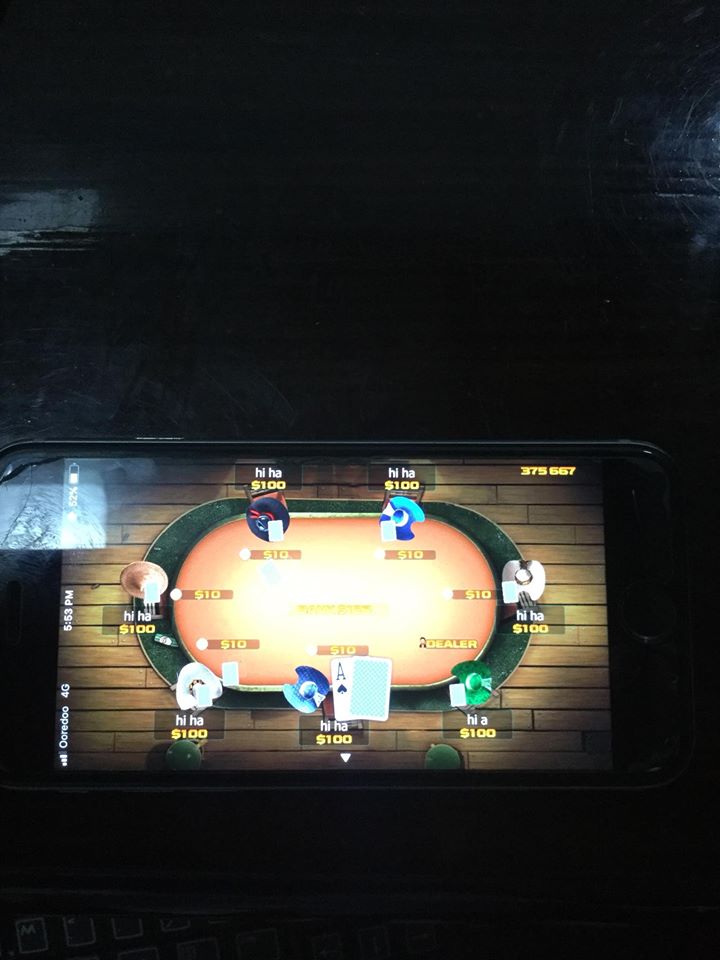
(still same ... red = html bg color. green = div bg color. but not visible anymore because canvas took over entire screen )
Please ignore the art. these are just placeholders I downloaded from internet for now.
There is no bug in Phaser though. I just need to set CSS in my parent DIV to work. Thanks a lot @yandeu for understanding my problem and guiding me.
charmingny
on 16 Feb 2019
Niiice. I'm glad you solved it! 😀
yandeu
on 16 Feb 2019
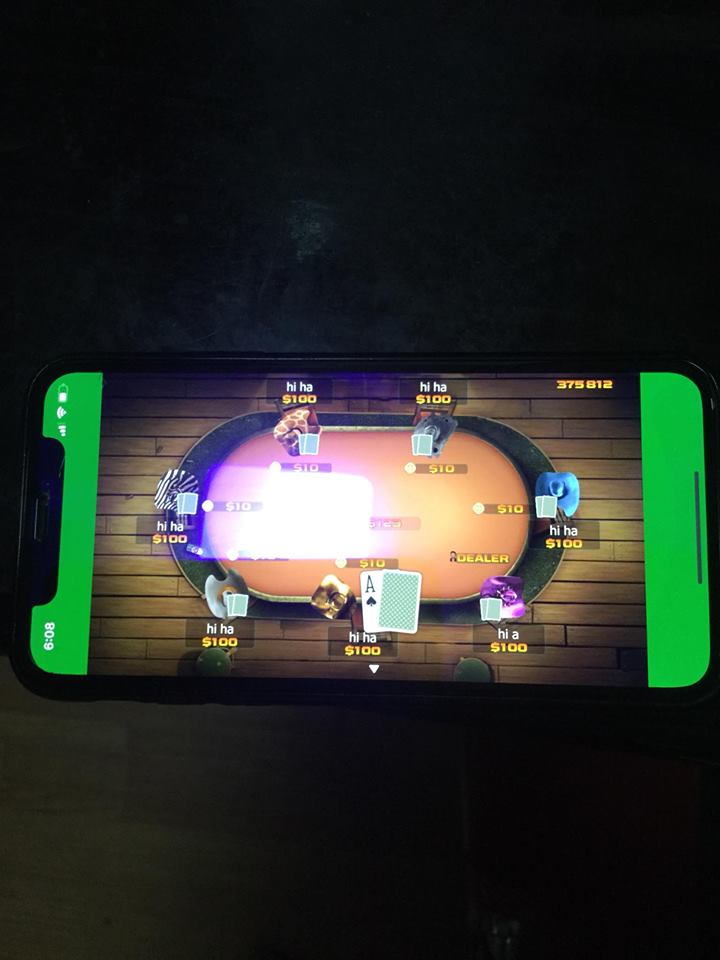
this is iPhone-X result I wanted. now I just need to change back green to black. I can also provide wider floor image inside div to cover green area as well. Thanks a lot sir.
charmingny
on 16 Feb 2019
Related issues
 samme
·
4Comments
samme
·
4Comments
 Colbydude
·
4Comments
Colbydude
·
4Comments
 frob
·
4Comments
frob
·
4Comments
 hugoruscitti
·
3Comments
hugoruscitti
·
3Comments
 Legomite
·
4Comments
Legomite
·
4Comments