Phaser: Broken 'roundPixels' setting of the game
Hello!
I understand that the very latest version of Phaser (3.12) is not stable/released, but I just want to be sure you know about this issue.
In a stable version if I create a tilemap (in Tiled) there is a small (1px) space between tiles visible while walking around the map, and extra pixels appear from the neighbor tile. This can be fixed by game's setting roundPixels = true.
If I update Phaser to the latest version from the master branch - it seems this setting is being ignored, or is not working, or something else causes the same issue.
Here is a screenshot:
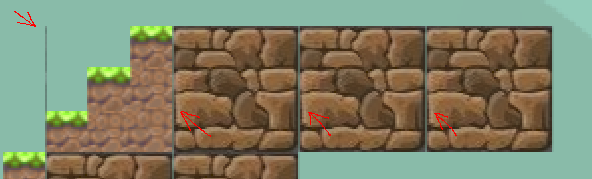
Red arrows shows incorrect rendering places. The first arrow shows an extra pixels column from neighbor tile, it shouldn't be visible because this tile has transparent background. Other arrows show extra gap between tiles.
And probably related issue with text labels - while moving around the map text font also often is a little corrupted:

.. bad font/rendering on the left and normal on the right, here noticeably different are letters H, e, o, d.
Want to back this issue? Post a bounty on it! We accept bounties via Bountysource.
 inmylo
All 6 comments
I've noticed a similar problem in a stable version too - if one layer is Static and the second is Dynamic - there is also a visible gap between tiles of different layers when camera is moving.
My background is light and tiles are dark. So while moving a see the light pixels between tiles of different layers. Looks like static and dynamic layers are being rendered on different timesteps, so at some frames background becomes visible.
inmylo
on 20 Jul 2018
They're not (being rendered at different times), it's that the UV calculations are done once, at the start, for static, and in real-time for dynamic, and if the tiles are not properly extruded they'll blend like this, no matter what setting is set.
 photonstorm
on 20 Jul 2018
photonstorm
on 20 Jul 2018
Then how do I use static and dynamic layers together and prevent these ugly gaps?
inmylo
on 21 Jul 2018
@imilo you should use the command line tool called tile extruder:
 ka0s420
on 25 Jul 2018
ka0s420
on 25 Jul 2018
Thanks for useful extruder tool! This makes an extra gap issue as fixable.
The only issue here left is corrupted font. However, I'm not sure about the best solution. If roundPixels will be fixed - in previous Phaser 3.10 all other game objects have rounded values too. I see that even rotation angles become rounded. This is a visually noticeable change, which makes some objects not beautiful. I hope in v3.12 this will not be an issue.
inmylo
on 19 Aug 2018
One more finding I have - I see this corrupted font when width/height of canvas (or the whole screen in my case) is an odd number. Maybe for rendering you use somewhere the half of canvas height (and width) and because of this extra 0.5px I get this issue. But if I resize to the even numbers - 95% of issues are gone.
However, not all of them. In some cases still visible artifacts.
At the moment as a workaround I use this to round numbers to the closest even numbers:
width:  2 * Math.round(window.innerWidth / 2),
height: 2 * Math.round(window.innerHeight / 2),
I hope it will help you to find the source of the issue.
inmylo
on 25 Aug 2018
Related issues
 sercand
·
3Comments
sercand
·
3Comments
 cncolder
·
4Comments
cncolder
·
4Comments
 SKEPDIMI
·
4Comments
SKEPDIMI
·
4Comments
 rexrainbow
·
4Comments
rexrainbow
·
4Comments
 lilijreey
·
4Comments
lilijreey
·
4Comments
Most helpful comment
@imilo you should use the command line tool called tile extruder:
https://www.npmjs.com/package/tile-extruder