Phaser: Tilemaps don't render transparent spaces
- A bug in the API (always say which version you're using!)
3.0.0-beta.1
This seems like a bug to me but it may be a deliberate decision that I'm not aware of. While loading Tilemap data using v2, layer data with an index of 0 would be rendered as transparent (black represents transparent spaces):
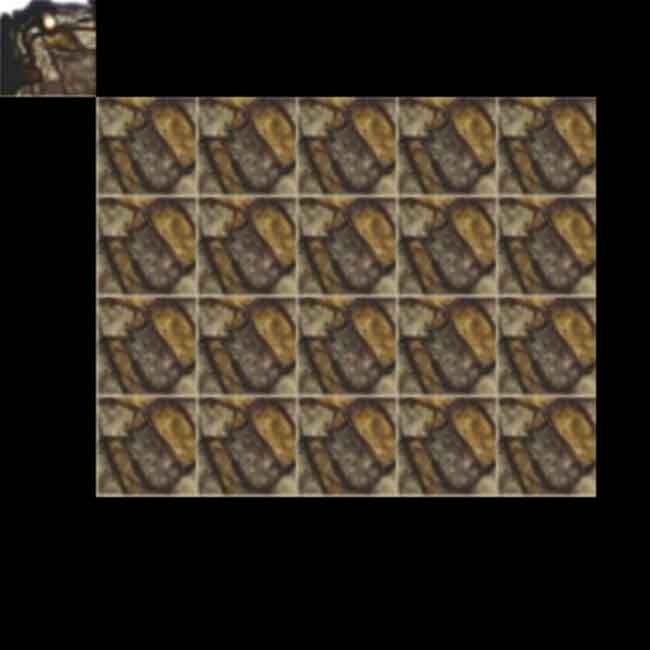
However, when rendering the same layer data with v3, these spaces render with what appears to be a stretched texture from the texture atlas:
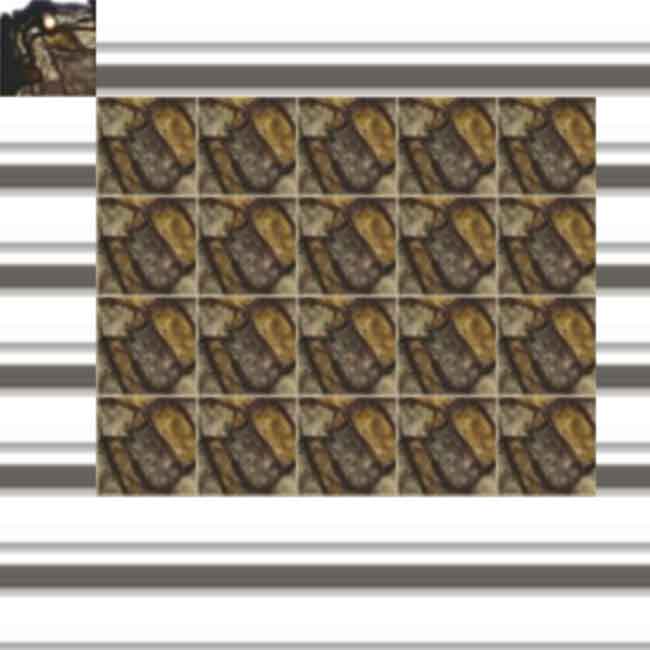
I based my setup off this demo. The following is my implementation:
const game = new Phaser.Game({
    backgroundColor: '#000000',
    height: window.innerHeight,
    parent: 'game',
    scene: {
        preload,
        create
    },

    type: Phaser.AUTO,
    width: window.innerWidth
});

function preload () {
    this.load.json('map', '/source/data/map/test.json');
    this.load.image('tiles', '/source/assets/tile/level01.png');
}

function create () {
    const {
        layers: [{
            data
        }]
    } = this.cache.json.get('map');

    const mapData = data.map(i => i - 1);

    this.add.staticTilemap(mapData, 0, 0, 50, 50, 20, 20, 0, 'tiles', null);
}
And in case it helps, this is the data exported from Tiled:
{
    "height":20,
    "layers":[
        {
            "data":[1, 0, 0, 0, 0, 0, 0, 0, 0, 0, 0, 0, 0, 0, 0, 0, 0, 0, 0, 0, 0, 12, 12, 12, 12, 12, 0, 0, 0, 0, 0, 0, 0, 0, 0, 0, 0, 0, 0, 0, 0, 12, 12, 12, 12, 12, 0, 0, 0, 0, 0, 0, 0, 0, 0, 0, 0, 0, 0, 0, 0, 12, 12, 12, 12, 12, 0, 0, 0, 0, 0, 0, 0, 0, 0, 0, 0, 0, 0, 0, 0, 12, 12, 12, 12, 12, 0, 0, 0, 0, 0, 0, 0, 0, 0, 0, 0, 0, 0, 0, 0, 0, 0, 0, 0, 0, 0, 0, 0, 0, 0, 0, 0, 0, 0, 0, 0, 0, 0, 0, 0, 0, 0, 0, 0, 0, 0, 0, 0, 0, 0, 0, 0, 0, 0, 0, 0, 0, 0, 0, 0, 0, 0, 0, 0, 0, 0, 0, 0, 0, 0, 0, 0, 0, 0, 0, 0, 0, 0, 0, 0, 0, 0, 0, 0, 0, 0, 0, 0, 0, 0, 0, 0, 0, 0, 0, 0, 0, 0, 0, 0, 0, 0, 0, 0, 0, 0, 0, 0, 0, 0, 0, 0, 0, 0, 0, 0, 0, 0, 0, 0, 0, 0, 0, 0, 0, 0, 0, 0, 0, 0, 0, 0, 0, 0, 0, 0, 0, 0, 0, 0, 0, 0, 0, 0, 0, 0, 0, 0, 0, 0, 0, 0, 0, 0, 0, 0, 0, 0, 0, 0, 0, 0, 0, 0, 0, 0, 0, 0, 0, 0, 0, 0, 0, 0, 0, 0, 0, 0, 0, 0, 0, 0, 0, 0, 0, 0, 0, 0, 0, 0, 0, 0, 0, 0, 0, 0, 0, 0, 0, 0, 0, 0, 0, 0, 0, 0, 0, 0, 0, 0, 0, 0, 0, 0, 0, 0, 0, 0, 0, 0, 0, 0, 0, 0, 0, 0, 0, 0, 0, 0, 0, 0, 0, 0, 0, 0, 0, 0, 0, 0, 0, 0, 0, 0, 0, 0, 0, 0, 0, 0, 0, 0, 0, 0, 0, 0, 0, 0, 0, 0, 0, 0, 0, 0, 0, 0, 0, 0, 0, 0, 0, 0, 0, 0, 0, 0, 0, 0, 0, 0, 0, 0, 0, 0, 0, 0, 0, 0, 0, 0, 0, 0, 0, 0, 0, 0, 0, 0, 0, 0, 0, 0, 0, 0, 0, 0, 0, 0, 0, 0, 0, 0, 0, 0, 0, 0, 0, 0, 0],
            "height":20,
            "name":"Tile Layer 1",
            "opacity":1,
            "type":"tilelayer",
            "visible":true,
            "width":20,
            "x":0,
            "y":0
        }
    ],
    "nextobjectid":1,
    "orientation":"orthogonal",
    "renderorder":"right-down",
    "tiledversion":"1.0.3",
    "tileheight":50,
    "tilesets":[
        {
            "firstgid":1,
            "source":"..\/..\/assets\/tile\/tileset.tsx"
        }
    ],
    "tilewidth":50,
    "type":"map",
    "version":1,
    "width":20
}
If this is intended and it is now required to have a blank space on a texture atlas, please let me know! :)
PS the transparent screenshot was created by adding the following code to src/gameobjects/tilemap/static/StaticTilemap.js:96:
if (tileId < 0) {
    continue;
}
 jorbascrumps
All 7 comments
@photonstorm Any chance I can get confirmation on this behaviour? If I have to convert my tilemaps I will but I'd like to know if this is something that will be fixed/ changed first. Thanks!
jorbascrumps
on 15 Oct 2017
Not yet decided. Will make a decision when we implement the Tilemap API (and not just the renderer). Very likely it will change to emulate old behavior.
 photonstorm
on 16 Oct 2017
photonstorm
on 16 Oct 2017
Thank you for the response! I'll keep an eye out for news and continue to make the current implementation work for me in the meantime. Very excited for the future of Phaser.
jorbascrumps
on 16 Oct 2017
Could this be a configurable option? I'm thinking perhaps a new property that you would assign the transparent tileId to. For example:
transparentTile = -1;
or something like that. So that the renderer would skip rendering -1.
 bobonthenet
on 24 Oct 2017
bobonthenet
on 24 Oct 2017
Ok this has now been added for both static and dynamic tilemaps. There is a new property skipIndexZero which you can toggle, and it has the desired effect of either rendering or skipping index 0 tiles which includes -1 tiles, or any 0 or negative value)
photonstorm
on 3 Nov 2017
@photonstorm I think there's been a regression with this functionality somewhere around Beta 17 or 18. The skipIndexZero option no longer appears in the 3.0.0 build.
jorbascrumps
on 14 Feb 2018
Appears to be fixed in v3.2.0 by setting transparent: true in the game config.
jorbascrumps
on 10 Mar 2018
Related issues
 hugoruscitti
·
3Comments
hugoruscitti
·
3Comments
 JoeBerkley
·
3Comments
JoeBerkley
·
3Comments
 Legomite
·
4Comments
Legomite
·
4Comments
 Colbydude
·
4Comments
Colbydude
·
4Comments
 lilijreey
·
4Comments
lilijreey
·
4Comments
Most helpful comment
Ok this has now been added for both static and dynamic tilemaps. There is a new property
skipIndexZerowhich you can toggle, and it has the desired effect of either rendering or skipping index 0 tiles which includes -1 tiles, or any 0 or negative value)