Phantomjs: Fails to fetch web resource with HTTPS connection on up-to-date Ubuntu-16.04.3
Which version of PhantomJS are you using? Tip: run
phantomjs --version.
2.1.1(Resolved to 2.1.7, although in packages.json we have phantomjs-prebuilt: 2.1.16)What steps will reproduce the problem?
A. Upgraded to the latest at the moment version of Ubuntu-16.04
B. Try to download a web resource from HTTPS, e.g.:
phantomjs test.js
where test.js contents is:
var page = require('webpage').create();

page.onError = function (msg, trace) {
    console.log(msg);
    trace.forEach(function(item) {
        console.log('  ', item.file, ':', item.line);
    });
};
page.onResourceRequested = function (request) {
    console.log('Request ' + JSON.stringify(request, undefined, 4));
};
page.onResourceReceived = function(response) {
    console.log('Receive ' + JSON.stringify(response, undefined, 4));
};

page.open('https://ajax.googleapis.com/ajax/libs/jquery/3.2.1/jquery.min.js', function(status) {
//page.open('https://cdnjs.cloudflare.com/ajax/libs/jquery/3.2.1/jquery.min.js', function(status) {
//page.open('https://cdnjs.cloudflare.com/ajax/libs/twitter-bootstrap/3.3.7/js/bootstrap.min.js', function(status) {
    console.log("Status: " + status);
    if(status === "success") {
        page.render('example.png');
    }
    phantom.exit();
});
C. Observe output "Status: fail" in console.
D. When use HTTP access, the Status reports "success".
Which operating system are you using?
Ubuntu 16.04.3 LTS (GNU/Linux 4.4.0-104-generic x86_64)Did you use binary PhantomJS or did you compile it from source?
Installed withnpm install -gPlease provide any additional information below.
Nodev8.9.0
NPMv5.5.1
Yarn1.2.1
The situation started to appear after I made this upgrade:
$ sudo apt-get upgrade
Reading package lists... Done
Building dependency tree
Reading state information... Done
Calculating upgrade... Done
The following packages were automatically installed and are no longer required:
  libboost-filesystem1.58.0 libboost-program-options1.58.0 libboost-system1.58.0 libboost-thread1.58.0 libgoogle-perftools4 liblockfile-bin liblockfile1 libpcrecpp0v5 libsnappy1v5 libsnmp-base
  libsnmp30 libtcmalloc-minimal4 libunwind8 libv8-3.14.5 libvpx3 libyaml-cpp0.5v5 m4 procmail sendmail-base sendmail-cf sensible-mda snmp
Use 'sudo apt autoremove' to remove them.
The following packages will be upgraded:
  golang-1.6 golang-1.6-doc golang-1.6-go golang-1.6-src grub-legacy-ec2 libperl5.22 libpq-dev libpq5 libssl-dev libssl1.0.0 libssl1.1 lshw openjdk-8-jre-headless openssl perl perl-base
  perl-modules-5.22 php7.2-common postgresql-9.5 postgresql-client-9.5 postgresql-client-common postgresql-common postgresql-contrib-9.5 resolvconf snapd tzdata ubuntu-core-launcher ubuntu-minimal
  ubuntu-server
29 upgraded, 0 newly installed, 0 to remove and 0 not upgraded.
Need to get 89.1 MB of archives.
After this operation, 8492 kB of additional disk space will be used.
Do you want to continue? [Y/n]
I suspect it has something to do with SSL related Ubuntu packages.
Unfortunately, can't prove it, so maybe for authors of PhantomJS it's more clear how to debug.
I tried on different machines, and with latest, up-to-date Ubuntu-16.04 this situation reproduces.
Works fine on MacOS X though...
 rodush
All 16 comments
Okay, small updated here:
I found this issue https://github.com/ariya/phantomjs/issues/12181 and decided to give it a try.
So, with --ignore-ssl-errors=true seem to work fine.... Hope it gives more information.
[UPDATE]
But if I run with Karma test suite, I get this cryptic error:
20 12 2017 16:46:30.683:INFO [karma]: Karma v1.7.1 server started at http://0.0.0.0:9876/
20 12 2017 16:46:30.684:INFO [launcher]: Launching browser Phantom_IgnoreSslErrors with unlimited concurrency
20 12 2017 16:46:30.690:INFO [launcher]: Starting browser PhantomJS
20 12 2017 16:46:30.979:INFO [PhantomJS 2.1.1 (Linux 0.0.0)]: Connected on socket YVlW1xOySN90_VMoAAAA with id 47790730
PhantomJS 2.1.1 (Linux 0.0.0) ERROR
  Script error.


error Command failed with exit code 1.
info Visit https://yarnpkg.com/en/docs/cli/run for documentation about this command.
@rodush Thanks for reporting this. Will investigate. Do you use Lets Encrypt? Can see you're on EC2; they are shipping PhantomJS bundled with their Ubuntu AMI, so quick solution that may work is to completely uninstall PhantomJS and install it from official binary provided on phantomjs.org
/cc @Vitallium @ariya any thoughts?
@one down:: for 99% it will not work as PJS binary shipped with EC2 is somehow broken. Been through this. But, its still worth trying..... there is slim possibility that this wil work
 ghost
on 21 Dec 2017
ghost
on 21 Dec 2017
I believe rebuilding binaries with latest OpenSSL version should fix this problem.
 vitallium
on 21 Dec 2017
vitallium
on 21 Dec 2017
In my case it is just a VPS, with Ubuntu-16.04 installed. Fully controlled by myself (as much as my knowledge of Unix helps me to control the server :-) )
But also situation reproduced on any Vagrantbox for Ubuntu-16.04
Although with --ingore-ssl-errors resources seem to be downloaded, still Karma crashes with cryptic "Script error" message...
I'm trying to find a way how I can debug from my MacOS host, when test suit is being run inside Vagrant....
rodush
on 21 Dec 2017
@Vitallium I decided to check what openssl I have, and see quite weird situation:
ii openssl 1.1.0g-2.1+ubuntu16.04.1+deb.sury.org+1 amd64 Secure Sockets Layer toolkit - cryptographic utility
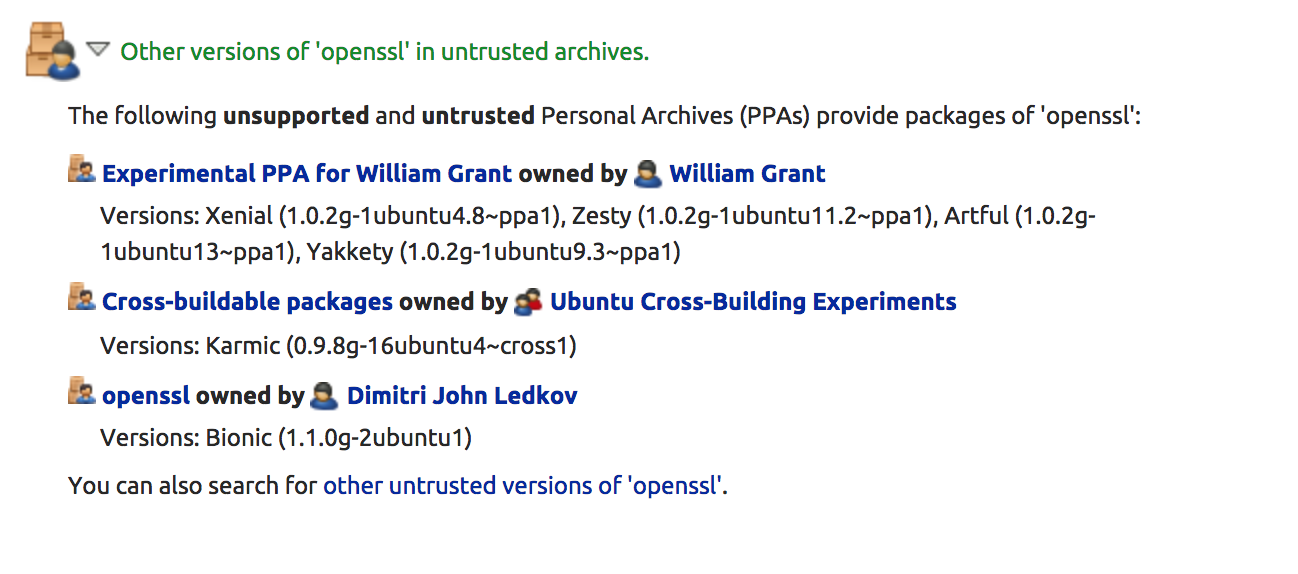
...and when I check https://launchpad.net/ubuntu/+source/openssl, it shows quite interesting information: this version of package is not-official / untrusted, so I need to find out how and why it gets installed to the latest Ubuntu-16.04.
UPDATE
Appeared that libssl1.1 comes from ppa:ondrej/php, which is needed to install PHP-7.1 on Ubuntu 16.04 xenial...
rodush
on 21 Dec 2017
@rodush VPS or not - its hosted on AWS.... otherwise there would not be grub-legacy-ec2 package, as AWS does not ship their custom made pkgs outside of their distros.....
What will happen if you make switch from openssl to Lets Encrypt? Would this problem persist or be gone?
ghost
on 21 Dec 2017
Thanks for helping to investigate this.
The output which I took, was from a Vagrantbox (Ubuntu-16.04), it is not hosted on AWS.
Another server (our CI), is a VPS which I meant, doesn't have that library, but still the same issue.
I can not get rid of openssl as this library is needed for PHP-7.1 to be installed in Ubuntu-16.04, unfortunately...
I think the bug is not in PhantomJS itself, but at least that is where it crashes... Other people under same conditions as mine (Ubuntu-16.04 + PHP-7.1 + PhantomJS/Karma), might have similar trouble at some point in time. Like I said, the combination worked until I upgraded Ubuntu...
So feel free to close this task, if you guys don't have time to reproduce / investigate.
rodush
on 22 Dec 2017
we (at least I) will not close this; openssl is indeed needed by php, but once you install (anbd configure) Lets Encrypt, it will run paralelly to openssl. For me its worth trying. Dont worry, you will break nothing.....
ghost
on 22 Dec 2017
Hi, @pixiuPL !
What exactly do you mean by installing and configuring lets encrypt?
I'm not afraid on installing it, it's just I don't clearly understand what to install... Do you mean certbot utility? https://stackoverflow.com/a/44850749/5298897
rodush
on 23 Dec 2017
@rodush sorry for the delay. Nothing to worry about - you will not mess your system :) Just go here, select your web-server, your operating system and simply follow the instructions.
Once you are done installing, test your issue and post results here. Afterwards just remove certbot sudo apt-get purge *certbot* (notice * in front of and after pkg name - they are important) and thats it - you are back where you are now
ghost
on 31 Dec 2017
@pixiuPL why did you close it?
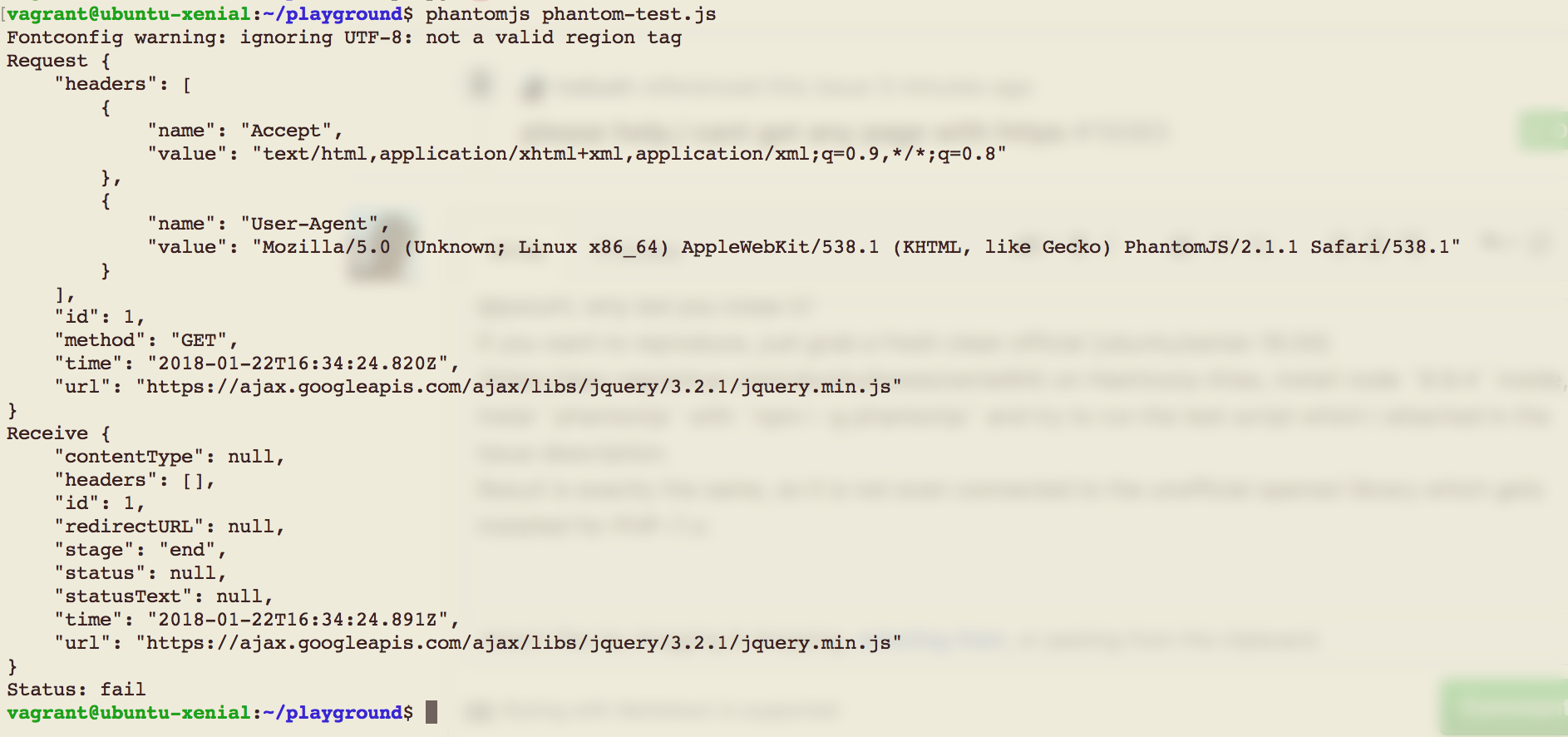
If you want to reproduce, just grab a fresh clean official ubuntu/xenial-16.04 on Hashicorp Atlas, install node 8.9.4 inside, instal phantomjs with npm i -g phantomjs and try to run the test script which I attached in the issue description.
Result is exactly the same, so it is not even connected to the unofficial openssl library which gets installed for PHP-7.x:
rodush
on 22 Jan 2018
@rodush sorry for closing it -> I just thought you solved/forgot about it. My bet.
Whats Hashicorp Atlas?
Good catch as it comes to openssl. Will investigate.
ghost
on 22 Jan 2018
it is a vagrant + virtualbox, so an isolated environment to test.
rodush
on 22 Jan 2018
@rodush Thanks a milion :) we dont use it so I dont know it.
Nonetheless, will test what you've reported.....
ghost
on 22 Jan 2018
We also ran into this issue while upgrading from Ubuntu 16.04.2 to 16.04.3 (official docker image):
Using phantomjs 2.1.1 we were not able to open up any https site.
What I found was that Ubuntu 16.04.3 comes with an updated ca-certificates package (dpkg -l | grep ca-certificates):
ii ca-certificates 20170717~16.04.1 all Common CA certificates
Checking Ubuntu 16.04.2:
ii ca-certificates 20160104ubuntu1 all Common CA certificates
No idea why but downgrading the package from 20170717~16.04.1 to 20160104ubuntu1 (apt-get install ca-certificates=20160104ubuntu1) resolved the issue.
I've attached the dpkg output of the downgrade:
ca-certs-downgrade.txt
 mrmiagi
on 24 Jan 2018
mrmiagi
on 24 Jan 2018
Due to our very limited maintenance capacity (see #14541 for more details), we need to prioritize our development focus on other tasks. Therefore, this issue will be closed. In the future, if we see the need to attend to this issue again, then it will be reopened.
Thank you for your contribution!
 ariya
on 25 Dec 2019
ariya
on 25 Dec 2019
Related issues
 mdominado
·
3Comments
mdominado
·
3Comments
 mz3
·
5Comments
mz3
·
5Comments
 yisibl
·
5Comments
yisibl
·
5Comments
 olee
·
4Comments
olee
·
4Comments
 Snowlav
·
3Comments
Snowlav
·
3Comments
Most helpful comment
We also ran into this issue while upgrading from Ubuntu 16.04.2 to 16.04.3 (official docker image):
Using phantomjs 2.1.1 we were not able to open up any https site.
What I found was that Ubuntu 16.04.3 comes with an updated
ca-certificatespackage (dpkg -l | grep ca-certificates):ii ca-certificates 20170717~16.04.1 all Common CA certificatesChecking Ubuntu 16.04.2:
ii ca-certificates 20160104ubuntu1 all Common CA certificatesNo idea why but downgrading the package from
20170717~16.04.1to20160104ubuntu1(apt-get install ca-certificates=20160104ubuntu1) resolved the issue.I've attached the dpkg output of the downgrade:
ca-certs-downgrade.txt