Pgloader: Control stack exhausted (no more space for function call frames). This is probably due to heavily nested or infinitely recursive function calls, or a tail call that SBCL cannot or has not optimized away.
pgloader crashes with control stack exceptions. Here is the command I type:
docker run --rm --name pgloader --security-opt seccomp=unconfined --network host -v /pipelines/data:/pipelines/data dimitri/pgloader:latest pgloader /pipelines/data/GEOmetadb.sqlite postgresql://postgres:changeme@localhost/sequencing
Here are the errors
WARNING:
Couldn't re-execute SBCL with proper personality flags (/proc isn't mounted? setuid?)
Trying to continue anyway.
2018-06-16T14:43:28.037000Z LOG Migrating from #<SQLITE-CONNECTION sqlite:///pipelines/data/GEOmetadb.sqlite {1005FB27E3}>
2018-06-16T14:43:28.039000Z LOG Migrating into #<PGSQL-CONNECTION pgsql://postgres@localhost:5432/sequencing {10061FB983}>
KABOOM!
INFO: Control stack guard page unprotected
Control stack guard page temporarily disabled: proceed with caution

What I am doing here?

Control stack exhausted (no more space for function call frames).
This is probably due to heavily nested or infinitely recursive function
calls, or a tail call that SBCL cannot or has not optimized away.

PROCEED WITH CAUTION.

antonkulaga@lab:/pipelines/sources/GEOmetadb-scala/databases/postgres$ ./migrate.sh
2018-06-16T14:45:42.036000Z LOG Migrating from #<SQLITE-CONNECTION sqlite:///pipelines/data/GEOmetadb.sqlite {1005FB27E3}>
2018-06-16T14:45:42.038000Z LOG Migrating into #<PGSQL-CONNECTION pgsql://postgres@localhost:5432/sequencing {10061FBAA3}>
KABOOM!
INFO: Control stack guard page unprotected
Control stack guard page temporarily disabled: proceed with caution

What I am doing here?

Control stack exhausted (no more space for function call frames).
This is probably due to heavily nested or infinitely recursive function
calls, or a tail call that SBCL cannot or has not optimized away.

PROCEED WITH CAUTION.
 antonkulaga
All 86 comments
Looks like this issue is specific to official docker container :(
antonkulaga
on 16 Jun 2018
I just reproduced this issue without docker. (debian, pgloader 3.5 from sid built on stretch)
$ pgloader --version
pgloader version "3.5.2"
compiled with SBCL 1.3.14.debian
 diegonc
on 4 Jul 2018
diegonc
on 4 Jul 2018
Do you have a --debug output that I could have a look at? Or even better, could you share the SQLite input file so that I can try and reproduce the bug locally, then fix it?
 dimitri
on 5 Jul 2018
dimitri
on 5 Jul 2018
I too am trying to use pgloader version 3.5.2 with the same error without docker
I'm attempting to migrate a Mysql Gitlab database to Postgres.
pgloader version "3.5.2"
compiled with SBCL 1.3.14.debian
mroszko@mince3:~$ sudo -u postgres pgloader --debug commands.load
sb-impl::*default-external-format* :UTF-8
tmpdir: #P"/tmp/pgloader/"
2018-07-04T22:25:52.025000Z NOTICE Starting pgloader, log system is ready.
2018-07-04T22:25:52.066000Z INFO Starting monitor
2018-07-04T22:25:52.087000Z INFO Parsed command:
LOAD DATABASE
FROM mysql://git:meep@localhost/gitlabhq_production
INTO postgresql://postgres@unix://var/run/postgresql:/gitlabhq_production
WITH include no drop, truncate, disable triggers, create no tables,
create no indexes, preserve index names, no foreign keys,
data only
ALTER SCHEMA 'gitlabhq_production' RENAME TO 'public'
;
2018-07-04T22:25:52.115000Z DEBUG CONNECTED TO #<PGLOADER.PGSQL:PGSQL-CONNECTION pgsql://postgres@unix://var/run/postgresql:5432/gitlabhq_production {1006DED9A3}>
2018-07-04T22:25:52.115000Z DEBUG SET client_encoding TO 'utf8'
2018-07-04T22:25:52.115000Z DEBUG SET application_name TO 'pgloader'
2018-07-04T22:25:52.132000Z LOG Migrating from #<MYSQL-CONNECTION mysql://git@localhost:3306/gitlabhq_production {1006DEC423}>
2018-07-04T22:25:52.132000Z LOG Migrating into #<PGSQL-CONNECTION pgsql://postgres@unix://var/run/postgresql:5432/gitlabhq_production {1006DED9A3}>
2018-07-04T22:25:52.188000Z DEBUG CONNECTED TO #<MYSQL-CONNECTION mysql://git@localhost:3306/gitlabhq_production {1006DEC423}>
2018-07-04T22:25:52.192000Z SQL MySQL: sending query: -- params: db-name
-- table-type-name
-- only-tables
-- only-tables
-- including
-- filter-list-to-where-clause incuding
-- excluding
-- filter-list-to-where-clause excluding
select c.table_name, t.table_comment,
c.column_name, c.column_comment,
c.data_type, c.column_type, c.column_default,
c.is_nullable, c.extra
from information_schema.columns c
join information_schema.tables t using(table_schema, table_name)
where c.table_schema = 'gitlabhq_production' and t.table_type = 'BASE TABLE'
order by table_name, ordinal_position;
2018-07-04T22:25:54.656000Z NOTICE Prepare PostgreSQL database.
2018-07-04T22:25:54.660000Z DEBUG CONNECTED TO #<PGLOADER.PGSQL:PGSQL-CONNECTION pgsql://postgres@unix://var/run/postgresql:5432/gitlabhq_production {1012AC5A33}>
2018-07-04T22:25:54.660000Z DEBUG SET client_encoding TO 'utf8'
2018-07-04T22:25:54.660000Z DEBUG SET application_name TO 'pgloader'
2018-07-04T22:25:54.665000Z DEBUG BEGIN
KABOOM!
INFO: Control stack guard page unprotected
Control stack guard page temporarily disabled: proceed with caution
2018-07-04T22:25:54.999000Z INFO Stopping monitor
What I am doing here?
 marekr
on 5 Jul 2018
marekr
on 5 Jul 2018
Since I have two separate gitlab instances and servers that I'm migrating. The one that has
mroszko@btdebian:~$ pgloader --version
pgloader version "3.5.2"
compiled with SBCL 1.2.4.debian
mroszko@btdebian:~$ uname -a
Linux btdebian 3.16.0-4-amd64 #1 SMP Debian 3.16.43-2+deb8u5 (2017-09-19) x86_64 GNU/Linux
worked ok and migrated.
The one with
mroszko@mince3:~$
pgloader version "3.5.2"
compiled with SBCL 1.3.14.debian
mroszko@mince3:~$ uname -a
Linux mince3 4.9.0-6-amd64 #1 SMP Debian 4.9.88-1+deb9u1 (2018-05-07) x86_64 GNU/Linux
fails with the above debug log
marekr
on 5 Jul 2018
Current version of SBCL is 1.4.9 (see http://www.sbcl.org/platform-table.html for downloading it), is it possible for you to test if the bug is still to be found in that version? If that's the case, we'll need to investigate with SBCL people maybe.
dimitri
on 5 Jul 2018
Sadly
./build/bin/pgloader --version
pgloader version "3.5.2"
compiled with SBCL 1.4.9
still fails.
I seem to be encountering incredibly strange compiler errors trying to use SBCL 1.2.4 like the server was built with to try it on this server
marekr
on 5 Jul 2018
Well SBCL 1.2.4 seems incompatible though somehow the debian builds use it with patches I guess?
Newer than 1.2.5 keeps resulting in this error
Fatal INPUT-ERROR-IN-LOAD:
READ error during LOAD:
Package ASDF/SYSTEM-REGISTRY does not exist.
Line: 17, Column: 94, File-Position: 13863
And all this LISP stuff is way above my head here :/
marekr
on 5 Jul 2018
So I stole pgloader from the "good" server and copied it to the "bad" server. It still goes kaboom the same way.
So its probably not SBCL related but something else? Maybe postgres version? The "bad" server is running postgres 10. The good server is running 9.6.
marekr
on 5 Jul 2018
I’m working with Postgres 10, too. I’ll get the details tomorrow.
diegonc
on 5 Jul 2018
@dimitri i built 3.5.1 from the github releases. It works ok. Appears to be a bug in 3.5.2.
pgloader version "3.5.1~devel"
compiled with SBCL 1.4.9
I still have no way to reproduce the problem here, so I'm waiting on more information (like a source SQLite file or something) that would help me reproduce the bug and then fix it.
dimitri
on 6 Jul 2018
@dimitri Will mysql (and pg) dumps work? (I have the problem with mysql). I can probably sanitize the db before sending a dump.
I can probably also bisect down to the specific commit between 3.5.1 and 3.5.2.
marekr
on 6 Jul 2018
@marekr Yeah a MySQL dump would work, I don't think I need the pg one unless you're using _data only_ mode and a schema generated by another tool than pgloader, or manually. See my email address on my profile here. Thanks!
dimitri
on 8 Jul 2018
2018-07-12T11:00:46.054000Z LOG Migrating from #<MYSQL-CONNECTION mysql://[email protected]:3306/eth_spider_18 {100605E943}>
2018-07-12T11:00:46.057000Z LOG Migrating into #<PGSQL-CONNECTION pgsql://postgres@UNIX:5432/xx {10062A7D33}>
KABOOM!
INFO: Control stack guard page unprotected
Control stack guard page temporarily disabled: proceed with caution
What I am doing here?
Control stack exhausted (no more space for function call frames).
This is probably due to heavily nested or infinitely recursive function
calls, or a tail call that SBCL cannot or has not optimized away.
PROCEED WITH CAUTION.
=====================================
OS: debian 9 Src : MySQL 5.7 Dest: PG 10.4
=====================================
Help me!
 AsinRay
on 12 Jul 2018
AsinRay
on 12 Jul 2018
@asinray I will need more information to be able to help you. Version of pgloader you're using, --debug output, and if that's possible for you share the source database with me, or give me access to a box where I can reproduce the bug.
dimitri
on 12 Jul 2018
@dimitri my pgloader version:
pgloader version "3.5.2"
compiled with SBCL 1.3.14.debian
debug info:
postgres@eth-calc:~$ pgloader --debug mysql://root:'siOiZ2/qWLAY'@127.0.0.1/eth_spider_18 pgsql:///xx
sb-impl::*default-external-format* :UTF-8
tmpdir: #P"/tmp/pgloader/"
2018-07-13T01:22:45.017000Z NOTICE Starting pgloader, log system is ready.
2018-07-13T01:22:45.035000Z INFO Starting monitor
2018-07-13T01:22:45.039000Z INFO SOURCE: "mysql://root:siOiZ2/[email protected]/eth_spider_18"
2018-07-13T01:22:45.040000Z INFO SOURCE URI: #<PGLOADER.SOURCE.MYSQL:MYSQL-CONNECTION mysql://[email protected]:3306/eth_spider_18 {100605E943}>
2018-07-13T01:22:45.040000Z INFO TARGET: "pgsql:///xx"
2018-07-13T01:22:45.040000Z INFO TARGET URI: #<PGLOADER.PGSQL:PGSQL-CONNECTION pgsql://postgres@UNIX:5432/xx {10062A34C3}>
2018-07-13T01:22:45.040000Z DEBUG LOAD DATA FROM #<PGLOADER.SOURCE.MYSQL:MYSQL-CONNECTION mysql://[email protected]:3306/eth_spider_18 {100605E943}>
2018-07-13T01:22:45.044000Z DEBUG CONNECTED TO #<PGLOADER.PGSQL:PGSQL-CONNECTION pgsql://postgres@UNIX:5432/xx {10062A34C3}>
2018-07-13T01:22:45.044000Z DEBUG SET client_encoding TO 'utf8'
2018-07-13T01:22:45.045000Z DEBUG SET application_name TO 'pgloader'
2018-07-13T01:22:45.056000Z LOG Migrating from #<MYSQL-CONNECTION mysql://[email protected]:3306/eth_spider_18 {100605E943}>
2018-07-13T01:22:45.057000Z LOG Migrating into #<PGSQL-CONNECTION pgsql://postgres@UNIX:5432/xx {10062A34C3}>
2018-07-13T01:22:45.092000Z DEBUG CONNECTED TO #<MYSQL-CONNECTION mysql://[email protected]:3306/eth_spider_18 {100605E943}>
2018-07-13T01:22:45.095000Z SQL MySQL: sending query: -- params: db-name
-- table-type-name
-- only-tables
-- only-tables
-- including
-- filter-list-to-where-clause incuding
-- excluding
-- filter-list-to-where-clause excluding
select c.table_name, t.table_comment,
c.column_name, c.column_comment,
c.data_type, c.column_type, c.column_default,
c.is_nullable, c.extra
from information_schema.columns c
join information_schema.tables t using(table_schema, table_name)
where c.table_schema = 'eth_spider_18' and t.table_type = 'BASE TABLE'
order by table_name, ordinal_position;
2018-07-13T01:22:45.114000Z SQL MySQL: sending query: -- params: db-name
-- table-type-name
-- only-tables
-- only-tables
-- including
-- filter-list-to-where-clause incuding
-- excluding
-- filter-list-to-where-clause excluding
SELECT s.table_name, s.constraint_name, s.ft, s.cols, s.fcols,
rc.update_rule, rc.delete_rule
FROM
(
SELECT tc.table_schema, tc.table_name,
tc.constraint_name, k.referenced_table_name ft,
group_concat( k.column_name
order by k.ordinal_position) as cols,
group_concat( k.referenced_column_name
order by k.position_in_unique_constraint) as fcols
FROM information_schema.table_constraints tc
LEFT JOIN information_schema.key_column_usage k
ON k.table_schema = tc.table_schema
AND k.table_name = tc.table_name
AND k.constraint_name = tc.constraint_name
WHERE tc.table_schema = 'eth_spider_18'
AND k.referenced_table_schema = 'eth_spider_18'
AND tc.constraint_type = 'FOREIGN KEY'
GROUP BY tc.table_schema, tc.table_name, tc.constraint_name, ft
) s
JOIN information_schema.referential_constraints rc
ON rc.constraint_schema = s.table_schema
AND rc.constraint_name = s.constraint_name
AND rc.table_name = s.table_name;
2018-07-13T01:22:45.119000Z SQL MySQL: sending query: -- params: db-name
-- table-type-name
-- only-tables
-- only-tables
-- including
-- filter-list-to-where-clause incuding
-- excluding
-- filter-list-to-where-clause excluding
SELECT table_name, index_name, index_type,
sum(non_unique),
cast(GROUP_CONCAT(column_name order by seq_in_index) as char)
FROM information_schema.statistics
WHERE table_schema = 'eth_spider_18'
GROUP BY table_name, index_name, index_type;
2018-07-13T01:22:45.153000Z NOTICE Prepare PostgreSQL database.
2018-07-13T01:22:45.156000Z DEBUG CONNECTED TO #<PGLOADER.PGSQL:PGSQL-CONNECTION pgsql://postgres@UNIX:5432/xx {10062A34C3}>
2018-07-13T01:22:45.156000Z DEBUG SET client_encoding TO 'utf8'
2018-07-13T01:22:45.156000Z DEBUG SET application_name TO 'pgloader'
2018-07-13T01:22:45.159000Z DEBUG BEGIN
KABOOM!
INFO: Control stack guard page unprotected
Control stack guard page temporarily disabled: proceed with caution
2018-07-13T01:22:45.519000Z INFO Stopping monitor
What I am doing here?
Control stack exhausted (no more space for function call frames).
This is probably due to heavily nested or infinitely recursive function
calls, or a tail call that SBCL cannot or has not optimized away.
PROCEED WITH CAUTION.
Hi,
Since today, I'm experimenting exactly the same issue .
pgloader version 3.5.2 compiled with SBCL 1.3.1.debian
I'm working on a linux VM
Linux vmaussie2 4.4.0-130-generic #156-Ubuntu SMP Thu Jun 14 08:53:28 UTC 2018 x86_64 x86_64 x86_64 GNU/Linux
And yesterday everything was working fine ...
The only thing that has changed (except that today is friday 13th...) is that I made an update of my Ubuntu ...
But I also tried in my other VM Linux vmaussie2 4.4.0-127-generic , same issue.
I do not upgrade in SBCL 1.4.9 since it seems not resolving anything .
Thanks in advance for any help .
 SarahTournon
on 13 Jul 2018
SarahTournon
on 13 Jul 2018
@AsinRay thanks! can you show your load command (without sensitive information), please?
dimitri
on 13 Jul 2018
pgloader mysql://root:XXXXX@localhost/tempo_migration
postgresql://usermigrate:XXXXX@localhost/tempo_migration
Dimitri Fontaine notifications@github.com a écrit :
@AsinRay thanks! can you show your load command (without sensitive
information), please?--
You are receiving this because you commented.
Reply to this email directly or view it on GitHub:
https://github.com/dimitri/pgloader/issues/810#issuecomment-404772169
SarahTournon
on 13 Jul 2018
@SarahTournon is it possible for you to share the source database with me, or give me access to an environment where I can reproduce the bug? I'm yet to find a way to reproduce it locally so that I can solve it, and really, I wish I was in a position to fix that one...
dimitri
on 13 Jul 2018
here it is , the dababase is very small , only one table...
Dimitri Fontaine notifications@github.com a écrit :
@SarahTournon is it possible for you to share the source database
with me, or give me access to an environment where I can reproduce
the bug? I'm yet to find a way to reproduce it locally so that I can
solve it, and really, I wish I was in a position to fix that one...--
You are receiving this because you were mentioned.
Reply to this email directly or view it on GitHub:
https://github.com/dimitri/pgloader/issues/810#issuecomment-404835006
SarahTournon
on 13 Jul 2018
@SarahTournon It seems like the email attachement didn't make it to Github's for us to see it. Can you either send an email to my personal address (see my GitHub profile) or upload the file here on Github directly?
dimitri
on 13 Jul 2018
Got the database, failed to reproduce the bug locally again. Will try later with a debian/ubuntu environment (docker or otherwise).
dimitri
on 13 Jul 2018
I encountered the same issue loading a SQLite database to a PosgreSQL database (10.4) after upgrading the pgloader:
pgloader --version
pgloader version "3.5.2"
compiled with SBCL 1.3.14.debian
Do you still need a reproducible example?
 ccwang002
on 20 Jul 2018
ccwang002
on 20 Jul 2018
@ccwang002 yeah, another try would help testing that bug, thanks!
dimitri
on 20 Jul 2018
I was able to create a reproducible example on a fresh Debian stretch instance on Google Cloud Engine. I was trying to load this example SQLite database in the documentation (~70MB) into an empty PosgreSQL database.
I installed the PostgreSQL 10.4 (10.4-2.pgdg90+1) and pgloader (3.5.2-2.pgdg90+1) following the instructions at https://www.postgresql.org/download/linux/debian/:
$ sudo apt-get install postgresql-10 pgloader sqlite3
$ createdb mydb
$ wget https://github.com/lerocha/chinook-database/raw/master/ChinookDatabase/DataSources/Chinook_Sqlite_AutoIncrementPKs.sqlite
$ pgloader --version
pgloader version "3.5.2"
compiled with SBCL 1.3.14.debian
Log of
pgloader --debug --verbose ./Chinook_Sqlite_AutoIncrementPKs.sqlite postgresql:///mydb
sb-impl::*default-external-format* :UTF-8
tmpdir: #P"/tmp/pgloader/"
2018-07-20T14:47:24.016000Z NOTICE Starting pgloader, log system is ready.
2018-07-20T14:47:24.036000Z INFO Starting monitor
2018-07-20T14:47:24.039000Z INFO SOURCE: "./Chinook_Sqlite_AutoIncrementPKs.sqlite"
2018-07-20T14:47:24.039000Z INFO SOURCE URI: #<PGLOADER.SOURCE.SQLITE:SQLITE-CONNECTION sqlite:///home/lbwang/./Chinook_Sqlite_AutoIncrementPKs.sqlite {100601AE03}>
2018-07-20T14:47:24.039000Z INFO TARGET: "postgresql:///mydb"
2018-07-20T14:47:24.040000Z INFO TARGET URI: #<PGLOADER.PGSQL:PGSQL-CONNECTION pgsql://lbwang@UNIX:5432/mydb {10062634C3}>
2018-07-20T14:47:24.060000Z LOG Migrating from #<SQLITE-CONNECTION sqlite:///home/lbwang/./Chinook_Sqlite_AutoIncrementPKs.sqlite {100601AE03}>
2018-07-20T14:47:24.060000Z LOG Migrating into #<PGSQL-CONNECTION pgsql://lbwang@UNIX:5432/mydb {10062634C3}>
2018-07-20T14:47:24.073000Z SQL SQLite: SELECT tbl_name
FROM sqlite_master
WHERE tbl_name = 'sqlite_sequence'
2018-07-20T14:47:24.077000Z SQL SELECT tbl_name
FROM sqlite_master
WHERE type='table'
AND tbl_name <> 'sqlite_sequence'
2018-07-20T14:47:24.081000Z NOTICE SQLite column Album.AlbumId uses a sequence
2018-07-20T14:47:24.084000Z NOTICE SQLite column Artist.ArtistId uses a sequence
2018-07-20T14:47:24.084000Z NOTICE SQLite column Customer.CustomerId uses a sequence
2018-07-20T14:47:24.085000Z NOTICE SQLite column Employee.EmployeeId uses a sequence
2018-07-20T14:47:24.085000Z NOTICE SQLite column Genre.GenreId uses a sequence
2018-07-20T14:47:24.085000Z NOTICE SQLite column Invoice.InvoiceId uses a sequence
2018-07-20T14:47:24.085000Z NOTICE SQLite column InvoiceLine.InvoiceLineId uses a sequence
2018-07-20T14:47:24.086000Z NOTICE SQLite column MediaType.MediaTypeId uses a sequence
2018-07-20T14:47:24.086000Z NOTICE SQLite column Playlist.PlaylistId uses a sequence
2018-07-20T14:47:24.086000Z NOTICE SQLite column Track.TrackId uses a sequence
2018-07-20T14:47:24.118000Z NOTICE Prepare PostgreSQL database.
KABOOM!
INFO: Control stack guard page unprotected
Control stack guard page temporarily disabled: proceed with caution
2018-07-20T14:47:24.430000Z INFO Stopping monitor
What I am doing here?
Control stack exhausted (no more space for function call frames).
This is probably due to heavily nested or infinitely recursive function
calls, or a tail call that SBCL cannot or has not optimized away.
PROCEED WITH CAUTION.
If I did the same thing on my local Mac machine (OSX 10.13.6) with Homebrew pgloader (3.5.2; SBCL 1.4.9), the command can run successfully.
Thanks for helping this issue. I will also try to self compile the older version as a workaround (will update here later).
ccwang002
on 20 Jul 2018
I compiled the older versions of pgloader using the same SBCL (1.3.14) and here are the results running the same example database with the most recent 3 versions:
- 3.5.2: Failed
- 3.5.1: Successful
- 3.4.1: Successful
I decided to copy the self-compiled pgloader binary (3.4.1) to the production server (the binary seems to be self contained), and it worked again for my case. So I think something went unexpected between version 3.5.1 and 3.5.2.
Again, thanks for making this package and hope you can bisect the culprit commit soon :)
ccwang002
on 20 Jul 2018
Just chiming in that I came across this error as well on Ubuntu 16.0.4.
Same stories as above, with 3.5.2 failing from the apt-get source, but building my own on 3.5.1 works.
Sounds like it might be isolated to Debian?
 calvinl
on 26 Jul 2018
calvinl
on 26 Jul 2018
Hi,
From ubuntu 18.04 Linux spc 4.15.0-29-generic #31-Ubuntu SMP Tue Jul 17 15:39:52 UTC 2018 x86_64 x86_64 x86_64 GNU/Linux
jbi@spc:~/pg$ pgloader --version
pgloader version "3.5.2"
compiled with SBCL 1.4.5.debian
) it *works with target postgres 9.5
) it *fails with target postgres 10.4 - >
Control stack exhausted (no more space for function call frames).
This is probably due to heavily nested or infinitely recursive function
calls, or a tail call that SBCL cannot or has not optimized away.
I have used this sqlite as input:
https://github.com/lerocha/chinook-database/raw/master/ChinookDatabase/DataSources/Chinook_Sqlite_AutoIncrementPKs.sqlite
/Jan
/Jan
 jabi27
on 27 Jul 2018
jabi27
on 27 Jul 2018
Here's what I have when I try the same thing on my laptop (not a debian or ubuntu system). I still need to make some time and try it somewhere running debian.
$ curl -L -o /tmp/Chinook_Sqlite_AutoIncrementPKs.sqlite https://github.com/lerocha/chinook-database/raw/master/ChinookDatabase/DataSources/Chinook_Sqlite_AutoIncrementPKs.sqlite
% Total % Received % Xferd Average Speed Time Time Time Current
Dload Upload Total Spent Left Speed
100 198 100 198 0 0 472 0 --:--:-- --:--:-- --:--:-- 472
100 1042k 100 1042k 0 0 1109k 0 --:--:-- --:--:-- --:--:-- 8015k
$ ./build/bin/pgloader /tmp/Chinook_Sqlite_AutoIncrementPKs.sqlite pgsql:///pgloader
2018-07-29T12:51:42.024000+02:00 LOG Data errors in '/private/tmp/pgloader/'
2018-07-29T12:51:42.064000+02:00 LOG Migrating from #<SQLITE-CONNECTION sqlite:///tmp/Chinook_Sqlite_AutoIncrementPKs.sqlite {10056C9D63}>
2018-07-29T12:51:42.064000+02:00 LOG Migrating into #<PGSQL-CONNECTION pgsql://dim@UNIX:5432/pgloader {100580DB73}>
2018-07-29T12:51:43.114000+02:00 ERROR PostgreSQL Database error 42P16: multiple primary keys for table "playlisttrack" are not allowed
QUERY: ALTER TABLE playlisttrack ADD PRIMARY KEY USING INDEX idx_280337_sqlite_autoindex_playlisttrack_1;
2018-07-29T12:51:43.171000+02:00 LOG report summary reset
table name errors rows bytes total time
----------------------- --------- --------- --------- --------------
fetch 0 0 0.000s
fetch meta data 0 33 0.049s
Create Schemas 0 0 0.002s
Create SQL Types 0 0 0.006s
Create tables 0 22 0.233s
Set Table OIDs 0 11 0.010s
----------------------- --------- --------- --------- --------------
album 0 347 10.5 kB 0.029s
artist 0 275 6.8 kB 0.027s
customer 0 59 6.7 kB 0.035s
genre 0 25 0.3 kB 0.034s
invoiceline 0 2240 43.6 kB 0.085s
employee 0 8 1.4 kB 0.032s
invoice 0 412 31.0 kB 0.039s
mediatype 0 5 0.1 kB 0.045s
playlist 0 18 0.3 kB 0.042s
playlisttrack 0 8715 57.3 kB 0.092s
track 0 3503 236.6 kB 0.153s
----------------------- --------- --------- --------- --------------
COPY Threads Completion 0 4 0.278s
Create Indexes 0 22 0.273s
Index Build Completion 0 22 0.193s
Reset Sequences 0 10 0.092s
Primary Keys 1 11 0.023s
Create Foreign Keys 0 11 0.043s
Create Triggers 0 0 0.000s
Install Comments 0 0 0.000s
----------------------- --------- --------- --------- --------------
Total import time ✓ 15607 394.5 kB 0.902s
Not isolated to Debian. I ran into the same bug with 3.5.2 on ArchLinux doing mysql -> postgresql
I suggest bisecting between 3.5.1 and HEAD.
 mguentner
on 31 Jul 2018
mguentner
on 31 Jul 2018
git bisect start
git bisect bad v3.5.2
git bisect good v3.5.1
# run this; 172.16.28.28 is a rkt container
dropdb -h 172.16.28.28  pgloader -U postgres && createdb -h 172.16.28.28  pgloader -U postgres && make && ./build/bin/pgloader /tmp/Chinook_Sqlite_AutoIncrementPKs.sqlite pgsql://postgres:[email protected]/pgloader
after a some git bisect bad, we come to:
d4dc4499a82bb49e2a160876d16393c1b9075e2b is the first bad commit
mguentner
on 31 Jul 2018
v3.5.1 fixes this for me.
 0xbzho
on 7 Aug 2018
0xbzho
on 7 Aug 2018
Same bug and with me:
pgloader mysql://root:lallal@localhost/osmo postgresql://adm:sesesese@localhost/osmo
2-5 seconds ago I see:
KABOOM!
INFO: Control stack guard page unprotected
Control stack guard page temporarily disabled: proceed with caution
What I am doing here?
Control stack exhausted (no more space for function call frames).
This is probably due to heavily nested or infinitely recursive function
calls, or a tail call that SBCL cannot or has not optimized away.
PROCEED WITH CAUTION.
pgloader version "3.5.2"
compiled with SBCL 1.2.4.debian
installed via apt-get. Debian jessie
 GaMsh
on 28 Aug 2018
GaMsh
on 28 Aug 2018
I need to fix that, but I can't see how to do that without actually running the code in a debian system. My guess is that I introduced circular graph in the internal catalog representation of pgloader, mistakenly, but for some reasons I don't have that problem on my dev env...
dimitri
on 29 Aug 2018
Could it be foreign keys in MySQL? This happened to me with a gitlab
database originally installed for MySQL but I was migrating to postgres, in
case you want to try installing that for repro.
On Tue, Aug 28, 2018, 6:12 PM Dimitri Fontaine notifications@github.com
wrote:
I need to fix that, but I can't see how to do that without actually
running the code in a debian system. My guess is that I introduced circular
graph in the internal catalog representation of pgloader, mistakenly, but
for some reasons I don't have that problem on my dev env...—
You are receiving this because you were mentioned.
Reply to this email directly, view it on GitHub
https://github.com/dimitri/pgloader/issues/810#issuecomment-416757930,
or mute the thread
https://github.com/notifications/unsubscribe-auth/ABwLvUO4r99sUHjisGZG8MXLUSunPiihks5uVcBCgaJpZM4UqgSV
.
marekr
on 29 Aug 2018
My MySQL DB is simple. No foreign keys, no views, no procedures.
Some MyISAM and InnoDB tables, and 3 MEMORY tables, may me it`s problem?
GaMsh
on 29 Aug 2018
v3.5.2 and current HEAD work again for me on a current Arch Linux. I am not sure what unbroke it.
Maybe sbcl: https://git.archlinux.org/svntogit/packages.git/log/trunk?h=packages/sbcl
It's now @ 1.4.10 and was (pretty sure!) @ 1.4.7 when I reported my findings.
Or it's even libc. Not sure.
But we all know that you will have plenty of time until Debian updates whatever component that is causing this. :sweat_smile:
mguentner
on 29 Aug 2018
I have a similar error. Ended up here from Google, trying to find an answer.
Version
I'm on Debian Buster. Installed pgloader from apt-get.
root@localhost /v/w/m/log# cat /etc/*-release
PRETTY_NAME="Debian GNU/Linux buster/sid"
NAME="Debian GNU/Linux"
ID=debian
(buster)postgres@localhost:~$ psql
psql (10.5 (Debian 10.5-1.pgdg100+1))
root@localhost /v/w/m/log# pgloader --version
pgloader version "3.5.2"
compiled with SBCL 1.4.9.debian
Command:
pgloader --verbose --debug mysql://mumara:password@localhost/mumara postgresql://mumara:password@localhost/mumara
Output:
sb-impl::*default-external-format* :UTF-8
tmpdir: #P"/tmp/pgloader/"
2018-09-05T12:29:53.027000Z NOTICE Starting pgloader, log system is ready.
2018-09-05T12:29:53.051000Z INFO Starting monitor
2018-09-05T12:29:53.059000Z INFO     SOURCE: "mysql://mumara:password@localhost/mumara"
2018-09-05T12:29:53.060000Z INFO SOURCE URI: #<PGLOADER.SOURCE.MYSQL:MYSQL-CONNECTION mysql://mumara@localhost:3306/mumara {1005C1A7C3}>
2018-09-05T12:29:53.060000Z INFO     TARGET: "postgresql://mumara:password@localhost/mumara"
2018-09-05T12:29:53.060000Z INFO TARGET URI: #<PGLOADER.PGSQL:PGSQL-CONNECTION pgsql://mumara@localhost:5432/mumara {1005E55273}>
2018-09-05T12:29:53.060000Z DEBUG LOAD DATA FROM #<PGLOADER.SOURCE.MYSQL:MYSQL-CONNECTION mysql://mumara@localhost:3306/mumara {1005C1A7C3}>
2018-09-05T12:29:53.069000Z DEBUG CONNECTED TO #<PGLOADER.PGSQL:PGSQL-CONNECTION pgsql://mumara@localhost:5432/mumara {1005E55273}>
2018-09-05T12:29:53.069000Z DEBUG SET client_encoding TO 'utf8'
2018-09-05T12:29:53.069000Z DEBUG SET application_name TO 'pgloader'
2018-09-05T12:29:53.088000Z LOG Migrating from #<MYSQL-CONNECTION mysql://mumara@localhost:3306/mumara {1005C1A7C3}>
2018-09-05T12:29:53.088000Z LOG Migrating into #<PGSQL-CONNECTION pgsql://mumara@localhost:5432/mumara {1005E55273}>
2018-09-05T12:29:53.134000Z DEBUG CONNECTED TO #<MYSQL-CONNECTION mysql://mumara@localhost:3306/mumara {1005C1A7C3}>
2018-09-05T12:29:53.139000Z SQL MySQL: sending query: -- params: db-name
--         table-type-name
--         only-tables
--         only-tables
--         including
--         filter-list-to-where-clause incuding
--         excluding
--         filter-list-to-where-clause excluding
  select c.table_name, t.table_comment,
         c.column_name, c.column_comment,
         c.data_type, c.column_type, c.column_default,
         c.is_nullable, c.extra
    from information_schema.columns c
         join information_schema.tables t using(table_schema, table_name)
   where c.table_schema = 'mumara' and t.table_type = 'BASE TABLE'


order by table_name, ordinal_position;
2018-09-05T12:29:53.213000Z SQL MySQL: sending query: -- params: db-name
--         table-type-name
--         only-tables
--         only-tables
--         including
--         filter-list-to-where-clause incuding
--         excluding
--         filter-list-to-where-clause excluding
SELECT s.table_name, s.constraint_name, s.ft, s.cols, s.fcols,
       rc.update_rule, rc.delete_rule

FROM
 (
  SELECT tc.table_schema, tc.table_name,
         tc.constraint_name, k.referenced_table_name ft,

             group_concat(         k.column_name
                          order by k.ordinal_position) as cols,

             group_concat(         k.referenced_column_name
                          order by k.position_in_unique_constraint) as fcols

        FROM information_schema.table_constraints tc

        LEFT JOIN information_schema.key_column_usage k
               ON k.table_schema = tc.table_schema
              AND k.table_name = tc.table_name
              AND k.constraint_name = tc.constraint_name

      WHERE     tc.table_schema = 'mumara'
            AND k.referenced_table_schema = 'mumara'
            AND tc.constraint_type = 'FOREIGN KEY'


   GROUP BY tc.table_schema, tc.table_name, tc.constraint_name, ft
 ) s
             JOIN information_schema.referential_constraints rc
               ON rc.constraint_schema = s.table_schema
              AND rc.constraint_name = s.constraint_name
              AND rc.table_name = s.table_name;
2018-09-05T12:29:53.218000Z SQL MySQL: sending query: -- params: db-name
--         table-type-name
--         only-tables
--         only-tables
--         including
--         filter-list-to-where-clause incuding
--         excluding
--         filter-list-to-where-clause excluding
  SELECT table_name, index_name, index_type,
         sum(non_unique),
         cast(GROUP_CONCAT(column_name order by seq_in_index) as char)
    FROM information_schema.statistics
   WHERE table_schema = 'mumara'


GROUP BY table_name, index_name, index_type;
2018-09-05T12:29:55.059000Z NOTICE Prepare PostgreSQL database.
2018-09-05T12:29:55.063000Z DEBUG CONNECTED TO #<PGLOADER.PGSQL:PGSQL-CONNECTION pgsql://mumara@localhost:5432/mumara {1005E55273}>
2018-09-05T12:29:55.063000Z DEBUG SET client_encoding TO 'utf8'
2018-09-05T12:29:55.063000Z DEBUG SET application_name TO 'pgloader'
2018-09-05T12:29:55.067000Z DEBUG BEGIN
KABOOM!
INFO: Control stack guard page unprotected
Control stack guard page temporarily disabled: proceed with caution
2018-09-05T12:29:55.466000Z INFO Stopping monitor

What I am doing here?

Control stack exhausted (no more space for function call frames).
This is probably due to heavily nested or infinitely recursive function
calls, or a tail call that SBCL cannot or has not optimized away.

PROCEED WITH CAUTION.
I haven't messed with it very much. Just came across pgloader yesterday. I just wanted something that would convert a MySQL schema to PostgreSQL. Mainly to just learn from it by checking it out with pgmodeler.
If there is anything I can do to help figure out problem, @me and let me know.
I was going to maybe try downgrading postgres to 9.5, as @jabi27 mentioned it working. Would prefer not to deal w/the hassle of downgrading on Debian though :(.
 brizzbane
on 5 Sep 2018
brizzbane
on 5 Sep 2018
I am having the same issue, I am on ubuntu xenial, and got the pgloader from the repo at http://apt.postgresql.org/pub/repos/apt/ with xenial-pgdg and main.
Maybe helpful info:
# pgloader --version
pgloader version "3.5.2"
compiled with SBCL 1.3.1.debian
# lsb_release -a
Distributor ID: Ubuntu
Description:    Ubuntu 16.04.2 LTS
Release:        16.04
Codename:       xenial
 uda
on 11 Sep 2018
uda
on 11 Sep 2018
Same here.
pgloader version "3.5.2"
compiled with SBCL 1.3.1.debian
@dimitri I can send you the sqlite file if you need one for debugging.
 mosessoh
on 14 Sep 2018
mosessoh
on 14 Sep 2018
@mosessoh yes please!
dimitri
on 14 Sep 2018
@dimitri
same problem here:
pgloader --version
pgloader version "3.5.2"
compiled with SBCL 1.3.1.debian
lsb_release -a
Distributor ID: Ubuntu
Description: Ubuntu 16.04.2 LTS
Release: 16.04
Codename: xenial
i'll send you the db, it's a rather small one so maybe good for testing.
 whysthatso
on 17 Sep 2018
whysthatso
on 17 Sep 2018
pgloader --version
pgloader version "3.5.2"
Tested on pg 10.3: Fails with Control stack exhausted error.
Tested on pg 9.6.6: No problems
 yanivyalda
on 19 Sep 2018
yanivyalda
on 19 Sep 2018
Hi Dmitri
I am getting same error message with pgloader, version:3.5.2
Source where I am running is MySQL Database, and destination is postgres 10
pgloader version "3.5.2"
compiled with SBCL 1.4.0-1.el7
I am running command below
pgloader mysql://root:password@localhost/mysql_db postgresql://user:password@postgress_db_IP/postgress_db
=================
KABOOM!
INFO: Control stack guard page unprotected
Control stack guard page temporarily disabled: proceed with caution
What I am doing here?
Control stack exhausted (no more space for function call frames).
This is probably due to heavily nested or infinitely recursive function
calls, or a tail call that SBCL cannot or has not optimized away.
PROCEED WITH CAUTION.
Please advice
Thanks
Heera
 LetsCodeCloud
on 4 Oct 2018
LetsCodeCloud
on 4 Oct 2018
For now I think you would have to load your data in Postgres 9.6. That's what we did.
 cgendreau
on 4 Oct 2018
cgendreau
on 4 Oct 2018
Thanks for your quick reply. Do you think it may have to do with pgloader version. Shall I try earlier version of pgloader?
Also can you please share me correct source of pgloader, which is compatible for redhat 7.
LetsCodeCloud
on 4 Oct 2018
Got the download link
https://download.postgresql.org/pub/repos/yum/10/redhat/
Currently trying to install Postgress 9.6 and see if pgloader works with it
LetsCodeCloud
on 4 Oct 2018
According to https://github.com/dimitri/pgloader/issues/810#issuecomment-406643732 , 3.5.1 would work.
cgendreau
on 4 Oct 2018
For now I think you would have to load your data in Postgres 9.6. That's what we did.
Thanks mate it worked on 9.6. You saved me few hours of troubleshooting.
LetsCodeCloud
on 4 Oct 2018
According to #810 (comment) , 3.5.1 would work.
Can you please share repo for 3.5.1
LetsCodeCloud
on 4 Oct 2018
Had the same issue with official docker image(:latest), after reading the above I went in the container, download version 3.3.2 (latest non 3.5.x version) I found available on apt, used that and worked just fine to migrate my (fairly complicated) db. Hope this helps everyone until this is dealt with.
 leonBeis
on 11 Oct 2018
leonBeis
on 11 Oct 2018
I couldn't find any version < 3.5.x so I've used docker image for postgres 9.6 and the import went well. Then I've created dump via pg_dumpall and restored the data (pg_restore) into new docker image postgres 10. And once again into postgres 11.
It's important to create a dump and then load it into newer version. If you just upgrade postgres the data will be corrupted.
 im-n1
on 31 Oct 2018
im-n1
on 31 Oct 2018
I tried to use version 3.2.2 as @leonBeis said and it seems to work normally.
Unfortunately only latest version (3.5.2) is provided as Docker image, so I build a new container from debian:stretch and install version 3.2.2 to the container by using apt-get install.
$ cat Dockerfile
FROM debian:stretch

# proxy
ENV http_proxy http://<user>:<pass>@<server>:<port>
ENV https_proxy http://<user>:<pass>@<server>:<port>
COPY ./conf/apt.conf /etc/apt/

RUN apt-get update                                   && \
    apt-get install -y --no-install-recommends          \
                    wget curl make git bzip2 time       \
                    ca-certificates                     \
                    libzip-dev libssl1.1 openssl        \
                    patch unzip libsqlite3-dev gawk     \
                    pgloader                            \
                    freetds-dev sbcl                 && \
    rm -rf /var/lib/apt/lists/*

$ docker build -t myuser/pgloader:3.2.2 .

$ docker images
REPOSITORY                                       TAG                 IMAGE ID            CREATED             SIZE
myuser/pgloader                                  3.2.2               1cexxxxxxxxx        12 hours ago        300MB

$ docker network ls
NETWORK ID          NAME                        DRIVER              SCOPE
21xxxxxxx2865       bridge                      bridge              local
4Xxxxxxxx3d8a       myuser_default              bridge              local


$ docker run --rm --name pgloader --net myuser_default --link mysql:mysql --link postgres:postgres myuser/pgloader:3.3.2 pgloader mysql://myusername:mypassword@mysql/dbname postgresql://pgusername:pgpassword@postgres/dbname

...(omit)...

                  Index Build Completion        401        401          0          0.010s
                         Reset Sequences          0        110          0          0.059s
                            Primary Keys          1          1          0          0.172s
                     Create Foreign Keys        128        128          0          0.344s
                         Create Triggers          0          0          0          0.005s
                        Install Comments          0          0          0          0.000s
----------------------------------------  ---------  ---------  ---------  --------------  ---------  ---------
                       Total import time      35092      35092          0          6.823s     1.062s    1.305s
2018-11-01T12:01:46.830000Z INFO Stopping monitor
Thanks.
 moriyas1984
on 2 Nov 2018
moriyas1984
on 2 Nov 2018
@moriyas1984 apt.conf is missing
 FelikZ
on 2 Nov 2018
FelikZ
on 2 Nov 2018
@FelikZ sorry I forgot some explanations about it.
3 lines under the # ploxy are just settings for proxy server, so if you are not under a proxy, those lines should be removed.
But if you connected the Internet through a proxy, you should run commands mkdir ./conf and cp /etc/apt/apt.conf ./conf/ before docker build -t myuser/pgloader:3.2.2 ..
Note I use Ubuntu as host. So if you use other OS, the proxy settings may not work.
Thanks.
moriyas1984
on 2 Nov 2018
oddly enough the issue started occurring in 3.5.2 on centos-7, 3.5.1 build from source didn't resolve it for me, however running the migration on OSX's brew installation of 3.5.2 worked as expected.
 ambientlight
on 5 Nov 2018
ambientlight
on 5 Nov 2018
I am developing pgloader using MacOS and I can confirm I never had the issue here, with different versions of CCL, SBCL and PostgreSQL. To help fix it, I need to find some time to play around in a linux environment where I can first reproduce the issue and then hack pgloader to fix it, and I've been lacking time for that since the opening of the issue. Sorry about that. Will see about prioritising it, but really, having to setup a whole environment usually consumes all the time I can spend on pgloader in any given hacking session...
dimitri
on 5 Nov 2018
I have packaged pgloader for Nix(OS). https://gist.github.com/mguentner/a37d33185c6b85b9af01cdf4b6a8cdee
It works for me with the current HEAD of NixOS 18.09, 6d6e4e6b558989246ba99d13ddbafb8744cdb0b6
With that it's rather easy to use different versions of glibc, gcc, sbcl and postgresql.
mguentner
on 6 Nov 2018
I have the issue running on MacOS. I installed pgloader with Homebrew both from HEAD and the latest release.
I ran pgloader copying from a MySQL Docker container to a Postgresql Docker container. I'm following your Postgresql book and used the F1DB MySQL 5.1 database dump from here: http://ergast.com/mrd/db/.
I used the official Docker version of MySQL 5 (https://hub.docker.com/_/mysql/) and the official Docker version of Postgresql 11, 10 and 9 (https://hub.docker.com/_/postgres/). The problem ("Control stack exhausted") occurred with Postegres 11 and 10 but not 9.
I don't have my Mac with me right now, but if it helps I can give you more details later.
 ahjones
on 28 Nov 2018
ahjones
on 28 Nov 2018
Well, all I can say is that I still can't reproduce:
$ ./build/bin/pgloader --version
pgloader version "3.5.801d8a6"
compiled with Clozure Common Lisp Version 1.12-dev  DarwinX8664

$ psql -tqX -c 'select version()'
 PostgreSQL 10.5 on x86_64-apple-darwin14.5.0, compiled by Apple LLVM version 7.0.0 (clang-700.1.76), 64-bit

$ echo "select version();" | mysql
version()
10.3.10-MariaDB
And here it is:
$ ./build/bin/pgloader --verbose ./test/mysql/f1db.load
2018-11-28T14:04:30.016352+01:00 NOTICE Starting pgloader, log system is ready.
2018-11-28T14:04:30.058953+01:00 LOG Parsing commands from file #P"/Users/dim/dev/pgloader/test/mysql/f1db.load"
2018-11-28T14:04:30.471045+01:00 LOG Migrating from #<MYSQL-CONNECTION mysql://root@localhost:3306/f1db #x3020014433DD>
2018-11-28T14:04:30.471427+01:00 LOG Migrating into #<PGSQL-CONNECTION pgsql://dim@UNIX:5432/plop #x30200144330D>
2018-11-28T14:04:30.781902+01:00 NOTICE Prepare PostgreSQL database.
2018-11-28T14:04:31.104779+01:00 NOTICE COPY f1db.circuits
2018-11-28T14:04:31.105452+01:00 NOTICE COPY f1db.constructorresults
2018-11-28T14:04:31.106501+01:00 NOTICE COPY f1db.constructors
2018-11-28T14:04:31.115515+01:00 NOTICE COPY f1db.constructorstandings
2018-11-28T14:04:31.115732+01:00 NOTICE COPY f1db.drivers
2018-11-28T14:04:31.115875+01:00 NOTICE COPY f1db.driverstandings
2018-11-28T14:04:31.120752+01:00 NOTICE COPY f1db.laptimes
2018-11-28T14:04:31.121181+01:00 NOTICE COPY f1db.pitstops
2018-11-28T14:04:31.122580+01:00 NOTICE COPY f1db.qualifying
2018-11-28T14:04:31.131616+01:00 NOTICE COPY f1db.races
2018-11-28T14:04:31.132008+01:00 NOTICE COPY f1db.results
2018-11-28T14:04:31.132309+01:00 NOTICE COPY f1db.seasons
2018-11-28T14:04:31.132702+01:00 NOTICE COPY f1db.status
2018-11-28T14:04:31.186967+01:00 NOTICE DONE copying f1db.circuits
2018-11-28T14:04:31.255410+01:00 NOTICE CREATE UNIQUE INDEX idx_392076_primary ON f1db.circuits (circuitid);
2018-11-28T14:04:31.259309+01:00 NOTICE CREATE UNIQUE INDEX idx_392076_url ON f1db.circuits (url);
2018-11-28T14:04:31.274311+01:00 NOTICE DONE copying f1db.constructors
2018-11-28T14:04:31.323591+01:00 NOTICE CREATE UNIQUE INDEX idx_392099_name ON f1db.constructors (name);
2018-11-28T14:04:31.366354+01:00 NOTICE CREATE UNIQUE INDEX idx_392099_primary ON f1db.constructors (constructorid);
2018-11-28T14:04:31.407014+01:00 NOTICE DONE copying f1db.drivers
2018-11-28T14:04:31.439022+01:00 NOTICE CREATE UNIQUE INDEX idx_392123_url ON f1db.drivers (url);
2018-11-28T14:04:31.440307+01:00 NOTICE CREATE UNIQUE INDEX idx_392123_primary ON f1db.drivers (driverid);
2018-11-28T14:04:31.595615+01:00 NOTICE DONE copying f1db.constructorresults
2018-11-28T14:04:31.646204+01:00 NOTICE CREATE UNIQUE INDEX idx_392090_primary ON f1db.constructorresults (constructorresultsid);
2018-11-28T14:04:31.799020+01:00 NOTICE DONE copying f1db.constructorstandings
2018-11-28T14:04:31.837195+01:00 NOTICE CREATE UNIQUE INDEX idx_392112_primary ON f1db.constructorstandings (constructorstandingsid);
2018-11-28T14:04:32.466294+01:00 NOTICE DONE copying f1db.pitstops
2018-11-28T14:04:32.558001+01:00 NOTICE CREATE INDEX idx_392151_raceid ON f1db.pitstops (raceid);
2018-11-28T14:04:32.595895+01:00 NOTICE CREATE UNIQUE INDEX idx_392151_primary ON f1db.pitstops (raceid, driverid, stop);
2018-11-28T14:04:32.996336+01:00 NOTICE DONE copying f1db.driverstandings
2018-11-28T14:04:33.030350+01:00 NOTICE CREATE UNIQUE INDEX idx_392138_primary ON f1db.driverstandings (driverstandingsid);
2018-11-28T14:04:33.032551+01:00 NOTICE DONE copying f1db.qualifying
2018-11-28T14:04:33.063123+01:00 NOTICE CREATE UNIQUE INDEX idx_392157_primary ON f1db.qualifying (qualifyid);
2018-11-28T14:04:33.187737+01:00 NOTICE DONE copying f1db.races
2018-11-28T14:04:33.231183+01:00 NOTICE CREATE UNIQUE INDEX idx_392173_url ON f1db.races (url);
2018-11-28T14:04:33.235605+01:00 NOTICE CREATE UNIQUE INDEX idx_392173_primary ON f1db.races (raceid);
2018-11-28T14:04:33.873692+01:00 NOTICE DONE copying f1db.seasons
2018-11-28T14:04:33.901536+01:00 NOTICE CREATE UNIQUE INDEX idx_392207_primary ON f1db.seasons (year);
2018-11-28T14:04:33.907920+01:00 NOTICE CREATE UNIQUE INDEX idx_392207_url ON f1db.seasons (url);
2018-11-28T14:04:33.981630+01:00 NOTICE DONE copying f1db.status
2018-11-28T14:04:34.093513+01:00 NOTICE CREATE UNIQUE INDEX idx_392214_primary ON f1db.status (statusid);
2018-11-28T14:04:34.457561+01:00 NOTICE DONE copying f1db.results
2018-11-28T14:04:34.484802+01:00 NOTICE CREATE UNIQUE INDEX idx_392187_primary ON f1db.results (resultid);
2018-11-28T14:04:41.692852+01:00 NOTICE DONE copying f1db.laptimes
2018-11-28T14:04:41.724821+01:00 NOTICE CREATE UNIQUE INDEX idx_392147_primary ON f1db.laptimes (raceid, driverid, lap);
2018-11-28T14:04:41.727312+01:00 NOTICE CREATE INDEX idx_392147_raceid ON f1db.laptimes (raceid);
2018-11-28T14:04:42.995357+01:00 NOTICE Completing PostgreSQL database.
2018-11-28T14:04:42.995817+01:00 NOTICE Reset sequences
2018-11-28T14:04:43.091193+01:00 NOTICE ALTER TABLE f1db.circuits ADD PRIMARY KEY USING INDEX idx_392076_primary;
2018-11-28T14:04:43.094470+01:00 NOTICE ALTER TABLE f1db.constructors ADD PRIMARY KEY USING INDEX idx_392099_primary;
2018-11-28T14:04:43.095489+01:00 NOTICE ALTER TABLE f1db.drivers ADD PRIMARY KEY USING INDEX idx_392123_primary;
2018-11-28T14:04:43.096533+01:00 NOTICE ALTER TABLE f1db.constructorresults ADD PRIMARY KEY USING INDEX idx_392090_primary;
2018-11-28T14:04:43.097510+01:00 NOTICE ALTER TABLE f1db.constructorstandings ADD PRIMARY KEY USING INDEX idx_392112_primary;
2018-11-28T14:04:43.098368+01:00 NOTICE ALTER TABLE f1db.pitstops ADD PRIMARY KEY USING INDEX idx_392151_primary;
2018-11-28T14:04:43.100201+01:00 NOTICE ALTER TABLE f1db.driverstandings ADD PRIMARY KEY USING INDEX idx_392138_primary;
2018-11-28T14:04:43.101737+01:00 NOTICE ALTER TABLE f1db.qualifying ADD PRIMARY KEY USING INDEX idx_392157_primary;
2018-11-28T14:04:43.103347+01:00 NOTICE ALTER TABLE f1db.races ADD PRIMARY KEY USING INDEX idx_392173_primary;
2018-11-28T14:04:43.104774+01:00 NOTICE ALTER TABLE f1db.seasons ADD PRIMARY KEY USING INDEX idx_392207_primary;
2018-11-28T14:04:43.106203+01:00 NOTICE ALTER TABLE f1db.status ADD PRIMARY KEY USING INDEX idx_392214_primary;
2018-11-28T14:04:43.107169+01:00 NOTICE ALTER TABLE f1db.results ADD PRIMARY KEY USING INDEX idx_392187_primary;
2018-11-28T14:04:43.109320+01:00 NOTICE ALTER TABLE f1db.laptimes ADD PRIMARY KEY USING INDEX idx_392147_primary;
2018-11-28T14:04:43.114230+01:00 NOTICE ALTER DATABASE plop SET search_path TO public, f1db;
2018-11-28T14:04:43.116509+01:00 LOG report summary reset
               table name     errors       read   imported      bytes      total time       read      write
-------------------------  ---------  ---------  ---------  ---------  --------------  ---------  ---------
          fetch meta data          0         33         33                     0.186s
           Create Schemas          0          0          0                     0.016s
         Create SQL Types          0          0          0                     0.003s
            Create tables          0         26         26                     0.214s
           Set Table OIDs          0         13         13                     0.001s
-------------------------  ---------  ---------  ---------  ---------  --------------  ---------  ---------
            f1db.circuits          0         73         73     8.5 kB          0.081s     0.048s     0.003s
  f1db.constructorresults          0      11142      11142   186.2 kB          0.489s     0.140s     0.386s
        f1db.constructors          0        208        208    15.0 kB          0.120s     0.013s     0.013s
f1db.constructorstandings          0      11896      11896   249.3 kB          0.613s     0.169s     0.444s
             f1db.drivers          0        842        842    79.8 kB          0.133s     0.017s     0.051s
     f1db.driverstandings          0      31726      31726   719.1 kB          1.640s     0.539s     1.428s
            f1db.laptimes          0     426633     426633    11.2 MB         10.098s     8.368s     8.355s
            f1db.pitstops          0       6251       6251   209.6 kB          0.571s     0.110s     0.418s
          f1db.qualifying          0       7516       7516   286.4 kB          0.566s     0.119s     0.371s
               f1db.races          0        997        997   100.6 kB          0.192s     0.110s     0.094s
             f1db.results          0      23777      23777     1.3 MB          1.351s     0.718s     1.095s
             f1db.seasons          0         69         69     3.9 kB          0.045s     0.007s     0.002s
              f1db.status          0        134        134     1.7 kB          0.110s     0.012s     0.007s
-------------------------  ---------  ---------  ---------  ---------  --------------  ---------  ---------
  COPY Threads Completion          0          4          4                    10.549s
           Create Indexes          0         20         20                     2.420s
   Index Build Completion          0         20         20                     1.302s
          Reset Sequences          0         10         10                     0.076s
             Primary Keys          0         13         13                     0.020s
      Create Foreign Keys          0          0          0                     0.000s
          Create Triggers          0          0          0                     0.001s
          Set Search Path          0          1          1                     0.001s
         Install Comments          0          0          0                     0.000s
-------------------------  ---------  ---------  ---------  ---------  --------------  ---------  ---------
        Total import time          ✓     521264     521264    14.3 MB         14.369s
And then using SBCL:
$ ./build/bin/pgloader --version
pgloader version "3.5.801d8a6"
compiled with SBCL 1.4.12
We get this time the same result, only about twice as quickly:
$ ./build/bin/pgloader --verbose ./test/mysql/f1db.load
2018-11-28T14:08:40.080000+01:00 NOTICE Starting pgloader, log system is ready.
2018-11-28T14:08:40.106000+01:00 LOG Migrating from #<MYSQL-CONNECTION mysql://root@localhost:3306/f1db {100612B7F3}>
2018-11-28T14:08:40.109000+01:00 LOG Migrating into #<PGSQL-CONNECTION pgsql://dim@UNIX:5432/plop {100612C063}>
2018-11-28T14:08:40.407000+01:00 NOTICE Prepare PostgreSQL database.
2018-11-28T14:08:40.570000+01:00 NOTICE COPY f1db.circuits
2018-11-28T14:08:40.570000+01:00 NOTICE COPY f1db.constructorresults
2018-11-28T14:08:40.570000+01:00 NOTICE COPY f1db.constructors
2018-11-28T14:08:40.570000+01:00 NOTICE COPY f1db.constructorstandings
2018-11-28T14:08:40.570000+01:00 NOTICE COPY f1db.drivers
2018-11-28T14:08:40.570000+01:00 NOTICE COPY f1db.driverstandings
2018-11-28T14:08:40.570000+01:00 NOTICE COPY f1db.laptimes
2018-11-28T14:08:40.570000+01:00 NOTICE COPY f1db.pitstops
2018-11-28T14:08:40.570000+01:00 NOTICE COPY f1db.qualifying
2018-11-28T14:08:40.570000+01:00 NOTICE COPY f1db.races
2018-11-28T14:08:40.570000+01:00 NOTICE COPY f1db.results
2018-11-28T14:08:40.571000+01:00 NOTICE COPY f1db.seasons
2018-11-28T14:08:40.571000+01:00 NOTICE COPY f1db.status
2018-11-28T14:08:40.721000+01:00 NOTICE DONE copying f1db.circuits
2018-11-28T14:08:40.734000+01:00 NOTICE DONE copying f1db.constructors
2018-11-28T14:08:40.822000+01:00 NOTICE CREATE UNIQUE INDEX idx_392259_url ON f1db.circuits (url);
2018-11-28T14:08:40.822000+01:00 NOTICE CREATE UNIQUE INDEX idx_392259_primary ON f1db.circuits (circuitid);
2018-11-28T14:08:40.827000+01:00 NOTICE DONE copying f1db.constructorresults
2018-11-28T14:08:40.827000+01:00 NOTICE DONE copying f1db.drivers
2018-11-28T14:08:40.999000+01:00 NOTICE CREATE UNIQUE INDEX idx_392282_name ON f1db.constructors (name);
2018-11-28T14:08:40.999000+01:00 NOTICE CREATE UNIQUE INDEX idx_392282_primary ON f1db.constructors (constructorid);
2018-11-28T14:08:40.999000+01:00 NOTICE CREATE UNIQUE INDEX idx_392306_primary ON f1db.drivers (driverid);
2018-11-28T14:08:40.999000+01:00 NOTICE CREATE UNIQUE INDEX idx_392273_primary ON f1db.constructorresults (constructorresultsid);
2018-11-28T14:08:40.999000+01:00 NOTICE CREATE UNIQUE INDEX idx_392306_url ON f1db.drivers (url);
2018-11-28T14:08:41.150000+01:00 NOTICE DONE copying f1db.constructorstandings
2018-11-28T14:08:41.170000+01:00 NOTICE CREATE UNIQUE INDEX idx_392295_primary ON f1db.constructorstandings (constructorstandingsid);
2018-11-28T14:08:41.228000+01:00 NOTICE DONE copying f1db.driverstandings
2018-11-28T14:08:41.322000+01:00 NOTICE DONE copying f1db.pitstops
2018-11-28T14:08:41.341000+01:00 NOTICE CREATE UNIQUE INDEX idx_392334_primary ON f1db.pitstops (raceid, driverid, stop);
2018-11-28T14:08:41.351000+01:00 NOTICE DONE copying f1db.races
2018-11-28T14:08:41.371000+01:00 NOTICE DONE copying f1db.seasons
2018-11-28T14:08:41.382000+01:00 NOTICE CREATE UNIQUE INDEX idx_392321_primary ON f1db.driverstandings (driverstandingsid);
2018-11-28T14:08:41.391000+01:00 NOTICE CREATE UNIQUE INDEX idx_392356_primary ON f1db.races (raceid);
2018-11-28T14:08:41.434000+01:00 NOTICE CREATE UNIQUE INDEX idx_392390_primary ON f1db.seasons (year);
2018-11-28T14:08:41.434000+01:00 NOTICE CREATE INDEX idx_392334_raceid ON f1db.pitstops (raceid);
2018-11-28T14:08:41.445000+01:00 NOTICE CREATE UNIQUE INDEX idx_392356_url ON f1db.races (url);
2018-11-28T14:08:41.454000+01:00 NOTICE CREATE UNIQUE INDEX idx_392390_url ON f1db.seasons (url);
2018-11-28T14:08:42.965000+01:00 NOTICE DONE copying f1db.laptimes
2018-11-28T14:08:42.965000+01:00 NOTICE DONE copying f1db.qualifying
2018-11-28T14:08:42.971000+01:00 NOTICE CREATE INDEX idx_392330_raceid ON f1db.laptimes (raceid);
2018-11-28T14:08:42.990000+01:00 NOTICE DONE copying f1db.status
2018-11-28T14:08:43.062000+01:00 NOTICE CREATE UNIQUE INDEX idx_392330_primary ON f1db.laptimes (raceid, driverid, lap);
2018-11-28T14:08:43.243000+01:00 NOTICE DONE copying f1db.results
2018-11-28T14:08:43.698000+01:00 NOTICE CREATE UNIQUE INDEX idx_392397_primary ON f1db.status (statusid);
2018-11-28T14:08:43.699000+01:00 NOTICE CREATE UNIQUE INDEX idx_392340_primary ON f1db.qualifying (qualifyid);
2018-11-28T14:08:43.699000+01:00 NOTICE CREATE UNIQUE INDEX idx_392370_primary ON f1db.results (resultid);
2018-11-28T14:08:44.540000+01:00 NOTICE Completing PostgreSQL database.
2018-11-28T14:08:44.540000+01:00 NOTICE Reset sequences
2018-11-28T14:08:44.545000+01:00 NOTICE ALTER TABLE f1db.circuits ADD PRIMARY KEY USING INDEX idx_392259_primary;
2018-11-28T14:08:44.545000+01:00 NOTICE ALTER TABLE f1db.constructors ADD PRIMARY KEY USING INDEX idx_392282_primary;
2018-11-28T14:08:44.555000+01:00 NOTICE ALTER TABLE f1db.constructorresults ADD PRIMARY KEY USING INDEX idx_392273_primary;
2018-11-28T14:08:44.555000+01:00 NOTICE ALTER TABLE f1db.drivers ADD PRIMARY KEY USING INDEX idx_392306_primary;
2018-11-28T14:08:44.555000+01:00 NOTICE ALTER TABLE f1db.constructorstandings ADD PRIMARY KEY USING INDEX idx_392295_primary;
2018-11-28T14:08:44.555000+01:00 NOTICE ALTER TABLE f1db.driverstandings ADD PRIMARY KEY USING INDEX idx_392321_primary;
2018-11-28T14:08:44.556000+01:00 NOTICE ALTER TABLE f1db.pitstops ADD PRIMARY KEY USING INDEX idx_392334_primary;
2018-11-28T14:08:44.558000+01:00 NOTICE ALTER TABLE f1db.races ADD PRIMARY KEY USING INDEX idx_392356_primary;
2018-11-28T14:08:44.558000+01:00 NOTICE ALTER TABLE f1db.seasons ADD PRIMARY KEY USING INDEX idx_392390_primary;
2018-11-28T14:08:44.559000+01:00 NOTICE ALTER TABLE f1db.laptimes ADD PRIMARY KEY USING INDEX idx_392330_primary;
2018-11-28T14:08:44.561000+01:00 NOTICE ALTER TABLE f1db.qualifying ADD PRIMARY KEY USING INDEX idx_392340_primary;
2018-11-28T14:08:44.561000+01:00 NOTICE ALTER TABLE f1db.status ADD PRIMARY KEY USING INDEX idx_392397_primary;
2018-11-28T14:08:44.562000+01:00 NOTICE ALTER TABLE f1db.results ADD PRIMARY KEY USING INDEX idx_392370_primary;
2018-11-28T14:08:44.564000+01:00 NOTICE ALTER DATABASE plop SET search_path TO public, f1db;
2018-11-28T14:08:44.570000+01:00 LOG report summary reset
               table name     errors       read   imported      bytes      total time       read      write
-------------------------  ---------  ---------  ---------  ---------  --------------  ---------  ---------
          fetch meta data          0         33         33                     0.125s
           Create Schemas          0          0          0                     0.000s
         Create SQL Types          0          0          0                     0.004s
            Create tables          0         26         26                     0.114s
           Set Table OIDs          0         13         13                     0.006s
-------------------------  ---------  ---------  ---------  ---------  --------------  ---------  ---------
  f1db.constructorresults          0      11142      11142   186.2 kB          0.143s     0.073s     0.081s
            f1db.circuits          0         73         73     8.5 kB          0.048s     0.019s     0.001s
        f1db.constructors          0        208        208    15.0 kB          0.055s     0.008s     0.001s
             f1db.drivers          0        842        842    79.8 kB          0.124s     0.018s     0.023s
            f1db.laptimes          0     426633     426633    11.2 MB          2.168s     2.165s     1.578s
f1db.constructorstandings          0      11896      11896   249.3 kB          0.254s     0.084s     0.133s
     f1db.driverstandings          0      31726      31726   719.1 kB          0.409s     0.349s     0.217s
            f1db.pitstops          0       6251       6251   209.6 kB          0.139s     0.131s     0.028s
               f1db.races          0        997        997   100.6 kB          0.040s     0.014s     0.007s
             f1db.seasons          0         69         69     3.9 kB          0.059s     0.003s     0.001s
          f1db.qualifying          0       7516       7516   286.4 kB          0.075s     0.046s     0.028s
             f1db.results          0      23777      23777     1.3 MB          0.245s     0.241s     0.153s
              f1db.status          0        134        134     1.7 kB          0.028s     0.008s
-------------------------  ---------  ---------  ---------  ---------  --------------  ---------  ---------
  COPY Threads Completion          0          4          4                     2.663s
           Create Indexes          0         20         20                     2.225s
   Index Build Completion          0         20         20                     1.238s
          Reset Sequences          0         10         10                     0.046s
             Primary Keys          0         13         13                     0.020s
      Create Foreign Keys          0          0          0                     0.000s
          Create Triggers          0          0          0                     0.000s
          Set Search Path          0          1          1                     0.000s
         Install Comments          0          0          0                     0.000s
-------------------------  ---------  ---------  ---------  ---------  --------------  ---------  ---------
        Total import time          ✓     521264     521264    14.3 MB          6.192s
Further info:
I've installed and run the same version of Postgresql as you on MacOS and pgloader works.
It doesn't work when I run it against the same version of Postgresql running in a Docker container. I'll continue to experiment.
Edit to add:
This isn't limited to Postgresql running in Docker. I've just installed Postgresql 10 in a Linux VM and forwarded local port 5434 to host port 5432 and I get this:
$ psql -U ahj -h localhost -p 5434 -tqX plop -c 'select version()'
Password for user ahj:
 PostgreSQL 10.6 (Ubuntu 10.6-1.pgdg14.04+1) on x86_64-pc-linux-gnu, compiled by gcc (Ubuntu 4.8.4-2ubuntu1~14.04.4) 4.8.4, 64-bit
$ pgloader --version
pgloader version "3.5.2"
compiled with SBCL 1.4.9
$ pgloader --debug mysql://root:mysql@localhost/f1db postgres://ahj:ahj@localhost:5434/plop
sb-impl::*default-external-format* :UTF-8
tmpdir: #P"/var/folders/fm/4k2303xd39gfl4nr4z0df7m80000gn/T/"
2018-11-29T20:03:16.008000Z NOTICE Starting pgloader, log system is ready.
2018-11-29T20:03:16.015000Z INFO Starting monitor
2018-11-29T20:03:16.054000Z LOG Data errors in '/private/tmp/pgloader/'
2018-11-29T20:03:16.058000Z INFO     SOURCE: "mysql://root:mysql@localhost/f1db"
2018-11-29T20:03:16.058000Z INFO SOURCE URI: #<PGLOADER.SOURCE.MYSQL:MYSQL-CONNECTION mysql://root@localhost:3306/f1db {1005AC1423}>
2018-11-29T20:03:16.058000Z INFO     TARGET: "postgres://ahj:ahj@localhost:5434/plop"
2018-11-29T20:03:16.058000Z INFO TARGET URI: #<PGLOADER.PGSQL:PGSQL-CONNECTION pgsql://ahj@localhost:5434/plop {1005C0B8F3}>
2018-11-29T20:03:16.058000Z DEBUG LOAD DATA FROM #<PGLOADER.SOURCE.MYSQL:MYSQL-CONNECTION mysql://root@localhost:3306/f1db {1005AC1423}>
2018-11-29T20:03:16.097000Z DEBUG CONNECTED TO #<PGLOADER.PGSQL:PGSQL-CONNECTION pgsql://ahj@localhost:5434/plop {1005C0B8F3}>
2018-11-29T20:03:16.097000Z DEBUG SET client_encoding TO 'utf8'
2018-11-29T20:03:16.097000Z DEBUG SET application_name TO 'pgloader'
2018-11-29T20:03:16.116000Z LOG Migrating from #<MYSQL-CONNECTION mysql://root@localhost:3306/f1db {1005AC1423}>
2018-11-29T20:03:16.116000Z LOG Migrating into #<PGSQL-CONNECTION pgsql://ahj@localhost:5434/plop {1005C0B8F3}>
2018-11-29T20:03:16.196000Z DEBUG CONNECTED TO #<MYSQL-CONNECTION mysql://root@localhost:3306/f1db {1005AC1423}>
2018-11-29T20:03:16.196000Z SQL MySQL: sending query: -- params: db-name
--         table-type-name
--         only-tables
--         only-tables
--         including
--         filter-list-to-where-clause incuding
--         excluding
--         filter-list-to-where-clause excluding
  select c.table_name, t.table_comment,
         c.column_name, c.column_comment,
         c.data_type, c.column_type, c.column_default,
         c.is_nullable, c.extra
    from information_schema.columns c
         join information_schema.tables t using(table_schema, table_name)
   where c.table_schema = 'f1db' and t.table_type = 'BASE TABLE'


order by table_name, ordinal_position;
2018-11-29T20:03:16.205000Z SQL MySQL: sending query: -- params: db-name
--         table-type-name
--         only-tables
--         only-tables
--         including
--         filter-list-to-where-clause incuding
--         excluding
--         filter-list-to-where-clause excluding
SELECT s.table_name, s.constraint_name, s.ft, s.cols, s.fcols,
       rc.update_rule, rc.delete_rule

FROM
 (
  SELECT tc.table_schema, tc.table_name,
         tc.constraint_name, k.referenced_table_name ft,

             group_concat(         k.column_name
                          order by k.ordinal_position) as cols,

             group_concat(         k.referenced_column_name
                          order by k.position_in_unique_constraint) as fcols

        FROM information_schema.table_constraints tc

        LEFT JOIN information_schema.key_column_usage k
               ON k.table_schema = tc.table_schema
              AND k.table_name = tc.table_name
              AND k.constraint_name = tc.constraint_name

      WHERE     tc.table_schema = 'f1db'
            AND k.referenced_table_schema = 'f1db'
            AND tc.constraint_type = 'FOREIGN KEY'


   GROUP BY tc.table_schema, tc.table_name, tc.constraint_name, ft
 ) s
             JOIN information_schema.referential_constraints rc
               ON rc.constraint_schema = s.table_schema
              AND rc.constraint_name = s.constraint_name
              AND rc.table_name = s.table_name;
2018-11-29T20:03:16.243000Z SQL MySQL: sending query: -- params: db-name
--         table-type-name
--         only-tables
--         only-tables
--         including
--         filter-list-to-where-clause incuding
--         excluding
--         filter-list-to-where-clause excluding
  SELECT table_name, index_name, index_type,
         sum(non_unique),
         cast(GROUP_CONCAT(column_name order by seq_in_index) as char)
    FROM information_schema.statistics
   WHERE table_schema = 'f1db'


GROUP BY table_name, index_name, index_type;
KABOOM!
2018-11-29T20:03:16.503000Z NOTICE Prepare PostgreSQL database.
2018-11-29T20:03:16.504000Z DEBUG CONNECTED TO #<PGLOADER.PGSQL:PGSQL-CONNECTION pgsql://ahj@localhost:5434/plop {1005C0B8F3}>
2018-11-29T20:03:16.504000Z DEBUG SET client_encoding TO 'utf8'
2018-11-29T20:03:16.504000Z DEBUG SET application_name TO 'pgloader'
2018-11-29T20:03:16.504000Z DEBUG BEGIN
INFO: Control stack guard page unprotected
Control stack guard page temporarily disabled: proceed with caution
2018-11-29T20:03:16.853000Z INFO Stopping monitor

What I am doing here?

Control stack exhausted (no more space for function call frames).
This is probably due to heavily nested or infinitely recursive function
calls, or a tail call that SBCL cannot or has not optimized away.

PROCEED WITH CAUTION.
Some more:
I noticed that every operating system mentioned above was Debian. I've started Postgresql running in a Fedora VM and the problem doesn't occur.
$ psql -U ahj -h localhost -p 5434 -tqX plop -c 'select version()'
Password for user ahj:
 PostgreSQL 10.6 on x86_64-redhat-linux-gnu, compiled by gcc (GCC) 8.2.1 20181011 (Red Hat 8.2.1-4), 64-bit
-------------------------  ---------  ---------  ---------  ---------  --------------  ---------  ---------
  COPY Threads Completion          0          4          4                     3.793s
           Create Indexes          0         20         20                     2.220s
   Index Build Completion          0         20         20                     0.544s
          Reset Sequences          0         10         10                     0.024s
             Primary Keys          0         13         13                     0.039s
      Create Foreign Keys          0          0          0                     0.000s
          Create Triggers          0          0          0                     0.001s
          Set Search Path          0          1          1                     0.003s
         Install Comments          0          0          0                     0.000s
-------------------------  ---------  ---------  ---------  ---------  --------------  ---------  ---------
        Total import time          ✓     544690     544690    15.0 MB          6.624s
2018-11-29T21:41:36.129000Z INFO Stopping monitor
Hi again,
Probably my last comment for the evening. I think that my version string (PostgreSQL 10.6 (Ubuntu 10.6-1.pgdg14.04+1) on x86_64-pc-linux-gnu, compiled by gcc (Ubuntu 4.8.4-2ubuntu1~14.04.4) 4.8.4, 64-bit) doesn't match the regular expression that's used to detect Redshift.
I'm not sufficiently able to read CL to work out the implications, and unfortunately I'm not (right now) able to just experiment with changing the regexp.
ahjones
on 30 Nov 2018
Hi @ahjones, good spot! I think it might be just that, having a NIL in the :variant doesn't strike me as a good thing in our case. I just improved the parsing of the version string to support Debian and ubuntu packaging. Please try again and let me know!
CL-USER> (loop for version-string
            in '("PostgreSQL 8.0.2 on i686-pc-linux-gnu, compiled by GCC gcc (GCC) 3.4.2 20041017 (Red Hat 3.4.2-6.fc3), Redshift 1.0.2058"
                 "PostgreSQL 10.1 on x86_64-apple-darwin14.5.0, compiled by Apple LLVM version 7.0.0 (clang-700.1.76), 64-bit"
                 "PostgreSQL 10.6 (Ubuntu 10.6-1.pgdg14.04+1) on x86_64-pc-linux-gnu, compiled by gcc (Ubuntu 4.8.4-2ubuntu1~14.04.4) 4.8.4, 64-bit")
              collect (multiple-value-list
                       (pgloader.pgsql::parse-postgresql-version-string version-string)))
(("8.0.2" "8.0" :REDSHIFT) ("10.1" "10" :PGDG) ("10.6" "10" :PGDG))
Hi @dmitri, your fix works. Thanks very much for your help.
ahjones
on 30 Nov 2018
Closing issue as we might have found the problem. Feel free to reopen if necessary of course.
dimitri
on 30 Nov 2018
Hello, I'm having the same issue with Docker & pgloader 3.5.2.
I do not understand what to patch based on the conversation on this thread.
Will this issue be resolved in the next version of pgloader ?
 johndoudou
on 5 Dec 2018
johndoudou
on 5 Dec 2018
@johndoudou please compile from current sources, all the patches highlighted in the conversation have been merged there already. You should not have the bug with a fresh compile from the current master's branch. Please report success or failure!
dimitri
on 5 Dec 2018
Reporting success :)
I ran into the issue where brew install --HEAD is unable to build from source (https://github.com/dimitri/pgloader/issues/832) but got the building working with a simple make pgloader.
The import was effectively working afterwards, using the built build/bin/pgloader.
Thanks !
johndoudou
on 6 Dec 2018
Hello! I'm pretty new to all of this, but I'm having a similar warning pop up in my command line. It's not an error per se, but I'm wondering if there's something I can/should do to check that everything's alright before I proceed with my Heroku deployment. Thanks so much in advance!
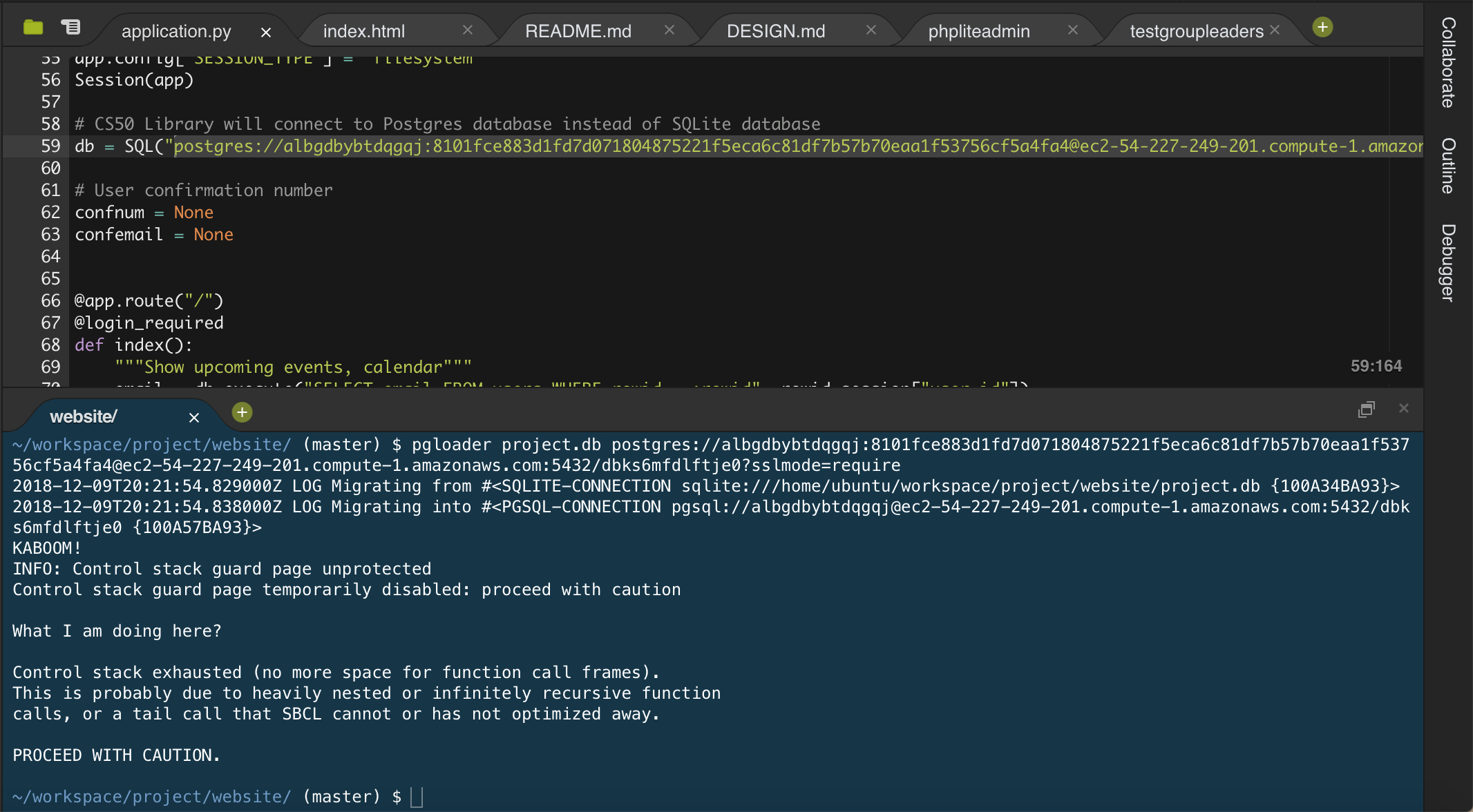
 az326
on 9 Dec 2018
az326
on 9 Dec 2018
Hi @az326 ; it's actually not a WARNING but a FATAL error here. Which version of pgloader are you using? Can you try the release candidate at
https://github.com/dimitri/pgloader/releases/tag/v3.6.0 and report success/failure?
dimitri
on 10 Dec 2018
Hi @dimitri . I'm using pgloader 3.5.2. Yes, sure, but is there any way I can install the new pgloader without homebrew? I'm having trouble installing homebrew in the IDE I'm using.
az326
on 10 Dec 2018
Yes, download the bundle tarball from the GitHub release page, expand the archive and type make in the directory obtained. That should output lots of compile-time logs and then you have ./bin/pgloader.
dimitri
on 10 Dec 2018
Gotcha, just finished that, although it's still showing "pgloader version '3.5.2'" when I check the version. I've also got an even weirder error message now...
(venv) ShuwendeMBP:website andrewzhang$ pgloader project.db postgres://albgdbybtdqgqj:8101fce883d1fd7d071804875221f5eca6c81df7b57b70eaa1f53756cf5a4fa4@ec2-54-227-249-201.compute-1.amazonaws.com:5432/dbks6mfdlftje0?sslmode=require

2018-12-10T15:28:15.022000Z LOG Data errors in '/private/tmp/pgloader/'
KABOOM!
FATAL error: Failed to connect to pgsql at "ec2-54-227-249-201.compute-1.amazonaws.com" (port 5432) as user "albgdbybtdqgqj": The alien function "SSL_load_error_strings" is undefined.
An unhandled error condition has been signalled:
   Failed to connect to pgsql at "ec2-54-227-249-201.compute-1.amazonaws.com" (port 5432) as user "albgdbybtdqgqj": The alien function "SSL_load_error_strings" is undefined.


What I am doing here?

Failed to connect to pgsql at "ec2-54-227-249-201.compute-1.amazonaws.com" (port 5432) as user "albgdbybtdqgqj": The alien function "SSL_load_error_strings" is undefined.
Are you sure you're using the newly built binary rather than the old one still?
dimitri
on 11 Dec 2018
Build from current source, on OSX, migrating MySQL to Postgres(11) I receive the same error:
2019-01-29T17:17:07.779000-07:00 DEBUG SET client_encoding TO 'utf8'
2019-01-29T17:17:07.863000-07:00 DEBUG SET application_name TO 'pgloader'
KABOOM!
2019-01-29T17:17:08.336000-07:00 DEBUG BEGIN
INFO: Control stack guard page unprotected
Control stack guard page temporarily disabled: proceed with caution
2019-01-29T17:17:08.806000-07:00 INFO Stopping monitor

What I am doing here?

Control stack exhausted (no more space for function call frames).
This is probably due to heavily nested or infinitely recursive function
calls, or a tail call that SBCL cannot or has not optimized away.

PROCEED WITH CAUTION.
 sixsixtrample
on 30 Jan 2019
sixsixtrample
on 30 Jan 2019
I had encountered the same problem with the package provided by Ubuntu (18.04.1 lts).
I have solved it by recompiling from source.
 equinton
on 8 Feb 2019
equinton
on 8 Feb 2019
I had the same problem with pgloader 3.5.2 on Linux Mint 19.1. I downloaded and compiled pgloader 3.6.1 and when it was run from ./bin/pgloader it worked as advertised and it was VERY FAST to migrate the database from MariaDB to Postgresql. Thanks for the great product.
Gerald
 GerBreOwn
on 11 Apr 2019
GerBreOwn
on 11 Apr 2019
was the patch for deb based linux ever merged?
 wyldbill
on 13 May 2020
wyldbill
on 13 May 2020
Which version is currently available in your debian distribtion?
 phoe
on 13 May 2020
phoe
on 13 May 2020
I've got a similar issue.
My environment is Ubuntu 18.04 under WSL1 on Windows 10 Pro 1909 (build 18363.900).
I've installed pgloader 3.5.2 (compiled with SBCL 1.4.5.debian) from postgresql apt.
I'm trying to load okato.dbf file from this archive into my PostgreSQL installation (PostgreSQL 12.2, compiled by Visual C++ build 1914, 64-bit) running on Windows system with following code:
LOAD DBF
        FROM /mnt/e/[path]/okato.dbf
    INTO postgresql://[credentials]@localhost/[database]
    WITH truncate, create table;
pgloader's output:
KABOOM!
INFO: Control stack guard page unprotected
Control stack guard page temporarily disabled: proceed with caution

What I am doing here?

Control stack exhausted (no more space for function call frames).
This is probably due to heavily nested or infinitely recursive function
calls, or a tail call that SBCL cannot or has not optimized away.

PROCEED WITH CAUTION.
 bessgeor
on 25 Jun 2020
bessgeor
on 25 Jun 2020
I've got a similar issue.
My environment is Ubuntu 18.04 under WSL1 on Windows 10 Pro 1909 (build 18363.900).
I've installed pgloader 3.5.2 (compiled with SBCL 1.4.5.debian) from postgresql apt.
I'm trying to load okato.dbf file from this archive into my PostgreSQL installation (PostgreSQL 12.2, compiled by Visual C++ build 1914, 64-bit) running on Windows system with following code:LOAD DBF FROM /mnt/e/[path]/okato.dbf INTO postgresql://[credentials]@localhost/[database] WITH truncate, create table;pgloader's output:
KABOOM!
INFO: Control stack guard page unprotected
Control stack guard page temporarily disabled: proceed with caution

What I am doing here?

Control stack exhausted (no more space for function call frames).
This is probably due to heavily nested or infinitely recursive function
calls, or a tail call that SBCL cannot or has not optimized away.

PROCEED WITH CAUTION.
Seems fixed in 3.6.2
bessgeor
on 25 Jun 2020
I was having this issue as well with the Docker container migrating a SQLite database to PostgresQL and I solved it by switching to the CCL version:
$ docker run --rm -it dimitri/pgloader:ccl.latest bash
root@bced8654dcf9:/# pgloader --version
pgloader version "3.6.3~devel"
compiled with Clozure Common Lisp Version 1.11.5/v1.11.5  (LinuxX8664)
I hope this helps someone else :D
 jvtrigueros
on 29 Jun 2020
jvtrigueros
on 29 Jun 2020
Just hit this as well - running dmitri/pgloader:ccl.latest as per https://github.com/dimitri/pgloader/issues/810#issuecomment-650840264 (sha256:79b3ea97a3e08cb728e58790a77ef8b3a86bd014e3f0a7a50034e189c999c40b at the time of this writing) works.
The one distributed with debian (3.6.2) is still borked.
 Ocramius
on 22 Sep 2020
Ocramius
on 22 Sep 2020
Related issues
 richardkmichael
·
6Comments
richardkmichael
·
6Comments
 kim-ae
·
5Comments
kim-ae
·
5Comments
 rap2hpoutre
·
5Comments
rap2hpoutre
·
5Comments
 benvest
·
8Comments
phoe
·
4Comments
benvest
·
8Comments
phoe
·
4Comments
Most helpful comment
after a some
git bisect bad, we come to: