Permissionsdispatcher: Xiaomi READ_SMS & WRITE_SMS
Overview
android.permission.READ_SMS and android.permission.WRITE_SMS permissions not working on Xiaomi MI5 device.
Expected
Should be open SMS runtime permission dialog.
Actual
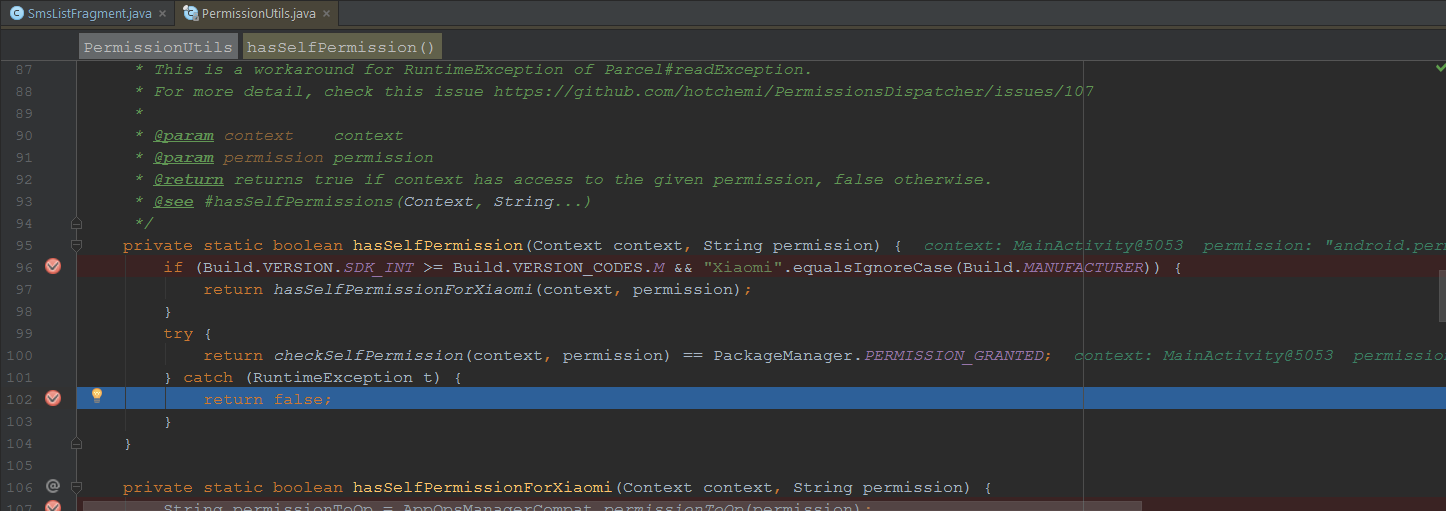
It is throwing error inside of library code but I can't see it what it is exactly throwed. error did not send to the stacktrace and throwable variable can not inspectable on debug mode.
Environment
compile "com.github.hotchemi:permissionsdispatcher:2.4.0"
annotationProcessor "com.github.hotchemi:permissionsdispatcher-processor:2.4.0"
Xiaomi MI 5
- Android version 6.0.1 MXB48T
- MIUI version : MIUI Global 8.1 | Stable 8.1.2.0 (MAAMIDI)
Example code to reproduce issue
package com.okarakose.sms;

import android.content.Intent;
import android.os.Bundle;
import android.support.annotation.NonNull;
import android.support.annotation.Nullable;
import android.support.v4.app.Fragment;
import android.view.View;

import permissions.dispatcher.NeedsPermission;
import permissions.dispatcher.OnNeverAskAgain;
import permissions.dispatcher.OnPermissionDenied;
import permissions.dispatcher.OnShowRationale;
import permissions.dispatcher.PermissionRequest;
import permissions.dispatcher.RuntimePermissions;

@RuntimePermissions
public class SmsListFragment extends Fragment {

    private static final int REQUEST_SMS = 102;

    public static SmsListFragment newInstance() {
        SmsListFragment fragment = new SmsListFragment();
        Bundle args = new Bundle();
        // put args
        fragment.setArguments(args);
        return fragment;
    }

    @Override
    public void onCreate(@Nullable Bundle savedInstanceState) {
        super.onCreate(savedInstanceState);
        fetchList();
    }

    @Override
    public void onActivityResult(int requestCode, int resultCode, Intent data) {
        super.onActivityResult(requestCode, resultCode, data);
        switch (requestCode) {
            case REQUEST_SMS:
                requestPermission();
                break;
        }
    }

    @Override
    public void onRequestPermissionsResult(int requestCode, @NonNull String[] permissions, @NonNull int[] grantResults) {
        super.onRequestPermissionsResult(requestCode, permissions, grantResults);
        SmsListFragmentPermissionsDispatcher.onRequestPermissionsResult(this, requestCode, grantResults);
    }

    public void fetchList() {
        requestPermission();
    }

    @NeedsPermission({"android.permission.READ_SMS", "android.permission.WRITE_SMS"})
    public void showList() {
        // permissions granted. continue
    }

    @OnShowRationale({"android.permission.READ_SMS", "android.permission.WRITE_SMS"})
    public void showRationaleForLocation(final PermissionRequest request) {
        // no-op
    }

    @OnPermissionDenied({"android.permission.READ_SMS", "android.permission.WRITE_SMS"})
    public void showDeniedForLocation() {
        // no-op
    }

    @OnNeverAskAgain({"android.permission.READ_SMS", "android.permission.WRITE_SMS"})
    public void showNeverAskForLocation() {
        // no-op
    }

    private void requestPermission() {
        SmsListFragmentPermissionsDispatcher.showListWithCheck(this);
    }
}
 okarakose
All 15 comments
@okarakose thx! Actually we don't have any Xiaomi device...
let me have a quick question, as for screen shot a debugger didn't stop on line 96~98?
I thought hasSelfPermissionForXiaomi is supposed to be called but it seems it wasn't called.
 hotchemi
on 3 Jul 2017
hotchemi
on 3 Jul 2017
@hotchemi it is actually calling hasSelfPermissionForXiaomi function as seen below
READ_SMS debugger ui

WRITE_SMS debugger ui
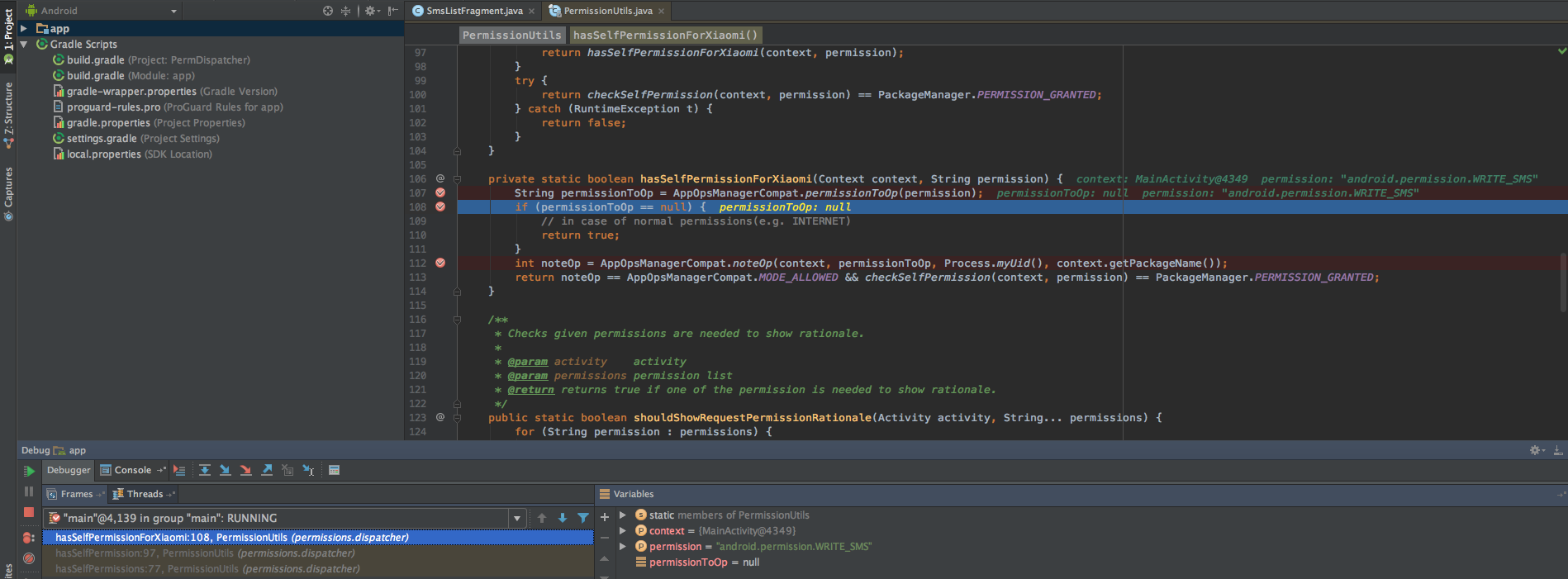
I think permissionToOp variable should not be null for READ_SMS and WRITE_SMS permissions.
I added READ_CONTACTS permission for example. permissionToOp does not null.
READ_CONTACTS debugger ui

okarakose
on 3 Jul 2017
@okarakose thx! I have two unclarified points:
- if
hasSelfPermissionForXiaomiis called why catch statement is called after that? In my understandinghasSelfPermissionForXiaomiis not surrounded by try~catch so the catch statement would be never called.
- I checked Android framework source code and it seems there's READ_SMS and WRITE_SMS inside of it so probably Xiaomi manipulated the framework...if there's no null check before noteOp does it work?
https://android.googlesource.com/platform/frameworks/base/+/refs/heads/master/core/java/android/app/AppOpsManager.java#544
hotchemi
on 4 Jul 2017
@hotchemi I forked repository and added t.printStackTrace() statement to catch block. and you are right, it does not throw an exception and catch block did not run. android studio debugger ui shown wrong line sometimes.
if there's no null check before noteOp it is working like this :
String permissionToOp = "android:read_sms";
AppOpsManagerCompat.noteOp(context, permissionToOp, Process.myUid(), context.getPackageName());
but you can't know the value is android:read_sms for android.permission.READ_SMS without fetching permissionToOp value.
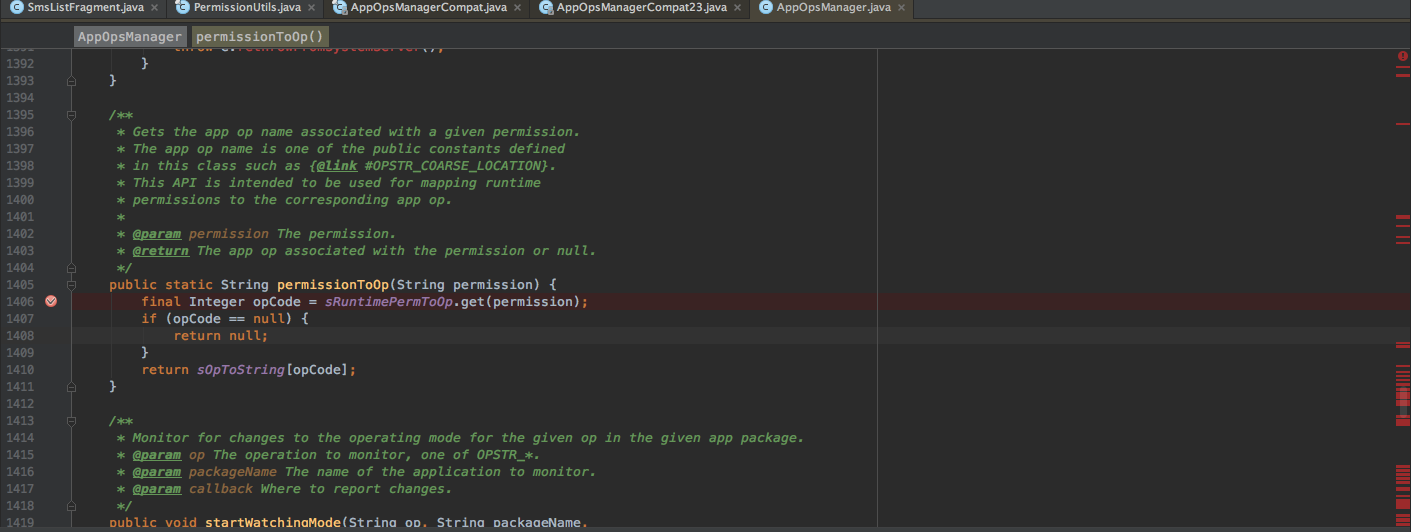
above picture showspermissionToOp function and there is a HashMap which is sRuntimePermToOp but I can't inspect it on my device because of Source code does not match the bytecode
okarakose
on 4 Jul 2017
@okarakose sorry for the late.
So...in short we should avoid permissionToOp check when given permission is READ_SMS or WRITE_SMS? Then it'd be so simple.
And I have another question, is this problem only occurred only in MI 5 or other Xiaomi devices as well?
hotchemi
on 7 Jul 2017
Btw, I found an official forum for MIUI, could you possibly post the problem and get their answer?
@okarakose
I think it's pretty weird behaviour and it might be a bug.
hotchemi
on 7 Jul 2017
@hotchemi lucky for us, I have another Xiaomi devices :)
I tested on Mi 5, Mi 6, Mi Note 2 and Redmi Note 3 devices. Only worked on Mi 6 as expected.
permissionToOp variable equals to 'android:read_sms' as expected.
List
Xiaomi Mi 5
MIUI Version : MIUI Global 8.1 | Stable 8.1.2.0 ( MAAMIDI )
Android Version : 6.0.1 MXB48T
Result
READ_CALL_LOG : android:read_call_log
WRITE_CALL_LOG : android:write_call_log
READ_CONTACTS : android:read_contacts
WRITE_CONTACTS : android:write_contacts
READ_SMS : null
WRITE_SMS : null
Xiaomi Mi 6
MIUI Version : MIUI Global 8.2 | Stable 8.2.2.0 ( NCAMIEC )
Android Version : 7.1.1 NMF26X
Result
READ_CALL_LOG : android:read_call_log
WRITE_CALL_LOG : android:write_call_log
READ_CONTACTS : android:read_contacts
WRITE_CONTACTS : android:write_contacts
READ_SMS : android:read_sms
WRITE_SMS : android:write_sms
Xiaomi Mi Note 2
MIUI Version : MIUI Global 8.2 | Stable 8.2.6.0 ( MADMIDL )
Android Version : 6.0.1 MXB48T
Result
READ_CALL_LOG : android:read_call_log
WRITE_CALL_LOG : android:write_call_log
READ_CONTACTS : android:read_contacts
WRITE_CONTACTS : android:write_contacts
READ_SMS : null
WRITE_SMS : null
Redmi Note 3
MIUI Version : MIUI Global 8.5 | Stable 8.5.3.0 ( MHOMIED )
Android Version : 6.0.1 MMB29M
Result
READ_CALL_LOG : android:read_call_log
WRITE_CALL_LOG : android:write_call_log
READ_CONTACTS : android:read_contacts
WRITE_CONTACTS : android:write_contacts
READ_SMS : null
WRITE_SMS : null
As you mentioned above, this should be miui rom issue. I will try to send above list to miui forum, maybe we can get detailed answer from there "Why read_sms and write_sms returns null"
okarakose
on 8 Jul 2017
Yes, please do that. Keep us posted with any result or solution they might have over there!
 mannodermaus
on 8 Jul 2017
mannodermaus
on 8 Jul 2017
I opened issue on miui forum which is here : http://en.miui.com/thread-682712-1-1.html
can you confirm the issue for more attention ?
okarakose
on 11 Jul 2017
@okarakose thx! I put a fav and noted a rationale for it.
hotchemi
on 12 Jul 2017
Does anyone come up with a workaround for this issue?
hotchemi
on 16 Jul 2017
I am still waiting response from en.miui.com but nobody did not give attention to it.
Can I ask, why there is a specific control for "is device Xiaomi" on permission check control ? if it is not really necessary can we ignore it ?
okarakose
on 16 Jul 2017
Check these
https://github.com/hotchemi/PermissionsDispatcher/issues/187
https://github.com/hotchemi/PermissionsDispatcher/issues/211
 shiraji
on 17 Jul 2017
shiraji
on 17 Jul 2017
@okarakose yes, we added a workaround code requested by library user.
But actually, we haven't tested pretty much cuz we don't have any Xiaomi devices... 😅
hotchemi
on 20 Jul 2017
@okarakose there's no response yet so let us close the issue for the time being.
Or do you come up with a countermeasure for this?
hotchemi
on 22 Aug 2017
Related issues
 Alex-ZHOU
·
6Comments
Alex-ZHOU
·
6Comments
 herbertdai
·
7Comments
herbertdai
·
7Comments
 sp00ne
·
6Comments
sp00ne
·
6Comments
 vincentnock
·
4Comments
vincentnock
·
4Comments
 rckahale
·
5Comments
rckahale
·
5Comments
Most helpful comment
@hotchemi lucky for us, I have another Xiaomi devices :)
I tested on Mi 5, Mi 6, Mi Note 2 and Redmi Note 3 devices. Only worked on Mi 6 as expected.
permissionToOpvariable equals to 'android:read_sms' as expected.List
Xiaomi Mi 5
MIUI Version : MIUI Global 8.1 | Stable 8.1.2.0 ( MAAMIDI )
Android Version : 6.0.1 MXB48T
Result
Xiaomi Mi 6
MIUI Version : MIUI Global 8.2 | Stable 8.2.2.0 ( NCAMIEC )
Android Version : 7.1.1 NMF26X
Result
Xiaomi Mi Note 2
MIUI Version : MIUI Global 8.2 | Stable 8.2.6.0 ( MADMIDL )
Android Version : 6.0.1 MXB48T
Result
Redmi Note 3
MIUI Version : MIUI Global 8.5 | Stable 8.5.3.0 ( MHOMIED )
Android Version : 6.0.1 MMB29M
Result
As you mentioned above, this should be miui rom issue. I will try to send above list to miui forum, maybe we can get detailed answer from there "Why read_sms and write_sms returns null"