Pengwin: Fresh install: Installing fish from pengwin-setup leaves the system with SH as default shell and won't install fish
After a fresh install of Pengwin and installing stuff through pengwin-setup, the VcXsrv is broken and at every startup I get the following output.
/mnt/c/WINDOWS/system32/ipconfig.exe
Detected: LIBGL_ALWAYS_INDIRECT changed! Restart Pengwin to apply changes.
-sh: 3: /etc/profile.d/01-vcxsrv.sh: [[: not found
Welcome to the VcXsrv X Server
Vendor: The VcXsrv Project
Release: 1.20.8.1

OS: Windows NT 6.2 build 9200 (64-bit)
Contact: [email protected]

LoadPreferences: C:\Users\Francesco\AppData\Roaming\.XWinrc not found
LoadPreferences: Loading C:\Users\Francesco\.vcxsrv\system.XWinrc
Warning: Locale not supported by X, falling back to 'C' locale.
(II) IGLX: Loaded and initialized swrast
(II) GLX: Initialized DRISWRAST GL provider for screen 0
winClipboardThreadProc - DISPLAY=127.0.0.1:0.0
Using Composite redirection
OS maintains clipboard viewer chain: yes
Authorization required, but no authorization protocol specified
Also, the default shell results as /bin/sh and not default Bash, I have to start it manually afterwards by typing bash. During pengwin-setup I also installed fish which doesn't appear in any directory (/etc/shells) and if I type fish it says command not found.
The VcXsrv appears running on Windows, but it just doesn't work through Pengwin (I can start the default applications like xcalc through the Windows dialog).
Screenshots
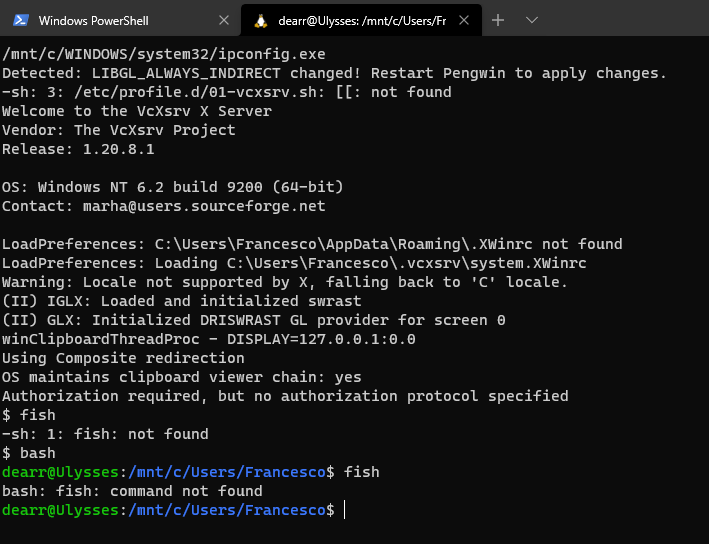
I'm on Windows 10 v. 2004 and Pengwin is v. 20.8.3.0
I've removed, rebooted and reinstalled Pengwin multiple times and the result is always the same.
 FraCart
All 13 comments
Hello @FraCart,
Looks like your default shell was changed to sh. We will make some tests to see what is happening. Meanwhile, please run this command and try again:
sudo chsh --shell /bin/bash "${USER}"
Regards,
Carlos
 crramirez
on 12 Oct 2020
crramirez
on 12 Oct 2020
Yes, I've already tried that and nothing changed. Also tried to remove /bin/sh from /etc/shells and it still runs as before.
FraCart
on 12 Oct 2020
What this command says: echo $SHELL
crramirez
on 12 Oct 2020
Are you in WSL 1 or 2 ? What is the output for the command wsl.exe --list --verbose
crramirez
on 12 Oct 2020
After a new installation the /bin/sh was still set, but by running your version of chsh it worked and it changed it to Bash. Now I don't understand why Fish didn't install during pengwin-setup and the VcXsrv doesn't work.
Now at every startup I get this:
Authorization required, but no authorization protocol specified
dearr@Ulysses:/mnt/c/Users/Francesco$
Also, I'm on WSL2
PS C:\Users\Francesco> wsl.exe --list --verbose
  NAME      STATE           VERSION
* WLinux    Running         2
  Ubuntu    Stopped         2
To be honest, seems like anything I have selected on pengwin-setup didn't install. For example, I've selected C++ in the Language section, but neither gcc and g++ are found as commands.
FraCart
on 12 Oct 2020
I am doing some tests to see if I can reproduce the error. If the shell is not working I doubt that anything in pengwin-setup works it is all based on bash. Did you check your free space in Windows?
Regards,
Carlos
crramirez
on 12 Oct 2020
Well, it is very strange in a new installation after you enter the username and password it starts in sh instead of bash? Or when it changes to sh?
If you can detail me step by step what you do since you install pengwin, I can figure out what is happening. I retested with a fresh version downloaded from Store with WSL2 and everything is working fine.
crramirez
on 12 Oct 2020
Changing the default starting directory with "commandline": "wsl.exe ~ -d WLinux" seems to have solved that authorization message before the shell starts. Now by running pengwin-setup it seems to have installed C++ correctly.
I think I found the culprit. While trying to install Fish I get to this point (and it exits the pengwin-setup interface)
SHELLS
Selected: FISH

Installing fish...
Saving current directory as $CURDIR
Going to $TMPDIR: /tmp/tmp.WIpaS3Myhg
Reading package lists... Done
Building dependency tree
Reading state information... Done
Some packages could not be installed. This may mean that you have
requested an impossible situation or if you are using the unstable
distribution that some required packages have not yet been created
or been moved out of Incoming.
The following information may help to resolve the situation:

The following packages have unmet dependencies:
 python : PreDepends: python-minimal (= 2.7.16-1) but it is not going to be installed
          Depends: libpython-stdlib (= 2.7.16-1) but it is not going to be installed
          Depends: python2 (= 2.7.16-1) but 2.7.18-2 is to be installed
E: Unable to correct problems, you have held broken packages.
/usr/local/pengwin-setup.d/shells.sh: line 91: fish: command not found
  % Total    % Received % Xferd  Average Speed   Time    Time     Time  Current
                                 Dload  Upload   Total   Spent    Left  Speed
100   194  100   194    0     0   1319      0 --:--:-- --:--:-- --:--:--  1319
 21 19035   21  4113    0     0  14741      0  0:00:01 --:--:--  0:00:01 14741
curl: (23) Failure writing output to destination
/usr/local/pengwin-setup.d/shells.sh: line 95: fish: command not found
/usr/local/pengwin-setup.d/shells.sh: line 98: fish: command not found
Returning to /home/dearr
Cleaning up /tmp/tmp.WIpaS3Myhg
chsh: Warning:  does not exist
Unholding pengwin-base & pengwin-setup
And after restarting Pengwin I see myself again in /bin/sh
FraCart
on 12 Oct 2020
OK, good thanks a lot the problem is installing fish. I will check and release a new version of pengwin-setup.
crramirez
on 12 Oct 2020
The patch is coming: https://github.com/WhitewaterFoundry/pengwin-setup/pull/280
crramirez
on 12 Oct 2020
We published an upgraded version of pengwin-setup. Just run it to get the upgrade. Now fish should work.
Thanks for reporting.
crramirez
on 13 Oct 2020
The update went smoothly and it installed Fish, thanks a lot!
FraCart
on 13 Oct 2020
Related issues
 ket000
·
5Comments
ket000
·
5Comments
 camilorojasguzman
·
4Comments
camilorojasguzman
·
4Comments
 pnelsonsr
·
5Comments
pnelsonsr
·
5Comments
 BhavyaJain7
·
3Comments
BhavyaJain7
·
3Comments
 patmolloy
·
4Comments
patmolloy
·
4Comments