Pengwin: Support appendWindowsPath=false in wlinux-setup
Is your feature request related to a problem? Please describe.
WSL makes a real mess of things when you have a tool like java installed both on the Windows PATH and the Linux PATH, since (eg) Maven doesn't know which Java to use. WSL 1809 added the boolean option appendWindowsPath in wsl.conf, which avoids this problem, but if you set appendWindowsPath=false, then wlinux-help and wlinux-setup can't find powershell.exe and cmd.exe.
Describe the solution you'd like
Scripts like wlinux-help and wlinux-setup should be able to find Windows tools like cmd.exe and powershell.exe without needing them on the Linux PATH.
 seanf
seanf
All 10 comments
We will discuss it due to it would be a significant change. Pengwin uses windows path a lot; without it we are blind. We must assume where cmd and powershell should be.
As a workaround, you can do:
sudo -s
su - myuser
This session won't have windows path and you can work without changing wsl.conf.
But as I said this is something to discuss.
Regards
 crramirez
on 23 Apr 2019
crramirez
on 23 Apr 2019
I would actually want it to be set to true personally. Since the default should be true, I'd add it to wsl.conf as true and let the user choose to change it to false.
We must assume where cmd and powershell should be.
As long as you can read the environmental variables, you should be fine. Hard-linking to the default folder isn't advisable since someone could install ps core on both windows and Linux (which will be the new default on windows) and the file path on windows can be wherever the user wants to install it. However for it to run as intended, it needs to be appended to the environmental variables (and does so during install).
Another option is to search for the executable and run it when found but this will probably be a slower option, especially if file indexing isn't enabled on the drive it's installed to and even if it is, it still needs to add it to the index, which still takes more time. Calling the env variable directly is a faster solution that help ensure commands still can be executed by cmd and ps.
 WSLUser
on 25 Apr 2019
WSLUser
on 25 Apr 2019
@crramirez What @WSLUser said is correct, the solution is actually pretty simple. There are multiple ways of retrieving the proper path necessary, this is just one of them:
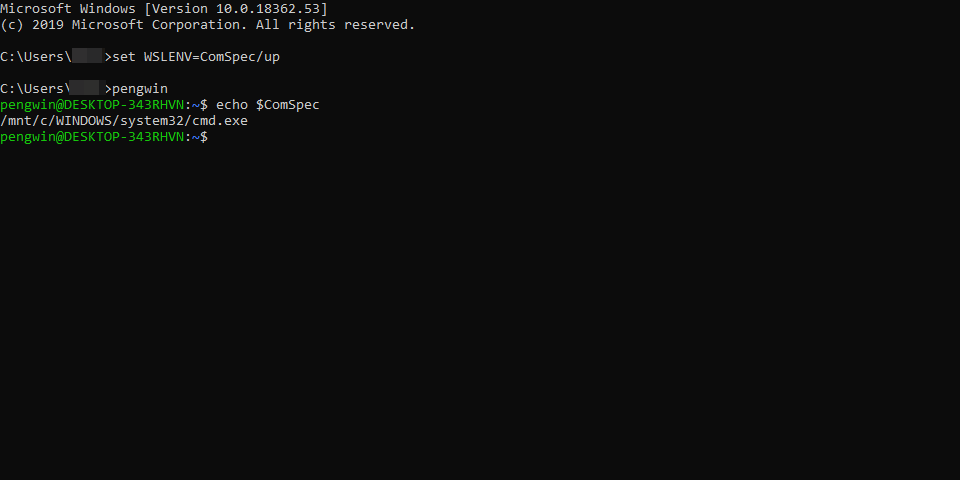
(Documentation: Windows Command Line Tools for Developers)
 ghost
on 28 Apr 2019
ghost
on 28 Apr 2019
@crramirez Actually, I just now discovered this, since you include wslu you can just do this:

ghost
on 28 Apr 2019
@crramirez Did you ever look into this?
ghost
on 14 Jun 2019
Hello,
I implemented a solution for this regarding npm this week. I am thinking of having a file like command blacklist and have there all the programs that the user doesn't want to be imported from Windows.
What do you think?
Regards
crramirez
on 14 Jun 2019
How would that work? Would a blacklist of directories (ie dirs from Windows PATH to remove from the WSL PATH) be more straightforward?
seanf
on 14 Jun 2019
Executables. See the solution we made for npm. This answer your main concern "WSL makes a real mess of things when you have a tool like java installed both on the Windows PATH and the Linux PATH"
You can now have npm in windows and WSL and it works. The blacklist file could work in the same way:
# Check if we have Windows Path
if ( which cmd.exe >/dev/null ); then
  WIN_NPM_PATH="\$(dirname "\$(which npm)")"
  WIN_C_PATH="\$(wslpath 'C:\')"
  if [[ "\${WIN_NPM_PATH}" == "\${WIN_C_PATH}"* ]]; then
    PATH=\$(echo "\${PATH}" | sed -e "s#\${WIN_NPM_PATH}##")
  fi
  WIN_YARN_PATH="\$(dirname "\$(which yarn)")"
  if [[ "\${WIN_YARN_PATH}" == "\${WIN_C_PATH}"* ]]; then
    PATH=\$(echo "\${PATH}" | sed -e "s#\${WIN_YARN_PATH}##")
  fi
fi
Here we check for npm and yarn. We can simply iterate over the blacklist file.
We can explore other solutions like saving in a file the PATH when we have it and use when we don't. But I think it is a little risky.
Regards
crramirez
on 14 Jun 2019
Thanks @crramirez. So it seems like it will actually remove entire directories from PATH, but only based on the presence of blacklisted executables in those directories?
Will that be able to handle arbitrary executables which might appear on both Linux and Windows PATHs (eg due to user-installed packages)?
In any case, please don't forget other Windows drives which might be on the path, eg D:\!
findmnt --types drvfs --noheadings --output target
I'm pretty sure that when the same software exists in both environments and you have Windows paths appended, pengwin or any other wsl distro will run whatever is read from PATH first. This is a first come, first serve mechanism so if the Windows path is read first and you're trying to use the software to do something Windows doesn't support, it will obviously give you errors. This is why it's always considered best practice to ensure your Linux paths come first. Honestly though, with as far as PS Core has advanced with 7.0, you're better off using PS 7 for your Windows stuff and WSL for your Linux stuff. Windows Terminal and ConEmu both support tabs and Windows Terminal actually has built-in pane support. So if it's simply a matter of wanting to stay in the same window and tab, create a new pane running PS7. I personally have PS set as my default shell in WT and go to Pengwin or Fedora in a new tab if I want/need to do something such as testing out my python code in WSL.
WSLUser
on 20 Mar 2020
Related issues
 sharpninja
·
3Comments
sharpninja
·
3Comments
 mikart143
·
5Comments
mikart143
·
5Comments
 patmolloy
·
4Comments
ghost
·
5Comments
patmolloy
·
4Comments
ghost
·
5Comments
 ket000
·
5Comments
ket000
·
5Comments
Most helpful comment
@crramirez Actually, I just now discovered this, since you include wslu you can just do this: