Pengwin: WLinux Docker for Windows secure bridge has unexpected behaviour
Describe the bug
Docker support inside WLinux does not behave as expected.
To Reproduce
Steps to reproduce the behavior:
- WLinux distribution installed
- Install a secure bridge to Docker for Windows (WLinux support)
- Start Docker for Windows in background
- Open
cmd.exe - Run command
docker ps -a, command works as expected - Run command
docker images, command works as expected - Open
wlinux(or if WLinux is default distrowslalso works) - Run
docker ps -a - See error:
sh error during connect: Get http://%2Fvar%2Frun%2Fdocker.sock/v1.38/containers/json?all=1: EOF - Run
docker images - See error:
sh
error during connect: Get http://%2Fvar%2Frun%2Fdocker.sock/v1.38/images/json: EOF
Expected behavior
Docker commands should be supported considering the Docker support is installed inside WLinux with wlinux-setup
Basic Troubleshooting Checklist
[x] I have searched Google for the error message.
[x] I have checked official WSL troubleshooting documentation: https://docs.microsoft.com/en-us/windows/wsl/troubleshooting#confirm-wsl-is-enabled.
[x] I have searched the official Microsoft WSL issues page: https://github.com/Microsoft/WSL/issues.
[x] I have searched the WLinux issues page: https://github.com/WhitewaterFoundry/WLinux/issues.
[x] I have reset WLinux: Settings->Apps->Apps & features->WLinux->Advanced Options->Reset.
[x] I have disabled and re-enabled WSL in Windows Features.
[x] I have run Windows 10 updates and restarted.
What other troubleshooting have you attempted?
Insert here:
WLinux Version
Find: Settings->Apps->Apps & features->WLinux->Advanced Options->Version.
Insert here: 1.1.22.0
Windows Build
Run 'systeminfo | findstr /C:"OS"' in Command Prompt and insert here:
OS Name:                   Microsoft Windows 10 Pro Insider Preview
OS Version:                10.0.18282 N/A Build 18282
OS Manufacturer:           Microsoft Corporation
OS Configuration:          Standalone Workstation
OS Build Type:             Multiprocessor Free
BIOS Version:              LENOVO*
For help on retrieving: https://docs.microsoft.com/en-us/windows/wsl/troubleshooting#check-your-build-number
 n3rd4i
All 21 comments
Hello,
Please run wlinux-setup again and be sure you select yes to the upgrade setup prompt. We just pushed a fix for it, and tell us.
Regards,
Carlos
 crramirez
on 21 Nov 2018
crramirez
on 21 Nov 2018
I've update the upgrade script just now, the result are unexpected:
- Setup selection:
[*] DOCKER Install a secure bridge to Docker for Windows - Further install step:
Please go to Docker for Windows -> Settings -> General and enable 'Expose daemon on tcp://localhost:2375 without TLS' or upgrade your Windows version and run this script again. - We can already notice that step 1. and step 2. are mutually exclusive, there is no "secure bridge" anymore ?
- OS version is latest ?
OS Version: 10.0.18282 N/A Build 18282 - Additionally after this steps:
/usr/bin/wslsys: line 82: /mnt/c/Windows/System32/reg.exe: No such file or directory /etc/setup: line 858: [[: Build:: syntax error in expression (error token is ":") - Worth mentioning in a previous setup step (while trying to install Docker support in WLinux)
[automount] root=/ enabled = true - One could see that the root folder changed from
root=/mnt/toroot=/but the script expects/mnt/c...??
I will skip the Expose daemon on tcp://localhost:2375 without TLS even though that one works.
n3rd4i
on 21 Nov 2018
I observed this behaviour too (error during connect: Get http://%2Fvar%2Frun%2Fdocker.sock/v1.38/containers/json?all=1: EOF error), immediately after a WLinux setup where I selected the Docker option. It seems as though the symlink to npiperelay.exe is incorrectly created -- as @n3rd4i observes above, the root for DrvFs mounts is set to / (which I agreed to during the setup), but the symlink is: /usr/local/bin/npiperelay.exe -> /mnt/c/Users/<username>/go/bin/npiperelay.exe, correcting the /mnt/c to /c made docker work for me.
 imgrant
on 21 Nov 2018
imgrant
on 21 Nov 2018
Ok, let's try to solve it. Probably you have Windows 1809. The version is good no problem with that and the bridge without opening the port should work. Stay tuned I will try to reproduce, them and submit a patch
crramirez
on 21 Nov 2018
@n3rd4i please paste here the result of: echo $PATH
@imgrant I am improving the symlink creation
crramirez
on 22 Nov 2018
I suspect the culprit is wslpath -- specifically, wHome=$(wslpath -u ${wHomeWinPath}) on line 739 of setup in function dockerinstall_build_relay.
It looks like this step is performed before the root is changed from /mnt to /, and so C: is mounted at /mnt/c at that time.
imgrant
on 22 Nov 2018
I suspect the culprit is
wslpath-- specifically,wHome=$(wslpath -u ${wHomeWinPath})on line 739 ofsetupin functiondockerinstall_build_relay.
It looks like this step is performed before the root is changed from/mntto/, and so C: is mounted at/mnt/cat that time.
Exactly
crramirez
on 22 Nov 2018
Please test with this updated wlinux-setup
crramirez
on 22 Nov 2018
I get the same error as before:
Selected: DOCKER
DOCKER
Installing the bridge to Docker.
Saving current directory as $CURDIR
Going to $TMPDIR: /tmp/tmp.6ekgOPcD2i
Will not apply HSTS. The HSTS database must be a regular and non-world-writable file.
ERROR: could not open HSTS store at '/home/andrei/.wget-hsts'. HSTS will be disabled.
--2018-11-22 17:31:58--  https://download.docker.com/linux/static/stable/x86_64/docker-18.09.0.tgz
Resolving download.docker.com (download.docker.com)... 54.230.129.13, 54.230.129.51, 54.230.129.14, ...
Connecting to download.docker.com (download.docker.com)|54.230.129.13|:443... connected.
HTTP request sent, awaiting response... 200 OK
Length: 47110650 (45M) [application/x-tar]
Saving to: ‘docker-18.09.0.tgz’

docker-18.09.0.tgz                        100%[=====================================================================================>]  44.93M  4.78MB/s    in 10s

2018-11-22 17:32:09 (4.47 MB/s) - ‘docker-18.09.0.tgz’ saved [47110650/47110650]

docker/docker
/usr/bin/wslsys: line 82: /mnt/c/Windows/System32/reg.exe: No such file or directory
/etc/setup: line 863: [[: Build:: syntax error in expression (error token is ":")
Connect to Docker via TCP
Installing bash-completion
Reading package lists...
Building dependency tree...
Reading state information...
bash-completion is already the newest version (1:2.1-4.3).
0 upgraded, 0 newly installed, 0 to remove and 0 not upgraded.
  % Total    % Received % Xferd  Average Speed   Time    Time     Time  Current
                                 Dload  Upload   Total   Spent    Left  Speed
100  104k  100  104k    0     0   409k      0 --:--:-- --:--:-- --:--:--  411k
Installing docker-compose
  % Total    % Received % Xferd  Average Speed   Time    Time     Time  Current
                                 Dload  Upload   Total   Spent    Left  Speed
100   617    0   617    0     0   2504      0 --:--:-- --:--:-- --:--:--  2508
100 11.1M  100 11.1M    0     0  1686k      0  0:00:06  0:00:06 --:--:-- 2100k
  % Total    % Received % Xferd  Average Speed   Time    Time     Time  Current
                                 Dload  Upload   Total   Spent    Left  Speed
100 13238  100 13238    0     0  53568      0 --:--:-- --:--:-- --:--:-- 53813
docker-compose version 1.23.1, build b02f1306
docker-py version: 3.5.0
CPython version: 3.6.7
OpenSSL version: OpenSSL 1.1.0f  25 May 2017
Returning to /tmp/tmp.8frrEDeMli
Cleaning up /tmp/tmp.6ekgOPcD2i
This is the output of the echo $PATH
/home/andrei/go//bin:/usr/local/go/bin:/usr/local/go/bin:/home/andrei/go//bin:/usr/local/go/bin:/usr/local/go/bin:/usr/local/sbin:/usr/local/bin:/usr/sbin:/usr/bin:/sbin:/bin:/usr/games:/usr/local/games:/c/Program Files (x86)/NVIDIA Corporation/PhysX/Common:/c/Program Files/Docker/Docker/Resources/bin:/c/WINDOWS/system32:/c/WINDOWS:/c/WINDOWS/System32/Wbem:/c/WINDOWS/System32/WindowsPowerShell/v1.0/:/c/WINDOWS/System32/OpenSSH/:/c/Program Files/dotnet/:/c/Program Files/Git/cmd:/c/Program Files/ojdkbuild/java-1.8.0-openjdk-1.8.0.191-1/bin:/c/Users/andrei/AppData/Local/Microsoft/WindowsApps:/c/Users/andrei/AppData/Local/Programs/Microsoft VS Code/bin:/c/Users/andrei/AppData/Local/GitHubDesktop/bin:/c/Users/andrei/AppData/Local/NVIDIA Corporation/GeForceNOW/CEF:/c/Users/andrei/AppData/Local/Programs/Python/Python37:/c/Users/andrei/AppData/Local/Programs/Python/Python37/Scripts:/c/Users/andrei/AppData/Roaming/Python/Python37/Scripts:/c/Program Files (x86)/Microsoft Visual Studio/2017/Community/Common7/Tools:/c/apps/AStyle/bin:/c/Apps/totalcmd:/c/Users/andrei/AppData/Local/Markdown Monster:/c/Users/andrei/AppData/Local/Markdown Monster/Markdown Monster:/c/Users/andrei/AppData/Local/Microsoft/WindowsApps:/c/Program Files/Oracle/VirtualBox
$ which reg.exe
/c/WINDOWS/system32/reg.exe
My wsl.conf is the same as in my previous comment.
n3rd4i
on 22 Nov 2018
And what happens if you execute: reg.exe query
'HKLM\Software\Microsoft\Windows NT\CurrentVersion' /v BuildLabEx directly
in your WLinux terminal?
I am a little blind because I don't have this insider version that you have
also in your path your windows folder is all caps "WINDOWS" instead of
"Windows" probably this is part of the problem
Regards
On Thu, Nov 22, 2018 at 11:41 AM n3rd4i notifications@github.com wrote:
I get the same error as before:
Selected: DOCKER
DOCKER
Installing the bridge to Docker.
Saving current directory as $CURDIR
Going to $TMPDIR: /tmp/tmp.6ekgOPcD2i
Will not apply HSTS. The HSTS database must be a regular and non-world-writable file.
ERROR: could not open HSTS store at '/home/andrei/.wget-hsts'. HSTS will be disabled.
--2018-11-22 17:31:58-- https://download.docker.com/linux/static/stable/x86_64/docker-18.09.0.tgz
Resolving download.docker.com (download.docker.com)... 54.230.129.13, 54.230.129.51, 54.230.129.14, ...
Connecting to download.docker.com (download.docker.com)|54.230.129.13|:443... connected.
HTTP request sent, awaiting response... 200 OK
Length: 47110650 (45M) [application/x-tar]
Saving to: ‘docker-18.09.0.tgz’docker-18.09.0.tgz 100%[=====================================================================================>] 44.93M 4.78MB/s in 10s
2018-11-22 17:32:09 (4.47 MB/s) - ‘docker-18.09.0.tgz’ saved [47110650/47110650]
docker/docker
/usr/bin/wslsys: line 82: /mnt/c/Windows/System32/reg.exe: No such file or directory
/etc/setup: line 863: [[: Build:: syntax error in expression (error token is ":")
Connect to Docker via TCP
Installing bash-completion
Reading package lists...
Building dependency tree...
Reading state information...
bash-completion is already the newest version (1:2.1-4.3).
0 upgraded, 0 newly installed, 0 to remove and 0 not upgraded.
% Total % Received % Xferd Average Speed Time Time Time Current
Dload Upload Total Spent Left Speed
100 104k 100 104k 0 0 409k 0 --:--:-- --:--:-- --:--:-- 411k
Installing docker-compose
% Total % Received % Xferd Average Speed Time Time Time Current
Dload Upload Total Spent Left Speed
100 617 0 617 0 0 2504 0 --:--:-- --:--:-- --:--:-- 2508
100 11.1M 100 11.1M 0 0 1686k 0 0:00:06 0:00:06 --:--:-- 2100k
% Total % Received % Xferd Average Speed Time Time Time Current
Dload Upload Total Spent Left Speed
100 13238 100 13238 0 0 53568 0 --:--:-- --:--:-- --:--:-- 53813
docker-compose version 1.23.1, build b02f1306
docker-py version: 3.5.0
CPython version: 3.6.7
OpenSSL version: OpenSSL 1.1.0f 25 May 2017
Returning to /tmp/tmp.8frrEDeMli
Cleaning up /tmp/tmp.6ekgOPcD2iThis is the output of the echo $PATH
/home/andrei/go//bin:/usr/local/go/bin:/usr/local/go/bin:/home/andrei/go//bin:/usr/local/go/bin:/usr/local/go/bin:/usr/local/sbin:/usr/local/bin:/usr/sbin:/usr/bin:/sbin:/bin:/usr/games:/usr/local/games:/c/Program Files (x86)/NVIDIA Corporation/PhysX/Common:/c/Program Files/Docker/Docker/Resources/bin:/c/WINDOWS/system32:/c/WINDOWS:/c/WINDOWS/System32/Wbem:/c/WINDOWS/System32/WindowsPowerShell/v1.0/:/c/WINDOWS/System32/OpenSSH/:/c/Program Files/dotnet/:/c/Program Files/Git/cmd:/c/Program Files/ojdkbuild/java-1.8.0-openjdk-1.8.0.191-1/bin:/c/Users/andrei/AppData/Local/Microsoft/WindowsApps:/c/Users/andrei/AppData/Local/Programs/Microsoft VS Code/bin:/c/Users/andrei/AppData/Local/GitHubDesktop/bin:/c/Users/andrei/AppData/Local/NVIDIA Corporation/GeForceNOW/CEF:/c/Users/andrei/AppData/Local/Programs/Python/Python37:/c/Users/andrei/AppData/Local/Programs/Python/Python37/Scripts:/c/Users/andrei/AppData/Roaming/Python/Python37/Scripts:/c/Program Files (x86)/Microsoft Visual Studio/2017/Community/Common7/Tools:/c/apps/AStyle/bin:/c/Apps/totalcmd:/c/Users/andrei/AppData/Local/Markdown Monster:/c/Users/andrei/AppData/Local/Markdown Monster/Markdown Monster:/c/Users/andrei/AppData/Local/Microsoft/WindowsApps:/c/Program Files/Oracle/VirtualBox
$ which reg.exe
/c/WINDOWS/system32/reg.exeMy wsl.conf is the same as in my previous comment.
—
You are receiving this because you were assigned.Reply to this email directly, view it on GitHub
https://github.com/WhitewaterFoundry/WLinux/issues/210#issuecomment-441081239,
or mute the thread
https://github.com/notifications/unsubscribe-auth/AIAiQ9Grpm8uyq0dd6Dlf9NqsQcri-M8ks5uxtOsgaJpZM4YtsaK
.
crramirez
on 22 Nov 2018
I found the error is with the version 1.9 of wslu. I don't understand why they hardcoded the path. I will be working on get rid of wslsys of dockerinstaller
crramirez
on 22 Nov 2018
And what happens if you execute: reg.exe query 'HKLM\Software\Microsoft\Windows NT\CurrentVersion' /v BuildLabEx directly in your WLinux terminal?
Nothing, there is no printout.
If I run similar command in cmd.exe and I get this:
> reg.exe query "HKLM\Software\Microsoft\Windows NT\CurrentVersion" /v BuildLabEx

HKEY_LOCAL_MACHINE\Software\Microsoft\Windows NT\CurrentVersion
    BuildLabEx    REG_SZ    18282.1000.amd64fre.rs_prerelease.181109-1613
I installed docker support with freshly updated setup and now I have more positive results. The only thing that could be ironed out later is that somehow, sometimes when I run docker comands within WLinux says that docker server is not running. In rest it looks fine
n3rd4i
on 26 Nov 2018
Excellent thanks for the feedback!!!
El lun., 26 de nov. de 2018 6:49 a. m., n3rd4i notifications@github.com
escribió:
I installed docker support with freshly updated setup and now I have more
positive results. The only thing that could be ironed out later is that
somehow, sometimes when I run docker comands within WLinux says that docker
server is not running. In rest it looks fine—
You are receiving this because you were assigned.
Reply to this email directly, view it on GitHub
https://github.com/WhitewaterFoundry/WLinux/issues/210#issuecomment-441612527,
or mute the thread
https://github.com/notifications/unsubscribe-auth/AIAiQ7gc-hSGTa2_PwTGpuoTr0cJufgIks5uy9VYgaJpZM4YtsaK
.
crramirez
on 26 Nov 2018
I get the same error(error during connect: Get http://%2Fvar%2Frun%2Fdocker.sock/v1.38/containers/json: EOF) on :
Windows Versioin: pro 1803
OS: 17134.407
WLinux Version: 1.1.25.0
 Michael-Lee-Wang
on 26 Nov 2018
Michael-Lee-Wang
on 26 Nov 2018
I get the same error(error during connect: Get http://%2Fvar%2Frun%2Fdocker.sock/v1.38/containers/json: EOF) on :
Windows Versioin: pro 1803
OS: 17134.407WLinux Version: 1.1.25.0
Hello,
Did you try closing and reopening WLinux after the installation?
Also did you use the latests wlinux-setup?
Regards
crramirez
on 26 Nov 2018
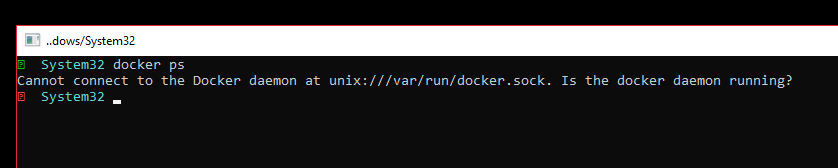
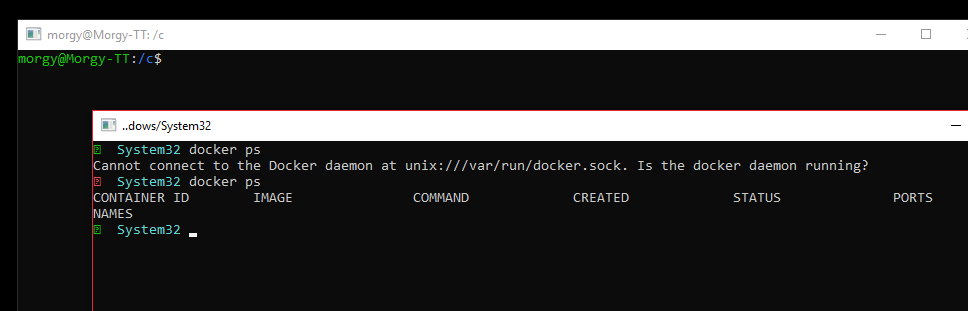
I had the same issue yesterday. Now after restart and stuff the issue is even weirder.
I can only use the docker bridge with zsh if I have the bash opened - else it doesn't work.
Not quite sure if it's still related to this one.
WSL without bash opened:
WSL after I opened bash:
 Morgy93
on 27 Nov 2018
Morgy93
on 27 Nov 2018
Hello @Morgy93,
This is a completely different issue related to using zsh instead of bash.
Can you file a bug for this please?
Regards
El mar., 27 de nov. de 2018 4:23 a. m., Morgy93 notifications@github.com
escribió:
I had the same issue yesterday. Now after restart and stuff the issue is
even weirder.I can only use the docker bridge with zsh if I have the bash opened - else
it doesn't work.
Not quite sure if it's still related to this one.WSL without bash opened:
[image: image]
https://user-images.githubusercontent.com/7961978/49071428-3962e500-f22e-11e8-97c7-d8f526bc705c.pngWSL after I opened bash:
[image: image]
https://user-images.githubusercontent.com/7961978/49071469-53042c80-f22e-11e8-958c-f916d0ffc3e2.png—
You are receiving this because you were assigned.
Reply to this email directly, view it on GitHub
https://github.com/WhitewaterFoundry/WLinux/issues/210#issuecomment-441986483,
or mute the thread
https://github.com/notifications/unsubscribe-auth/AIAiQ9zLEQiD2wg2k5630_cMA4fhuJS3ks5uzQSAgaJpZM4YtsaK
.
crramirez
on 27 Nov 2018
Closed because issues are devolving.
Please run wlinux-setup to get the latest version of the script and try again.
If you are having issues with zsh please open a separate issue.
Thank you.
 sirredbeard
on 27 Nov 2018
sirredbeard
on 27 Nov 2018
For users with spaces in their user directory (e.g.: C:\Users\Aaron Friel), the script does not work and the symptoms are exactly as reported above. I've submitted PR #233 to handle exactly this case.
 AaronFriel
on 28 Nov 2018
AaronFriel
on 28 Nov 2018
Thank you I'll check it
El mié., 28 de nov. de 2018 4:53 p. m., Aaron Friel <
[email protected]> escribió:
For users with spaces in their user directory (e.g.: C:\Users\Aaron Friel),
the script does not work and the symptoms are exactly as reported above.
I've submitted PR #233
https://github.com/WhitewaterFoundry/WLinux/pull/233 to handle exactly
this case.—
You are receiving this because you were assigned.
Reply to this email directly, view it on GitHub
https://github.com/WhitewaterFoundry/WLinux/issues/210#issuecomment-442618892,
or mute the thread
https://github.com/notifications/unsubscribe-auth/AIAiQzLk-WZDnHfUQlt9JI0Wepbu8rq3ks5uzwXAgaJpZM4YtsaK
.
crramirez
on 28 Nov 2018
Related issues
 Photonico
·
5Comments
Photonico
·
5Comments
 camilorojasguzman
·
4Comments
camilorojasguzman
·
4Comments
 mikart143
·
5Comments
mikart143
·
5Comments
 laurin1
·
4Comments
laurin1
·
4Comments
 ghost
·
5Comments
ghost
·
5Comments
Most helpful comment
I suspect the culprit is
wslpath-- specifically,wHome=$(wslpath -u ${wHomeWinPath})on line 739 ofsetupin functiondockerinstall_build_relay.It looks like this step is performed before the root is changed from
/mntto/, and so C: is mounted at/mnt/cat that time.